1
4 Use Bluetooth
devices
With this speaker, you can listen to audio from
a player and make a call through Bluetooth.
Note
•• Philips does not guarantee the compatibility with all
Bluetooth devices.
•• Before pairing a device with this system, read its user
manual for Bluetooth compatibility.
•• The product can memorize a maximum of 4 paired
devices.
•• Make sure that Bluetooth function is enabled on your
device, and your device is set as visible to all other
Bluetooth devices.
•• The operational range between this system and a
Bluetooth device is approximately 10 meters (30 feet).
•• Any obstacle between this system and a Bluetooth
device can reduce the operational range.
•• Keep away from any other electronic device that may
cause interference.
• If a password is required, enter 0000
and then confirm.
»» The speaker beeps when the
Bluetooth connection is established.
Bluetooth indicator
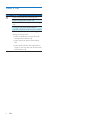
The LED indicator on the top indicates the
status of Bluetooth connection.
Indicator
Bluetooth connection
Blinking
blue
Solid blue
Connecting or waiting for
connection
Connected
Disconnect a device
•
•
On your device, disable the Bluetooth
connection with this product.
Or, on this product, press and hold
when it is not during a call.
Note
•• Before connecting another Bluetooth device, disconnect
the current device first.
Connect a device
Reconnect a device
•
•
For a paired Bluetooth device on which
the automatic reconnection is enabled,
this product reconnects with it once it is
detected.
For a paired Bluetooth device that does
not support the automatic reconnection,
reconnect it with this product manually.
Play audio via Bluetooth
1
2
3
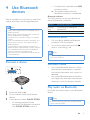
Switch the slider to .
On your device, search for Bluetooth
devices.
In the device list, select PHILIPS BT2500.
• If a message prompts for the
permission for Bluetooth connection
with PHILIPS BT2500, confirm it.
Play audio and control play on your Bluetooth
device.
Note
•• If there is an incoming call on the connected mobile
phone, audio play pauses.
EN
5