1
4 Get started
5 Listen to radio
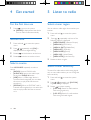
For the first time use
Select a tuner region
1
You can select a radio region that matches your
location.
Press
to turn on the system.
»» [PHILIPS] is displayed and the device
turns to radio mode automatically.
Set the clock
1
Press and hold
menu.
2
Press / repeatedly until [CLK] is
displayed with time digits blinking.
3
4
Rotate
anti-clockwise to set the hour.
Rotate
clockwise to set the minute.
Press AS/SOURCE repeatedly to select a
source.
• [RADIO]: Listen to FM/AM radio.
• [AUDIO IN]: Listen to the audio input
through the AUDIO IN socket.
• [USB]: When a USB storage device is
connected and recognized, you can select
this source to play audio files that are
stored on it.
• [SD/SDHC]: When an SD/SDHC card is
inserted and recognized, you can select this
source to play audio files that are stored
on it.
EN
Press and hold
menu.
2
Press /
repeatedly until one of the
following options is displayed.
• [AREA EUROPE] (Western Europe)
• [AREA ASIA] (Asia Pacific)
• [AREA M--EAST] (Middle East)
• [AREA AUST] (Australia)
• [AREA RUSSIA] (Russia)
• [AREA USA] (United States)
• [AREA LATIN] (Latin America)
3
Rotate to select a region.
to access the system
Select a source
10
1
to access the system
Select a tuner sensitivity
To search for radio stations with strong signals
only or more radio stations, you can change the
tuner sensitivity.
1
Press and hold
menu.
2
Press / repeatedly until [LOC ON]
or [LOC OFF] is displayed.
3
Rotate
to select a setting.
• [LOC ON]: Search for radio stations
with strong signals only.
• [LOC OFF]: Search for radio stations
with strong and weak signals.
to access the system