1
Hardware Manual
Accessing the Camera
Connect the Equipment
To be able to connect to the camera firmware from your PC, both the camera and the PC have to
be connected to each other via Ethernet cable. At the same time, the camera has to have its own
power supply. In case of PoE cameras, you can use a PoE Injector or a PoE Switch between the
camera and the PC. The cameras that have the DC power connectors may be powered on by
using a power adapter.
The Ethernet port LED or Power LED of the camera will indicate that the power supply for the
camera works normally.
Configure the IP Addresses
In order to be able to communicate with the camera from your PC, both the camera and the PC
have to be within the same network segment. In most cases, it means that they both should have
very similar IP addresses, where only the last number of the IP address is different from each
other. There are 2 different approaches to IP Address management in Local Area Networks – by
DHCP Server or Manually.
Using DHCP server to assign IP addresses
If you have connected the computer and the camera into the network that has a DHCP server
running, then you do not need to configure the IP addresses at all – both the camera and the PC
would request a unique IP address from the DHCP server automatically. In such case, the
camera will immediately be ready for the access from the PC. The user, however, might not know
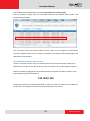
the IP address of the camera yet. It is necessary to know the IP address of the camera in order to
access it using a Web browser.
32
www.acti.com