1
1 Help and support
Use onscreen Help (user manual)
Navigate onscreen Help
2Important
Safety
Care for your product
Care of the environment
3D health warning
3 Your home theater
Remote control
Main unit
Connectors
4 Connect and set up
Connect speakers
Connect to TV
Connect digital devices through HDMI
Connect audio from TV and other devices
Set up speakers
Set up EasyLink (HDMI-CEC control)
Connect and set up a home network
5 Use your home theater
Access the home menu
Discs
Data files
USB storage devices
Audio, video, and picture options
Radio
MP3 player
iPod or iPhone
Smartphone control
Browse Net TV
Browse PC through DLNA
Karaoke
Choose sound
6 Change settings
25
25
25
26
26
26
26
27
27
7 Update software
27
27
28
28
28
8 Product specifications
29
8
8
9
11
11
12
12
13
9Troubleshooting
33
10Notice
35
35
14
14
15
16
17
17
19
19
20
20
21
23
23
24
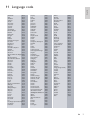
11 Language code
37
12Index
38
2
2
2
3
3
4
4
4
5
5
6
7
Language settings
Picture and video settings
Audio settings
Parental control settings
Display settings
Energy saving settings
Speaker settings
Restore default settings
Check software version
Update software through USB
Update software through the Internet
Update the onscreen help
Open source software
RMVB end user agreement (Asia Pacific
and China only)
Trademarks
EN
35
35
1
English
Contents