1
Hardware Manual
Accessing the Camera
Configure the IP Addresses
In order to be able to communicate with the camera from your PC, both the camera and the PC
have to be within the same network segment. In most cases, it means that they both should have
very similar IP addresses, where only the last number of the IP address is different from each
other. There are 2 different approaches to IP Address management in Local Area Networks – by
DHCP Server or Manually.
Using DHCP server to assign IP addresses:
If you have connected the computer and the camera into the network that has a DHCP server
running, then you do not need to configure the IP addresses at all – both the camera and the PC
would request a unique IP address from DHCP server automatically. In such case, the camera
will immediately be ready for the access from the PC. The user, however, might not know the IP
address of the camera yet. It is necessary to know the IP address of the camera in other to be
able to access it by using a Web browser.
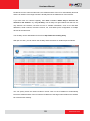
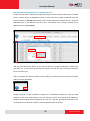
The quickest way to discover the cameras in the network is to use the simplest network
search, built in the Windows system – just by pressing the “Network” icon, all the cameras of the
local area network will be discovered by Windows thanks to the UPnP function support of our
cameras.
In the example below, we successfully found the camera model that had just connected to the
network.
27
www.acti.com