1
PENTAX RICOH IMAGING CO., LTD.
2-35-7, Maeno-cho, Itabashi-ku, Tokyo 174-8639, JAPAN
(http://www.pentax.jp)
PENTAX RICOH IMAGING
FRANCE S.A.S.
(European Headquarters)
112 Quai de Bezons, B.P. 204, 95106 Argenteuil Cedex,
FRANCE
(HQ - http://www.pentax.eu)
(France - http://www.pentax.fr)
PENTAX RICOH IMAGING
DEUTSCHLAND GmbH
Julius-Vosseler-Strasse 104, 22527 Hamburg,
GERMANY
(http://www.pentax.de)
PENTAX RICOH IMAGING
UK LTD.
PENTAX House, Heron Drive, Langley, Slough, Berks
SL3 8PN, U.K.
(http://www.pentax.co.uk)
ENG
Digital Camera
Operating Manual
PENTAX RICOH IMAGING 633 17th Street, Suite 2600, Denver, Colorado 80202,
AMERICAS CORPORATION U.S.A.
(http://www.pentaximaging.com)
1770 Argentia Road Mississauga, Ontario L5N 3S7,
CANADA
(http://www.pentax.ca)
PENTAX RICOH IMAGING
CHINA CO., LTD.
23D, Jun Yao International Plaza, 789 Zhaojiabang
Road, Xu Hui District, Shanghai, 200032, CHINA
(http://www.pentax.com.cn)
/
PENTAX RICOH IMAGING
CANADA INC.
http://www.pentax.jp/english
• Specifications and external dimensions are subject to change without notice.
OPWG30101/ENG
Copyright © PENTAX RICOH IMAGING CO., LTD. 2013
FOM 01.03.2013 Printed in Europe
To ensure the best performance from your camera, please read
the Operating Manual before using the camera.
Thank you for purchasing this PENTAX Digital Camera.
Please read this manual before using the camera in order to get the most out of
all the features and functions. Keep this manual safe, as it can be a valuable tool
in helping you to understand all the camera’s capabilities.
This operating manual applies to PENTAX WG-3 GPS and PENTAX WG-3.
The illustrations used in this manual are those of PENTAX WG-3 GPS.
Regarding copyrights
Images taken with the PENTAX Digital Camera that are for anything other than
personal enjoyment cannot be used without permission according to the rights as
specified in the Copyright Act. Please take care, as there are cases where limitations
are placed on taking pictures even for personal enjoyment during demonstrations,
performances or of items on display. Images taken with the purpose of obtaining
copyrights also cannot be used outside the scope of use of the copyright as laid out in
the Copyright Act, and care should be taken here also.
Regarding trademarks
• SDXC logo is a trademark of SD-3C, LLC.
• Windows and Windows Vista are registered trademarks of Microsoft
Corporation in the United States of America and other countries.
• Macintosh and Mac OS are trademarks of Apple Inc., registered in the U.S. and
other countries.
• ArcSoft®, and its logo are either the registered trademark or trademark of
ArcSoft Inc. in the United States and/or other countries.
• HDMI, the HDMI logo, and High-Definition Multimedia Interface are trademarks
or registered trademarks of HDMI Licensing, LLC in the United States and/or
other countries.
• Eye-Fi, the Eye-Fi logo, and Eye-Fi connected are trademarks of Eye-Fi, Inc.
• Intel, Intel Core, and Pentium are trademarks of Intel Corporation in the U.S.
and/or other countries.
• AMD, AMD Athlon, and ATI Radeon are trademarks or registered trademarks
of Advanced Micro Devices, Inc.
• NVIDIA and GeForce are trademarks and/or registered trademarks of NVIDIA
Corporation in the U.S. and/or other countries.
• This product supports PRINT Image Matching III. PRINT Image Matching
enabled digital still cameras, printers and software help photographers to
produce images more faithful to their intentions. Some functions are not
available on printers that are not PRINT Image Matching III compliant.
Copyright 2001 Seiko Epson Corporation. All Rights Reserved.
PRINT Image Matching is a trademark of Seiko Epson Corporation. The PRINT
Image Matching logo is a trademark of Seiko Epson Corporation.
• This product is licensed under the AVC Patent Portfolio License for the personal
use of a consumer or other uses in which it does not receive remuneration to (i)
encode video in compliance with the AVC standard (“AVC video”) and/or (ii)
decode AVC video that was encoded by a consumer engaged in a personal
activity and/or was obtained from a video provider licensed to provide AVC
video. No license is granted or shall be implied for any other use.
Additional information may be obtained from MPEG LA, LLC.
See http://www.mpegla.com.
• All other trademarks are the property of their respective owners.
Regarding Product Registration
In order to better serve you, we request that you complete the product registration,
which can be found on the CD-ROM supplied with the camera or on the PENTAX
website. Thank you for your cooperation.
Refer to “Product Registration on the Internet” (p.199) for more information.
To users of this camera
• Do not use or store this camera in the vicinity of equipment that generates strong
electromagnetic radiation or magnetic fields.
Strong static charges or the magnetic fields produced by equipment such as radio
transmitters could interfere with the display, damage the stored data, or affect the
camera’s internal circuitry and cause camera misoperation.
• The liquid crystal panel used for the display is manufactured using extremely high
precision technology. Although the level of functioning pixels is 99.99% or better, you
should be aware that 0.01% or fewer of the pixels may not illuminate or may
illuminate when they should not. However, this has no effect on the recorded image.
• There is a possibility that the illustrations and the screen display in this manual are
different from the actual ones.
• In this manual, SD Memory Cards, SDHC Memory Cards and SDXC Memory Cards
are referred to as SD Memory Cards.
• In this manual, the generic term “computer(s)” refers to either a Windows PC or a
Macintosh.
• In this manual, the term “battery(ies)” refers to any type of batteries used for this
camera and its accessories.
Using Your Camera Safely
We have paid close attention to the safety of this camera. When using
this camera, we request your special attention regarding items marked
with the following symbols.
Warning
This symbol indicates that ignoring this item could
cause serious personal injuries.
Caution
This symbol indicates that ignoring this item could
cause minor or medium personal injuries, or loss of
property.
1
About the Camera
Warning
• Do not attempt to take the camera apart or modify the camera. High voltages
are present within the camera, and there is a danger of electric shock if the
camera is taken apart.
• If the inside of the camera should become exposed as a result of, for example,
the camera being dropped, please do not under any circumstances touch such
exposed portions, as there is a danger of receiving an electric shock.
• Wrapping the strap around a neck is dangerous. Take care that small children
do not hang the strap around their necks.
• If any irregularities occur during use, such as smoke or a strange odor, stop use
immediately, remove the battery or the AC adapter, and contact your nearest
PENTAX Service Center. Continued use can cause a fire or electric shock.
Caution
• Do not place your finger on the flash when it is discharging as there is a risk of
burns.
• Do not discharge the flash while it is touching your clothing as there is a risk of
discoloring.
• Some portions of the camera heat up during use, so please take care, as there
is a risk of low temperature burns if such portions are held for long periods of
time.
• Should the display be damaged, be careful of glass fragments. Also, be careful
not to allow the liquid crystal to get on your skin, in your eyes, or in your mouth.
• Depending on your individual factors or physical condition, the use of the
camera may cause itching, rashes or blisters. In case of any abnormality, stop
using the camera and get medical attention immediately.
2
About the Power Adapter and the AC Adapter
Warning
• Always use the power adapter or AC adapter exclusively developed for this
camera, with the specified power and voltage. Using a power adapter or AC
adapter not exclusive to this camera, or using the exclusive power adapter or
AC adapter with an unspecified power or voltage can cause a fire, electric
shock, or camera breakdown. The specified voltage is 100-240V AC.
• Do not disassemble or modify the product. This can cause a fire or electric
shock.
• If the generation of smoke or strange odor from the product or other abnormality
occurs, immediately discontinue its use and consult a PENTAX Service Center.
Continued use can cause a fire or electric shock.
• If water should happen to get inside the product, consult a PENTAX Service
Center. Continued use can cause a fire or electric shock.
• If you see a lightning flash or hear thunder during use of the power adapter or
AC adapter, unplug the AC plug and discontinue use. Continued use can cause
damage to the product, fire, or electric shock.
• Wipe off the AC plug if it becomes covered with dust. Accumulated dust may
cause a fire.
Caution
• Do not place or drop heavy objects on or forcefully bend the USB cord or AC
plug cord. Doing so may damage the cord. Should the cord be damaged,
consult a PENTAX Service Center.
• Do not touch or short-circuit the terminal area of the USB cord or AC plug cord
while the cord is plugged in.
• Do not handle the AC plug with wet hands. This can cause an electric shock.
• Do not subject the product to strong impacts or allow it to drop onto a hard
surface. This can cause a malfunction.
• Do not use the power adapter to charge a battery other than a rechargeable
lithium-ion battery D-LI92. This can cause overheating, explosion, or power
adapter failure.
• To reduce the risk of hazards, use only a CSA/UL certified power supply cord set,
cord is Type SPT-2 or heavier, minimum NO.18 AWG copper, one end with a
molded-on male attachment plug cap (with a specified NEMA configuration), and
the other is provided with a molded-on female connector body (with a specified IEC
nonindustrial type configuration) or the equivalent.
3
About the Battery
Warning
• Be sure to store the battery out of the reach of small children. Placing it in their
mouths may cause an electric shock.
• If any leakage from the battery should come in contact with your eyes, it may
cause a loss of sight. Flush your eyes with clean water and get medical
attention immediately. Do not rub them.
Caution
• Only use the specified battery with this camera. Use of other batteries may
cause an explosion or fire.
• Do not disassemble the battery. Disassembling the battery may cause an
explosion or leakage.
• Remove the battery from the camera immediately if it becomes hot or begins to
smoke. Be careful not to burn yourself during removal.
• Keep wires, hairpins, and other metal objects away from the + and - contacts of
the battery.
• Do not short the battery or dispose of the battery in fire. This can cause an
explosion or fire.
• If any leakage from the battery should come in contact with skin or clothes, it may
cause irritation to the skin. Wash the affected areas thoroughly with water.
• Precautions for D-LI92 Battery Usage:
BATTERY MAY EXPLODE OR FIRE IF MISTREATED.
- DO NOT DISASSEMBLE OR DISPOSE OF IN FIRE.
- DO NOT CHARGE EXCEPT SPECIFIED CHARGING CONDITION.
- DO NOT HEAT ABOVE 140°F / 60°C, OR SHORT CIRCUIT.
- DO NOT CRUSH OR MODIFY.
Keep the Camera and its Accessories out of the Reach of Small
Children
Warning
• Be sure to keep the camera and its accessories out of the reach of small
children.
1. Injuries may result from the product falling or from unexpected movement.
2. Suffocation may result from wrapping the strap around the neck.
3. Small accessories such as battery or an SD Memory Card may be
swallowed. Seek medical attention immediately if an accessory is
accidentally swallowed.
4
Care to be Taken During Handling
Before Using Your Camera
• When traveling, take the Worldwide Service Network listing that is included in
the package. This will be useful if you experience problems abroad.
• When the camera has not been used for a long time, confirm that it is still
working properly, particularly prior to taking important pictures (such as at a
wedding or when traveling). Contents of the recording cannot be guaranteed if
recording, playback or transferring your data to a computer, etc. is not possible
due to a malfunction of your camera or recording media (SD Memory Card), etc.
• The lens on this camera is not interchangeable. The lens is not removable.
About the Battery and Power Adapter
• To keep the battery in optimum condition, avoid storing it in a fully charged state
or in high temperatures.
• If the battery is left inserted and the camera is not used for a long time, the
battery will over-discharge and shorten the battery’s life.
• Charging the battery a day before use or on the day of use is recommended.
• The AC plug adapter D-PL135 is designed for exclusive use with the Power
Adapter D-PA135. Do not use it with other devices.
Precautions on Carrying and Using Your Camera
• Hot and humid places should be avoided. Particular care should be taken
regarding vehicles, which can become very hot inside.
• Ensure that the camera is not subjected to substantial vibrations, shocks, or
pressure as this may cause damage, malfunction, or a loss in waterproof
performance. Place the camera on a cushion for protection when the camera is
subjected to the vibrations of a motorbike, car, ship, etc. If the camera is
subjected to substantial vibrations, shocks, or pressure, take your camera to
your nearest PENTAX Service Center and have it checked.
• The temperature range in which the camera can be used is -10°C to 40°C (14°F
to 104°F).
• The display will become black at high temperatures but will return to normal at
normal temperatures.
• The response speed of the display becomes slow at low temperatures. This is
due to the properties of the liquid crystal and is not a malfunction.
5
• If the camera is subjected to rapid temperature changes, condensation may
form on the inside and outside of the camera. Therefore put the camera in a bag
or plastic bag and take it out when the difference in temperature has subsided.
• Avoid contact with garbage, mud, sand, dust, water, toxic gases, or salt. These
could cause the camera to breakdown. Wipe the camera to dry off any rain or
water drops.
• Do not press the display with excessive force. This could cause it to break or
malfunction.
• Be careful not to sit down with the camera in your back pocket as this may
damage the exterior of the camera or the display.
• When using a tripod with the camera, be careful not to overtighten the screw in
the tripod socket on the camera.
Cleaning Your Camera
• Do not clean the camera with organic solvents such as thinner, alcohol or
benzine.
• Use a lens brush to remove dust accumulated on the lens. Never use a spray
blower for cleaning as it may damage the lens.
Storing Your Camera
• Avoid storing the camera where pesticides and chemicals are handled.
Remove the camera from its case and store it in a well-ventilated place to
prevent the camera from becoming moldy during storage.
• Avoid using or storing the camera where it may be exposed to static electricity
or electrical interference.
• Avoid using or storing the camera in direct sunlight or in locations where it may
be exposed to rapid changes in temperature or to condensation.
• Periodic inspections are recommended every one to two years to maintain high
performance.
6
Other Precautions
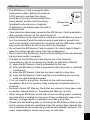
• The SD Memory Card is equipped with a
write-protect switch. Setting the switch to
LOCK prevents new data from being
recorded on the card, the stored data from
being deleted, and the card from being
Write-protect
formatted by the camera or computer.
switch
r appears on the display when the card is
write-protected.
• Care should be taken when removing the SD Memory Card immediately
after using the camera, as the card may be hot.
• Keep the battery cover closed and do not remove the SD Memory Card or
turn the camera off while the data is being played back or saved to the
card, or the camera is connected to a computer with the USB cable, as this
may cause the data to be lost or the card to be damaged.
• Do not bend the SD Memory Card or subject it to violent impact. Keep it
away from water and store away from high temperature.
• Do not remove the SD Memory Card during formatting as this may damage
the card and render it unusable.
• The data on the SD Memory Card may be lost in the following
circumstances. We do not accept any liability for data that is deleted
(1) when the SD Memory Card is mishandled by the user.
(2) when the SD Memory Card is exposed to static electricity or electrical
interference.
(3) when the SD Memory Card has not been used for a long time.
(4) when the SD Memory Card is ejected or the batteries are removed
while the card is being accessed.
• If it is not used for a long time, the data on the card may become
unreadable. Be sure to regularly make a backup of important data on a
computer.
• Be sure to format SD Memory Cards that are unused or have been used
on another camera. Refer to “Formatting the Memory” (p.168).
• When using an SD Memory Card with a slow recording speed, recording
may stop while recording a movie even if there is adequate space in the
memory, or image capture or playback may take a long time.
• Please note that deleting data, or formatting the SD Memory Cards or the
built-in memory does not completely erase the original data. Deleted files
can sometimes be recovered using commercially available software. It is
user’s responsibility to ensure the privacy of such data.
7
Regarding Waterproof, Dustproof, and
Shockproof Design
• This camera is provided with a waterproof/dustproof design complying with JIS
waterproof grade 8 and JIS dustproof grade 6 (equivalent to IP68).
• The camera satisfies the PENTAX drop test (2.0 m height onto a 5 cm thick
plywood surface) complying with MIL-Standard 810F Method 516.5-Shock
testing.
• The camera satisfies the PENTAX test for the waterproof, dustproof, and
shockproof performance, but this does not guarantee it will remain free of
trouble or damages.
• Waterproof performance is not guaranteed if the camera is exposed to impact
such as being dropped or hit.
Precautions Before Using the Camera in the
Water
Check the Following Before Going Near the Water
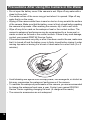
• Make sure that there are no cracks or scratches on the rubber seal of the
battery cover.
Waterproof seal
Contact surface
• Make sure that there are no foreign objects (dust, sand, hair, lint or liquid) on the
rubber seal or the surface they contact before closing the battery cover. Wipe
off any foreign objects with a clean lint-free cloth.
• Close the battery cover properly. Otherwise water may get in and damage the
camera.
8
Be Careful Near the Water
• Avoid opening the battery cover when near the waterside or with wet hands.
When changing the battery or the SD Memory Card, avoid places where the
camera is likely to get wet or dirty, and make sure that the camera and your
hands are completely dry.
• The camera will sink if dropped in water, so be sure to attach the strap to the
camera and wrap it around your wrist when using the camera in or near water.
• To enhance the waterproof performance of the camera, the front of the lens is
protected by glass. The glass should be kept clean at all times, as any dirt or
water on the glass will affect the quality of pictures taken.
Precautions When Using the Camera in the Water
• Do not use the camera deeper than 14 meters underwater. Do not use the
camera underwater for more than 120 minutes consecutively.
• Do not open the battery cover underwater.
• Do not use the camera in hot water or in a hot spring.
• Do not apply excessive force to the camera, for example diving into water with
it. Doing so may compromise the waterproof performance of the camera or
cause the cover to open.
• Do not leave the camera on the sand at the beach, as this may cause the
camera to exceed the upper limit of its operational temperature range, or cause
the speaker or microphone to become blocked with sand.
• Avoid subjecting the camera to substantial vibrations, shocks, or pressure as
this may cause a loss in waterproof performance. If the camera is subjected to
substantial vibrations, shocks or pressure, take your camera to your nearest
PENTAX Service Center and have it checked.
• Avoid getting sunscreen or sun oil on the camera as it may cause discoloration
of the surface. If any oil gets on the camera, wash it off immediately with warm
water.
• Sudden and extreme changes in temperature may cause condensation to form
in and on the camera. Keep the camera in a bag or case to reduce the
difference in temperature.
9
Precautions After Using the Camera in the Water
• Do not open the battery cover if the camera is wet. Wipe off any water with a
clean lint-free cloth.
• The inside surface of the cover may get wet when it is opened. Wipe off any
water that is on the cover.
• Wiping off the camera while there is sand or dust on it may scratch the surface
of the camera. Make sure that the battery cover is firmly closed before washing
the camera in tap water. After washing the camera, dry it with a soft cloth.
• Wipe off any dirt or sand on the waterproof seal or the contact surface. The
camera’s waterproof performance may be compromised by a loose seal, or
cracks or dents on the seal or the contact surface. If there is any such damage,
contact your nearest PENTAX Service Center.
• If the camera becomes very dirty or after it has been used in the sea, make sure
that it is turned off and the battery cover is firmly closed before rinsing it under
running tap water or leaving it in a bowl of clean water for a short time (2 or 3
minutes).
• Avoid cleaning with agents such as soapy water, mild detergents, or alcohol as
this may compromise the waterproof performance of the camera.
• To maintain the waterproof performance of the camera, you are recommended
to change the waterproof seal once a year. Contact your nearest PENTAX
Service Center regarding changing the seal. (A charge will be made.)
• The camera’s accessories are not waterproof.
10
Contents
Using Your Camera Safely ...................................................................... 1
Care to be Taken During Handling .......................................................... 5
Regarding Waterproof, Dustproof, and Shockproof Design.................... 8
Precautions Before Using the Camera in the Water................................ 8
Precautions When Using the Camera in the Water................................. 9
Precautions After Using the Camera in the Water................................. 10
Contents ................................................................................................ 11
Composition of the Operating Manual ................................................... 17
Getting Started
18
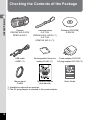
Checking the Contents of the Package.................................................... 18
Names of Parts ........................................................................................... 19
Names of Operating Parts ......................................................................... 20
Display Indications .................................................................................... 21
Display in A Mode................................................................................ 21
Display in Q Mode............................................................................... 25
Guide Display ........................................................................................ 27
Histogram .............................................................................................. 28
Electronic Level ..................................................................................... 29
Sub-display Indicator (PENTAX WG-3 GPS Only)................................... 30
Attaching the Carabiner Strap .................................................................. 31
Powering the Camera ................................................................................ 32
Installing the Battery .............................................................................. 32
Charging the Battery ............................................................................. 34
Using the AC Adapter............................................................................ 37
Installing an SD Memory Card .................................................................. 39
Turning the Camera On and Off................................................................ 41
Starting-up in Playback Mode ............................................................... 42
Initial Settings............................................................................................. 43
Setting the Display Language ............................................................... 43
Setting the Date and Time..................................................................... 46
Common Operations
48
Understanding the Button Functions....................................................... 48
A Mode ................................................................................................ 48
Q Mode ............................................................................................... 50
Switching Between A Mode and Q Mode.......................................... 52
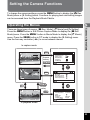
Setting the Camera Functions .................................................................. 53
Operating the Menus ............................................................................. 53
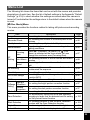
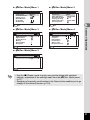
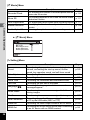
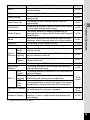
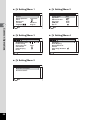
Menu List ............................................................................................... 55
11
Taking Pictures
61
Taking Still Pictures ................................................................................... 61
Taking Pictures...................................................................................... 61
Using the Zoom ..................................................................................... 64
Setting the Shooting Mode .................................................................... 67
Using the Face Detection Function ....................................................... 70
Taking Pictures in Basic Mode (Green Mode)....................................... 71
Taking Pictures of Your Pet (Pet Mode) ................................................ 72
Taking Pictures in Digital Microscope Mode.......................................... 72
Taking Pictures at a Set Interval (Interval Shot) .................................... 73
Using the Self-timer ............................................................................... 74
Taking a Series of Pictures (Continuous Shooting/Burst Shooting) ...... 76
Taking Pictures Using a Remote Control Unit (Optional) ...................... 77
Taking Pictures with Automatic Exposure Adjustment
(Auto Bracketing) ............................................................................ 78
Using the Digital Wide Function (Digital Wide Mode)............................ 79
Taking Panoramic Pictures (Digital Panorama Mode)........................... 81
Setting the Shooting Functions ................................................................ 83
Using the Rec. Mode Menu Items ......................................................... 83
Selecting the Flash Mode ...................................................................... 84
Selecting the Focus Mode..................................................................... 85
Setting the Image Tone ......................................................................... 89
Selecting the Number of Recorded Pixels............................................. 90
Selecting the Quality Level of Still Pictures ........................................... 91
Adjusting the White Balance ................................................................. 92
Setting the AE Metering ........................................................................ 94
Setting the Sensitivity ............................................................................ 95
Setting AUTO ISO Range ..................................................................... 96
Setting the Exposure (EV Compensation)............................................. 96
Correcting the Brightness (D-Range Setting) ........................................ 97
Setting the Shake Reduction ................................................................. 98
Switching the Face Detection Function ............................................... 100
Setting the Blink Detection Function ................................................... 102
Setting the Instant Review................................................................... 102
Setting the Green Button Function ...................................................... 103
Setting the Image Sharpness (Sharpness) ......................................... 106
Setting the Saturation/Tone Adjustment.............................................. 106
Setting the Image Contrast (Contrast)................................................. 107
Setting the Date Imprint Function ........................................................ 107
Setting the IQ Enhancer Processing ................................................... 108
Setting the Macro Light ....................................................................... 108
Setting the Electronic Level ................................................................. 109
Using a Conversion Lens .................................................................... 109
Underwater Shooting............................................................................... 111
Underwater Shooting (Underwater Mode/Underwater Movie Mode)... 111
12
Recording Movies .................................................................................... 113
Recording Movies................................................................................ 113
Recording a Movie Quickly Using the Movie Button............................ 115
Selecting the Number of Recorded Pixels and Frame Rate
for Movies ..................................................................................... 116
Setting the Movie SR (Movie Shake Reduction) Function................... 117
Suppressing Wind Noises during Movie Recording
(Wind Suppression) ...................................................................... 117
Constantly Adjusting Focus While Recording Movies ......................... 118
Setting the Optical Zoom ..................................................................... 118
Combining Pictures Taken at a Set Interval into a Movie
(Interval Movie) ............................................................................. 119
Using the Time-Lapse Movie Function ................................................ 121
Using the High Speed Movie Function ................................................ 122
Using the 1cm-Macro Movie Function ................................................. 123
Saving the Settings (Memory)................................................................. 124
Playing Back and Deleting Images
126
Playing Back Images ............................................................................... 126
Playing Back Still Pictures ................................................................... 126
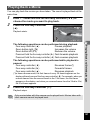
Playing Back a Movie .......................................................................... 127
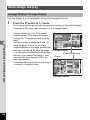
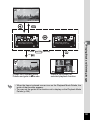
Multi-Image Display ............................................................................. 128
Using the Playback Functions ............................................................. 130
Slideshow ............................................................................................ 133
Rotating the Image .............................................................................. 135
Zoom Playback.................................................................................... 136
Deleting Images........................................................................................ 137
Deleting a Single Image ...................................................................... 137
Deleting Selected Images ................................................................... 138
Deleting All Images ............................................................................. 139
Protecting Images from Deletion (Protect) .......................................... 140
Connecting the Camera to an AV Device............................................... 142
Connecting the Camera to a Video Input Terminal ............................. 142
Connecting the Camera to an HDMI Terminal .................................... 144
13
Editing and Printing
145
Editing Images.......................................................................................... 145
Changing the Image Size (Resize)...................................................... 145
Cropping Images ................................................................................. 146
Processing Images to Make Faces Look Smaller ............................... 147
Using the Digital Filters ....................................................................... 148
Using the HDR Filter ........................................................................... 150
Using the Ink Rubbing Filter ................................................................ 150
Creating a Collage Image.................................................................... 151
Red-eye Edit........................................................................................ 154
Overlaying Your Original Frame on Still Pictures ................................ 155
Editing Movies ..................................................................................... 159
Copying Images .................................................................................. 162
Printing Settings ...................................................................................... 164
Setting the Printing Service (DPOF).................................................... 164
Settings
167
Camera Settings ....................................................................................... 167
Using the Setting Menu Items ............................................................. 167
Formatting the Memory ....................................................................... 168
Changing the Sound Settings.............................................................. 169
Changing the Date and Time .............................................................. 170
Setting the Alarm ................................................................................. 171
Setting the World Time ........................................................................ 173
Setting the Text Size on the Menu ...................................................... 175
Changing the Display Language ......................................................... 175
Changing the Naming System of the Folder........................................ 176
Changing the Naming System of the File ............................................ 178
Changing the Video Output Format..................................................... 180
Selecting the HDMI Output Format ..................................................... 181
Setting the Eye-Fi Communication ...................................................... 182
Adjusting the Brightness of the Display ............................................... 182
Using the Power Saving Function ....................................................... 183
Using the Auto Power Off Function ..................................................... 183
Setting the Quick Zoom Function ........................................................ 184
Setting the Guide Display .................................................................... 184
Perform Pixel Mapping ........................................................................ 185
Changing the Start-up Screen............................................................. 186
Resetting to Default Settings (Reset) .................................................. 187
Setting the Startup Shortcut ................................................................ 187
Displaying the Clock Display ............................................................... 188
Light up the LED Macro Lights ............................................................ 189
Automatically Rotating Images during Playing Back ........................... 189
Using the Pressure Sensor ................................................................ 190
14
Connecting to a Computer
192
Connecting to a Computer ...................................................................... 192
Setting the USB Connection Mode...................................................... 192
Connecting the Camera and a Computer............................................ 193
Disconnecting the Camera from the Computer ................................... 194
Using the Provided Software .................................................................. 195
System Requirements ......................................................................... 195
Installing the Software ......................................................................... 196
Using MediaImpression on Windows .................................................. 199
Using MediaImpression on Macintosh................................................. 201
Transferring Images Using an Eye-Fi Card............................................ 203
Appendix
206
Functions Available for Each Shooting Mode ....................................... 206
Messages .................................................................................................. 210
Troubleshooting ....................................................................................... 212
Default Settings ........................................................................................ 214
List of World Time Cities ......................................................................... 220
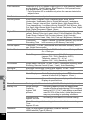
Main Specifications.................................................................................. 221
Utilities Guide for GPS............................................................................. 226
Before Using the GPS .............................................................................. 226
About the GPS .................................................................................... 226
GPS Function on the PENTAX WG-3 ................................................. 226
Precautions for Using the GPS ........................................................... 227
Using the GPS .......................................................................................... 229
Preparation for Using the GPS Function ............................................. 229
Recording GPS Information on Captured Images ............................... 230
Recording and Saving a Log ............................................................... 232
Correcting Time Automatically............................................................. 238
Adjusting the Electronic Compass (Calibration) .................................. 239
Warranty Policy ........................................................................................ 241
Index .......................................................................................................... 246
15
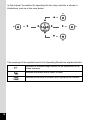
In this manual, the method for operating the four-way controller is shown in
illustrations, such as in the ones below.
2
2 or
2
4
or 4
4
5
5 or
5
3
3 or
3
The meanings of the symbols used in this Operating Manual are explained below.
1
Indicates the reference page number for an explanation of the
related operation.
Indicates information that is useful to know.
Indicates precautions to be taken when operating the camera.
16
Composition of the Operating Manual
This Operating Manual contains the following chapters.
1 Getting Started ––––––––––––––––––––––––––––––––––––––––––––––––
This chapter explains what you need to do after purchasing the camera before
you start taking pictures. Be sure to read it and follow the instructions.
2 Common Operations –––––––––––––––––––––––––––––––––––––––––––
This chapter explains common operations such as the functions of the buttons and
how to use the menus. For more details, refer to the respective chapters below.
3 Taking Pictures –––––––––––––––––––––––––––––––––––––––––––––––
This chapter explains the various ways of capturing images and how to set the
relevant functions.
4 Playing Back and Deleting Images ––––––––––––––––––––––––––––––––
1
2
3
4
This chapter explains how to view still pictures and movies on the camera or on
a TV and how to delete them from the camera.
5 Editing and Printing ––––––––––––––––––––––––––––––––––––––––––––
5
This chapter explains the various ways of printing still pictures and how to edit
them with the camera.
6 Settings ––––––––––––––––––––––––––––––––––––––––––––––––––––––
6
This chapter explains how to set camera-related functions.
7 Connecting to a Computer ––––––––––––––––––––––––––––––––––––––
This chapter explains how to connect the camera to a computer, and includes
installation instructions and a general overview of the provided software.
8 Appendix –––––––––––––––––––––––––––––––––––––––––––––––––––––
This chapter provides some basic troubleshooting tips and other useful
information.
7
8
17
Checking the Contents of the Package
1
Getting Started
Camera
PENTAX WG-3 GPS/
PENTAX WG-3
USB cable
I-USB7 (*1)
Carabiner strap
O-ST134
(PENTAX WG-3 GPS) (*1)
O-ST135
(PENTAX WG-3) (*1)
Software (CD-ROM)
S-SW135
Rechargeable lithium-ion
Power adapter D-PA135/
battery D-LI92 (*1)
AC plug adapter D-PL135 (*2)
ENG
Thank you for purchasing this PENTAX digital camera.
The PENTAX WG-3 GPS / PENTAX WG-3 is waterproof,
dustproof, and shockproof, as shown below, so you can
use it in a wide range of outdoor activities.
Waterproof/dustproof: JIS grade 8 waterproof and grade 6
dustproof (IP68)
Shockproof: Satisfies the PENTAX drop test (2.0 m height
onto a 5 cm thick plywood surface) complying with
MIL-Standard 810F Method 516.5-Shock testing.
* Waterproof performance is not guaranteed if the camera
is exposed to impact such as being dropped or hit.
* The camera is not guaranteed to be free of trouble or
damage under every condition.
0
Macro stand
O-MS2
Operating Manual
(this manual)
*1 Available as optional accessories.
*2 The AC plug adapter is attached to the power adapter.
18
Quick Guide
1Getting Started
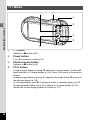
Names of Parts
Front
Power button/Power lamp (green)
Shutter release button
1
Self-timer lamp/
Focus assist light
Flash
Getting Started
Lens
Sub-display (*)
Microphones
Remote control receiver
Strap lug
LED Macro Lights
(*) Only available with the PENTAX WG-3 GPS.
Back
Release latch
Battery cover
Display
Remote control receiver
Tripod socket
Speakers
Battery cover lock
USB/AV terminal
HDMI terminal
Battery lock lever
19
Names of Operating Parts
Power button
1
Getting Started
Shutter release button
W/T/f/y button
Q button
Movie button
Four-way controller
4 button
3 button
Green/i button
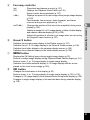
Refer to “Understanding the Button Functions” (p.48 - 51) for an explanation
of the function of each button.
Macro stand
Attaching the supplied macro stand (O-MS2) reduces camera shake during shooting
(1cm-Macro Movie) mode (p.72, p.123). Insert two
in
(Digital Microscope) or
clips into the slits in upper and lower sides of the LED Macro Lights part. When
attaching and detaching the macro stand, do not hold the clip part.
* When using the macro stand, the camera may not be able to focus if the objects
have uneven surfaces.
20
Display Indications
Display in A Mode
1
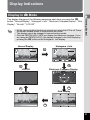
• All the camera buttons function as normal even when the LCD is off. Press
the shutter release button to take pictures as normal.
• The display cannot be changed in some shooting modes.
• Only the PENTAX WG-3 GPS can display the electronic compass. If you
are using the PENTAX WG-3, the display changes to the Grid Display by
pressing the 4 button at the Histogram + Info display.
Normal Display
36m
Getting Started
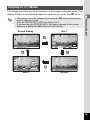
The display changes in the following sequence each time you press the 4
button: “Normal Display”, “Histogram + Info”, “Electronic Compass Display”, “Grid
Display”, “No Info”, “LCD Off”.
Histogram + Info
36m
OK
38
38
AWB
WB
12M
IS
ISO
20
200
OK
OK
Electronic Compass Display
LCD Off
N
N
E
S
W
W
0°
E
S
E
S
04/04/ '13
3776m
N
W
N 35°45’52”
W 123°45’52”
08:24 AM
OK
OK
Grid Display
No Info
OK
21
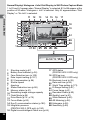
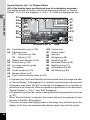
Normal Display/ Histogram + Info/ Grid Display in Still Picture Capture Mode
1 to 22 and A1 appear when “Normal Display” is selected. B1 to B6 appear at the
position of 20 when “Histogram + Info” is selected. Only A1 appears when “Grid
Display” or “No Info” is selected.
1
11 12
Getting Started
1
2
3
4
5
6
7
8
9
10
13
14 15 16
36m
P
19
+1.0
1/250
F3.5
38
A1
B5
12M
20
200
B6
04/04/'13 14:25
20
AWB
IS
ISO
B1 B2 B3 B4
Shooting mode (p.67)
17
Battery level indicator (p.36)
Face Detection icon (p.100)
18
Date Imprint setting (p.107)
EV Compensation (p.96)
19
Shutter speed
20
Aperture
21
Shake Reduction icon (p.98)
22
Memory status (p.41)
A1
Remaining image storage capacity
B1
Flash Mode (p.84)
B2
Drive Mode (p.74 - p.78)
B3
Focus Mode (p.85)
B4
Eye-Fi communication status (p.182)
B5
Height/air pressure
B6
(PENTAX WG-3 GPS only) (p.190)
16 Digital zoom/Intelligent Zoom icon (p.64)
22
18
DATE
21 22
1
2
3
4
5
6
7
8
9
10
11
12
13
14
15
17
GPS status
(PENTAX WG-3 GPS only)
GPS log icon
(PENTAX WG-3 GPS only)
Electronic Level (p.29)
Date and time (p.46)
World Time setting (p.173)
D-Range Setting (p.97)
Focus frame (p.61)
Recorded Pixels (p.90)
Quality Level (p.91)
White Balance (p.92)
AE Metering (p.94)
Histogram (p.28)
Sensitivity (p.95)
1
Getting Started
* 6 and 7 are only displayed when the shutter release button is pressed half-way.
* For 8, M appears if the shutter release button is pressed halfway when
[Shake Reduction] in the [A Rec. Mode] menu is set to [Sensor Shift] or [Dual].
l appears when [Shake Reduction] is set to [Off].
* For 13, when the focus mode is set to = and the Auto Macro function is
activated, q appears on the display (p.85).
* 14 changes depending on [Eye-Fi] setting in the [W Setting] menu.
* 15 changes depending on [Pressure Sensor] settings in [W Setting] menu.
* 17 changes depending on [GPS] settings in [WSetting] menu.
No icon is displayed on the screen when [GPS On/Off] is set to [Off].
* 18 appears when recording the GPS log.
* 20 disappears for two seconds after the camera is turned on.
* 22 changes depending on [D-Range Setting] settings in the [A Rec. Mode]
menu.
No icon is displayed on the screen when [Highlight Correction] and [Shadow
Correction] are both set to [Off].
* When the shooting mode is b (Auto Picture) and if you press the shutter
release button halfway, the automatically selected shooting mode appears in
A1 even when “No Info” is selected.
* If there are overexposed highlight areas in the image, they will blink red on the
display, and if there are underexposed shadow areas, they will blink yellow.
* Some indications may not appear depending on the shooting mode.
23
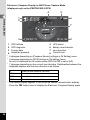
Electronic Compass Display in Still Picture Capture Mode
(displayed only on the PENTAX WG-3 GPS)
4
N 35°45’52”
W 123°45’52”
N
3776m
N
E
7
S
W
W
0°
E
S
E
1
2
3
4
04/04/ '13
GPS latitude
GPS longitude
Current date
Height/air pressure
S
3
6
N
Getting Started
1
2
W
1
5
08:24 AM
5
6
7
8
8
GPS status
Battery level indicator
Lens direction
Current time
* 4 changes depending on [Pressure Sensor] settings in [W Setting] menu.
* 5 changes depending on [GPS] settings in [W Setting] menu.
No icon is displayed on the screen when [GPS On/Off] is set to [Off].
* 7 changes depending on the current lens direction. Relationship between the
displayed degrees and the lens direction is as follows:
0°
90°
180°
270°
When the lens points to the north
When the lens points to the east
When the lens points to the south
When the lens points to the west
* The normal display appears if you press the shutter release button halfway.
Press the 4 button twice to display the Electronic Compass Display again.
24
Display in Q Mode
The display shows the shooting information of the image in playback mode. The
display changes in the following sequence each time you press the 4 button:
Normal Display
Info 1
10 - 0038
100
003
10 - 003
100
0038
1
Getting Started
• The display cannot be changed by pressing the 4 button while playing
back or pausing a movie.
• Only the PENTAX WG-3 GPS can display Info 2.
If you are using the PENTAX WG-3, the display changes to the normal
display by pressing the 4 button at no info display.
OK
1/250
F3.5
Edit
Edit
04/04/'13 14:25
OK
12M
AWB
WB
IS
ISO
20
200
OK
10 - 0038
100
003
Edit
3200m
700hPa
180ɋ
04/04/'13 06: 25: 00
N 35 45' 52"
W139 41' 29"
Info 2
OK
Edit
No Info
25
Normal Display/ Info 1 in Playback Mode
(All of the display items are displayed here for explanatory purposes.)
The display shows information such as the shooting conditions. In “Normal
Display”, A1 to A10 are displayed. In “Info 1”, B1 to B8 are displayed as well.
1
Getting Started
A1
A2
A3
100 - 003
10
0038
A4
B1
B2
1/250
F3.5
A5
B3
Edit
12M
B5
A1
A2
A3
A4
A5
A6
A7
A8
A9
A6
A7
A8
A9
A10
B6
AWB
WB
B7
Face Detection icon (p.100)
A10
Playback mode
B1
Q : Still picture (p.126)
B2
K : Movie (p.127)
B3
Battery level indicator (p.36)
B4
Protect icon (p.140)
B5
Four-way controller guide
B6
File number
B7
Folder number (p.176)
B8
Memory status (p.41)
Eye-Fi communication status (p.182)
IS
ISO
20
200
B4
B8
Volume icon
Shutter speed
Aperture
Histogram (p.28)
Sensitivity (p.95)
Recorded Pixels (p.90)
Quality Level (p.91)
White Balance (p.92)
AE Metering (p.94)
* A1 appears only if the Face Detection function worked when the image was shot.
* In “Normal Display”, A3 disappears if no operation is performed for two seconds.
* A5 appears even when “No Info” is selected, but disappears if no operation is
performed for two seconds. When no operation is performed for two seconds in
“Normal Display” or “Info 1”, only “Edit” disappears.
* A10 appears only when the volume is being adjusted during playback of movies
(p.127).
* When “Normal Display” is selected, the current date and time appears for two
seconds in the B4 to B8 positions.
* If there are overexposed highlight areas in the image, they will blink red on the
display, and if there are underexposed shadow areas, they will blink yellow.
26
Info 2 in Playback Mode (displayed only on the PENTAX WG-3 GPS)
6
1
2
3
100
10 - 003
0038
5
Edit
Face Detection icon
Playback mode
Battery level indicator
Protect icon
Four-way controller guide
Volume icon
Eye-Fi communication status
File number
3200m
700hPa
180ɋ
04/04/'13 06: 25: 00
N 35 45' 52"
W139 41' 29"
9
10
11
12
13
14
15
16
8
9
10
11
12
13
14
15
16
1
Getting Started
4
1
2
3
4
5
6
7
8
7
Folder number
Memory status
Height
Air pressure
Lens direction
GPS time
GPS latitude
GPS longitude
* 6 appears only when the volume is being adjusted during playback of movies (p.127).
* “-” appears at 11 and 12 when [Pressure Sensor] is set to [Off] (p.190).
*
(height) appears at 11 and
(air pressure) at 12 when [Not underwater]
is selected for [Camera Location] in [Pressure Sensor].
(water depth) appears at 11 and
(underwater pressure) at 12 when
[Underwater] is selected for [Camera Location] in [Pressure Sensor] (p.190).
* 13 displays the lens direction during shooting. “0°” is displayed when the lens
pointed to the north at the time of shooting (p.24).
* 14 is displayed in GPS time (the reference time scale of the GPS system). This
may be different from the time you have set on the camera.
Guide Display
A guide indicator for each available button or key operation appears as follows on
the display during operation.
2
3
4
5
MENU
Four-way controller (2)
Four-way controller (3)
Four-way controller (4)
Four-way controller (5)
3 button
Zoom button
4 button
Shutter release button
SHUTTER
X (green), i Green/i button
(red)
Movie button
OK
27
Histogram
Getting Started
Number of pixels→
1
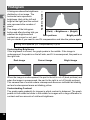
A histogram shows the brightness
distribution of an image. The
horizontal axis represents
brightness (dark at the left and
bright at the right) and the vertical
axis represents the number of
pixels.
The shape of the histogram
(Dark) ←Brightness→ (Bright)
before and after shooting tells you
whether the brightness and
Dark portions
Bright portions
contrast are correct or not, and
lets you decide if you need to use EV compensation and take the picture again.
Setting the Exposure (EV Compensation) 1p.96
Understanding Brightness
If the brightness is correct, the graph peaks in the middle. If the image is
underexposed, the peak is on the left side, and if it is overexposed, the peak is on
the right side.
Dark image
Correct image
Bright image
When the image is underexposed, the part to the left is cut off (dark portions) and
when the image is overexposed, the part to the right is cut off (bright portions).
This camera has a function where overexposed areas are indicated as blinking
red and underexposed areas as blinking yellow.
Understanding Contrast
The graph peaks gradually for images in which contrast is balanced. The graph
peaks on both sides but sinks in the middle for images with a large difference in
contrast and low amounts of mid-level brightness.
28
Electronic Level
1
Getting Started
This camera is equipped with an electronic level for detecting whether the camera
is level.
When [Electronic Level] is set to O (On) in the [A Rec. Mode] menu, the
electronic level can be displayed, and you can check how level the camera is
(p.109).
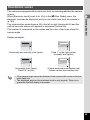
The horizontal bar scale shows a tilt to the left or right (horizontal tilt) and the
vertical bar scale shows a tilt upward or downward (vertical tilt).
The number of increments on the scales and the color of bar scale show the
camera angle.
Display examples:
Horizontally and vertically level (green)
Tilted 1° to the right (yellow)
Vertically level (green)
Horizontally level (green)
Tilted 2.5° up (red)
Outside horizontal level display (red)
Outside vertical level display (red)
• If the camera angle cannot be detected, both ends and the center of the bar
scale flash red.
• The displayed angle on the electronic level is only a guide. There is no
guarantee that the display is accurate.
29
Sub-display Indicator
(PENTAX WG-3 GPS Only)
1
When the camera is turned off, information such as the current time and air
pressure is displayed on the sub-display on the camera’s front side.
Getting Started
1
2
1
2
Current time
Height/air pressure
* 2 changes depending on [Pressure Sensor] settings in [W Setting] menu
(p.190).
• The sub-display’s back light turns on for five seconds when the shutter
release button is pressed fully.
• You can change the display items by pressing the zoom button. The items
are switched as follows each time the zoom button right is pressed:
Current time → current time + height → current time + air pressure
Press the zoom button left to change the items in the opposite order.
Nothing is displayed at 2 when [Off] is selected for [Pressure Sensor].
• The height that can be displayed on the sub-display is between -300 to
4000 meters when [Not underwater] is selected for [Camera Location].
When the height reaches -300 or 4000 meters, the height value on the subdisplay blinks.
The displayed value is between -15 to 0 meters when [Underwater] is
selected (“d” is displayed instead of “-” on the sub-display). When the water
depth reaches -15 meters, the water depth value on the sub-display blinks.
30
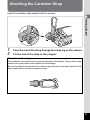
Attaching the Carabiner Strap
Attach the carabiner strap supplied with the camera.
1
Getting Started
1
2
Pass the end of the strap through the strap lug on the camera.
Fix the end of the strap to the stopper.
Protective rubber ring
The carabiner has rubber rings to prevent damage to the display. These rubber rings
cushion the impact when the carabiner hits the display.
Be sure to adjust the positions of the rubber rings as shown in the figure below for the
best results before using the carabiner strap.
31
Powering the Camera
1
Installing the Battery
Getting Started
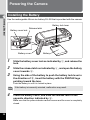
Use the rechargeable lithium-ion battery D-LI92 that is provided with the camera.
Battery lock lever
Battery cover lock
Release latch
Battery cover
1
2
3
Battery
Slide the battery cover lock as indicated by 1, and release the
lock.
Slide the release latch as indicated by 2, and open the battery
cover towards 3.
Using the side of the battery to push the battery lock lever in
the direction of 4, insert the battery with the PENTAX logo
pointing toward the lens.
Push the battery in until it is locked in place.
If the battery is incorrectly oriented, malfunction may result.
4
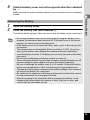
Close the battery cover, and slide the release latch in the
opposite direction indicated by 2.
Make sure that the yellow indicator cannot be seen and the cover is completely
closed.
32
5
Slide the battery cover lock in the opposite direction indicated
by 1.
Make sure that the yellow indicator cannot be seen and the cover is completely
locked.
1
2
Open the battery cover.
Push the battery lock lever towards 4.
The battery will be ejected. Take care not to drop the battery when removing it.
Getting Started
Removing the Battery
1
• Do not use excessive force when opening and closing the battery cover
because the waterproof seal may peel off. If the seal is not in the correct
position, the camera will not be waterproof.
• If the battery cover is not locked securely, water, sand, or dirt may get into
the camera.
• This camera uses a rechargeable lithium-ion battery D-LI92. Use of any
other type of battery may damage the camera and cause malfunction.
• Insert the battery correctly. If the battery is incorrectly oriented, malfunction
may result.
• Do not remove the battery while the camera is turned on.
• When storing the battery for more than 6 months, charge the battery for 30
minutes using the power adapter and store the battery separately.
Be sure to recharge the battery every 6 to 12 months. Storing the battery
below room temperature is ideal. Avoid storing it in high temperatures.
• The date and time may be returned to the default settings if the camera is
left without the battery for a long time.
• Be careful as the camera or the battery may become hot when the camera
is used continuously for a long period of time.
• Allow the camera to dry completely before changing the battery. Avoid
changing the battery where the camera is likely to get wet or dirty, and
make sure that your hands are dry.
33
Charging the Battery
1
Connect the supplied power adapter (D-PA135) to the camera and charge the
battery before using it for the first time or after a long period of non-use, or when
the [Battery depleted] message appears.
Getting Started
Power lamp
While charging: Blinks
Charging finished: Turns off
To power outlet
2
3
Power adapter
USB cable
1
2
3
4
5
6
7
34
1
Make sure that the camera is turned off and open the battery
cover.
Connect the USB cable to the power adapter.
Connect the USB cable to the camera.
Plug the power adapter into the power outlet.
The power lamp blinks while charging.
When charging is finished, the power lamp turns off.
The battery cover will not close while charging. Leave the cover open when
charging and do not attempt to close it.
Unplug the power adapter from the power outlet when
charging is finished.
Remove the USB cable from the camera.
Close the battery cover.
• The time required to fully charge the battery is about 180 minutes (max.).
(The charging time may vary depending on the ambient temperature and
charging conditions.) The appropriate ambient temperature for charging
the battery is 0°C to 40°C (32°F to 104°F).
• The PENTAX WG-3 GPS uses the Qi wireless charging standard. You can
charge the battery in the camera by placing the camera on a wireless
charger that supports the Qi standard. (When charging the battery, the
camera must be turned off and placed with the lens facing downward.) For
details on how to charge the battery, see the manual of the wireless charger.
1
Getting Started
• Do not charge batteries other than the rechargeable lithium-ion battery DLI92 using the supplied power adapter (D-PA135). Doing otherwise may
cause damage or overheating.
• The battery has reached the end of its service life when it starts to run down
soon after being charged. Replace it with a new battery.
• If the camera is connected to the power outlet but the charging indicator
fails to light, the battery may be faulty. Replace it with a new battery.
• When charging the battery, you cannot set the camera upright on the table
because the USB cable comes out of the bottom of the camera.
• Do not use excessive force when sliding the battery cover open and closed
because the waterproof seal may peel off. If the seal is not in the correct
position, the camera will not be waterproof.
• Image Storage Capacity, Movie Recording Time, and Playback Time
(at 23°C (73.4°F) with the display on and the battery fully charged)
Image Storage Capacity*1
(flash used for 50% of shots)
Movie Recording Time*2
Playback Time*2
Approx. 240 pictures
Approx. 65 min.
Approx. 200 min.
*1 The image storage capacity shows the approximate number of shots recorded
during CIPA-compliant testing (at 23°C (73.4°F) with display on and flash used
for 50% of the shots). Actual performance may vary according to operating
conditions.
*2 According to the results of in-house testing.
• Battery performance may deteriorate as temperature decreases. When
using the camera in cold regions, we recommend carrying a spare battery
in your pocket to keep it warm. Battery performance will recover when the
temperature returns to normal.
• If [GPS On/Off] of the [GPS] settings is set to [On], the camera performs
GPS positioning regularly even while the camera power is off, which
reduces the battery life.
• Using the camera’s pressure sensor to determine the current air pressure
and height reduces the battery’s life.
• Be sure to take a spare battery with you when traveling abroad or to a cold
region, or if you intend to take a lot of pictures.
35
• Battery Level Indicator
You can check the battery level by the indicator on the display.
Screen Display
1
Getting Started
36
Battery Status
(green)
Adequate power remains.
(green)
Battery is running low.
(yellow)
Battery is running very low.
(red)
[Battery depleted]
Battery is exhausted.
The camera will turn off after this message appears.
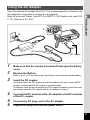
Using the AC Adapter
1
6
3
5
DC terminal
1
Getting Started
Use of the optional AC adapter kit (K-AC117) is recommended if you intend to use
the camera for a long time or connect it to a computer.
Note: AC plug cord “Listed, Type SPT-2 or NISPT-2, 18/2 flexible cord, rated 125
V, 7A, minimum 6 ft (1.8 m)”
4
DC coupler
1
2
3
4
5
6
Make sure that the camera is turned off and open the battery
cover.
Remove the Battery.
Refer to p.32 - p.33 on how to open the battery cover and remove the battery.
Insert the DC coupler.
Using the side of the DC coupler to push the battery lock lever, insert the DC
coupler. Confirm that the DC coupler is locked in place.
The battery cover will not close while the DC coupler is inserted. Leave the cover
open when using the AC adapter and do not attempt to close it.
Connect the DC terminal of the AC adapter to the DC terminal
of the DC coupler.
Connect the AC plug cord to the AC adapter.
Plug the AC plug cord into the power outlet.
37
1
Getting Started
38
• Make sure that the camera is turned off before connecting or disconnecting
the AC adapter.
• Make sure that the AC plug cord and the DC terminal connecting the AC
adapter to the camera are inserted securely. Data may be lost if either
becomes disconnected while the data is being recorded on the SD Memory
Card or in the built-in memory.
• Use the AC adapter with due care to avoid fire or electric shock.
Be sure to read “About the Power Adapter and the AC Adapter” (p.3) before
using the AC adapter.
• Be sure to read the operation manual accompanying the AC adapter kit
K-AC117 before using the adapter.
• When connecting the AC adapter, you cannot set the camera upright on the
table because the cord from the DC coupler comes out of the bottom of the
camera.
• Do not use excessive force when sliding the battery cover open and closed
because the waterproof seal may peel off. If the seal is not in the correct
position, the camera will not be waterproof.
Installing an SD Memory Card
• Be sure to use this camera to format (initialize) an SD Memory Card that is
unused or has been previously used on other cameras or digital devices.
Refer to “Formatting the Memory” (p.168) for instructions on formatting
cards.
• Make sure that the camera is turned off before inserting or removing the SD
Memory Card.
• Allow the camera to dry completely before changing the SD Memory Card.
Avoid changing the card where the camera is likely to get wet or dirty, and
make sure that your hands are dry.
• Do not use excessive force when sliding the battery cover open and closed
because the waterproof seal may peel off. If the seal is not in the correct
position, the camera will not be waterproof.
1
Getting Started
This camera uses SD Memory Cards, SDHC Memory Cards or SDXC Memory
Cards. Captured images are saved on the SD Memory Card if a card is inserted
in the camera. They are saved in the built-in memory if a card is not inserted
(p.41).
• The number of still pictures that can be stored varies depending on the
capacity of the SD Memory Card and the selected number of recorded
pixels and quality level (p.222).
• The power lamp blinks while the SD Memory Card is being accessed (data
is being recorded or read).
Backing Up Data
The camera may not be able to access data in the built-in memory in the case of a
malfunction. Use a computer or other device to back up important data in another
location.
39
1
Getting Started
Battery cover
1
2
3
4
5
SD Memory
Card socket
SD Memory Card
Slide the battery cover lock as indicated by 1, and release the
lock.
Slide the release latch as indicated by 2, and open the battery
cover towards 3.
Insert an SD Memory Card into the SD Memory Card socket so
that the label is facing toward the front of the camera (the side
with the lens).
Push the card in all the way. Images may not be recorded correctly if the card is
not inserted all the way.
To remove the SD Memory Card, push it in once and then pull it out.
Close the battery cover, and slide the release latch in the
opposite direction indicated by 2.
Slide the battery cover lock in the opposite direction indicated
by 1.
Make sure that the lever clicks and the cover is locked.
If the battery cover is not locked securely, water, sand, or dirt may get into the
camera.
• The image file size varies depending on the number of recorded pixels and
the number of images that can be saved on an SD Memory Card also varies.
• Set the number of recorded pixels for still pictures from the [A Rec. Mode]
menu and for movies from the [C Movie] menu.
• For an approximate number of still pictures and amount of time of movies that
can be saved on an SD Memory Card, see “Main Specifications” (p.221).
40
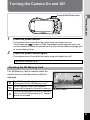
Turning the Camera On and Off
Power button/Power lamp
1
Getting Started
1
Press the power button.
2
The camera turns on and both the power lamp and display turn on.
If the [Language/
] screen or [Date Adjustment] screen appears when you
turn the camera on, follow the procedure on p.43 to set the display language and/
or current date and time.
Press the power button again.
The camera turns off and both the power lamp and display turn off.
Taking Still Pictures 1p.61
Checking the SD Memory Card
The SD Memory Card is checked when the
camera turns on and the memory status is
displayed.
a
+
r
The SD Memory Card is inserted. Images
will be saved on the SD Memory Card.
38
The SD Memory Card is not inserted.
Images will be saved in the built-in memory.
Memory status
The write-protect switch on the SD Memory
Card is in the LOCK position (p.7). Images
cannot be recorded.
41
Starting-up in Playback Mode
1
Use this function when you want to play back images straightaway without taking
any picture.
Getting Started
Power button
Q button
1
Press and hold down the Q button.
The display turns on and the camera starts up in playback mode.
• To switch from playback mode to capture mode, press the Q button or
press the shutter release button halfway.
• In order to set the camera not to start up in playback mode, set [Playback
Mode] to P (Off) from [Startup Shortcut] in the [W Setting] menu. (p.187)
Playing Back Still Pictures 1p.126
42
Initial Settings
The language, date, and time can be changed later. Refer to the pages below for
instructions.
• To change the language, follow the steps in “Changing the Display Language”
(1p.175).
• To change the date and time, follow the steps in “Changing the Date and Time”
(1p.170).
1
Getting Started
The [Language/
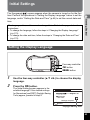
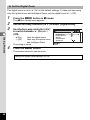
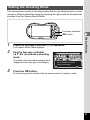
] screen appears when the camera is turned on for the first
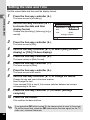
time. Perform the operations in “Setting the Display Language” below to set the
language, and in “Setting the Date and Time” (p.46) to set the current date and
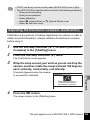
time.
Setting the Display Language
Four-way controller
4 button
3 button
1
2
Use the four-way controller (2345) to choose the display
language.
Press the 4 button.
The [Initial Setting] screen appears in the
selected language. If the desired settings
for [Hometown] and [DST] (Daylight Saving
Time) appear, proceed to step 9.
Initial Setting
English
Hometown
New York
DST
OFF
Settings complete
MENU
Cancel
Daylight saving time
43
3
Press the four-way controller (3).
The frame moves to [W Hometown].
Initial Setting
English
Hometown
New York
1
DST
OFF
Settings complete
Getting Started
MENU
4
5
Cancel
Press the four-way controller (5).
The [W Hometown] screen appears.
Use the four-way controller (45)
to choose a city.
Hometown
City
New York
DST
MENU
6
7
8
9
10
Cancel
OK
Press the four-way controller (3).
The frame moves to [DST] (Daylight Saving Time).
Use the four-way controller (45) to select O(On) or P (Off).
Press the 4 button.
The [Initial Setting] screen reappears.
Press the four-way controller (3) to select [Settings
complete].
Press the 4 button.
The [Date Adjustment] screen appears. Next, set the date and time.
44
OK
If you accidentally select the wrong language and go to the next procedure, perform
the following operation to set the language back.
When the Wrong Language Has Been Inadvertently Selected
1
Press the four-way controller (5).
Use the four-way controller (2345) to select the desired
language and press the 4 button.
The [Initial Setting] screen appears in the selected language.
When the Screen After Step 2 Appears in the Wrong Language
1
2
3
4
5
6
7
Press the 3 button.
Getting Started
1
2
This exits the setting screen and returns the camera to capture mode.
Press the 3 button.
The [A Rec. Mode] menu appears.
Press the four-way controller (5) twice.
Use the four-way controller (32) to select [Language/
].
Press the four-way controller (5).
The [Language/
] screen appears.
Use the four-way controller (2345) to select the desired
language.
Press the 4 button.
The [W Setting] menu appears in the selected language.
The language is now switched to your desired language. To reset [Hometown], [Date]
and [Time], refer to the pages below for instructions.
• To change the Hometown city, follow the steps in “Setting the World Time”
(1p.173).
• To change the date and time, follow the steps in “Changing the Date and Time”
(1p.170).
The video output format (NTSC/PAL) is set to the format of the city selected in
[Hometown] on the [Initial Setting] screen. See the following pages for information on
the available video output formats and how to change the output format.
• Video output formats available initially: “List of World Time Cities” (1p.220)
• To change the video output format: “Changing the Video Output Format” (1p.180).
45
Setting the Date and Time
Set the current date and time and the display format.
1
1
Press the four-way controller (5).
Getting Started
The frame moves to [mm/dd/yy].
2
Use the four-way controller (23)
to choose the date and time
display format.
Choose from [mm/dd/yy], [dd/mm/yy] or [yy/
mm/dd].
Date Adjustment
Date Format
mm/dd/yy 24h
Date
01/01/2013
00:00
Time
Settings complete
MENU Cancel
3
Press the four-way controller (5).
The frame moves to [24h].
4
5
6
7
8
9
10
Use the four-way controller (23) to select [24h] (24-hour
display) or [12h] (12-hour display).
Press the four-way controller (5).
The frame returns to [Date Format].
Press the four-way controller (3).
The frame moves to [Date].
Press the four-way controller (5).
The frame moves to the month.
Use the four-way controller (23) to change the month.
Change the day and year in the same manner.
Next, change the time.
If you selected [12h] in step 4, the camera switches between am and pm
corresponding to the time.
Press the four-way controller (3) to select [Settings
complete].
Press the 4 button.
This confirms the date and time.
If you press the 4 button in step 10, the camera clock is reset to 0 seconds.
To set the exact time, press the 4 button when the time signal (on the TV,
radio, etc.) reaches 0 seconds.
46
When the [Initial Setting] or [Date Adjustment] screen is displayed, you can
cancel the setting operation and switch to capture mode by pressing the
3 button. In this case, the [Initial Setting] screen will appear next time
you turn the camera on.
1
Getting Started
[Language/
], [Date], [Time], [Hometown] and [DST] can be changed. Refer to
the pages below for instructions.
• To change the language, follow the steps in “Changing the Display Language”
(1p.175).
• To change the date and time, follow the steps in “Changing the Date and Time”
(1p.170).
• To change the Hometown city or turn the DST setting on and off, follow the steps
in “Setting the World Time” (1p.173).
47
Understanding the Button Functions
A Mode
1
2
2
3
Common Operations
4
5
6
7
9
1
Q button
2
Power button
3
Shutter release button
8
Switches to Q mode (p.52).
Turns the camera on and off (p.41).
Focuses the camera on the subject when pressed halfway in Still Picture
Capture Mode (except when the focus mode is set to 3, s, and \) (p.62).
Takes a still picture when pressed down fully (p.62).
Pressing down fully starts and stops movie recording in C (Movie),
(Underwater Movie),
(High Speed Movie), c (Time-Lapse Movie), and
(1cm-Macro Movie) modes (p.111, p.113, p.121, p.122, and p.123).
4
W/T button
5
Movie button
Changes the captured area (p.64).
Starts movie recording in Still Picture Capture Mode (p.115).
48
2Com mon Operations
6
Four-way controller
(2)
(3)
(4)
(5)
(23)
7
:
:
:
:
:
Changes the drive mode (p.74 - p.78).
Displays the Capture Mode Palette (p.68).
Changes the flash mode (p.84).
Changes the focus mode (p.85).
Adjusts the focus when the focus mode is set to \ (p.86).
Green button
Switches to 9 (Green) mode (p.71).
Calls up the assigned function (p.103).
3 button
In Still Picture Capture Mode, [A Rec. Mode] menu appears. In Movie Mode,
[C Movie] menu appears (p.53).
9
4 button
Changes the information on the display (p.21).
Common Operations
8
2
49
Q Mode
1
2
3
4
2
Common Operations
5
6
8
1
7
Q button
Switches to A mode (p.52).
2
Power button
3
Shutter release button
4
f/y button
Turns the camera on and off (p.41).
Switches to A mode (p.52).
In single-image display, pressing f switches to 6-image display. Pressing f
again switches to 12-image display (p.128). Press y to return to the previous
display.
In single-image display, pressing y magnifies the image. Press f to return to
the previous display (p.136).
In 12-image display, press f to change to folder or calendar display (p.129).
In folder/calendar display, press y to change to 12-image display (p.129).
Adjusts the volume during playback of movies (p.127).
50
5
Four-way controller
(2)
(3)
(45)
(2345)
Green/i button
Switches from single-image display to the Delete screen (p.137).
Switches from 6- or 12-image display to the Select & Delete screen (p.138).
Switches from folder display to the calendar display screen (p.129).
Switches from calendar display to the folder display screen (p.129).
7
2
Common Operations
6
: Plays back and pauses a movie (p.127).
: Displays the Playback Mode Palette (p.132).
Stops a movie during playback (p.127).
: Displays the previous or next image during single-image display
(p.126).
Fast-forwards, fast-reverses, frame forwards, and frame
reverses during movie playback (p.127).
: Changes the position of the area to be magnified during zoom
display (p.136).
Selects an image in 6- or 12-image display, a folder in folder display,
and a date in calendar display (p.128, p.129).
Adjusts the position of a frame or an image when you are using
the Original Frame function (p.157).
3 button
Displays the [W Setting] menu during single-image display (p.53).
Returns to single-image display during Playback Mode Palette display (p.131).
Returns zoom, 6- or 12-image display to single-image display.
Switches from folder/calendar display to 12-image display with the cursor
placed on the most recent image (p.129).
8
4 button
Changes the information on the display (p.25).
Returns zoom, 6- or 12-image display to single-image display (p.129, p.136).
Changes to 12-image display of the selected folder during folder display (p.129).
Changes to single-image display of the selected date during calendar display
(p.130).
51
Switching Between A Mode and Q Mode
2
In this manual, the capture mode, such as for taking still pictures and recording
movies, is referred to as “A mode” (capture mode) (“Still Picture Capture Mode”
refers to the mode for taking still pictures and “Movie Mode” refers to the mode
for recording movies). The playback mode, such as for viewing captured images
on the display, is referred to as “Q mode” (playback mode). In Q mode, you
can perform simple editing operations on the images that are played back.
Follow the procedure below to switch between A mode and Q mode.
Common Operations
To Switch from A Mode to Q Mode
1
Press the Q button.
The camera switches to Q mode.
To Switch from Q Mode to A Mode
1
Press the Q button or the shutter release button halfway.
The camera switches to A mode.
Displaying data stored in the built-in memory
When an SD Memory Card is inserted in the camera, still pictures and movies on the
SD Memory Card are displayed. If you want to display still pictures and movies stored
in the built-in memory, turn the camera off and remove the SD Memory Card.
Make sure that the camera is turned off before inserting or removing the
SD Memory Card.
52
Setting the Camera Functions
To change the camera settings, press the 3 button to display the [A Rec.
Mode] menu or [W Setting] menu. Functions for playing back and editing images
can be accessed from the Playback Mode Palette.
Operating the Menus
2
In capture mode
MENU
P
Pressed
halfway
38
'10/02/02 14:25
SHUTTER
MENU
Rec. Mode
Image Tone
Recorded Pixels
Quality Level
White Balance
AF Setting
AE Metering
Common Operations
There are three types of menus: [A Rec. Mode], [C Movie] and [W Setting].
Press the 3 button in Still Picture Capture Mode to display the [A Rec.
Mode] menu. Press the 3 button in Movie Mode to display the [C Movie]
menu. Press the 3 button in Q mode to display the [W Setting] menu.
Use the four-way controller (45) to move between menus.
1/5
Bright
12M
AWB
MENU Exit
Movie
Recorded Pixels
Mov i e SR
Wind Suppression
Enable Autofocus
Enable Optical Zoom
07:34
MENU
Exit
SHUTTER
Pressed
halfway
100-003
10
100-0038
0038
MENU
Setting
Sound
Date Adjustment
Alarm
World Time
Text Size
Language
Edit
' 104/04/'13
0 / 0 2 / 0 2 114:25
4:25
1/5
01/01/2013
Standard
English
MENU Exit
In playback mode
53
• Available button and key operations appear on the display during menu
operation.
• The 3 button function varies depending on the screen. Refer to the
guide indications.
2
Common Operations
54
MENU Exit
Exits the menu and returns to the original screen.
MENU
Returns to the previous screen with the current settings.
MENU Cancel Cancels the current selection, exits the menu and
returns to the previous screen.
Menu List
The following list shows the items that can be set with the menus and provides
descriptions of each item. See the list of default settings in the Appendix “Default
Settings” (p.214) to check whether the settings are saved when the camera is
turned off, and whether the settings return to the default values when the camera
is reset.
Item
Image Tone
Description
For setting the tone of images
For choosing the number of recorded pixels of still
Recorded Pixels
pictures
Quality Level
For setting the quality level of still pictures
For adjusting the color balance according to the
White Balance
lighting conditions
When = (Standard), q (Macro), or
(1cm
Focusing
Macro) is selected as the focus mode, you can
Area
change the autofocus area (Focusing Area)
AF
For choosing whether or not to use the auto macro
Setting Auto Macro
function
For setting whether or not to use the focus assist
Focus
Assist
light
For choosing the area of the screen that is metered
AE Metering
to determine the exposure
Sensitivity
For setting the sensitivity
For setting the adjustment range when the sensitivity
AUTO ISO Range
is set to AUTO
EV Compensation
For adjusting the overall brightness of an image
Highlight
For setting the bright portion correction function
D-Range Correction
Setting Shadow
For setting the dark portion correction function
Correction
Shake Reduction
For setting the Shake Reduction function
For automatically setting the focus and exposure
Face Detection
according to faces that are detected and for setting
the Self-portrait Assist function
For choosing whether to use the Blink Detection
Blink Detection
function with the Face Detection function
Digital Zoom
For choosing whether or not to use the digital zoom
Instant Review
For choosing whether to display Instant Review
Page
p.89
p.90
p.91
p.92
2
Common Operations
[A Rec. Mode] Menu
This menu provides the functions related to taking still pictures and recording
movies.
p.87
p.88
p.88
p.94
p.95
p.96
p.96
p.97
p.97
p.98
p.100
p.102
p.66
p.102
55
Item
2
Common Operations
56
Description
For choosing whether to save the set values of the
Memory
shooting functions or return to the defaults when the
camera is turned off
For assigning a function to the Green button in A
Green Button
mode
Sharpness
For choosing sharp or soft outlines
Saturation
For setting the color saturation. When [Monochrome]
(Tone Adjustment)
is selected, the item changes to [Tone Adjustment]
Contrast
For setting the image contrast level
For choosing whether to imprint the date and/or time
Date Imprint
when taking still pictures
For setting whether to apply the IQ Enhancer
IQ Enhancer*
process to an image
For setting whether or not to turn on the LED Macro
Macro Light
Lights for macro photography
For choosing whether to display the electronic level
Electronic Level
for detecting the tilt of the camera
For mounting the RICOH Wide Conversion Lens
Lens Adapter On
DW-5 (optional)
*IQ Enhancer = Image Quality Enhancer
Page
p.124
p.103
p.106
p.106
p.107
p.107
p.108
p.108
p.109
p.109
[A Rec. Mode] Menu 1
Rec. Mode
1/5
Image Tone
Recorded Pixels
Quality Level
White Balance
AF Setting
AE Metering
Bright
12M
AWB
Rec. Mode
Sensitivity
Auto ISO Range
EV Compensation
D-Range Setting
Shake Reduction
Face Detection
2/5
AUTO
ISO125-1600
0.0
Sensor Shift
2
MENU Exit
MENU Exit
3/5
Blink Detection
Digital Zoom
Instant Review
Memory
Green Button
Sharpness
[A Rec. Mode] Menu 4
Rec. Mode
Saturation
Contrast
Date Imprint
IQ Enhancer
Macro Light
Electronic Level
MENU Exit
4/5
Off
MENU Exit
[A Rec. Mode] Menu 5
Rec. Mode
Common Operations
[A Rec. Mode] Menu 3
Rec. Mode
[A Rec. Mode] Menu 2
5/5
Lens Adapter On
MENU Exit
• Use the 9 (Green) mode to enjoy easy picture-taking with standard
settings, regardless of the settings made from the [A Rec. Mode] menu
(p.71).
• Assigning a frequently used function to the Green button enables you to go
straight to the desired function (p.103).
57
[C Movie] Menu
Item
2
Common Operations
Description
For choosing the number of recorded pixels and the
Recorded Pixels
frame rate for movies
For choosing whether or not to use the Movie Shake
Movie SR
Reduction function
Wind Suppression
For suppressing wind noises while recording movies
For staying focused on the subject while recording
Enable Autofocus
movies
Enable Optical Zoom For using the optical zoom while recording movies
Page
p.116
p.117
p.117
p.118
p.118
[C Movie] Menu
Movie
Recorded Pixels
Mov i e SR
Wind Suppression
Enable Autofocus
Enable Optical Zoom
MENU
Exit
[W Setting] Menu
Item
Sound
Date Adjustment
Alarm
World Time
Text Size
Language/
Folder Name
File Name
USB Connection
Video Out
HDMI Out
58
Description
For adjusting the operation volume and playback
volume, and setting the start-up sound, shutter
sound, key operation sound, and self-timer sound
For adjusting the date and time
For setting the alarm
For setting the Hometown and Destination cities
For setting the text size of the menu
For setting the language in which menus and
messages appear
For choosing how names are assigned to folders for
storing images
For choosing how names are assigned to images
For setting the method for connecting the camera to
a PC by the USB cable (MSC or PTP)
For setting the video output format to an AV device
For setting the HDMI output format when connecting
to an AV device with an HDMI terminal
Page
p.169
p.170
p.171
p.173
p.175
p.175
p.176
p.178
p.192
p.180
p.181
Item
Page
p.182
p.182
p.183
p.183
p.184
p.184
p.187
p.139
p.185
p.187
2
Common Operations
Description
For setting whether or not to use Eye-Fi
Eye-Fi
communication
Brightness Level
For changing the brightness of the display
For setting the time until the camera enters powerPower Saving
saving mode
For setting the time until the camera turns off
Auto Power Off
automatically
For choosing whether to use the Quick Zoom function
Quick Zoom
(p.136) when playing back images
For setting whether to display explanations for
Guide Display
selected items in Capture Mode Palette and Playback
Mode Palette
For returning settings other than the date and time,
Reset
language, world time and video out to their defaults
Delete All
For deleting all the images at once
Pixel Mapping
For correcting defective pixels on the image sensor
Playback For setting whether to start-up the camera in
Mode
playback mode.
Startup LED
For setting whether to turn the LED Macro Lights on
Shortcut Lighting with the camera turned off.
Clock
For setting whether to display the clock with the
Display
camera turned off.
Format
For formatting the SD Memory Card/built-in memory
Auto Image
For setting whether to rotate images automatically
Rotation
when playing them back
GPS
For setting whether to record the GPS information on
On/Off
captured images
GPS
For setting the interval and duration of recording logs,
GPS (*) Logging and saving and deleting the recorded logs
GPS
For setting whether to correct the clock in the camera
Time
automatically using the received GPS information
Sync
Electronic Compass
For calibrating the electronic compass
(*)
For setting whether to display time, time + air
Pressure Sensor (*) pressure, or time + height on the sub-display and
main display
p.187
p.187
p.168
p.189
GPS
Guide
GPS
Guide
p.190
(*) PENTAX WG-3 GPS only
59
[W Setting] Menu 1
Setting
2
Sound
Date Adjustment
Alarm
World Time
Text Size
Language
[W Setting] Menu 2
01/01/2013
Standard
English
Common Operations
MENU Exit
Eye- Fi
2/5
Date
IMGP
MSC
NTSC
Auto
[W Setting] Menu 4
Setting
Brightness Level
Power Saving
Auto Power Off
Quick Zoom
Guide Display
Reset
Setting
3/5
Delete All
Pixel Mapping
Startup Shortcut
Format
Auto Image Rotation
GPS
5sec.
3min.
MENU Exit
MENU Exit
[W Setting] Menu 5
Setting
Electronic Compass
Pressure Sensor
60
Folder Name
File Name
USB Connection
Video Out
HDMI Out
MENU Exit
[W Setting] Menu 3
MENU Exit
Setting
1/5
5/5
4/5
Taking Still Pictures
3Taking Pictures
Taking Pictures
This camera has various functions and shooting modes that support a wide array
of scenes and subjects. This section explains shooting with the default settings
when shipped.
Power button
Shutter release button
W/T button
2
Taking Pictures
1
3
Press the power button.
The camera turns on and is ready to take still pictures. In this manual, this is
called Still Picture Capture Mode.
Check the subject and shooting
information on the display.
The focus frame in the middle of the display
indicates the automatic focusing area.
38
Focus frame
When the camera detects a person’s face,
the Face Detection function is activated and
the face detection frame appears (p.70).
38
Face detection frame
61
3
3
Taking Pictures
62
4
You can change the captured area by pressing the zoom button (p.64).
Right (T)
Enlarges the subject.
Left (W)
Widens the area that is captured by the camera.
Press the shutter release button
halfway.
The camera emits focus assist light in dark
shooting situations.
The focus frame (or face detection frame)
on the display turns green when the camera
focuses on the subject.
1/250
F4.6
38
Press the shutter release button fully.
The picture is taken.
The flash discharges automatically depending on the light conditions.
The image appears on the display temporarily (Instant Review: p.64) and is
saved to the SD Memory Card or the built-in memory.
• Press the Green button to switch to 9 (Green) mode and let the camera
set all the shooting functions automatically (p.71).
• f is displayed when the shutter release button is pressed halfway if there
is a risk of camera shake.
Using the Shutter Release Button
The shutter release button works in a two-step action as follows.
Press halfway
This refers to pressing the shutter release button gently to the first position. This
locks the focus setting and exposure. The green focus frame lights on the display
when the shutter release button is pressed halfway and the subject is in focus. If
the subject is out of focus, the frame turns white.
Press fully
This refers to pressing the shutter release button all the way down to the fully
depressed position. This takes a picture.
Pressed halfway
Pressed fully
(first position)
(second position)
Taking Pictures
Not pressed
3
Poor focusing conditions
The camera may not be able to focus under the following conditions. In these cases,
lock the focus on an object the same distance away as the subject (by pressing and
holding the shutter release button halfway), then aim the camera at your subject and
press the shutter release button fully.
• Objects that lack contrast such as a blue sky or white wall
• Dark places or objects, or conditions that prevent light being reflected back
• Intricate patterns
• Fast moving objects
• When both an object in the foreground and an object in the background exist in the
captured area
• Strongly reflected light or strong backlighting (bright background)
63
Instant Review and Blink Detection
The image appears on the display temporarily (Instant Review) immediately after
it is captured. If the camera detects that the subject’s eyes are closed while Face
Detection (p.100) is activated, the message [Closed eyes have been detected]
appears for 3 seconds (Blink Detection).
• When the Face Detection function does not work, Blink Detection also does
not function. Even if the subjects’ faces are recognized, Blink Detection
may not function depending on the condition of the recognized faces.
• You can also disable the Blink Detection function (p.102).
3
Taking Pictures
Using the Zoom
You can use the zoom to change the captured area.
W/T button
Four-way controller
4 button
3 button
1
Press the W/T button in A mode.
W Wide (left)
Widens the area that is captured by the
camera.
T Tele (right)
Enlarges the subject.
Zoom ratio
Zoom bar
28.8
If you continue to press T, the camera
automatically switches from optical zoom to
Intelligent Zoom and stops at the point where
38
the zoom switches to digital zoom.
Once the button is released and pressed again, the camera switches to digital
zoom.
If the digital zoom is set to off in the menu, the optical zoom and the Intelligent
Zoom ranges are available for use. The zoom ratio of the Intelligent Zoom varies
depending on the number of recorded pixels.
64
The zoom bar is displayed as follows.
Zoom in with high image quality.
Optical zoom range*1
Zoom in with some degree of image
deterioration.
Intelligent
Zoom range*2
Digital zoom
range
*1 You can zoom in to a maximum of 4× optically.
*2 The Intelligent Zoom range varies depending on the number of recorded
pixels. See the following table.
Recorded Pixels
/
/
Intelligent Zoom
(The zoom ratio includes the 4× optical zoom.)
Not Available (4× optical zoom only)
6/
Approx. 6×
f/
Approx. 7.1×
h
h
V (*)
l
Digital zoom
Equivalent to
approx. 28.8×
3
Taking Pictures
Recorded pixels and the maximum zoom ratio
Approx. 9×
Approx. 9.6×
Not Available (4× optical zoom only)
Approx. 18×
Equivalent to
approx. 28.8×
Approx. 28.8× (same as digital zoom)
m
(*) V can be set only when
(Report) mode is set.
• We recommend you use a tripod to prevent camera shake when taking
pictures at high zoom ratios.
• Pictures taken in the digital zoom range appear grainier than pictures taken
in the optical zoom range.
• For details on the available functions, refer to “Functions Available for Each
Shooting Mode” (p.206).
• The image magnified using Intelligent Zoom may appear rough on the
display. This does not affect the quality of the recorded image.
• Intelligent Zoom is available regardless of whether the digital zoom is
turned on or off.
65
To Set the Digital Zoom
The digital zoom is set to O (On) in the default settings. To take pictures using
only the optical zoom and Intelligent Zoom, set the digital zoom to P (Off).
1
2
3
3
Press the 3 button in A mode.
The [A Rec. Mode] menu appears.
Use the four-way controller (23) to select [Digital Zoom].
Use the four-way controller (45)
to switch between O (On) or P
(Off).
Taking Pictures
Uses the digital zoom
Uses only the optical zoom
and Intelligent Zoom
The setting is saved.
O(On)
P (Off)
4
Press the 3 button.
The camera returns to capture mode.
Saving the Digital Zoom setting 1p.124
66
Rec. Mode
Blink Detection
Digital Zoom
Instant Review
Memory
Green Button
Sharpness
MENU Exit
3/5
Setting the Shooting Mode
This camera has a variety of shooting modes that let you take pictures or record
movies in different situations simply by choosing the right mode for the particular
situation from the Capture Mode Palette.
Four-way controller
4 button
2
Press the four-way controller (3) in A mode.
The Capture Mode Palette appears.
Use the four-way controller
(2345) to choose a shooting
mode.
The guide of the selected shooting mode is
displayed in the lower part of the display.
Landscape
For capturing landscape
views. Enhances colors
of sky and foliage
MENU Cancel
3
1/2
Taking Pictures
1
3
OK
OK
Press the 4 button.
The shooting mode is selected and the camera returns to capture mode.
67
The following modes can be selected from the Capture Mode Palette.
Item
Description
Page
The camera automatically selects the
appropriate shooting mode from the following
fifteen modes
3
Taking Pictures
b Auto Picture
Standard
Night Scene
Night Scene
Portrait
Landscape
Flower
Portrait
Sport
Candlelight
Blue Sky
Portrait×
Blue Sky
Portrait×
Backlight
Sunset
Portrait×
Sunset
Group
Photograph
Text
⎯
* When the camera detects the pet’s face, the
shutter is automatically released.
Used for basic shooting. The shutter speed and
aperture are set automatically by the camera
during shooting. However, you can select and set
other functions as desired, such as the flash
mode and the number of recorded pixels
⎯
HDR
Combines 3 images into a single image
delivering a wider dynamic range image
⎯
Handheld Night
Snap
Minimizes camera shake for shooting at night or
other low light settings
⎯
Movie
For recording movies. Sound is recorded at the
same time
p.113
Underwater
For capturing images underwater
p.111
R Program
C
Underwater Movie Use this mode for taking underwater movies
68
p.111
Digital Microscope
Captures the bigger images of the closer objects
(fixed to h)
p.72
a
Landscape
For capturing landscape views. Enhances colors
of sky and foliage
⎯
b
Flower
For images of flowers. The outline of the flower is
softened
⎯
Item
c
Description
For capturing portraits. Reproduces a healthy
and bright skin tone
Interval Shot
Shoots a series of images at a specified interval
of time
p.73
Interval Movie
Shoots a series of images at a specified interval,
and saves them as a movie
p.119
High Speed Movie Captures frames for slow motion playback
c
Page
Portrait
⎯
p.122
Time-Lapse Movie Captures frames for fast motion playback
p.121
1cm-Macro Movie For capturing movie clips at close distances
p.123
⎯
Q Surf & Snow
⎯
R
For capturing moving kids. Reproduces a healthy
and bright skin tone
⎯
Kids
e Pet
\
Sport
A Night Scene
For capturing images of moving pets
p.72
For a fast moving subject. Tracks the subject until
the picture is taken
⎯
For night time images. Use of a tripod or other
support is suggested
⎯
B
Night Scene
Portrait
For images of people at night. Use of a tripod or
other support is advised
⎯
S
Fireworks
For capturing fireworks. Use of a tripod or other
support is suggested
⎯
K
Food
For images of food and prepared dishes.
Enhances saturation and contrast
⎯
X Digital Wide
Stitches two pictures together to create a wider
image
Stitches images taken with the camera to create
F Digital Panorama a panoramic photograph
Report
For capturing image with fixed 1280×960 pixels
for reports
3
Taking Pictures
Higher sensitivity reduces blur
For bright images such as sand or snow.
Accurately meters for bright scenes
c Digital SR
p.79
p.81
⎯
* 9 (Green) (p.71) mode is available in addition to the ones noted above.
69
3
Taking Pictures
• In shooting modes other than R (Program), A (Night Scene), C (Movie),
(Digital Microscope),
(Handheld Night Snap),
(Interval Shot),
(Interval Movie),
(High Speed Movie), c (Time-Lapse Movie),
(1cmMacro Movie), c (Digital SR), F (Digital Panorama), and X (Digital
Wide), Saturation, Contrast, Sharpness, White Balance, etc. are
automatically set to the optimal settings for the selected mode.
• Some functions may not be available or may not function fully depending
on the selected shooting mode. For details, refer to “Functions Available for
Each Shooting Mode” (p.206).
• You can turn off the shooting mode guide to be displayed on the Capture
Mode Palette (p.184).
• The shutter speed tends to be slower when taking pictures of dark scenes.
To prevent camera shake, set [Shake Reduction] to [Sensor Shift] or [Dual]
(p.98), or put the camera on a tripod and use the self-timer (p.74) or a
remote control unit (p.77).
Using the Face Detection Function
When the camera detects a person’s face in the
image, the Face Detection function displays a
yellow face detection frame around the face on the
display screen, sets the focus (Face Detection AF)
and compensates the exposure (Face Detection
AE).
If the subject in the face detection frame moves,
the frame also moves and changes its size as it
tracks the face.
The Face Detection function can recognize up
to 32 people’s faces. If it recognizes multiple
faces, the camera displays a yellow frame over
the main face and white frames over the other
faces. Up to a total of 31 frames, including both
the main and white frames can be displayed on
the screen.
38
Face detection frame
When the multiple faces are
detected
38
Main frame
Switching the Face Detection Function 1p.100
70
White frame
Taking Pictures in Basic Mode (Green Mode)
In 9 (Green) mode, you can enjoy easy picture-taking with standard settings,
regardless of the settings made from the [A Rec. Mode] menu.
The 9 mode settings are as shown below.
, (Auto)
9 (Standard)
= (Standard)
Normal display
Sensor Shift
(4608×2592)
F (Auto)
J (Multiple)
O (On)
O (On)
L (Multi-segment
AE Metering
metering)
Image Tone
Bright
Quality Level
D (Better)
Highlight Correction Auto
Shadow Correction Auto
1
2
3
Sensitivity
EV Compensation
Blink Detection
Digital Zoom
Instant Review
Sharpness
Saturation
Contrast
Date Imprint
IQ Enhancer
Macro Light
Face Detection
Electronic Level
Lens Adapter On
AUTO (125-1600)
±0.0
O (On)
O (On)
O (On)
G (Normal)
G (Normal)
G (Normal)
Off
O (On)
P (Off)
I (Face
Detection On)
P (Off)
P (Off)
3
Taking Pictures
Flash Mode
Drive Mode
Focus Mode
Information Display
Shake Reduction
Recorded Pixels
White Balance
Focusing Area
Auto Macro
Focus Assist
Press the Green button in A
mode.
The camera switches to 9 mode.
Press the Green button again to return to
the mode before 9 mode was selected.
When the camera detects a person’s face,
the Face Detection function is activated and
the face detection frame appears (p.70).
\
38
Press the shutter release button halfway.
The focus frame on the display turns green when the camera focuses on the
subject.
Press the shutter release button fully.
The picture is taken.
71
• Assign the9 mode to the [Green Button] in the [A Rec. Mode] menu to
use the 9 mode (p.103). (By default, the 9 mode is assigned.)
• When the 3 button is pressed in 9 mode, the [W Setting] menu
appears. The [A Rec. Mode] menu cannot be displayed.
• When the camera is turned off in 9 mode, it turns on in 9 mode next time
the power button is pressed.
Taking Pictures of Your Pet (Pet Mode)
In e (Pet) mode, the camera automatically releases the shutter when the pet is detected.
3
1
Taking Pictures
2
Use the four-way controller (2345) to select e (Pet) from
the Capture Mode Palette.
Press the 4 button.
The e mode is selected and the camera returns to capture mode.
When the camera detects the pet’s face, the shutter is automatically released.
Taking Pictures in Digital Microscope Mode
In
(Digital Microscope) mode, you can take pictures of objects as close as 1 cm,
also because the LED Macro Lights around the lens are always lighted, you can
take minute pictures of text, the veins of leaves, or specimens of tiny insects etc.
The illumination of the LED Macro Lights may be uneven or insufficient
depending on the shooting conditions.
1
2
3
Use the four-way controller (2345) to select
Microscope) from the Capture Mode Palette.
(Digital
Press the 4 button.
The
mode is selected and the camera returns to capture mode.
Press the W/T button.
If you press T, the camera enlarges the subject.
You can enlarge the subject up to 9.6 times(*).
(*)Intelligent Zoom is included. Up to 4 times for optical zoom.
W Wide (left)
Widens the area that is captured by the camera.
T Tele (right)
Enlarges the subject.
Attaching the supplied macro stand (O-MS2) reduces camera shake during
macro photography (p.20).
72
Taking Pictures at a Set Interval (Interval Shot)
In this mode, a set number of pictures can be taken automatically at a set interval
from a set time.
You can set the shooting interval in increments of one
second from ten seconds to 4 minutes, and in 1 minute
increments from 4 to 99 minutes. You cannot set the
camera to take interval shots at less than ten seconds.
Number
2 shots – number of You can set this up to 1000 shots. However, it
of Shots
recordable images cannot exceed the number of recordable images.
You can set this in 1-minute increments. If the start
Start Delay 0 min. – 24 hours time is set to 0 minutes, the first picture is taken as
soon as the shutter release button is pressed.
Interval
2
3
4
Use the four-way controller (2345) to select
Shot) from the Capture Mode Palette.
Press the 4 button.
The current interval shot settings appear for approximately 1 minute. To take
pictures with the current settings, go to step 10.
Press the 4 button while the current settings are displayed.
The [Interval Shot] setting screen appears. [Interval] is marked with the frame.
Set the interval.
1 Press the four-way controller (5).
2 Use the four-way controller (23)
to set the minutes, then press the
four-way controller (5).
3 Use the four-way controller (23)
to set the seconds, then press the
four-way controller (5).
5
6
(Interval
3
Taking Pictures
1
10 sec. – 99 min.
Interval Shot
Interval
Number of Shots
Start Delay
0min. 10 sec.
2
0hr.
0 min.
MENU
The frame returns to [Interval].
Press the four-way controller (3).
The frame moves to [Number of Shots].
Set the number of shots.
1 Press the four-way controller (5).
2 Use the four-way controller (23) to set [Number of Shots],
then press the four-way controller (5).
The frame returns to [Number of Shots].
73
7
Press the four-way controller (3).
The frame moves to [Start Delay].
8
Set the start delay.
1 Press the four-way controller (5).
2 Use the four-way controller (23) to set the hours, then press
the four-way controller (5).
3 Use the four-way controller (23) to set the minutes, then press
the four-way controller (5).
The frame returns to [Start Delay].
3
9
Press the 3 button.
Taking Pictures
10
11
The [Interval Shot] settings are saved and the camera returns to capture mode.
Press the shutter release button halfway.
The focus frame on the display turns green if the subject is in focus.
Press the shutter release button fully.
Interval shooting starts.
The LCD turns off between shots (during standby). Press the power button during
standby to display the remaining number of shots and shooting interval on the screen.
The [Stop interval shooting?] message is displayed when the power button and
then the 3 button are pressed during standby. Pressing the 4 button
cancels interval shooting.
• Even if an alarm is set, it will not ring during interval shooting.
• Interval shooting stops if the SD Memory Card is removed or inserted
during standby.
Using the Self-timer
In Self-timer mode, a picture is taken ten seconds or two seconds after the shutter
release button is pressed.
Stabilize the camera with a tripod or other support when taking a picture with the
self-timer.
g
Z
1
Use this mode when you want to be included in a group picture. The picture
is taken approximately ten seconds after the shutter release button is pressed.
Use this mode to avoid camera shake. The picture is taken approximately two
seconds after the shutter release button is pressed.
Press the four-way controller (2) in A mode.
The [Drive Mode] screen appears.
74
2
3
Use the four-way controller (45)
to select g or Z and press the
4 button.
The camera is ready to take a picture using
the self-timer.
When the camera detects a person’s face,
the Face Detection function is activated
and the face detection frame appears
(p.70).
Drive Mode
Self-timer
MENU Cancel
OK
OK
Press the shutter release button to take a picture.
The countdown starts and the remaining seconds are displayed on the screen.
If you select g
The self-timer lamp and all of the LED Macro Lights turn on.
From 5 seconds before shooting, the LED Macro Lights turn off in order from
the top right.
From 3 seconds before shooting, the self-timer lamp blinks.
3
Taking Pictures
4
Use the four-way controller (45) to select g and press the
four-way controller (3).
If you select Z
The self-timer lamp and the LED Macro Lights blink.
The picture is taken after a countdown of either ten seconds or two seconds.
Focusing may be compromised if you move the camera while the self-timer
lamp is blinking when taking still pictures.
• In C (Movie),
(Underwater Movie),
(High Speed Movie), c (TimeLapse Movie), and
(1cm-Macro Movie) modes, recording will start after
ten seconds or two seconds.
• Press the shutter release button halfway while the self-timer is engaged to
stop the countdown and press fully to restart the countdown.
• Z cannot be selected while the 9 (Green) mode settings remain at
default. Select Z in another shooting mode and then switch the shooting
mode to 9.
• The self-timer lamp and LED Macro Lights do not turn on or blink in e (Pet)
mode.
• In the following situations, the LED Macro Lights remain turned on
regardless of the countdown.
- In
(Digital Microscope) or
(1cm-Macro Movie) mode
- When [Macro Light] in the [A Rec. Mode] menu is set to O (On)
• g/Z cannot be selected in some shooting modes. Refer to “Functions
Available for Each Shooting Mode” (p.206) for details.
75
Taking a Series of Pictures (Continuous
Shooting/Burst Shooting)
Pictures are taken continuously as long as the shutter release button is pressed.
j
c
3
Each time a picture is taken, the image is saved in the memory
Continuous
before the next image is taken. The higher the image quality,
Shooting
the longer the interval between shots.
Burst
The number of recorded pixels is fixed at f/
and the
Shooting
interval between shots is shorter than “Continuous Shooting”.
* The number of images that can be shot continuously and the interval between shots
depend on shooting situations.
Taking Pictures
1
2
3
Press the four-way controller (2) in A mode.
The [Drive Mode] screen appears.
Use the four-way controller (45) to select j or c and press
the 4 button.
The camera is ready for taking pictures continuously.
Press the shutter release button to take a picture.
Pictures are taken continuously as long as you keep the shutter release button
pressed.
j/c cannot be selected in some shooting modes. Refer to “Functions
Available for Each Shooting Mode” (p.206) for details.
• With j, you can continue shooting until the capacity of the SD Memory
Card or built-in memory becomes full.
• The shooting interval of j varies according to the [Recorded Pixels] and
[Quality Level] settings.
• The focus, exposure and white balance are locked with the first shot.
• When the Face Detection function is activated (p.100), it works only when
taking the first shot.
• The Blink Detection function works only for the last shot.
• The number of recorded pixels is fixed to f or
in c mode. When
the shooting mode is set to
(Report), the number of recorded pixels is
fixed to V.
76
Taking Pictures Using a Remote Control Unit
(Optional)
You can use a remote control unit (optional) to take pictures while you are away
from the camera.
i
h
2
3
4
3
Press the four-way controller (2) in A mode.
The [Drive Mode] screen appears.
Use the four-way controller (45) to select i and press the
four-way controller (3).
Use the four-way controller (45)
to select i or h and press the
4 button.
The self-timer lamp begins to blink slowly
and the camera is ready to take a picture by
remote control.
When the camera detects a person’s face,
the Face Detection function is activated
and the face detection frame appears (p.70).
Taking Pictures
1
The shutter will be released after about three seconds when the shutter release
button on the remote control unit is pressed.
The shutter will be released immediately when the shutter release button on
the remote control unit is pressed.
Drive Mode
Remote Control
MENU Cancel
OK
OK
Point a remote control unit at the remote control receiver and
press the shutter release button on the remote control unit.
The focus frame turns green when the subject is in focus and the camera takes
a picture at the following timing.
When i is selected:
The self-timer lamp and the LED Macro Lights blink quickly and the
camera takes a picture after about three seconds.
When h is selected:
The camera takes a picture immediately.
77
• A remote control signal can be received from either receivers on the front
and the back of the camera.
• The operating range is approx. 4 m from the front of the camera and
approx. 2 m from the back of it.
• In C (Movie),
(Underwater Movie),
(High Speed Movie), c (TimeLapse Movie), and
(1cm-Macro Movie) modes, pressing the shutter
release button again stops the recording.
• The camera takes a picture even if the focus is not achieved.
• If the shutter release button on the camera is pressed halfway during the
countdown, the countdown stops. If the shutter release button on the
remote control unit is pressed again, the camera starts the countdown
again.
• i/h cannot be selected in some shooting modes. Refer to “Functions
Available for Each Shooting Mode” (p.206) for details.
• The self-timer lamp and LED Macro Lights do not turn on or blink in e (Pet)
mode.
3
Taking Pictures
Taking Pictures with Automatic Exposure
Adjustment (Auto Bracketing)
Press the shutter release button once to automatically adjust the exposure and
take three pictures in succession. After taking the pictures, you can select the best
shot from them.
The shooting order is as follows: the proper exposure → –1.0 EV → +1.0 EV.
1
2
Press the four-way controller (2) in A mode.
The [Drive Mode] screen appears.
Use the four-way controller (45) to select a (Auto
Bracketing) and press the 4 button.
The camera is now ready to take pictures with Auto Bracketing.
• When the Instant Review is set to O (On) (p.102), the pictures taken are
shown in Instant Review after shooting (p.64).
• a cannot be selected in some shooting modes. Refer to “Functions
Available for Each Shooting Mode” (p.206) for details.
78
Using the Digital Wide Function (Digital Wide
Mode)
In X (Digital Wide) mode, you can stitch two vertical images captured with this
camera into a single frame up to approx. 19 mm coverage (35 mm film
equivalent).
3
+
2
Use the four-way controller (2345) to select X (Digital
Wide) from the Capture Mode Palette.
Press the 4 button.
The camera enters X mode.
Turn the camera 90° clockwise and compose your
first picture.
When the camera detects a person’s face, the
Face Detection function is activated and the face
detection frame appears (p.70).
1
Taking Pictures
1
38
79
3
Press the shutter release button to take
a picture.
2
The first captured image is temporarily saved, and
the shooting screen for the second image is
displayed.
3
OK
Taking Pictures
4
Exit
Take the second image.
Overlap the image on the preview guide on the left of the screen to compose the
second image. Repeat step 3 to take the second image. This combines first and
second images.
The stitched image appears on the display temporarily (Instant Review), and
then is saved.
• To minimize distortion when taking the second image, turn the camera so
that it pivots around the right edge of the preview guide on the screen.
• The images cannot be stitched if moving objects, repeating patterns, or
nothing exists in the preview guide area for overlapping the first and second
images.
• When the Face Detection function is activated (p.100), it works only when
taking the first shot.
• The number of recorded pixels for images captured in X mode is fixed at
f.
To Cancel after Taking the First Shot
1
When the shooting screen for the second image is displayed
in step 4 on p.80, press the 4 button or the four-way
controller (3).
A confirmation dialog appears.
80
2
Use the four-way controller (23) to select an option and
press the 4 button.
Save
Discard
Cancel
Saves the first image and you can retake the first shot. The first
image is saved at h (2048×1536).
Discards the first image and you can retake the first shot.
Returns to the shooting screen for the second image.
Taking Panoramic Pictures (Digital Panorama
Mode)
1
2
3
4
Use the four-way controller (2345) to select F (Digital
Panorama) from the Capture Mode Palette.
Press the 4 button.
The camera enters F mode and the message [Set shift direction] is displayed.
Use the four-way controller (45)
to choose the direction in which
the images will be joined.
The screen for taking the first frame is
displayed.
When the camera detects a person’s face,
the Face Detection function is activated and
the face detection frame appears (p.70).
3
Taking Pictures
In F (Digital Panorama) mode, you can stitch together two or three captured
frames to create a panoramic photograph with the camera.
Set shift direction
Press the shutter release button to take a picture.
The screen for taking the second frame is displayed after you take the first
frame.
If you select right (5) in step 3:
The right edge of the first frame appears in semi-transparent form on
the left edge of the display.
If you select left (4) in step 3:
The left edge of the first frame appears in semi-transparent form on
the right edge of the display.
81
5
Take the second frame.
Move the camera so that the semitransparent image and the actual view
overlap and press the shutter release
button.
1 2
SHUTTER
6
2nd Frame
OK
Exit
Take the third frame.
Repeat steps 4 to 5 to take the third frame.
The images are joined together and a panorama image appears.
The panorama image does not appear when [Instant Review] (p.102) is set to
[Off].
3
Taking Pictures
• The images cannot be stitched if moving objects, repeating patterns, or
nothing exists in the preview guide area for overlapping the first and second
images, or the second and third images.
• When the Face Detection function is activated (p.100), it works only when
taking the first shot.
To Cancel after Taking the First or Second Frame
1
2
After shooting the first frame in step 5 or the second frame in
step 6 on p.82, press the 4 button or the four-way controller
(3).
A confirmation dialog appears.
Use the four-way controller (23) to select an option and
press the 4 button.
Save
Saves the captured image(s) and you can retake the first frame.
When this option is selected after shooting the second frame, the first
and the second frames are stitched together and saved as a
panoramic photograph.
Discard Discards the captured image(s) and you can retake the first frame.
Cancel Returns to the previous shooting screen.
Unstitched images shot in F mode are fixed at h.
82
Setting the Shooting Functions
Using the Rec. Mode Menu Items
Settings for shooting are mostly set from the [A Rec. Mode] menu. Refer to
explanations for each function on how to make these settings.
1
The [A Rec. Mode] menu appears.
Pressing the 3 button in Movie Mode displays the [C Movie] menu.
Use the four-way controller (2345) to select an item and
set it up.
To Save the Setting and Start Taking Pictures
3
After setting, press the 3 button.
The camera returns to capture mode.
The setting is saved and the camera returns to the previous screen.
3
Taking Pictures
2
Press the 3 button in Still Picture Capture Mode.
When the [W Setting] menu is displayed from Q mode, you can switch to
A mode by pressing the Q button.
To Save the Setting and Start Playback of Images
3
Press the Q button.
When the [A Rec. Mode], [C Movie] or [W Setting] menu is displayed from
A mode, the setting is saved and the camera returns to playback mode.
To Cancel the Changes and Continue with Menu Operations
3
Press the 3 button.
The changes are canceled and you can select a menu.
83
The 3 button function varies depending on the screen. Refer to the
guide indications.
MENU Exit
Exits the menu and returns to the original screen.
MENU
Returns to the previous screen with the current settings.
MENU Cancel
Cancels the current selection, exits the menu and returns
to the previous screen.
Selecting the Flash Mode
3
Taking Pictures
,
a
b
c
d
The flash discharges automatically depending on the light
conditions.
The flash does not discharge, regardless of the brightness.
Flash Off
Use this mode to take pictures where flash photography is
prohibited.
The flash discharges for each shot regardless of the
Flash On
brightness.
This mode reduces the red-eye phenomenon caused by the
Auto + Red-eye light from the flash being reflected in the subject’s eyes. The
flash discharges automatically.
This mode reduces the red-eye phenomenon caused by the
Flash On +
light from the flash being reflected in the subject’s eyes. The
Red-eye
flash discharges regardless of the light conditions.
Auto
• The available modes differ depending on the selected shooting mode,
focus mode or drive mode. Refer to “Functions Available for Each Shooting
Mode” (p.206) for details.
• If you use the Face Detection function when , is selected, the flash mode
is automatically set to d.
• A pre-flash discharges when using the red-eye reduction function.
Using the flash when capturing images at a close distance may cause
irregularities in the image due to the light distribution.
1
Press the four-way controller (4)
in A mode.
The [Flash Mode] screen appears.
The flash mode changes each time the
button is pressed. You can also change the
setting using the four-way controller (23).
84
Flash Mode
Auto
MENU
Cancel
OK
OK
2
Press the 4 button.
The setting is saved and the camera returns to capture mode.
About the red-eye phenomenon
Taking pictures using the flash may cause the subject’s eyes to appear red in the
resulting picture. This phenomenon occurs when the light from the flash is reflected
in the subject’s eyes. It can be reduced by increasing the illumination in the area
around the subject and/or decreasing the subject distance and adjusting the lens to
wider angle setting. Setting the flash mode to c (Auto + Red-eye) or d (Flash On +
Red-eye) is also an effective way of reducing red eyes.
If the subject’s eyes appear red despite such precautions, they can be corrected by
the Red-eye Edit function (p.154).
Selecting the Focus Mode
= Standard
q
Macro
1cm Macro
3 Pan Focus
s
Infinity
Taking Pictures
Saving the Flash Mode setting 1p.124
3
This mode is used when the distance to the subject is from 40 cm
to ∞. The camera is focused on the subject in the autofocus area
when the shutter release button is pressed halfway.
This mode is used when the distance to the subject is from 10 cm
to 50 cm. The camera is focused on the subject in the autofocus
area when the shutter release button is pressed halfway.
This mode is used when the distance to the subject is from 1 cm
to 30 cm. The camera is focused on the subject in the autofocus
area when the shutter release button is pressed halfway.
This mode is used when you ask someone to take pictures for
you, or when taking pictures of the scenery through the window
of a car or train. The entire picture, from the front to the back, is
focused.
This mode is used for taking distant objects. The flash is set to
a (Flash Off).
\ Manual Focus This mode lets you adjust the focus manually.
85
1
Press the four-way controller (5)
in A mode.
Focus Mode
Standard
The [Focus Mode] screen appears.
The focus mode changes each time the
button is pressed. You can also change the
setting using the four-way controller (23).
MEN Cancel
MENU
2
OK
OK
Press the 4 button.
The setting is saved and the camera returns to capture mode.
3
Taking Pictures
• The available modes differ depending on the selected shooting mode.
Refer to “Functions Available for Each Shooting Mode” (p.206) for details.
• The noise from focusing is recorded when a focus mode other than 3 or
s is selected in C (Movie),
(Underwater Movie),
(High Speed
Movie), c (Time-Lapse Movie), and
(1cm-Macro Movie) modes.
• When [Auto Macro] is on and shooting with q selected, if the subject is
further than 50 cm away, the camera automatically focuses to ∞ (Infinity).
Saving the Focus Mode setting 1p.124
To Set the Manual Focus
The procedure for setting the focus manually (\) is described here.
1
Press the four-way controller (5) in A mode.
The [Focus Mode] screen appears.
2
3
4
Use the four-way controller (5) to select \.
Press the 4 button.
The central portion of the image is magnified to full screen on the display.
Press the four-way controller
(23).
The \ indicator appears on the display to
indicate the approximate distance to the
subject. Use the four-way controller (23)
to adjust the focus using the indicator as a
guide.
2 for distant focus
3 for closer focus
86
1.5
m
0.8
0.4
MENU
MEN
OK
OK
\ indicator
5
Press the 4 button.
The focus is locked and the camera returns to capture mode.
After the focus is locked, you can press the four-way controller (5) again to
display the \ indicator and readjust the focus.
The shooting mode and drive mode cannot be changed while the \
indicator is displayed.
To switch from \ to another focus mode, press the four-way controller (5)
while the \ indicator is displayed.
3
You can change the autofocus area (Focusing Area).
J Multiple
K Spot
W Automatic Tracking
1
2
3
4
5
6
Uses the normal autofocus area.
Makes the focusing area smaller.
Tracks a moving subject and keeps it in focus.
Taking Pictures
Changing the Autofocus Area
Use the four-way controller (23) to select [AF Setting] in the
[A Rec. Mode] menu.
Press the four-way controller (5).
The [AF Setting] screen appears.
Use the four-way controller (23) to select [Focusing Area].
Press the four-way controller (5).
A pull-down menu appears.
Use the four-way controller (23) to change the autofocus
area.
Press the 4 button.
The setting is saved.
The available modes differ depending on the selected shooting mode. Refer
to “Functions Available for Each Shooting Mode” (p.206) for details.
87
Setting the Auto Macro
When [Auto Macro] is set to O(On), the focus is adjusted to the macro range
(distance to the subject is 10 cm to 50 cm) as necessary, even if the focus mode
is set to = (Standard).
When it is off and the focus mode is set to = (Standard), the AF operates only in
the standard range, and focusing is not done in the macro range.
When the focus mode is set to q (Macro) or
(1cm Macro), the focus is only
adjusted in the respective macro ranges and is not done in the standard range.
1
3
Taking Pictures
2
3
4
Use the four-way controller (23) to select [AF Setting] in the
[A Rec. Mode] menu.
Press the four-way controller (5).
The [AF Setting] screen appears.
Use the four-way controller (23) to select [Auto Macro].
Use the four-way controller (45) to select O (On)/P (Off).
The setting is saved.
Setting the = Assist Light (Focus Assist)
The camera automatically emits the focus assist light in dark shooting situations.
You can set the light to on or off.
1
2
3
4
Use the four-way controller (23) to select [AF Setting] in the
[A Rec. Mode] menu.
Press the four-way controller (5).
The [AF Setting] screen appears.
Use the four-way controller (23) to select [Focus Assist].
Use the four-way controller (45) to select O (On)/P (Off).
The setting is saved.
Looking at the light directly will not create a safety hazard. However, do not
look into the emitter from a very short distance since you may feel dazzled.
The camera does not emit the focus assist light depending on the selected
shooting mode or focus mode. Refer to “Functions Available for Each
Shooting Mode” (p.206) for details.
88
Setting the Image Tone
For setting the tone of images.
You can select from [Bright], [Natural], or [Monochrome].
The default setting is [Bright].
1
2
Press the four-way controller (5).
A pull-down menu appears.
Use the four-way controller (23) to select a finishing tone.
Press the 4 button.
The setting is saved.
When [Monochrome] is selected, [Tone Adjustment] appears in the [A Rec.
Mode] menu for setting the tone of monochrome images instead of
[Saturation].
3
Taking Pictures
3
4
Use the four-way controller (23) to select [Image Tone] in the
[A Rec. Mode] menu.
89
Selecting the Number of Recorded Pixels
You can choose the number of recorded pixels for still pictures.
The larger the number of recorded pixels, the clearer the details will appear when
you print your picture. As the quality of the printed picture also depends on the image
quality, exposure control, resolution of the printer, and other factors, you do not need
to select more than the required number of recorded pixels. h is adequate for
making postcard-size prints. The more pixels there are, the larger the picture and the
bigger the file size.
Refer to the following table for the appropriate setting according to expected
usage.
Recorded Pixels
Expected Usage
Taking Pictures
4608×3456
For printing high quality photos or A4-size pictures or
larger, or editing images on a computer.
3456×3456
4608×2592
6
3072×2304
3072×1728
f
2592×1944
2592×1464
h
2048×1536
Clearer
3
For making postcard-size prints.
h 1920×1080
V
1280×960
l
1024×768
m
640×480
For posting on a website or attaching to e-mails.
• The default setting is
.
• V can be set only when
(Report) mode is set. V does not appear in the
[Recorded Pixels] options.
If you select
/6/f/h/l/m,
the aspect ratio of the screen is 4:3. The
monitor display for image capture and
playback is as shown on the right.
P
38
90
1
Use the four-way controller (23) to select [Recorded Pixels]
in the [A Rec. Mode] menu.
2
Press the four-way controller (5).
A pull-down menu appears.
3
Use the four-way controller (23) to change the number of
recorded pixels.
4
Press the 4 button.
The setting is saved.
Selecting the Quality Level of Still Pictures
Select the quality level (data compression ratio) for still images according to how
the images will be used.
The more stars (E), the higher the quality of the image, but the file size increases.
The selected number of recorded pixels also affects the size of the image file
(1p.90).
3
Taking Pictures
The selectable number of recorded pixels differs depending on the shooting
mode. Refer to “Functions Available for Each Shooting Mode” (p.206) for
details.
Quality Level
C
1
2
3
4
Best
D
Better
E
Good
Lowest compression ratio. Suitable for photo prints.
Standard compression ratio. Suitable for viewing the image
on a computer screen. (default setting)
Highest compression ratio. Suitable for attaching to e-mails
or creating websites.
Use the four-way controller (23) to select [Quality Level] in
the [A Rec. Mode] menu.
Press the four-way controller (5).
A pull-down menu appears.
Use the four-way controller (23) to change the quality level.
The number of recordable still pictures is displayed at the top of the screen when
you select a quality level.
Press the 4 button.
The setting is saved.
91
Adjusting the White Balance
You can take pictures in natural colors by adjusting the white balance according
to the light conditions at the time of shooting.
Auto
The camera adjusts the white balance automatically.
G
l
Daylight
Use this mode when taking pictures outside in sunlight.
Shade
Use this mode when taking pictures outside in the shade.
I
Tungsten Light
Use this mode when taking pictures under tungsten lamps
or electric lights other than fluorescent.
F
3
JD
Taking Pictures
JN
JW
K
Daylight Colors
Fluorescent
Daylight White Use this mode when taking pictures under fluorescent
Fluorescent
light.
White Light
Fluorescent
Manual
Use this mode when adjusting the white balance manually.
• Set another white balance if you are not satisfied with the color balance of
pictures taken with the white balance set to F.
• The white balance setting may not be changed depending on the selected
shooting mode. Refer to “Functions Available for Each Shooting Mode”
(p.206) for details.
1
2
3
Use the four-way controller (23) to select [White Balance] in
the [A Rec. Mode] menu.
Press the four-way controller (5).
The [White Balance] screen appears.
Use the four-way controller (23)
to change the setting.
White Balance
Auto
You can check the results of available white
balance settings on the preview image each
time you press the four-way controller.
D
MEN
MENU
92
Cancel
OK
OK
4
Press the 4 button.
The setting is saved.
Refer to the following instructions if you want to set the white balance by
selecting the fluorescent light type, or adjust it manually.
If you change the [White Balance] setting frequently, you can save time by
assigning the Fn Setting to the Green button (p.103).
Saving the White Balance setting 1p.124
Selecting the Fluorescent Light Type
1
2
3
4
In the [White Balance] screen, use the four-way controller
(23) to select [JD (Daylight Colors Fluorescent)].
Press the four-way controller (5).
3
Taking Pictures
Select the proper fluorescent light type from JD (Daylight Colors Fluorescent),
JN (Daylight White Fluorescent), or JW (White Light Fluorescent).
Press the four-way controller (23) to select the fluorescent
light type.
The white balance is automatically adjusted.
Press the 4 button.
The setting is saved.
The icon displayed on the [White Balance] screen changes when the
fluorescent light type is changed.
Manual Setting
Have a blank sheet of white paper or similar material ready.
1
2
3
In the [White Balance] screen, use the four-way controller
(23) to select K (Manual).
Point the camera at the blank sheet of paper or other material
so that it fills the frame displayed in the center of the screen.
Press the shutter release button fully.
The white balance is automatically adjusted.
93
4
Press the 4 button.
The setting is saved and the screen returns to the [A Rec. Mode] menu.
Setting the AE Metering
You can set the area of the screen where the brightness is metered to determine
the exposure.
L
M
3
Taking Pictures
N
1
2
3
4
Multi-segment
metering
Centerweighted
metering
Spot AE
metering
The camera divides the screen into 256 areas, meters the
brightness and determines the exposure.
The camera takes a reading of the overall brightness of the
screen with the center of the screen having more influence
on the exposure.
The camera determines the exposure by metering the
brightness only at the center of the screen.
Use the four-way controller (23) to select [AE Metering] in
the [A Rec. Mode] menu.
Press the four-way controller (5).
A pull-down menu appears.
Use the four-way controller (23) to select a metering
method.
Press the 4 button.
The setting is saved.
• When the shutter release button is pressed halfway, the brightness is
metered and the exposure is determined.
• When the subject is not at the center of the screen and you want to use the
Spot AE metering, center the subject on the screen and press and hold the
shutter release button halfway to lock the exposure, then compose your
picture again and press the shutter release button fully.
• The AE Metering setting may not be changed depending on the selected
shooting mode. Refer to “Functions Available for Each Shooting Mode”
(p.206) for details.
Saving the AE Metering setting 1p.124
94
Setting the Sensitivity
You can select the sensitivity to suit the brightness of the surroundings.
AUTO
1
2
3
4
The lower the sensitivity, the less noise that affects the image. The
shutter speed will be slower in low light conditions.
Higher sensitivity settings use faster shutter speeds in low light
conditions to reduce camera shake, but the image may be affected
by noise.
Use the four-way controller (23) to select [Sensitivity] in the
[A Rec. Mode] menu.
Press the four-way controller (5).
A pull-down menu appears.
3
Taking Pictures
125
200
400
800
1600
3200
6400
The sensitivity is automatically set by the camera.
(Default value: sensitivity 125-1600)
Use the four-way controller (23) to change the sensitivity.
Press the 4 button.
The setting is saved.
• The sensitivity cannot be changed in some shooting modes. Refer to
“Functions Available for Each Shooting Mode” (p.206) for details.
• When the shooting mode is set to
(Report), the AUTO sensitivity range
is fixed at 125-6400.
• When [Shake Reduction] is set to [Dual], 3200 and 6400 cannot be
selected.
• When [Highlight Correction] is set to [On], the minimum sensitivity value is
doubled.
Saving the Sensitivity setting 1p.124
95
Setting AUTO ISO Range
Set the sensitivity range when the sensitivity is set to AUTO.
The sensitivity can be set to 125-200, 125-400, 125-800, 125-1600, 125-3200, 1256400.
1
2
3
3
Taking Pictures
4
Use the four-way controller (23) to select [AUTO ISO Range]
in the [A Rec. Mode] menu.
Press the four-way controller (5).
A pull-down menu appears.
Use the four-way controller (23) to select the sensitivity
adjustment range.
Press the 4 button.
The setting is saved.
• The selectable sensitivity range differs depending on the selected shooting
mode. Refer to “Functions Available for Each Shooting Mode” (p.206) for
details.
• When [Shake Reduction] is set to [Dual], 125-3200 and 125-6400 cannot
be selected.
• When [Highlight Correction] is set to [On], the minimum sensitivity value is
doubled.
Setting the Exposure (EV Compensation)
You can adjust the overall brightness of the picture.
Use this function to take pictures that are intentionally overexposed or underexposed.
1
2
Use the four-way controller (23) to select [EV
Compensation] in the [A Rec. Mode] menu.
Use the four-way controller (45) to select the exposure
compensation value.
To brighten, select a positive (+) value. To darken, select a negative (–) value.
You can choose the compensation value in the range of –2.0 EV to +2.0 EV in 1/
3 EV steps.
96
• When a histogram is displayed in Still Picture Capture Mode or playback
mode, you can check whether the exposure is correct (p.28).
• EV Compensation cannot be used in some shooting modes. Refer to
“Functions Available for Each Shooting Mode” (p.206) for details.
Saving the EV Compensation setting 1p.124
Correcting the Brightness (D-Range Setting)
Expands the dynamic range and prevents bright and dark areas from occurring.
[Highlight Correction] adjusts the bright areas when the image is too bright and
[Shadow Correction] adjusts the dark areas when the image is too dark.
1
2
3
The camera corrects the bright/dark areas automatically as necessary.
The camera always corrects the bright/dark areas.
The camera does not correct the bright/dark areas.
Use the four-way controller (23) to select [D-Range Setting]
in the [A Rec. Mode] menu.
Taking Pictures
Auto
On
Off
3
Press the four-way controller (5).
The [D-Range Setting] screen appears.
Use the four-way controller (23)
to select [Highlight Correction] or
[Shadow Correction].
D-Range Setting
Highlight Correction
Shadow Correction
AWVQ
AWVQ
MENU
4
Press the four-way controller (5).
A pull-down menu appears.
5
Use the four-way controller (23) to change the setting.
97
6
Press the 4 button.
The setting is saved.
The D-Range Setting icon appears on the
display.
P
Q
O
3
When [Highlight Correction] is set
to [Auto] or [On]
When [Shadow Correction] is set to
[Auto] or [On]
When both [Highlight Correction]
and [Shadow Correction] are set to
[Auto] or [On]
P
38
Taking Pictures
• When [Highlight Correction] is set to [On], the minimum sensitivity value is
doubled.
• If you change the [Highlight Correction] or [Shadow Correction] setting
frequently, you can save time by assigning it to the Green button (p.103).
The D-Range setting cannot be set in some shooting modes. Refer to
“Functions Available for Each Shooting Mode” (p.206) for details.
Setting the Shake Reduction
By using this function, you can correct camera shake during shooting. You can
select the optical correction only (Sensor Shift) or both the optical and electronic
corrections (Dual). The default setting is [Sensor Shift].
Sensor Shift
Dual
Off
1
2
3
4
Corrects camera shake optically only.
Corrects camera shake both optically and electronically.
Does not apply optical or electronic correction.
Use the four-way controller (23) to select [Shake Reduction]
in the [A Rec. Mode] menu.
Press the four-way controller (5).
A pull-down menu appears.
Use the four-way controller (23) to change the setting.
Press the 4 button.
The setting is saved.
98
Shake Reduction may not be effective when the shutter speed is slow. We
recommend you turn off Shake Reduction and use a tripod for slow shutter
speeds.
3
Taking Pictures
• In 9 (Green) mode, the setting is fixed to [Sensor Shift].
• In
(Handheld Night Snap) mode, the setting is fixed to [Dual].
• In the following situations, [Dual] cannot be set. When [Dual] has been
already set, the setting automatically switches to [Sensor Shift].
• when j (Continuous Shooting), c (Burst Shooting), or g (Self-timer) is
selected as the drive mode
• when the sensitivity is set to 3200 or 6400
• when the flash is activated
• when a picture is taken without pressing the shutter release button
halfway
• when c (Digital SR), F (Digital Panorama), X (Digital Wide), S
(Fireworks), or
(HDR) is selected as the shooting mode
• For correcting camera shake in C (Movie),
(Underwater Movie), c
(Time-Lapse Movie), or
(1cm-Macro Movie) mode, use the Movie SR
function (p.117).
• When [Dual] is set, the optical correction is used whenever the camera can
correct camera shake optically.
• Shake Reduction cannot be set in some shooting modes. Refer to
“Functions Available for Each Shooting Mode” (p.206) for details.
99
Switching the Face Detection Function
The Face Detection function locates faces in the frame and automatically adjusts
the focus and exposure for those faces. You can change the setting of the
function so that the camera will automatically release the shutter when one or
more of the subjects smile. The default setting is I (Face Detection On).
I (Face Detection On)
3
Taking Pictures
The camera detects a person’s face.
The camera automatically release the shutter when your
J (Smile Capture)
subject smiles.
The LED Macro Lights flash when the camera detects a
(Self-portrait Assist)
person’s face. The position of the blinking LED Macro
Light indicates where the detected face is on the screen.
The LED Macro Lights flash when the camera detects a
J (Self-portrait Assist +
person’s face. The camera automatically release the
Smile Capture)
shutter when your subject smiles.
(Face Detection Off)
The camera does not detect a person’s face.
1
2
3
4
Use the four-way controller (23) to select [Face Detection] in
the [A Rec. Mode] menu.
Press the four-way controller (5).
A pull-down menu appears.
Use the four-way controller (23) to change the setting.
Press the 4 button.
The setting is saved.
The Face Detection icon appears on the display.
• Face Detection AF and AE may not work if the subject is wearing
sunglasses, has part of their face covered or is not looking toward the
camera.
• If the camera cannot detect the subject’s face, the camera focuses with the
setting currently selected in [Focusing Area].
• Even when Smile Capture is selected, it may not work and an image may
not be captured, depending on the condition of the recognized faces, such
as the faces are too small. If this happens, press the shutter release button
to take a picture.
• In e (Pet) mode, the Face Detection function serves as the pet detection
function (for one pet only).
• The Face Detection function cannot be selected in some shooting modes.
Refer to “Functions Available for Each Shooting Mode” (p.206) for details.
100
To Use the Self-portrait Assist Function
The LED Macro Lights around the lens blink when the camera detects people’s
faces in
(Self-portrait Assist) or J (Self-portrait Assist + Smile Capture)
mode. The position of the blinking LED Macro Light indicates where the detected
face is on the screen.
The position (area) of the detected face corresponds to the blinking LED Macro
Light as follows.
1
6
2
1
6
3
5
3
4
5
4
3
Taking Pictures
2
Example 1. When the camera detects a person in area 1 on the display.
Example 2. When the camera detects two people in areas 2 and 5 on the
display.
101
• When the camera detects two faces in the same area, the closest LED
Macro Light to the blinking light also blinks.
• The camera can tell the positions of up to three detected faces by blinking
the LED Macro Lights.
• When the camera detects four or five faces, four or five LED Macro Lights
blink depending on the number of detected faces. When the camera
detects six or more faces, all the six lights blink (the lights do not tell the
positions of detected faces).
• In b (Auto Picture) mode, the LED Macro Lights turn off if the camera
selects a mode in which the Face Detection function does not work after
pressing the shutter release button halfway.
• When the Self-portrait Assist function is on, the LED Macro Lights do not
turn off after the set period of Power Saving.
• The LED Macro Lights do not blink when the detected faces are too small.
3
Taking Pictures
Setting the Blink Detection Function
This specifies whether Blink Detection works when you use the Face Detection
function. The default setting is O (On).
1
2
Use the four-way controller (23) to select [Blink Detection] in
the [A Rec. Mode] menu.
Use the four-way controller (45) to switch between O (On) or
P (Off).
O(On)
The Blink Detection function works.
P (Off)
The Blink Detection function does not work.
The setting is saved.
Blink Detection 1p.64
If the Blink Detection function detected closed eyes when shooting, [Closed
eyes have been detected] is displayed for 3 seconds during Instant Review.
Setting the Instant Review
Use this setting to specify whether or not an Instant Review is displayed immediately
after images are shot. The default setting is O (On: displays the image).
1
102
Use the four-way controller (23) to select [Instant Review] in
the [A Rec. Mode] menu.
2
Use the four-way controller (45) to switch between O (On)
or P (Off).
O(On)
Instant Review is displayed.
P (Off)
Instant Review is not displayed.
The setting is saved.
Instant Review 1p.64
Setting the Green Button Function
When the shooting mode is set to 9 (Green) mode, the Green Button setting
from the [A Rec. Mode] menu is disabled. Switch to a mode other than 9
to access [Green Button] in the [A Rec. Mode] menu.
3
Taking Pictures
You can assign one of the following functions to the Green button: [Green Mode]
(p.71) or [Fn Setting] (p.104). You can activate the assigned function by just
pressing the Green button.
Assigning a Function to the Green Button
1
2
3
Use the four-way controller (23) to select [Green Button] in
the [A Rec. Mode] menu.
Press the four-way controller (5).
A pull-down menu appears.
Use the four-way controller (23)
to select a function you want to
assign.
Green Button
Green Mode
Fn Setting
MENU
4
Cancel
OK
OK
Press the 4 button.
The setting is saved.
[Green Mode] is assigned to the Green button as the default setting.
103
Assigning Frequently Used Functions to the Four-way Controller
(Fn Setting)
You can assign frequently used functions on the four-way controller. Using this
function, you can directly set the functions by pressing the four-way controller
without displaying the menu in capture mode.
In [Fn Setting], Still Picture Capture Mode and Movie Mode have different settings. To
execute [Fn Setting] in Movie Mode, press the 3 button in Movie Mode and use
the four-way controller (45) to display the [C Movie] menu before step 1 on p.103.
3
3
Use the four-way controller (23)
to select [Fn Setting].
Green Button
Taking Pictures
+
+
+
+
MENU
4
5
Green Mode
Fn Setting
EV Compensation
Recorded Pixels
Quality Level
WBWhite Balance
Cancel
OK
OK
OK
OK
Press the 4 button.
The [Fn Setting] screen appears.
Use the four-way controller (23)
to select a key you want to assign
a function to.
Green Button
Fn Setting
+
+
+
+
EV Compensation
Recorded Pixels
Quality Level
WB White Balance
MENU
6
7
Press the four-way controller (5).
A pull-down menu appears.
Use the four-way controller (23)
to select an item you want to
assign.
Green Button
+
+
+
+
MENU
8
EV Compensation
Recorded Pixels
Quality Level
WB White Balance
ISO Sensitivity
AF Focusing Area
Cancel
Press the 4 button.
The setting is saved.
The functions assigned to the keys of the four-way controller can be used only
when [Fn Setting] is assigned to the Green button.
104
You can assign only one function to each key.
The default settings for each mode
Still Picture Capture Mode
Default settings (2) EV Compensation
(3) Recorded Pixels
(4) Quality Level
(5) White Balance
Movie mode
(2) Movie SR
(3) EV Compensation
(4) Recorded Pixels
(5) White Balance
3
Selectable
items
Still Picture Capture Mode
EV Compensation
Recorded Pixels
Quality Level
White Balance
Sensitivity
Focusing Area
Face Detection
Auto Macro
AE Metering
Highlight Correction
Shadow Correction
Sharpness
Saturation (Tone Adjustment) *
Contrast
Movie mode
Recorded Pixels
Movie SR
White Balance
Focusing Area
Face Detection
EV Compensation
Sharpness
Saturation (Tone Adjustment) *
Contrast
Taking Pictures
Items that can be assigned to each key
* The menu item to be displayed changes depending on the [Image Tone]
selected in the [A Rec. Mode] menu. When you have selected either [Bright]
or [Natural], [Saturation] is displayed, and when [Monochrome] is selected,
[Tone Adjustment] is displayed.
Changing Assigned Items
Press the Green button in capture mode to display the Fn Setting screen. Select
an item with the four-way controller (2345), and press either the (23) or
(45) four-way controller to change the settings.
105
Setting the Image Sharpness (Sharpness)
You can give an image sharp or soft outlines.
1
2
Use the four-way controller (23) to select [Sharpness] in the
[A Rec. Mode] menu.
Use the four-way controller (45) to change the sharpness
level.
F
G
H
3
Soft
Normal
Sharp
Taking Pictures
Setting the Saturation/Tone Adjustment
You can set either color brightness (Saturation) or the tone of monochrome
images (Tone Adjustment).
The menu item to be displayed changes depending on the [Image Tone] selected
in the [A Rec. Mode] menu.
Selected Image Tone
Bright, Natural
Monochrome
1
2
Use the four-way controller (23) to select [Saturation (or
Tone Adjustment)] in the [A Rec. Mode] menu.
Use the four-way controller (45) to select the level of
saturation (or color tone for Tone Adjustment).
F
G
H
106
Displayed item
Saturation
Tone Adjustment
Low
Normal
High
(Blue for Tone Adjustment)
(B&W for Tone Adjustment)
(Sepia for Tone Adjustment)
Setting the Image Contrast (Contrast)
For setting the image contrast level.
1
2
Use the four-way controller (23) to select [Contrast] in the
[A Rec. Mode] menu.
Use the four-way controller (45) to change the contrast
level.
F
G
H
Low
Normal
High
You can choose whether to imprint the date and/or time when taking still pictures.
1
2
3
4
Use the four-way controller (23) to select [Date Imprint] on
the [A Rec. Mode] menu.
Taking Pictures
Setting the Date Imprint Function
3
Press the four-way controller (5).
A pull-down menu appears.
Use the four-way controller (23) to select the Date Imprint
details.
Choose from [Date], [Date & Time], [Time] or [Off].
Press the 4 button.
The setting is saved.
• The date and/or time imprinted with the Date Imprint function cannot be
deleted.
• Note that if a printer or image editing software is set to print the date and
the images to be printed already have the date and/or time imprinted, the
imprinted dates and/or times may overlap.
• O appears on the display in A mode when [Date Imprint] is set to any
setting other than [Off].
• The date and/or time are imprinted on the picture with the display format
set in the [Date Adjustment] screen (p.46).
107
Setting the IQ Enhancer Processing
You can take pictures with clearer details by using image processing with the IQ
Enhancer technique.
1
2
Use the four-way controller (23) to select [IQ Enhancer] in
the [A Rec. Mode] menu.
Use the four-way controller (45) to select O (On)/P (Off).
O (On)
The IQ Enhancer function works
P (Off)
The IQ Enhancer function does not work
The setting is saved.
3
Taking Pictures
IQ Enhancer does not function in the following situations:
• When the drive mode is set to c (Burst Shooting)
• When the shooting mode is set to X (Digital Wide), F (Digital
Panorama) or
(Handheld Night Snap)
Setting the Macro Light
Set whether or not to turn on the LED Macro Lights around the lens.
The LED Macro Lights turn on when the [Macro Light] is set to O (On).
The default setting is P (Off).
1
2
Use the four-way controller (23) to select [Macro Light] in
the [A Rec. Mode] menu.
Use the four-way controller (45) to select O (On)/P (Off).
O (On)
Turns on the LED Macro Lights
P (Off)
Turns off the LED Macro Lights
The setting is saved.
• In
(Digital Microscope) or
(1cm-Macro Movie) mode, the LED Macro
Lights turn on regardless of whether the setting is turned on or off.
• If Power Saving is set to on, the light turns off after the set time.
• The LED Macro Lights turn off during playback and when using the USB
connector except when outputting video signals in
(Digital Microscope)
or
(1cm-Macro Movie) mode.
•
(Self-portrait Assist) and J (Self-portrait Assist + Smile Capture)
cannot be selected when [Macro Light] is set to O (On).
If you take a picture using the self-timer (g, Z) or a remote control unit (h,
i) while [Macro Light] is set to O (On), the LED Macro Lights remain on
regardless of the countdown.
108
Setting the Electronic Level
The camera has the electronic level to detect the tilt of the camera.
When [Electronic Level] in the [A Rec. Mode] menu is set to O (On), the
electronic level appears on the display.
The default setting is O (On).
1
2
Use the four-way controller (23) to select [Electronic Level]
in the [A Rec. Mode] menu.
Use the four-way controller (45) to select O (On)/P (Off).
Electronic Level 1p.29
Using a Conversion Lens
3
Taking Pictures
O (On)
The electronic level is displayed.
P (Off)
The electronic level is not displayed.
The setting is saved.
You can attach the RICOH Wide Conversion Lens DW-5 to shoot pictures at a
lens magnification of 0.8 (equivalent to a 35 mm camera’s 20 mm wide-angle
zoom).
To use the DW-5, select O (On) for [Lens Adapter On] in the [A Rec. Mode]
menu.
1
2
Use the four-way controller (23) to select [Lens Adapter On]
in the [A Rec. Mode] menu.
Use the four-way controller (45) to select O (On)/P (Off).
O (On)
The conversion lens is available.
P (Off)
The conversion lens is not available.
The setting is saved.
109
• You need the Lens Adapter O-LA135 to mount the DW-5.
• See the documentation provided with the Lens Adapter O-LA135 for details
on how to use the adapter.
• You cannot select O (On) for
(Digital Microscope),
(1cm-Macro
Movie), and 9 (Green) modes.
• The following restrictions apply when O (On) is selected:
•Zoom: Fixed at the full wide-angle
•Focus Mode: 10 cm to ∞
•Flash Mode: Fixed to a
•Remote Control: Unavailable
•Focus Assist: Fixed to P (Off)
•Macro Light: Fixed to P (Off)
3
Taking Pictures
110
Underwater Shooting
Underwater Shooting (Underwater Mode/
Underwater Movie Mode)
This camera complies with JIS waterproof grade 8 and can be used to take
pictures at a depth of 14 meters continuously for 2 hours. In addition, this camera
complies with JIS dustproof grade 6 (IP68).
Use the Underwater mode to take underwater still pictures that capture the
blueness of the sea.
Use the Underwater Movie mode to record movies underwater.
2
3
Use the four-way controller (2345) to select
(Underwater)/
(Underwater Movie) from the Capture Mode
Palette.
Press the 4 button.
The shooting mode is selected and the camera returns to capture mode.
Taking Pictures
1
3
Press the shutter release button fully.
If you selected
, a still picture is taken.
If you selected
, movie recording starts. You can continue recording until the
recorded movie time reaches 25 minutes. To stop recording, press the shutter
release button fully again. An underwater movie can be recorded in the same
way as C (Movie) mode.
Recording Movies 1p.113
• Before shooting underwater, make sure that there is no dirt or sand on the
waterproof seal of the battery cover and check that the cover is securely
locked.
• Before opening the battery cover after using the camera underwater, make
sure that there is no water, dirt, or sand on the cover or anywhere else on
the camera. Wipe the camera before opening the cover.
• When shooting in
(Underwater Movie) mode, use SD Speed Class 4
or higher cards.
Regarding Waterproof, Dustproof, and Shockproof Design 1p.8
• If the focus mode is set to \ in
mode, you can adjust the focus before
recording starts and during recording.
• The optical zoom and digital zoom can be used in
mode before
recording starts. The digital zoom can also be used during recording.
111
Although the camera is designed to be waterproof and dustproof, avoid using
the camera under the following conditions. It may momentarily be subjected
to water pressure beyond that covered in the guarantee and water may enter
the interior of the camera.
• Jumping into the water while holding the camera
• Swimming while holding the camera in your hand
• Using the camera in environments where water is applied forcefully, such
as strong river currents and waterfalls
3
Taking Pictures
112
Recording Movies
Recording Movies
This mode enables you to record movies. Sound is recorded at the same time.
Shutter release button
W/T button
3
1
2
Use the four-way controller (2345) to select C (Movie)
from the Capture Mode Palette.
Press the 4 button.
Taking Pictures
Four-way controller
4 button
1
The C (Movie) mode is selected and the
camera returns to capture mode.
The following information appears on the
display.
1 Movie mode icon
2 Movie Shake Reduction icon
REC
07:34
3 Remaining recordable time
4 REC indicator (blinks during
2
3 4 5
recording)
5 Focus frame (does not appear during recording)
6 Still picture capture icon (appears during recording)
7 Electronic level (does not appear during recording)
OK
6
7
You can change the captured area by pressing the W/T button.
T
Enlarges the subject.
W
Widens the area that is captured by the camera.
113
3
Press the shutter release button fully.
Recording starts. You can continue recording until the recorded movie time
reaches 25 minutes.
Saving a still picture during movie recording
3
Taking Pictures
4
• If you press the 4 button during movie recording, the frame captured at the
moment you pressed the 4 button is recorded as a still picture.
• A still picture is recorded with the default settings made in the [A Rec. Mode]
(p.215).
• Up to three still pictures can be recorded per each continuous movie
recording.
• The recorded still pictures will be saved when the movie recording is stopped.
• Still picture capture with the 4 button is not available when the number of
recorded pixels and frame rate settings are set to
.
• The angle of view may change, depending on the number of recorded pixels
for movies.
• The image may be distorted, depending on recording conditions.
Press the shutter release button fully.
Recording stops.
Playing Back a Movie 1p.127
• You can use the optical zoom and autofocus functions while recording
movies when [Enable Autofocus] (p.118) and [Enable Optical Zoom]
(p.118) are set to O (On) in the [C Movie] menu. However, operation noise
is recorded in the movie.
• The focus mode can be changed before recording starts.
• When the focus mode is set to \(Manual Focus), you can adjust the
focus before recording starts and during recording.
• When the shooting mode is set to C (Movie), Face Detection is
automatically set to on. You can select Smile Capture or Face Detection Off
before starting recording a movie (p.100). When the Smile Capture function
is activated, movie recording starts automatically when the camera
recognizes the subject’s smile. However, the Smile Capture function may
not work depending on the condition of the recognized faces, and movie
recording may not start automatically. If this happens, press the shutter
release button to start movie recording.
• You can record a movie using a remote control unit (optional) (p.77).
• When you use the SD Memory Card, use SD Speed Class 4 or higher
cards.
114
Keeping the Shutter Release Button Pressed
If you keep the shutter release button pressed for more than one second,
recording will continue as long as you keep the button pressed. Shooting stops
when you take your finger off the shutter release button.
Recording a Movie Quickly Using the Movie
Button
This camera starts/stops movie recording simply by pressing the Movie button,
without selecting C (Movie) from the Capture Mode Palette. This is useful when
you want to start recording quickly.
1
2
Taking Pictures
Movie button
3
Press the Movie button.
Recording starts. You can continue recording until the recorded movie time
reaches 25 minutes.
Press the Movie button again.
Recording stops.
• You cannot stop recording by pressing the shutter release button. To stop
recording, press the Movie button.
• You cannot start recording a movie by pressing the Movie button when the
shooting mode is set to C (Movie),
(Underwater Movie),
(Digital
Microscope), k (Interval Shot),
(High Speed Movie), c (Time-Lapse
Movie),
(Interval Movie),
(1cm-Macro Movie), or e (Pet), or the
camera is in Q mode.
• Movies are recorded with the default settings for the [C Movie] menu when
recording movies with the Movie button (p.215).
115
Selecting the Number of Recorded Pixels and
Frame Rate for Movies
You can choose the number of recorded pixels and frame rate settings for movies.
The more pixels there are, the clearer the details and the bigger the file size. The
more frames per second, the better the quality of the movie, but the file size
becomes larger.
Recorded
Pixels
Frame
Rate
3
1920x1080
30 fps
Records images in full HDTV format (16:9).
Movement is recorded smoothly. (default setting)
Taking Pictures
1280x720
60 fps
Records images in HDTV format (16:9). Quick
movement is recorded smoothly.
1280×720
30 fps
Records images in HDTV format (16:9). Movement
is recorded smoothly.
Setting
M
Use
* The frame rate (fps) indicates the number of frames per second.
1
2
3
Use the four-way controller (23) to select [Recorded Pixels]
in the [C Movie] menu.
Press the four-way controller (5).
A pull-down menu appears.
Use the four-way controller (23)
to change the number of
recorded pixels and frame rate.
Rec. Time
Mov i e SR
Wind Suppression
Enable Autofocus
Enable Optical Zoom
MENU
4
02:26
Recorded Pixels
Cancel
OK
OK
Press the 4 button.
The setting is saved.
Due to the following restriction, the actual recordable time may differ from the
recordable time (Rec. Time) that appears in the top-right corner of the screen.
• The maximum recordable time of a file is 25 minutes.
116
Setting the Movie SR (Movie Shake Reduction)
Function
In C (Movie),
Underwater Movie), and
(1cm-Macro Movie) modes, you
can correct camera shake while you are recording a movie with the Movie SR
(Movie Shake Reduction) function.
The default setting is O (On).
1
2
Use the four-way controller (23) to select [Movie SR] in the
[C Movie] menu.
Automatically corrects
camera shake.
P (Off)
Does not correct camera
shake.
The setting is saved.
O(On)
3
Movie
Recorded Pixels
Mov i e SR
Wind Suppression
Enable Autofocus
Enable Optical Zoom
MENU
Exit
Taking Pictures
Use the four-way controller (45)
to select O (On) or P (Off).
Suppressing Wind Noises during Movie
Recording (Wind Suppression)
You can reduce wind noises during movie recording.
The default setting is P (Off).
1
2
Use the four-way controller (23) to select [Wind
Suppression] in the [C Movie] menu.
Use the four-way controller (45)
to select O (On)/P (Off).
Suppresses wind noises.
Does not suppress wind
noises.
The setting is saved.
O(On)
P (Off)
Movie
Recorded Pixels
Mov i e SR
Wind Suppression
Enable Autofocus
Enable Optical Zoom
MENU
Exit
117
Constantly Adjusting Focus While Recording
Movies
The camera constantly tracks the subject during movie recording and
automatically adjust focus. This is useful for shooting a moving subject.
The default setting is P (Off).
1
3
2
Use the four-way controller (23) to select [Enable
Autofocus] in the [C Movie] menu.
Use the four-way controller (45)
to select O (On)/P (Off).
Continues to focus on the
subject during movie
recording.
P (Off)
Locks focus by pressing the
shutter release button
halfway before recording.
The setting is saved.
Taking Pictures
O(On)
Movie
Recorded Pixels
Mov i e SR
Wind Suppression
Enable Autofocus
Enable Optical Zoom
MENU
Exit
• Noise from focusing operation is recorded while recording movies.
• When set to O, the autofocus area is fixed to J (Multiple) during movie
recording.
Setting the Optical Zoom
You can use the optical zoom while recording movies.
The default setting is P (Off).
1
2
Use the four-way controller (23) to select [Enable Optical
Zoom] in the [C Movie] menu.
Use the four-way controller (45)
to select O (On)/P (Off).
Optical zoom is available.
Optical zoom is not
available.
The setting is saved.
O(On)
P (Off)
Movie
Recorded Pixels
Mov i e SR
Wind Suppression
Enable Autofocus
Enable Optical Zoom
MENU
Exit
Noise from zooming operation is recorded while recording movies.
118
Combining Pictures Taken at a Set Interval into a
Movie (Interval Movie)
In this mode, you can record multiple still pictures taken automatically at a set
interval from a set time, as a movie file.
Set the shooting interval to 1 minute, 5 minutes, 10 minutes, 30 minutes,
or 1 hour.
Set the total time, from 10 minutes to 359 hours. The total time and the time
Total Time unit change depending on the interval set. The total time can be set in
increments of 1 minute, 5 minutes, 10 minutes, 30 minutes, or 1 hour.
Set the start delay, from 0 minutes to 24 hours. You can set this in 1Start Delay minute increments. If the start time is set to 0 minutes, the first picture is
taken as soon as the shutter release button is pressed.
Interval
2
3
4
Use the four-way controller (2345) to select
Movie) from the Capture Mode Palette.
Press the 4 button.
The current Interval Movie settings appear for approximately one minute. To
take pictures with the current settings, go to step 10.
Press the 4 button while the current settings are displayed.
The Interval Movie setting screen appears. [Interval] is marked with the frame.
Set the interval.
1 Press the four-way controller (5).
A pull-down menu appears.
2 Use the four-way controller (23)
to set the interval, then press the
4 button.
5
(Interval
Taking Pictures
1
3
Interval Shot
Interval
1min.
Total Time
0hr. 10 min.
Start Delay
0hr.
0 min.
MENU
The frame returns to [Interval].
Press the four-way controller (3).
The frame moves to [Total Time].
119
6
Set the total time.
1 Press the four-way controller (5).
2 Use the four-way controller (23) to set the hours, then press
the four-way controller (5).
3 Use the four-way controller (23) to set the minutes, then press
the four-way controller (5).
7
3
Taking Pictures
8
The frame returns to [Total Time].
Press the four-way controller (3).
The frame moves to [Start Delay].
Set the start delay.
1 Press the four-way controller (5).
2 Use the four-way controller (23) to set the hours, then press
the four-way controller (5).
3 Use the four-way controller (23) to set the minutes, then press
the four-way controller (5).
9
10
The frame returns to [Start Delay].
Press the 3 button.
The Interval Movie settings are saved and the camera returns to capture mode.
Press the shutter release button to take a picture.
Interval movie recording starts.
The LCD turns off between shots (during standby). Press the power button during
standby to display the remaining time and shooting interval on the screen.
The [Stop interval shooting?] message is displayed when the power button and
then the 3 button are pressed during standby. Pressing the 4 button
cancels interval movie recording.
• Confirm that the battery is sufficiently charged before starting interval
movie recording. If the battery is not sufficiently charged, it may become
depleted during interval movie recording and cause recording of the movie
to stop.
• For interval movie recording, the following settings are fixed. Recorded
Pixels:
, Frame Rate: 30fps, Quality Level: C, Movie SR: P (Off),
and Flash Mode: a.
• Interval movie recording stops if the SD Memory Card is removed or
inserted during standby.
• Sound cannot be recorded during interval movie recording.
• When you use the SD Memory Card, use SD Speed Class 4 or higher
cards.
120
• If you set a start delay, a start time corresponding to the current time and
the start delay you set is displayed in real time.
• The total time you can set differs according to the shooting interval you set,
as indicated in the table below.
Interval
1 min
5 min
10 min
1 hr
• The Date Imprint function (p.107) is available for Interval Movie mode.
3
Taking Pictures
30 min
Total time that can be set
30 fps
10 minutes to 5 hours and 59 minutes
(in increments of 1 minute)
30 minutes to 29 hours and 55 minutes
(in increments of 5 minutes)
1 hour to 59 hours and 50 minutes
(in increments of 10 minutes)
3 hours to 179 hours and 30 minutes
(in increments of 30 minutes)
6 hours to 359 hours
(in increments of 1 hour)
Using the Time-Lapse Movie Function
You can capture frames for fast motion playback.
1
2
Use the four-way controller (2345) to select c (TimeLapse Movie) from the Capture Mode Palette.
Press the 4 button.
The camera returns to capture mode.
07:34
3
4
Press the shutter release button fully.
Recording starts. The maximum length of continuous recording time is 25
minutes.
Press the shutter release button fully again.
Recording stops.
121
• The number of recorded pixels is fixed to 640 × 360.
• The frame rate is fixed to 15 fps when recording. The frame rate is 240 fps
when playing back.
• Zoom is not available during recording.
• The flash does not discharge in this mode.
• The Blink Detection, Enable Autofocus, and Enable Optical Zoom functions
are fixed to P (Off).
•
(Self-portrait Assist) and J (Self-portrait Assist + Smile Capture) are
not available.
3
Using the High Speed Movie Function
Taking Pictures
The camera records a high speed movie for slow motion playback.
1
2
Use the four-way controller (2345) to select
Speed Movie) from the Capture Mode Palette.
(High
Press the 4 button.
The camera returns to capture mode.
00:15
3
4
Press the shutter release button fully.
Recording starts. You can continue recording until the built-in memory or the SD
Memory Card is full, or the recorded movie time reaches 15 seconds.
Press the shutter release button fully again.
Recording stops.
• The recorded pixels is fixed to 1280 x 720.
• The flash does not discharge in this mode.
• The Movie SR, Enable Autofocus, and Enable Optical Zoom functions are
fixed to P (Off).
• When you use the SD Memory Card, use SD Speed Class 4 or higher
cards.
• Zoom is not available during recording.
•
(Self-portrait Assist) and J (Self-portrait Assist + Smile Capture) are
not available.
122
Using the 1cm-Macro Movie Function
You can record movies of objects at the closest distance of 1 cm. The LED Macro
Lights around the lens are always lighted, so you can record minute text, the veins
of leaves, or specimens of tiny insects etc.
The illumination of the LED Macro Lights may be uneven or insufficient
depending on the shooting conditions.
1
3
4
5
(1cm-Macro
Press the 4 button.
The camera returns to capture mode.
Press the W/T button.
If you press T, the camera enlarges the subject.
You can enlarge the subject up to 8 times (*).
(*)Intelligent Zoom is included. Up to 4 times for the optical zoom.
W Wide (left)
Widens the area that is captured by the camera.
T Tele (right)
Enlarges the subject.
3
Taking Pictures
2
Use the four-way controller (2345) to select
Movie) from the Capture Mode Palette.
Press the shutter release button fully.
Recording starts. The maximum length of continuous recording time is 25
minutes.
Press the shutter release button fully again.
Recording stops.
• The flash does not discharge in this mode.
• The Face Detection and Blink Detection functions are not available.
• Attaching the supplied macro stand (O-MS2) reduces camera shake during
macro photography (p.20).
123
Saving the Settings (Memory)
3
Taking Pictures
124
The Memory function is for saving the current camera settings when the camera
is turned off.
For some camera settings, the Memory function is always set to O (On) (the settings
are saved when the camera is turned off), while for others you can choose O or P
(Off) (to choose whether the settings are saved or not when the camera is turned off).
The items which can be set to O or P in the Memory function are shown in the table
below. (Items not listed here are always saved in the selected settings when the
camera is turned off.)
If you select O, the settings will be saved in the status they were in immediately before the
camera was turned off. If you select P, the settings will be reset to the defaults when the
camera is turned off. The table below also shows whether the Memory default setting for
each item is O or P.
Item
Description
The [Face Detection] setting in the [A Rec.
Mode] menu
The flash mode set with the four-way
Flash Mode
controller (4)
The drive mode set with the four-way
Drive Mode
controller (2)
The focus mode set with the four-way
Focus Mode
controller (5)
Zoom Position
The zoom position set with the W/T button.
The manual focus position set with the fourMF Position
way controller (23)
The [White Balance] setting in the
White Balance
[A Rec. Mode] menu
The [Sensitivity] setting in the
Sensitivity
[A Rec. Mode] menu
The [EV Compensation] setting in the
EV Compensation
[A Rec. Mode] menu
The [AE Metering] setting in the
AE Metering
[A Rec. Mode] menu
The [Digital Zoom] setting in the
Digital Zoom
[A Rec. Mode] menu
The information display mode set with the
DISPLAY
4 button
If a new SD Memory Card is inserted when
File No.
set to O (On), file numbers are assigned
sequentially.
Face Detection
Default
setting
Page
P
p.100
O
p.84
P
p.74 p.78
P
p.85
P
p.64
P
p.86
P
p.92
P
p.95
P
p.96
P
p.94
O
p.66
P
p.21
O
⎯
1
2
3
Use the four-way controller (23) to select [Memory] in the
[A Rec. Mode] menu.
Press the four-way controller (5).
The [Memory] screen appears.
Use the four-way controller (23)
to choose an item.
Memory
1/3
Face Detection
Flash Mode
Drive Mode
Focus Mode
Zoom Position
MF Position
MENU
Use the four-way controller (45) to select O (On) or P (Off).
Taking Pictures
4
3
125
Playing Back Images
4Playing Back an d Deleting Im ag es
Playing Back Still Pictures
Q button
Four-way controller
4 button
i button
4
Playing Back and Deleting Images
1
Press the Q button after taking a
picture.
File number
10 - 003
100
0038
The camera enters Q mode and the image
appears on the display. Displaying one
image in full in Q mode (default setting) is
called single-image display.
Edit
04/04/'13 14:25
To Play Back the Previous or Next Image
2
Press the four-way controller (45).
The previous or next image appears.
To Delete the Displayed Image
Press the i button while the image is
displayed to display the Delete screen. Press
the four-way controller (2) to select [Delete]
and press the 4 button.
100 - 0017
Delete
Cancel
OK
For information on other deletion procedures 1p.137
126
OK
Playing Back a Movie
You can play back the movies you have taken. The sound is played back at the
same time.
1
2
Enter Q mode and use the four-way controller (45) to
choose the movie you want to play back.
Press the four-way controller
(2).
10 - 0017
100
001
00 : 30
Playback starts.
Edit
04/04/'13 14:25
The following operations can be performed while playback is
paused.
Four-way controller (4)
Reverses frames(*)
Four-way controller (5)
Forwards frames
Four-way controller (2)
Resumes playback
3
(*)In frame-reverse mode, the first frame of every 30 frames appears on the
display with each press of the four-way controller(4). For example, when you
reverse frames from the second frame to the 31st frame, the first frame
appears on the display, and when you reverse frames from the 32nd to 61st,
the 31st frame appears.
4
Playing Back and Deleting Images
The following operations can be performed during playback.
Four-way controller (2)
Pauses playback
Zoom button right (y)
Increases the volume
Zoom button left (f)
Reduces the volume
Press and hold the four-way controller (5) Fast-forwards playback
Press and hold the four-way controller (4) Fast-reverses playback
Press the four-way controller (3).
Playback stops.
Only movies taken with this camera can be played back. Movies taken with
other cameras cannot be played back.
127
Multi-Image Display
6-Image Display/12-Image Display
You can display 6 or 12 thumbnails of captured images at a time.
1
Press the f button in Q mode.
The 6-image display appears showing a page consisting of 6 thumbnail images.
Pressing the f button again changes it to a 12-image display.
4
Playing Back and Deleting Images
128
A page consisting of 6 or 12 thumbnail
images appears. The displayed images
change 6 or 12 images at a time page by
page.
Use the four-way controller (2345) to
move the frame. If there are too many
images to display on one page, pressing the
four-way controller (24) while the image
1 is selected will display the previous page.
Similarly, if you choose the image 2 and
press the four-way controller (35), the
next page appears.
♦ indicates that the previous or next screen
is stored in a separate folder.
1
ɟ
Select & Delete
2
100-0010
6-Image Display
Folder divider icon
Frame
1
2
Select & Delete
12-Image Display
100-0010
The icons that appear on the images indicate the following:
(No icon)
C
c
Still picture
Movie (the first frame appears)
High Speed Movie (the first frame appears)
Time-Lapse Movie (the first frame appears)
Press the 4 button to switch to single-image display of the selected image.
Press the Q button to switch to A mode.
Folder Display/Calendar Display
Press the f button in 12-image display to switch to folder or calendar display.
Press the Green button to switch between folder display and calendar display.
1
The screen changes to 12-image display.
Press the f button.
The screen changes to folder display or calendar display.
Folder display
The list of folders with recorded images
appears.
Use the four-way controller (2345) to
move the frame.
If you select a folder and press the y
button or the 4 button, the images in the
selected folder are displayed in 12-image
display.
Frame
101
102
105
106
103
104
101_0707
Playing Back and Deleting Images
2
4
Press the f button twice in Q mode.
129
Calendar display
Stored images are displayed by date in
Frame
calendar format.
SUN
MON
TUE
WED
THU
FRI
SAT
The first image captured on a date is
1
2
3
4
5
6
displayed for that date on the calendar.
7
8
9
10
11
12
13
Use the four-way controller (2345) to
15
16
17
14
18
19
20
move the frame.
21
25
26
27
22
23
24
If you select a date and press the y button,
28
29
30
the images captured on that date are
2013
displayed in 12-image display.
Select a date and press the 4 button to switch to single-image display of the
first image captured on that date.
• Press the 3 button in folder display or calendar display to switch to
12-image display.
• Press the Q button or press the shutter release button halfway in folder
display or calendar display to switch to A mode.
4
Playing Back and Deleting Images
Using the Playback Functions
1
2
In Q mode, press the four-way controller (3).
The Playback Mode Palette appears.
Use the four-way controller
(2345) to choose an icon.
The guide for the selected function appears
below.
Press the 4 button.
The playback function is recalled.
130
For continuously playing
back images. Screen or
sound effects can be set
MENU Cancel
3
1/2
Slideshow
OK
OK
100 - 0038
100 - 0038
10
003 100 - 0038
Edit Edit
140: 2/ 052 / 0 2 14:25
14:25
Edit '02/02/'12
1 0 / 0 '04/04/'13
21/00/20 214:25
1/40:22 514:25
1'02/02/'12
MENU
Image Rotation
1/2
Slideshow
For continuously playing
back images. Screen or
sound effects can be set
4
Rotates captured images.
Useful when viewing
vertical images on a TV
OK
MENU
OK
Press SHUTTER
SHUTTER
OK
Cancel
halfway
OK
OK
or
38
38
3 8 ' 1 0 / 0 '21/00/20 21/40:22 51' 140: 2/ 052 / 0 2 1 4 : 2 5
Closes the Playback Mode
Palette and goes to A mode.
MENU
Cancel
OK
OK
Goes to the screen for
selected playback function.
Playing Back and Deleting Images
MENU Cancel
1/2
• When the frame is placed over an icon on the Playback Mode Palette, the
guide of that function appears.
• You can set the guide of the function not to display on the Playback Mode
Palette (p.184).
131
Playback Mode Palette
Playback Mode
u Slideshow
s Image Rotation
k Small Face Filter
Ink Rubbing Filter
Collage
P Digital Filter
HDR Filter
4
Playing Back and Deleting Images
132
E Original Frame
Description
For continuously playing back images. Screen or
sound effects can be set
Rotates captured images. Useful when viewing
vertical images on a TV
Reduces the size of faces in the image, for wellproportioned portraits
Creates an image similar to ink rubbing from
original pictures
Creates a collage print page from saved image files
For modifying images with a Color filter or Soft filter
Processes single image to simulate HDR effect
Available to make from the kind and color of a
frame. Available to enter text
Save as
For saving one frame from a movie as a still picture
Still Image
Movie Divide
For dividing a movie into two
[ Edit
Movies
Adding
For adding a title picture to your movie
title picture
Attempts to edit out the red-eye effect in image.
Z Red-eye Edit
Success may vary
Changes Recorded Pixels and Quality Level to
n Resize
make the file size smaller
For cropping images to the size you like. Saved as
o Cropping
a new image
To copy images between the built-in memory and
p Image Copy
an SD Memory Card
Protects images from delete function. Format
Z Protect
function still erases all
For the print settings. Useful when printing at a
r DPOF
printing service
For setting a captured image as the Start-up
Start-up Screen
Screen
Page
p.133
p.135
p.147
p.150
p.151
p.148
p.150
p.155
p.159
p.154
p.145
p.146
p.162
p.140
p.164
p.186
Slideshow
You can play back recorded still pictures and movies one after another.
1
2
3
4
Enter Q mode and use the four-way controller (45) to
choose the image to start the slideshow with.
Use the four-way controller (2345) to select
u (Slideshow) from the Playback Mode Palette.
Press the 4 button.
The slideshow setting screen appears.
Use the four-way controller (23)
to select [Start].
Slideshow starts
4
Start
3sec.
Wipe
MENU
5
6
OK
OK
Press the 4 button.
The slideshow starts.
Pressing the 4 button during the slideshow pauses the slideshow. To resume
the slideshow, press the 4 button again.
Press any button other than the 4 button.
The slideshow stops.
To Set the Slideshow Conditions
You can set the playback interval, a screen effect and sound effect for when one
image changes to the next.
1
Use the four-way controller (23)
to select [Interval] in step 4 on
p.133.
Playing Back and Deleting Images
Interval
Screen Effect
Sound Effect
Start
Interval
Screen Effect
Sound Effect
3sec.
Wipe
MENU
2
Press the four-way controller (5).
A pull-down menu appears.
133
3
4
Use the four-way controller (23) to change [Interval] and
press the 4 button.
Choose from [3sec.], [5sec.], [10sec.], [20sec.] or [30sec.].
Use the four-way controller (23) to select [Screen Effect].
After selecting [Screen Effect], press the four-way controller (5). A pull-down
menu appears with the following items. Use the four-way controller (23) to
select an item and press the 4 button.
Wipe
Checker
Fade
Random
Off
4
Playing Back and Deleting Images
5
6
7
8
The next image slides over the previous one from left to right
The next image appears in small square mosaic blocks
The current image gradually fades out and the next image
fades in
Various effects are used randomly
No effect
Use the four-way controller (23) to select [Sound Effect].
Use the four-way controller (45) to select O (On) or P (Off).
Except when the [Screen Effect] is set to [Off], you can choose O (On) or P (Off)
for the sound that is played when one image changes to the next.
Use the four-way controller (23) to select [Start].
Press the 4 button.
The slideshow starts with the selected interval and effects.
• The slideshow will continue until you press any button other than the 4
button.
• Movies will be played back through to the end before the next picture is
displayed, regardless of the Interval setting. However, pressing the fourway controller (5) while playing back a movie skips to the next image.
• Images taken in F (Digital Panorama) are displayed by scrolling from left
to right in 4 seconds before the next picture is displayed, regardless of the
Interval and Screen Effect settings.
• When [Random] is selected for the screen effect, the interval is fixed to the
setting selected in step 3 and the sound effect is set to off.
Connecting the Camera to an AV Device 1p.142
134
Rotating the Image
1
2
3
Press the Q button after taking a picture.
The image appears on the display.
Use the four-way controller (2345) to select s (Image
Rotation) from the Playback Mode Palette.
Press the 4 button.
The rotation selection screen (0°, Right 90°, Left 90°, or 180°) appears.
4
Use the four-way controller
(2345) to choose the rotation
direction and press the 4
button.
4
MENU
Cancel
OK
OK
• Images taken in F (Digital Panorama) and movies cannot be rotated.
• Protected images can be rotated, but they cannot be saved in a rotated
state.
Playing Back and Deleting Images
The rotated image is saved.
135
Zoom Playback
You can magnify an image up to ten times.
1
2
Press the y button.
The image is magnified (×1.1 to ×10). Holding down the y button continuously
magnifies the image.
With [Quick Zoom] (p.184) set to O (On), pressing y button once magnifies
the image to 10×.
You can use the + mark of the guide at the
bottom left of the screen to check which
portion of the image is magnified.
4
Playing Back and Deleting Images
136
Enter Q mode and use the four-way controller (45) to
choose the image you want to magnify.
The following operations can be
performed while an image is
magnified.
Four-way controller (2345)
Zoom button right (y)
Zoom button left (f)
3
Changes the position of the area to be
magnified
Makes the image bigger (max. of 10×)
Makes the image smaller (min. of 1.1×)
Press the 4 button.
The image returns to single-image display.
Movies cannot be magnified.
Guide
Deleting Images
Delete images that you do not want to keep.
Deleting a Single Image
You can delete a single image.
Protected images cannot be deleted (p.140).
1
2
4
Press the i button.
A confirmation screen appears.
Use the four-way controller (2) to
select [Delete].
100 - 0017
Delete
Cancel
OK
4
Press the 4 button.
The image is deleted.
OK
Playing Back and Deleting Images
3
Enter Q mode and use the four-way controller (45) to
choose the image you want to delete.
137
Deleting Selected Images
You can delete multiple images selected from the 6- or 12-image display at once.
Protected images cannot be deleted (p.140).
1
2
Press the f button once or twice in Q mode.
6-image display or 12-image display appears.
Press the i button.
P appears on the images.
4
Playing Back and Deleting Images
Select & Delete
3
4
5
6
Use the four-way controller
(2345) to choose the images
that you want to delete and press
the 4 button.
O appears on the selected images.
Pressing and holding the y button displays
MENU Cancel
OK
Delete
the selected image in single-image display
and you can check whether to delete the image. Releasing the button returns to
6- or 12-image display. However, protected images cannot be displayed in
single-image display.
Press the i button.
A confirmation screen appears.
Use the four-way controller (2) to select [Select & Delete].
Press the 4 button.
The selected images are deleted.
138
100 - 0017
Deleting All Images
Deletes all the images at once.
Protected images cannot be deleted (p.140).
1
2
Press the 3 button in Q mode.
The [W Setting] menu appears.
When you press the 3 button in A mode, press the four-way controller
(5) once or twice.
Use the four-way controller (23)
to select [Delete All].
Setting
MENU Exit
3
4
5
Press the four-way controller (5).
A confirmation dialog appears.
Use the four-way controller (2) to select [Delete All].
Press the 4 button.
All the images are deleted.
4/5
4
Playing Back and Deleting Images
Delete All
Pixel Mapping
Startup Shortcut
Format
Auto Image Rotation
GPS
139
Protecting Images from Deletion (Protect)
You can protect stored images from being accidentally deleted.
1
2
3
4
4
Enter Q mode and use the four-way controller (45) to
choose the image you want to protect.
Use the four-way controller (2345) to select Z (Protect)
from the Playback Mode Palette.
Press the 4 button.
The screen for selecting [Single Image] or [All Images] appears.
Use the four-way controller (2) to
select [Single Image].
Single Image
Playing Back and Deleting Images
All Images
Cancel
OK
5
6
Press the 4 button.
The message [Protects this image] appears.
To protect another image, use the four-way controller (45) to select another
image.
Use the four-way controller (2) to
select [Protect].
10 - 003
100
0038
Protects this image
Protect
Unprotect
Cancel
OK
OK
7
Press the 4 button.
The selected image is protected.
To protect other images, repeat steps 4 to 7.
Select [Cancel] to exit the Protect setting.
• To cancel the protection of the image, select [Unprotect] in step 6.
• Y appears on the protected images during playback.
140
OK
OK
To Protect All Images
1
Select [All Images] in step 4 on
p.140.
Single Image
All Images
Cancel
OK
2
3
OK
Press the 4 button.
Use the four-way controller (2) to
select [Protect].
Protects all images
4
OK
4
5
OK
Press the 4 button.
All the images are protected and the screen shown in step 1 reappears.
Use the four-way controller (23) to select [Cancel] and press
the 4 button.
The Playback Mode Palette reappears.
Protected images are deleted when the SD Memory Card or the built-in
memory is formatted (p.168).
To cancel the protection of all your images, select [Unprotect] in step 3.
Playing Back and Deleting Images
Protect
Unprotect
Cancel
OK
141
Connecting the Camera to an AV Device
You can connect the camera to a TV or other device with a video input terminal
or HDMl terminal and playback images.
4
Playing Back and Deleting Images
• The power lamp on the camera lights up during a connection.
• If you intend to use the camera continuously for a long period, use of the
AC adapter kit K-AC117 (optional) is recommended. (p.37)
• For an AV device with multiple video input terminals, check the operating
manual of the AV device, and select the video input terminal to which the
camera is connected.
• You cannot output both composite and HDMI video signals at the same
time.
• The camera display turns off while the camera is connected to an AV
device.
• You cannot adjust the volume on the camera when connected to an AV
device. Adjust the volume on the AV device.
• When the camera is connected to an AV device, you can change the
images displayed on the screen of the connected AV device with the
remote control (optional).
Connecting the Camera to a Video Input Terminal
By using the optional AV cable (I-AVC7), you can capture and play back images
on a device with a video input terminal, such as a TV.
External Input
Terminal
AUDIO
VIDEO (L)
(R)
USB/AV terminal
Yellow
142
White
1
2
3
4
5
7
Slide the battery cover lock as indicated by 1, and release the
lock.
Slide the release latch as indicated by 2, and open the battery
cover towards 3.
Connect the AV cable to the USB/AV terminal.
Connect the other ends of the AV cable (yellow: video, white:
audio) to the video input terminal and audio input terminal of
the AV device.
When using stereo sound device, insert the sound terminal into the L (white)
terminal.
Turn the AV device on.
When the device that the camera is connected to and the device that plays back
images are different, turn both devices on.
When viewing images on AV device with multiple video input terminals (such as
a TV), refer to the operating manual of the device and select the video input
terminal to which to connect the camera.
Turn the camera on.
• Depending on the country or region, images may fail to be played back if
the video output format is set different from the one in use there. If this
happens, change the video output format setting (p.180).
• The camera’s AV output is output at normal resolution.
To watch movies shot at
,
or M at HDTV resolution, output the
movies as HDMI or transfer them to a computer (p.144).
Close the battery cover securely when not using the terminal.
<How to close the battery cover>
Close the cover, slide the release latch in the opposite direction indicated by
2, and then slide the battery cover lock in the opposite direction indicated by
1 until it clicks.
4
Playing Back and Deleting Images
6
Turn the AV device and camera off.
143
Connecting the Camera to an HDMI Terminal
Use a commercially available HDMI cable to connect the camera to a device with
an HDMI terminal.
HDMI terminal
4
Playing Back and Deleting Images
1
2
3
4
5
6
Turn the AV device and camera off.
Slide the battery cover lock as indicated by 1, and release the lock.
Slide the release latch as indicated by 2, and open the battery
cover towards 3.
Connect the HDMI cable to the HDMI terminal.
Connect the other end of the HDMI cable to the HDMI terminal
on the AV device.
Turn the AV device and camera on.
The camera information is displayed on the screen of the connected AV device.
• The camera has a Type D (Micro) HDMI terminal. Use a commercially
available HDMI cable that matches your AV device.
• If you play back movies by connecting the camera to an AV device with a
commercially available HDMI cable, set the output format to “Selecting the
HDMI Output Format” (p.181).
Close the battery cover securely when not using the terminal.
<How to close the battery cover>
Close the cover, slide the release latch in the opposite direction indicated by
2, and then slide the battery cover lock in the opposite direction indicated by
1 until it clicks.
144
Editing Images
5Editing and Pr inting
Changing the Image Size (Resize)
By changing the recorded pixels and quality level of a selected image, you can
make the file size smaller than the original. You can use this function to continue
taking pictures when the SD Memory Card or the built-in memory is full, by making
the images smaller and overwriting the original images to make more space
available.
• Images taken with the recorded pixels of
or taken in F (Digital
Panorama) and movies cannot be resized.
• You cannot select a larger resolution and higher quality level than that of
the original image.
1
3
4
5
6
7
5
Use the four-way controller (2345) to select n (Resize)
from the Playback Mode Palette.
Press the 4 button.
The screen for choosing the recorded pixels and quality level appears.
Select [Recorded Pixels] and
[Quality Level].
Use the four-way controller (45) to choose
the desired recorded pixels and quality level.
Use the four-way controller (23) to switch
between [Recorded Pixels] and [Quality
Level].
Recorded Pixels
Quality Level
MENU Cancel
MEN
Editing and Printing
2
Enter Q mode and use the four-way controller (45) to
choose the image you want to resize.
16M
OK
OK
Press the 4 button.
A confirmation dialog for overwriting the image appears.
If the selected image is protected, the processed image is saved as a new image
and the confirmation dialog does not appear.
Use the four-way controller (23) to select [Overwrite] or
[Save as].
Press the 4 button.
The resized image is saved.
145
Cropping Images
You can delete the unwanted part of a picture and save the cropped image as a
separate image.
Images taken with the recorded pixels of
Panorama) and movies cannot be cropped.
1
2
3
5
Editing and Printing
4
or taken in F (Digital
Enter Q mode and use the four-way controller (45) to
choose the image you want to crop.
Use the four-way controller (2345) to select o (Cropping)
from the Playback Mode Palette.
Press the 4 button.
The cropping screen appears.
The largest size of the cropped image is shown with a green frame on the
screen. The cropped image cannot be larger than this cropping frame size.
Choose the cropping area.
The following operations specify the size
and position of the cropping frame.
Zoom button
(f/y)
Four-way
controller
(2345)
Green button
5
Changes the size of the
cropping frame
Moves the cropping frame
up, down, left and right
MENU
Cancel
OK
OK
Rotates the cropping frame.
• The button is displayed only
when the cropping frame
can be rotated.
Press the 4 button.
The cropped image is saved with a new file name.
The number of recorded pixels is selected automatically according to the size of
the cropped image. The image is saved at the same quality level as the original.
146
Processing Images to Make Faces Look Smaller
Images are processed to reduce the size of people’s faces detected with the Face
Detection function (p.100) when taking pictures so that they look smaller.
1
2
3
4
Enter Q mode and use the four-way controller (45) to
choose the image you want to edit.
Use the four-way controller (2345) to select k (Small Face
Filter) from the Playback Mode Palette.
Press the 4 button.
The face detection frames are displayed on the faces that can be processed.
Proceed to step 6 when there is only one detection frame.
Use the four-way controller
(2345) to select a face to be
processed.
A green frame indicates the face that is to
be processed.
9
OK
OK
Use the four-way controller (45)
to change the reduction ratio.
Approx. 5%
Approx. 7%
Approx. 10%
MENU
8
OK
Press the 4 button.
F
G
H
7
OK
Cancel
Editing and Printing
5
6
5
Press the 4 button.
A confirmation dialog for overwriting the image appears.
If the selected image is protected, the processed image is saved as a new image
and the confirmation dialog does not appear.
Use the four-way controller (23) to select [Overwrite] or
[Save as].
Press the 4 button.
The camera returns to Q mode and the processed image is displayed.
147
You may not be able to process images in the following situations:
• When the size of face taken is too large or too small, in relation to the image
• When faces are located in the edges of the image
In such cases, the face detection frame in step 3 will not appear.
Using the Digital Filters
This mode lets you change the color tones and perform special processing on a
selected image.
B&W/Sepia
5
Editing and Printing
Changes color images to black and white or processes using the
sepia filter.
Toy Camera
Images seem to have been taken with a toy camera.
Retro
Images have the feel of old photos with a white border. You can
choose from three filters: Original image, amber, and blue.
Color
Processes the image using the selected color filter. You can choose
from six filters: red, pink, purple, blue, green, and yellow.
Extract Color
Processes the image using the selected color extraction filter. You
can choose from three filters: red, green, and blue.
Color Emphasis There are 4 filters: Sky Blue/Fresh Green/Delicate Pink/Autumn
Leaves.
High Contrast
Adjusts the contrast of the captured images.
Starburst
Processes the image with a special sparkling look achieved by
adding cross-like effects to a highlighted area, such as town lights
at night, light reflected from water, or other light sources. You can
choose from three filters: Cross, Heart, and Star.
Soft
Processes the image into a soft image that appears soft overall.
Fish-eye
Applies a fish-eye lens effect to images.
Brightness
Adjusts the brightness of the image.
Miniature
Blurs a part of the image to create a fake miniature scene.
Images taken in F (Digital Panorama), movies or images taken with another
camera cannot be edited using the Digital Filter function. An error message
appears if you choose this function from the Playback Mode Palette and
press the 4 button.
1
2
148
Enter Q mode and use the four-way controller (45) to
choose the image you want to edit.
Use the four-way controller (2345) to select P (Digital
Filter) from the Playback Mode Palette.
3
4
The digital filter selection screen appears.
1 B&W/Sepia
2 Toy Camera
3 Retro
4 Color
5 Extract Color
6 Color Emphasis
7 High Contrast
8 Starburst
9 Soft
10 Fish-eye
11 Brightness
12 Miniature
MENU Cancel
12
1
2
3
4
5
6
7
8
9
10
11
OK
OK
Use the four-way controller (23) to choose the digital filter
you want to use.
The preview image of the result of the filter effect appears.
Use the four-way controller (45) to adjust the effect as
necessary.
Four-way controller
(4)
Retro
Blue
Toy Camera
Weak
High Contrast
Weak
Fish-eye
Weak
Brightness
Dark
Miniature
Upper
B&W/Sepia
Color
Extract Color
Color Emphasis
Starburst
6
B&W/Sepia
Default Setting
Original image
Standard
Standard
Standard
Standard
Upper and lower
Four-way controller
(5)
Amber
Strong
Strong
Strong
Bright
Lower
5
Editing and Printing
5
Press the 4 button.
B&W ↔ Sepia
Red ↔ Pink ↔ Purple ↔ Blue ↔ Green ↔ Yellow
Red ↔ Green ↔ Blue
Sky Blue ↔ Fresh Green ↔ Delicate Pink ↔ Autumn Leaves
Cross ↔ Heart ↔ Star
Press the 4 button.
A confirmation dialog for overwriting the image appears.
If the selected image is protected, the processed image is saved as a new image
and the confirmation dialog does not appear.
149
7
8
Use the four-way controller (23) to select [Overwrite] or
[Save as].
Press the 4 button.
The image processed with the filter is saved.
Using the HDR Filter
Adjusts parts of the image that are too bright or too dark and processes images
to simulate an HDR effect.
1
2
5
3
Editing and Printing
4
5
6
Enter Q mode and use the four-way controller (45) to
choose the image you want to edit.
Use the four-way controller (2345) to select
Filter) from the Playback Mode Palette.
(HDR
Press the 4 button.
The preview image of the results of the filter effect appears.
Press the 4 button.
A confirmation dialog for overwriting the image appears.
If the selected image is protected, the processed image is saved as a new image
and the confirmation dialog does not appear.
Use the four-way controller (23) to select [Overwrite] or
[Save as].
Press the 4 button.
The image processed with the filter is saved.
Using the Ink Rubbing Filter
You can edit the image to look like an ink rubbing.
The Ink Rubbing Filter cannot be used on the following images.
• Movies or images taken in F (Digital Panorama) or
(Report) mode
• Images taken with the recorded pixels of
, h, h, l, or m
• Images taken with other cameras
An error message appears in step 3.
1
150
Enter Q mode and use the four-way controller (45) to
choose the image you want to edit.
2
3
4
Use the four-way controller (2345) to select
Rubbing Filter) from the Playback Mode Palette.
Press the 4 button.
The preview image of the result of the filter effect appears.
Use the four-way controller (45)
to choose the effect.
You can adjust the effect in five levels.
F
Weak
G
Standard
H
Strong
5
6
Ink
Rubbing Filter
㝼ᜏࡈࠖ࡞࠲
MENU Cancel
OK
OK
Press the 4 button.
A confirmation dialog for overwriting the image appears.
If the selected image is protected, the processed image is saved as a new image
and the confirmation dialog does not appear.
Use the four-way controller (23) to select [Overwrite] or
[Save as].
Press the 4 button.
The image processed with the filter is saved.
• The processed image is saved with the recorded pixels of f/
.
• When there is little contrast between the object and the background, the
shape of the object may not be sharp depending on the conditions of the
original image.
5
Editing and Printing
7
(Ink
Creating a Collage Image
Make a collage image by placing captured images on a selected pattern.
The Collage function cannot be used on the following images.
• Movies or images taken in F (Digital Panorama) or
(Report) mode
• Images taken with the recorded pixels of
, l, or m
• Images taken with other cameras
1
Use the four-way controller (2345) to select
from the Playback Mode Palette.
(Collage)
151
2
Press the 4 button.
The item selection screen appears.
Recorded Pixels
Layout
Backgnd.
Select image(s)
3M
Create an image
MENU
Selecting the Number of Recorded Pixels
3
4
5
5
Use the four-way controller (23) to choose the [Recorded
Pixels].
Press the four-way controller (5).
A pull-down menu appears.
Use the four-way controller (23)
to choose the recorded pixels.
Editing and Printing
Recorded Pixels
Layout
Backgnd.
Select image(s)
You can choose from h or h.
3M
Create an image
MENU Cancel
6
OK
OK
Press the 4 button.
Returns to the item selection screen.
Selecting the Layout Pattern
7
8
Use the four-way controller (23) to choose the [Layout].
Press the four-way controller
(5).
Recorded Pixels
Layout
Backgnd.
Select image(s)
A pull-down menu appears.
3M
Create an image
MENU
9
10
OK
OK
Use the four-way controller (23) to choose the pattern of layout.
You can choose from 3 patterns of layout (
Press the 4 button.
Returns to the item selection screen.
152
Cancel
/
/
).
Selecting the Background
11
12
13
Use the four-way controller (23) to choose [Backgnd.].
Press the four-way controller (5).
A pull-down menu appears.
Use the four-way controller (23)
to choose the background.
Recorded Pixels
Layout
Backgnd.
Select image(s)
You can choose the white background or
the black background.
3M
Create an image
MENU
14
Cancel
OK
OK
Press the 4 button.
Returns to the item selection screen.
Laying Out the Images
5
15
16
17
Use the four-way controller (23) to choose [Select image(s)].
Press the four-way controller (5).
The available images appear.
Use the four-way controller (45)
to choose the image to be placed
and press the 4 button.
The selected image is placed in the
highlighted area in the guide. The guide
appears on the top left of the display.
18
Editing and Printing
• The following images cannot be used in a collage image, and they do not
appear as available images.
-Movies or images taken in F (Digital Panorama) or
(Report) mode
-Images taken with the recorded pixels of
, l, or m
-Images taken with other cameras
• If you select an image with a 16:9 aspect ratio, the black areas appear
above and below the image.
0/4
100 - 0001
OK
MENU Cancel
Exit
Repeat step 17 to lay out the rest images.
153
19
Press the 9 button.
Returns to the item selection screen.
Saving the Edited Image
20
Use the four-way controller (23)
to select [Create an image].
Recorded Pixels
Layout
Backgnd.
Select image(s)
3M
Create an image
MENU
21
5
22
23
OK
OK
Press the 4 button.
A confirmation dialog for saving the image appears.
Use the four-way controller (2) to select [Save].
Press the 4 button.
Editing and Printing
The edited image is saved.
The quality level of the image is fixed at C (Best).
Red-eye Edit
You can correct images where the flash has caused the subject to appear with
red eyes.
• The Red-eye Edit function cannot be used on images taken in F (Digital
Panorama), movies or on images where red eyes cannot be detected on
the camera. An error message appears in step 3.
• The Red-eye Edit function can only be used with still pictures taken with this
camera.
1
2
3
154
Enter Q mode and use the four-way controller (45) to
choose the image you want to edit.
Use the four-way controller (2345) to select Z (Red-eye
Edit) from the Playback Mode Palette.
Press the 4 button.
4
5
A confirmation dialog for overwriting the image appears.
If the selected image is protected, the processed image is saved as a new image
and the confirmation dialog does not appear.
Use the four-way controller (23) to select [Overwrite] or
[Save as].
Press the 4 button.
The edited image is saved.
Overlaying Your Original Frame on Still Pictures
You can overlay your original frame (decorative frame) on still pictures. You can
select the type and color of an original frame and its position. Text can also be
entered.
Frame
Text Stamp
Available
characters
Display Position
Color
A – Z, a – z, 0 – 9, Symbols, Space
M (Upper-left)/N (Upper-center)/O (Upper-right)/P (Lower-left)/
Q (Lower-center)/R (Lower-right)
White/Gray/Black/Pink/Pumpkin/Dark red/Dark green
5
Editing and Printing
Type of original
Blur/Edge Composite
frame
F (All sides)/G (Upper and lower sides)/H (Right and left sides)/
Frame Type
I (Upper side)/J (Lower side)/K (Left side)/L (Right side)
Color
White/Gray/Black/Pink/Pumpkin/Dark red/Dark green
The Original Frame function cannot be used on images taken in F (Digital
Panorama) or
(Report) mode, images taken with the recorded pixels of
/h/h/l/m or movies. An error message appears in step 3.
155
1
2
3
4
Enter Q mode and use the four-way controller (45) to
choose the image to which you want to add a frame.
Use the four-way controller (2345) to select E (Original
Frame) from the Playback Mode Palette.
Press the 4 button.
The original frame type selecting screen appears.
Use the four-way controller (23)
to select an original frame type,
and press the 4 button.
Blur
The frame setting screen appears.
Edge Composite
Cancel
OK
5
5
Use the four-way controller (23)
to select [Frame Type], and press
the four-way controller (5).
Editing and Printing
Frame Type
Color
Text Stamp
Position Adjustment
Cancel
MENU
6
7
8
9
10
OK
OK
Save
Use the four-way controller (23) to select a frame type, and
press the four-way controller (4).
Set [Color] in the same way as in steps 5 and 6.
Adjust the position of the frame and image.
For details, refer to “To Adjust the Position of the Frame and Image” (p.157).
Use the four-way controller (23) to select [Text Stamp], and
press the four-way controller (5).
The [Text Stamp] screen appears.
When you do not want to enter characters, proceed to step 11.
Set up the text stamp.
For details, refer to “To Set Up Text Stamp”
(p.158).
A/a
Text Stamp
A B C D E F G H I J K L MN O P Q R S TUVWX Y Z
0 1 2 3 4 5 6 7 8 9 . , ( ) [ ] < >@ / : ; ! ?
Finish
# + = $% { }
Delete One Character
MENU Cancel
156
OK
Enter
11
12
13
Press the 4 button.
A confirmation dialog for overwriting the image appears.
If the selected image is protected, the processed image is saved as a new image
and the confirmation dialog does not appear.
Use the four-way controller (23) to select [Overwrite] or
[Save as].
Press the 4 button.
The edited image is saved with the recorded pixels of f/
.
To Adjust the Position of the Frame and Image
1
Press the Green button.
The frame position adjustment screen
appears.
2
Press to adjust the
position of the frame
Press to make the
frame larger
Press to make the
frame smaller
MENU
Cancel
OK
/
OK
/
OK
Press the Green button.
The image position adjustment screen
appears.
Four-way controller
(2345)
Zoom button right
(y)
Zoom button left
(f)
3
Press to adjust the
position of the image
Press to make the
image larger
Press to make the
image smaller
MENU
Cancel
5
Editing and Printing
Four-way controller
(2345)
Zoom button right
(y)
Zoom button left
(f)
OK
Press the 4 button.
The screen returns to the original screen.
157
To Set Up Text Stamp
1
Use the four-way controller
(2345) to select a character
and press the 4 button.
The selected character is input.
Up to 52 characters can be input.
Movie button
Zoom button right
(y)
Zoom button left
(f)
i button
5
2
Editing and Printing
3
Delete One Character
MENU Cancel
OK
OK
Use the four-way controller (2345) to select [Finish] and
press the 4 button.
Use the four-way controller (23)
to select [Display Position] and
press the four-way controller (5).
Enter on this condition
F R I END S
Display Position
Color
Preview
MENU Cancel
4
5
6
158
Press to switch
between upper and
lower cases
Press to move the
cursor to the right
Press to move the
cursor to the left
Press to delete a
character
A/a
Text Stamp
A B C D E F G H I J K L MN O P Q R S TUVWX Y Z
0 1 2 3 4 5 6 7 8 9 . , ( ) [ ] < >@ / : ; ! ?
Finish
# + = $% { }
FR I ENDS
OK
OK
Use the four-way controller (23) to select the display
position and press the four-way controller (4).
Use the four-way controller (23) to select [Color] and press
the four-way controller (5).
Use the four-way controller (23) to select the color and
press the four-way controller (4).
To View the Preview Screen
1
Press the Green button.
The preview screen appears.
F R I ENDS
MENU
2
3
Press the 3 button.
The screen returns to the original screen.
Press the 4 button.
Proceed to step 11 on p.157.
Editing Movies
1
2
3
Enter Q mode and use the four-way controller (45) to
choose the movie you want to edit.
Use the four-way controller (2345) to select [ (Movie
Edit) from the Playback Mode Palette.
Press the 4 button.
The edit option selection screen appears.
Save as Still Image
5
Editing and Printing
You can extract a frame from a movie to save as a still picture, divide a movie into
two, or add a title picture to a movie.
Divide Movies
Adding title picture
Cancel
OK
OK
To Save a Frame from a Movie as a Still Picture
4
5
Select [Save as Still Image] on the edit option selection
screen.
Press the 4 button.
The screen for selecting a frame to be saved as a still picture appears.
159
6
Use the four-way controller
(2345) to choose the frame
you want to save.
2
3
4
7
5
Plays back or pauses the movie
Stops the movie and returns to
the first frame
Reverses the movie frame by
frame
Advances the movie frame by frame
100 - 0042
00:06
Select the image
to save
1
MENU
Cancel
OK
OK
Press the 4 button.
The selected frame is saved as a still picture.
To Divide a Movie
5
4
5
Editing and Printing
6
Select [Divide Movies] on the edit option selection screen.
Press the 4 button.
The screen for choosing a dividing position appears.
Use the four-way controller
(2345) to specify the dividing
position.
2
3
4
7
8
5
Plays back or pauses the movie
Stops the movie and returns to
the first frame
Reverses the movie frame by
frame
Advances the movie frame by frame
100 - 0042
00:09
Select image for
dividing position
31
MENU
Cancel
OK
OK
OK
OK
Press the 4 button.
A confirmation dialog appears.
Use the four-way controller (2) to
select [Divide].
Divide at this position?
Divide
Cancel
160
9
Press the 4 button.
The movie is divided at the specified position, each segment is saved as a new
file, and the original movie is deleted.
The protected movies cannot be divided.
• Only a movie for more than 2 seconds (31 frames) can be divided.
• For dividing, every 30 frames (31st, 61st, 91st.. frames) can be selected.
To Add a Title Picture to a Movie
4
5
7
8
Press the 4 button.
The screen for selecting a title picture appears.
Use the four-way controller (45) to choose the desired title
picture.
Only images available for the title picture are displayed.
Press the 4 button.
The screen for confirming the position of the title picture appears.
Use the four-way controller (23)
to select the position.
A
B
9
Adds the title picture to the
beginning of the movie
Adds the title picture to the end of
the movie
Specify the position of
title picture to add
5
Editing and Printing
6
Select [Adding title picture] on the edit option selection
screen.
Cancel
OK
OK
Press the 4 button.
The selected picture is saved as the title picture.
• A title picture cannot be added to protected movies.
• If a movie is more than 26 minutes long after adding title pictures, you
cannot add any more title pictures to it.
161
• When a title picture is added to the beginning of a movie: When the movie
is played back, the added still picture is played back for three seconds, and
then the movie is played back. The added still picture is used as the
thumbnail of the movie.
When a title picture is added to the end of a movie: When the movie is
played back, the movie is played back, and then the added still picture is
played back for three seconds. The thumbnail of the movie is not changed
by adding a title picture to the end of the movie.
• Only a still picture with the same aspect ratio as the movie can be set as a
title picture.
Copying Images
You can copy images from the built-in memory to the SD Memory Card and vice
versa. This function can only be selected when an SD Memory Card is inserted
in the camera.
Make sure that the camera is turned off before inserting or removing the SD
Memory Card.
5
Editing and Printing
1
2
Use the four-way controller (2345) to select p (Image
Copy) from the Playback Mode Palette.
Press the 4 button.
The copying method selection screen appears.
To Copy Files from the Built-in Memory to the SD Memory Card
All the images in the built-in memory are copied to the SD Memory Card at once.
Before copying the images, make sure that there is enough space on the SD
Memory Card.
3
Use the four-way controller (2) to
select [2}{].
SD
SD
Cancel
OK
4
Press the 4 button.
All the images are copied to the SD Memory Card.
162
OK
To Copy Files from the SD Memory Card to the Built-in Memory
The image selected from the SD Memory Card is copied to the built-in memory.
3
4
5
Use the four-way controller (23) to select [{}2].
Press the 4 button.
Use the four-way controller (45)
to select the image you want to
copy.
100 - 001
10
0017
Copies this image to
alternate memory
MENU Cancel
MEN
6
OK
OK
Press the 4 button.
The selected image is copied to the built-in memory.
To copy other images, repeat steps 3 to 6. Select [Cancel] to exit the copy
operation.
5
Editing and Printing
When an image is copied from the SD Memory Card to the built-in memory,
a new file name is assigned to the copied image.
163
Printing Settings
You can print pictures taken with the camera in the following ways.
1 Go to a photo processing lab.
2 Use a printer that has an SD Memory Card slot to print directly from the SD
Memory Card.
3 Use the software that is available on your computer to print images.
Setting the Printing Service (DPOF)
DPOF (Digital Print Order Format) is the format for storing print order data on still
pictures captured with a digital camera. Once the print order data has been
stored, the pictures can be printed according to the DPOF settings using a DPOFcompatible printer or at a photo processing lab.
DPOF cannot be set for movies.
If the picture already has the date and/or time imprinted on it (p.107), do not
set [Date] to O (On) in DPOF setting. If you select O, the imprinted date and/
or time may overlap.
5
Editing and Printing
Printing a Single Image
Set the following items for each image.
Copies For setting the number of prints. You can print up to 99 copies.
Date Specify whether you want the date inserted on the print or not.
1
2
Use the four-way controller (2345) to select r (DPOF)
from the Playback Mode Palette.
Press the 4 button.
The screen for selecting [Single Image] or [All Images] appears.
164
3
Use the four-way controller (23)
to select [Single Image].
Single Image
All Images
Cancel
OK
4
5
Press the 4 button.
The message [Applies DPOF settings to this image] appears.
To make DPOF settings for another image, use the four-way controller (45) to
select another image.
If the selected image already has the DPOF settings, the number of copies and
date setting (O (On) or P (Off)) that have been previously set will be displayed.
Use the four-way controller (23)
to choose the number of copies.
100 - 0017
Applies DPOF settings
to this image
Copies
Date
00
7
Use the Green button to choose
whether to imprint the date or not.
O(On) The date will be imprinted.
P (Off) The date will not be imprinted.
To continue setting DPOF print order data,
use the four-way controller (45) to choose
another image and repeat steps 5 and 6.
5
OK
OK
100 - 0017
Applies DPOF settings
to this image
Copies
Date
Date
MENU Cancel
01
OK
OK
Editing and Printing
Date
MENU Cancel
6
OK
Press the 4 button.
The settings are saved and the screen shown in step 3 reappears.
Depending on a printer or printing equipment at the photo processing lab, the
date may not be imprinted on the pictures even if O (On) is selected for the
Date setting.
To cancel DPOF settings, set the number of copies to [00] in step 5 and press
the 4 button.
165
Printing All Images
DPOF settings are applied to all the images stored in the camera.
1
2
3
Select [All Images] in step 3 on p.165.
Press the 4 button.
The message [Applies DPOF settings to all images] appears.
Choose the number of copies and
whether to imprint the date or not.
Refer to steps 5 and 6 in “Printing a Single
Image” (p.165) for details on how to make
the settings.
Applies DPOF settings
to all images
Copies
Date
Date
MENU Cancel
4
5
Editing and Printing
166
01
OK
OK
Press the 4 button.
The settings for all the images are saved and the camera returns to the initial
screen of the DPOF setting.
• The number of copies specified in the [All Images] settings applies to all the
images. Before printing, check that the number is correct.
• The DPOF settings made with [Single Image] are canceled when the
settings are made with [All Images].
Camera Settings
6Settings
Using the Setting Menu Items
Settings for the camera are set from the [W Setting] menu. Refer to explanations
for each function on how to make these settings.
1
2
3
Press the 3 button in Q mode.
The [W Setting] menu appears.
When you press the 3 button in A mode, press the four-way controller
(5).
Use the four-way controller (2345) to select an item and
set it up.
After finishing the settings, press the 3 button.
The setting is saved and the camera returns to the previous screen.
To Save the Setting and Start Taking Pictures
3
Press the shutter release button halfway.
When the [W Setting] menu is displayed from Q mode, you can switch to A
mode by pressing the Q button.
6
Settings
The setting is saved and the camera returns to capture mode.
To Cancel the Changes and Continue with Menu Operations
3
Press the 3 button before you finish the settings.
The changes are canceled and you can select a menu.
The 3 button function varies depending on the screen. Refer to the
guide indications.
MENU Exit
Exits the menu and returns to the original screen.
MENU
Returns to the previous screen with the current settings.
MENU Cancel
Cancels the current selection, exits the menu and returns
to the previous screen.
167
Formatting the Memory
Formatting deletes all the data on the SD Memory Card or in the built-in memory.
Be sure to use this camera to format (initialize) an SD Memory Card that is
unused or has been previously used on other cameras or digital devices.
• Do not remove the SD Memory Card while it is being formatted. This may
damage the card and make it unusable.
• Formatting deletes protected images and any data recorded on the card
with a computer or any camera.
• SD Memory Cards formatted on a computer or device other than this
camera cannot be used. Be sure to format the card with the camera.
• To format the built-in memory, be sure to eject the SD Memory Card
beforehand. Otherwise, the SD Memory Card will be formatted.
1
2
6
3
Use the four-way controller (23) to select [Format] in the
[W Setting] menu.
Press the four-way controller (5).
The [Format] screen appears.
Use the four-way controller (2) to
select [Format].
Format
Settings
All data will be deleted
Format
Cancel
OK
4
OK
Press the 4 button.
Formatting starts.
When formatting is completed, the camera returns to A mode or Q mode.
168
Changing the Sound Settings
You can adjust the volume of operation sounds and change the type of sound.
1
2
Use the four-way controller (23) to select [Sound] in the
[W Setting] menu.
Press the four-way controller
(5).
The [Sound] screen appears.
Sound
Operation Volume
Playback Volume
Startup Sound
Shutter Sound
Operation Sound
Self-timer Sound
Off
1
1
1
MENU
To Change the Operation Volume/Playback Volume
3
4
Use the four-way controller (45) to adjust the volume.
Set the volume to f to mute the start-up sound, shutter sound, operation sound,
and self-timer sound.
Change [Playback Volume] in the same way as in steps 3 and
4.
6
Settings
5
Use the four-way controller (23) to select [Operation
Volume].
To Change the Sound Type
3
4
5
6
7
Use the four-way controller (23) to select [Startup Sound].
Press the four-way controller (5).
A pull-down menu appears.
Use the four-way controller (23) to select the sound type.
Choose from [1], [2], [3], [4], or [Off].
Press the 4 button.
Set [Shutter Sound], [Operation Sound] and [Self-timer
Sound] in the same way as in steps 3 to 6.
169
Changing the Date and Time
You can change the initial date and time settings (p.46), and the style in which the
date appears on the display.
1
2
Use the four-way controller (23) to select [Date Adjustment]
in the [W Setting] menu.
Press the four-way controller (5).
The [Date Adjustment] screen appears.
Date Adjustment
Date Format
mm/dd/yy 24h
Date
01/01/2013
00:00
Time
Settings complete
MENU Cancel
3
4
6
Settings
5
6
7
8
9
Press the four-way controller (5).
The frame moves to [mm/dd/yy].
Depending on the initial setting or previous setting, [dd/mm/yy] or [yy/mm/dd]
may be displayed.
Use the four-way controller (23) to choose the date and time
display style.
Choose from [mm/dd/yy], [dd/mm/yy] or [yy/mm/dd].
Press the four-way controller (5).
The frame moves to [24h].
Use the four-way controller (23) to select [24h] (24-hour
display) or [12h] (12-hour display).
Press the four-way controller (5).
The frame returns to [Date Format].
Press the four-way controller (3).
The frame moves to [Date].
Press the four-way controller (5).
The frame moves to one of the following items depending on the date style set
in step 4.
Month for [mm/dd/yy]
Day for [dd/mm/yy]
Year for [yy/mm/dd]
The following operations use [mm/dd/yy] as an example. The operations are the
same even if another date style has been selected.
170
10
11
12
13
14
Use the four-way controller (23) to change the month.
Press the four-way controller (5).
The frame moves to the day field. Use the four-way controller (23) to change
the day. After changing the day, change the year in the same manner.
Change the time in the same way as in steps 7 to 11.
If you selected [12h] in step 6, the camera switches between am and pm
corresponding to the time.
Press the four-way controller (3) to select [Settings
complete].
Press the 4 button.
The date and time settings are saved and the screen returns to the [W Setting]
menu.
When you press the 4 button in step 14, the camera clock is reset to 0
seconds. To set the exact time, press the 4 button when the time signal (on
the TV, radio, etc.) reaches 0 seconds.
Setting the Alarm
Setting the Alarm
1
2
6
Settings
You can set the alarm to ring at a specified time.
You can choose whether the alarm will ring at the same time every day or only
once at the set time.
Use the four-way controller (23) to select [Alarm] in the
[W Setting] menu.
Press the four-way controller
(5).
The [Alarm] screen appears.
Alarm
14:14
Alarm
Off
Time
00:00
Settings complete
MENU
3
Cancel
Press the four-way controller (5).
A pull-down menu appears.
171
4
5
6
7
8
9
10
11
Use the four-way controller (23) to select the alarm.
Choose from [Off], [Once], or [Everyday].
Press the 4 button.
Press the four-way controller (3).
The frame moves to the [Time] field.
Press the four-way controller (5).
The frame moves to the hour field.
Use the four-way controller (23) to change the hours, then
press (5).
The frame moves to the minute field.
Change the minutes in the same manner.
Press the 4 button.
Press the four-way controller (3).
The frame moves to [Settings complete].
Press the 4 button.
When the alarm is set to [Off], the settings
are saved and the screen returns to the [W
Setting] menu.
When the alarm is set to [Once] or
[Everyday], [Alarm is set] is displayed and
the power turns off.
6
1/5
Setting
Settings
Sound
Date Adjustment
Alarm
World Time
Text Size
Language
01/01/2013
Standard
English
MENU Exit
Checking the Alarm
1
2
Use the four-way controller (23) to select [Alarm] in the
[W Setting] menu.
Check that [Alarm] is set to O (On).
Press the four-way controller
(5).
The [Alarm] screen appears.
Check the alarm frequency and time.
Alarm
14:14
Alarm
Once
Time
14:25
Settings complete
MENU
172
Cancel
Turning the Alarm Off
The Clock Display appears and the alarm rings
for one minute when the set time is reached
while the camera is turned off.
You can stop the alarm by pressing any button
on the camera while the alarm is ringing.
• The alarm will not ring if the camera is on when the set time is reached.
• Even if an alarm is set, it will not ring when Interval Shot or Interval Movie
is set.
Setting the World Time
The date and time selected in “Setting the Date and Time” (p.46) and “Changing
the Date and Time” (p.170) serve as the W (Hometown) date and time. By using
the world time function, you can display the time in the city that you select as X
(Destination). This is useful when taking pictures in a different time zone.
6
To Set the Destination
2
Use the four-way controller (23) to select [World Time] in the
[W Setting] menu.
Press the four-way controller
(5).
The [World Time] screen appears.
Settings
1
World Time
Select Time
DST
OFF
Destination
New York
14:25
Hometown
New York
14:25
DST
OFF
MENU
3
4
Use the four-way controller (23) to select X (Destination).
Press the four-way controller (5).
The [Destination] screen appears. The city that is currently selected blinks on
the map.
173
5
Use the four-way controller (45)
to change the Destination city.
14:25
Destination
The current time, location and time
difference of the selected city appear.
City
New York
DST
MENU
6
7
8
TimeDif.
+ 0:00
Cancel
OK
OK
Use the four-way controller (23) to select [DST].
Use the four-way controller (45) to select O (On) or P (Off).
Select O if the Destination city uses daylight saving time.
Press the 4 button.
The [World Time] setting is saved.
Select W (Hometown) in step 3 to set the city and DST setting for the
Hometown city.
To Display the Time of the Destination (Select Time)
6
1
Settings
2
3
4
5
Use the four-way controller (23) to select [World Time] in the
[W Setting] menu.
Press the four-way controller (5).
The [World Time] screen appears.
Use the four-way controller (23) to select [Select Time].
Press the four-way controller (5).
A pull-down menu appears.
Use the four-way controller (23) to select X (Destination) or
W (Hometown).
X
W
6
Displays the time of the Destination city
Displays the time of the Hometown city
Press the 4 button.
The setting is saved.
When X (Destination) is selected the X
icon appears on the display to indicate that
the date and time of the Destination city are
displayed in A mode.
P
38
174
Setting the Text Size on the Menu
You can set the text size of the item with the selection frame on the menu to
[Standard] (normal display) or [Large] (magnified display).
1
2
3
Use the four-way controller (23) to select [Text Size] in the
[W Setting] menu.
Press the four-way controller (5).
A pull-down menu appears.
Use the four-way controller (23)
to select the text size.
Select from [Standard] or [Large].
4
Setting
Sound
Date Adjustment
Alarm
World Time
Text Size
1/5
01/01/2013
Language
Standard
Large
MENU Cancel
OK
OK
Press the 4 button.
The setting is saved.
6
Changing the Display Language
1
2
3
4
Use the four-way controller (23) to select [Language/
the [W Setting] menu.
] in
Settings
You can change the language in which the menus, error messages, etc. are
displayed.
Press the four-way controller (5).
The [Language/
] screen appears.
Use the four-way controller (2345) to select the desired
language.
Press the 4 button.
The menus and messages are displayed in the selected language.
175
Changing the Naming System of the Folder
You can change the naming system of the folder for storing images. When the
naming system is set to the [Date], images are saved in separate folders by the
date they were taken.
Choice
Date
(Default)
PENTX
_USER
6
The name of the folder
xxx_mmdd (3-digit folder number_month day)
* xxx_ddmm (3-digit folder number_day month) when the date format is
set to [dd/mm/yy]
A folder is made by day, and the images of the day are saved in the
folder.
xxxPENTX (xxx is the 3-digit folder number)
Up to 9999 images are saved in the same folder.
xxxAAAAA (xxx is the automatically given 3-digit folder number, and
AAAAA is the 5-digit characters that you entered)
Up to 9999 images are saved in the same folder.
Image taken on April 1
with the folder name
setting set to [Date]
created.
A folder with the name
“100_0401” is created.
The images are saved in
the “100_0401” folder.
Settings
DCIM
100
100_0401
Image taken on April 8
with the folder name
setting set to [Date]
created.
A folder with the name
“101_0408” is created.
The images are saved in
the “101_0408” folder.
Image taken on April 10
with the folder name
setting set to [PENTX]
created.
A folder with the name
“102PENTX” is created.
The images are saved in
the “102PENTX” folder.
Image taken on April 15
with the folder name
setting set to [PENTX]
created.
A new folder is not
created.
The images are saved in
the “102PENTX” folder.
DCIM
DCIM
DCIM
100
100_0401
101
101_0408
• Up to 900 folders can be created.
• Up to 9999 images can be saved in a folder.
176
100
100_0401
101
100
100_0401
101
101_0408
101_0408
102
102PENTX
102
102PENTX
Selecting a Rule for Naming Folders
1
2
3
4
Use the four-way controller (23) to select [Folder Name] in
the [W Setting] menu.
Press the four-way controller (5).
A pull-down menu appears.
Use the four-way controller (23) to select the rule for naming
folders.
Press the 4 button.
The setting is saved.
Naming the Folder Yourself
You can name the folder in which to save images.
You can enter up to five single-byte alphanumeric characters.
The 5-digit name is displayed after the 3-digit folder number.
1
Press the four-way controller
(5).
The [Folder Name] screen appears.
“_USER” has already been entered.
Folder Name
A B C D E F G H I J K L M
N O P Q R S T U V W X Y Z
0 1 2 3 4 5 6 7 8 9
Settings complete
U S E R
MENU Cancel
3
4
OK
6
Settings
2
Select [_USER] in step 3 in “Selecting the Rule for Naming
Folders”.
Enter
Use the four-way controller (2345) to select a character to
enter, and press the 4 button.
The first character is fixed and the cursor moves to the second character.
Repeat step 3 and enter the remaining characters.
177
5
Press the four-way controller (4)
while “A” is selected, or press
(35) while “_” is selected.
The frame moves to [Settings complete].
Folder Name
A B C D E F G H I J K L M
N O P Q R S T U V W X Y Z
0 1 2 3 4 5 6 7 8 9
Settings complete
P A R T Y
MENU Cancel
6
OK
OK
Press the 4 button twice.
The folder name is fixed, and returns to the [W Setting] menu.
• You can move the cursor by pressing the zoom button.
• The folder name you have set is displayed in the [R Setting] menu.
Changing the Naming System of the File
You can change the naming system of the file.
Choice
IMGP
(Default)
6
Settings
USER
The name of the file
IMGPxxxx (xxxx is the automatically assigned 4-digit file number)
The file number follows the setting character which is specified to the
camera.
AAAAxxxx (xxxx is the automatically assigned 4-digit file number)
The file number follows the name you have entered.
Selecting a Rule for Naming Files
1
2
3
4
Use the four-way controller (23) to select [File Name] in the
[W Setting] menu.
Press the four-way controller (5).
A pull-down menu appears.
Use the four-way controller (23) to select the rule for naming
files.
Press the 4 button.
The setting is saved.
178
Naming the File Yourself
You can name the file of images that are captured.
You can enter up to four single-byte alphanumeric characters. The 4-digit name
is displayed before the 4-digit file number.
1
2
Select [USER] in step 3 in “Selecting a Rule for Naming Files”.
Press the four-way controller (5).
The [File Name] screen appears.
“USER” has already been entered.
File Name
A B C D E F G H I J K L M
N O P Q R S T U V W X Y Z
0 1 2 3 4 5 6 7 8 9
Settings complete
U S E R
MENU Cancel
3
4
5
OK
Enter
Use the four-way controller (2345) to select a character to
enter, and press the 4 button.
The first character is fixed and the cursor moves to the second character.
Repeat step 3 and enter the remaining characters.
The frame moves to [Settings complete].
File Name
6
A B C D E F G H I J K L M
N O P Q R S T U V W X Y Z
0 1 2 3 4 5 6 7 8 9
Settings complete
A B C D
MENU Cancel
6
OK
OK
Settings
Press the four-way controller (4)
while “A” is selected, or press
(35) while “_” is selected.
Press the 4 button twice.
The file name is fixed, and returns to the [W Setting] menu.
• You can move the cursor by pressing the zoom button.
• The file name you have set is not changed even if you reset the camera.
179
Changing the Video Output Format
When you connect the camera to an AV device, choose the appropriate video
output format (NTSC or PAL) for taking and playing back images.
1
2
3
4
Use the four-way controller (23) to select [Video Out] in the
[W Setting] menu.
Press the four-way controller (5).
A pull-down menu appears.
Use the four-way controller (23) to select a video output
format.
Choose the video output format to match the output format of the AV device.
Press the 4 button.
The setting is saved.
Depending on the country or region, images may fail to be played back if the
video output format is set differently from the one in use there. If this happens,
change the video output format setting.
6
Settings
180
Connecting the Camera to an AV Device 1p.142
Video Output Format by City 1p.220
Selecting the HDMI Output Format
When you connect the camera to an AV device with an HDMI cable, select an
output resolution for playing back images. The default setting is [Auto].
1
2
3
4
Use the four-way controller (23) to select [HDMI Out] in the
[W Setting] menu.
Press the four-way controller (5).
A pull-down menu appears.
Use the four-way controller (23) to select an output format.
Select an HDMI output format to match the output format of an AV device.
Press the 4 button.
The setting is saved.
The items on the pull-down menu vary depending on the selected video
output format.
To change the setting, change the video output format before changing the
HDMI output format.
The table below shows the combinations of the video output format and HDMI
output format.
6
Settings
Video output format
NTSC
PAL
Auto (The maximum resolution that both the
TV and camera support is automatically
HDMI
selected)
output
1080i (1920×1080i)
format
(resolution)
720p (1280×720p)
480p (720×480p)
576p (720×576p)
181
Setting the Eye-Fi Communication
You can automatically transfer images to a computer or other devices via a
wireless LAN using a commercially available Eye-Fi card. For details on
transferring images, refer to “Transferring Images Using an Eye-Fi Card” (p.203).
The default setting is P (Off).
1
2
3
Use the four-way controller (23) to select [Eye-Fi] in the
[W Setting] menu.
Use the four-way controller (45) to select O (On) or P (Off).
O (On)
P (Off)
Turns on communication using an Eye-Fi card
Turns off communication using an Eye-Fi card
Press the 4 button.
The setting is saved.
To establish an Eye-Fi communication, you first have to specify a wireless
LAN access point and transfer destination on the Eye-Fi card. For details on
how to set up the card, refer to the operating manual supplied with the EyeFi card.
6
Settings
Adjusting the Brightness of the Display
You can adjust the brightness of the display to 7 levels.
1
2
Use the four-way controller (23) to select [Brightness Level]
in the [W Setting] menu.
Use the four-way controller (45) to adjust the brightness.
F
G
H
182
Dark
Normal
Bright
Using the Power Saving Function
You can save the battery power by setting the display to dim automatically when
no operation is performed for a fixed time. After the Power Saving function has
been activated, the display returns to the ordinary brightness if any button is
pressed.
1
2
3
4
Use the four-way controller (23) to select [Power Saving] in
the [W Setting] menu.
Press the four-way controller (5).
A pull-down menu appears.
Use the four-way controller (23) to select the time until the
camera enters Power Saving mode.
Choose from [2min.], [1min.], [30sec.], [15sec.], [5sec.] or [Off].
Press the 4 button.
The setting is saved.
6
Settings
• Power Saving does not function in the following situations:
- While taking pictures in j (Continuous Shooting) and c (Burst
Shooting) modes
- In playback mode
- During movie recording
- While the camera is connected to a computer
- When using the AC adapter
- While a menu is being displayed
- In
(Digital Microscope) mode
• When no operation is performed after the camera is turned on, Power
Saving is activated only after 15 seconds elapse even if [5sec.] is set.
Using the Auto Power Off Function
You can set the camera to turn off automatically when no operation is performed
for a fixed time.
1
2
Use the four-way controller (23) to select [Auto Power Off]
in the [W Setting] menu.
Press the four-way controller (5).
A pull-down menu appears.
183
3
4
Use the four-way controller (23) to select the time until the
camera turns off automatically.
Choose from [5min.], [3min.] or [Off].
Press the 4 button.
The setting is saved.
Auto Power Off does not function in the following situations:
• While taking pictures in j (Continuous Shooting) and c (Burst Shooting)
modes
• While recording a movie
• During a slideshow or movie playback
• While the camera is connected to a computer
• While images are being transferred in Eye-Fi communication.
Setting the Quick Zoom Function
While playing back images in Q mode, you can set whether to use [Quick Zoom]
to magnify the playback image up to 10× when pressing the y button once.
1
6
Settings
2
Use the four-way controller (23) to select [Quick Zoom] in
the [W Setting] menu.
Use the four-way controller (45) to switch between O (On) or
P (Off).
O (On)
P (Off)
The Quick Zoom is available.
The Quick Zoom is not available.
Setting the Guide Display
Set whether to display mode guides for the Capture Mode Palette and Playback
Mode Palette.
1
2
Use the four-way controller (23) to select [Guide Display] in
the [W Setting] menu.
Use the four-way controller (45) to switch between O (On) or
P (Off).
O (On)
P (Off)
184
The mode guides are displayed.
The mode guides are not displayed.
Perform Pixel Mapping
Pixel Mapping is the function for mapping out and correcting defective pixels in
the image sensor. Run the Pixel Mapping function if image dots always seem to
be defective in the same place.
• Pixel Mapping is only accessible from A mode. Pixel Mapping cannot be
selected even if the [W Setting] menu is displayed by pressing the 3
button in Q mode.
• When executing Pixel Mapping from Q mode, press the Q button once
to enter A mode. Then press the 3 button and the four-way controller
(5) to display the [W Setting] menu and select Pixel Mapping.
1
2
3
Use the four-way controller (23) to select [Pixel Mapping] in
the [W Setting] menu.
Press the four-way controller (5).
The [Pixel Mapping] screen appears.
Use the four-way controller (2) to
select [Pixel Mapping].
Pixel Mapping
Checks the image sensor
and corrects defective
pixels
6
OK
4
OK
Press the 4 button.
Settings
Pixel Mapping
Cancel
Defective pixels are mapped out and corrected.
When the battery level is low, [Not enough battery power remaining to
activate Pixel Mapping] appears on the display. Use the AC adapter kit KAC117 (optional) or use a battery with ample capacity remaining.
185
Changing the Start-up Screen
You can choose the start-up screen displayed when the camera is turned on.
You can choose any of the following images as the start-up screen:
• Guide display start-up screen showing a guide for the shooting modes and
buttons
• Pre-installed screen
• One of the captured images (compatible images only)
1
2
3
6
Settings
186
4
Use the four-way controller (2345) to select
Screen) from the Playback Mode Palette.
(Start-up
Press the 4 button.
The image selection screen appears.
Use the four-way controller (45)
to choose the image for the startup screen.
Only images available for the start-up
screen are displayed. You can also choose
the pre-installed screen or guide display
start-up screen already stored in the
camera.
10 - 001
100
0017
MENU
MEN
Cancel
OK
OK
Press the 4 button.
The setting is saved.
• Once the start-up screen has been set, it will not be deleted even if the
original image is deleted or the SD Memory Card or built-in memory is
formatted. However the image is deleted if you change the start-up screen
after deleting the recorded image or formatting the memory.
• The start-up screen is not displayed when set to [Off].
• The start-up screen is not displayed when you turn the camera on in
playback mode.
• Movies or images taken in F (Digital Panorama) mode cannot be used
for the start-up screen.
Resetting to Default Settings (Reset)
You can reset the camera settings to their defaults. Refer to “Default Settings”
(p.214) for the reset settings.
1
2
3
Use the four-way controller (23) to select [Reset] in the
[W Setting] menu.
Press the four-way controller (5).
The [Reset] screen appears.
Use the four-way controller (2) to
select [Reset].
Reset
Returns to default
settings
Reset
Cancel
OK
4
OK
Press the 4 button.
The settings return to the defaults.
Setting the Startup Shortcut
Playback Mode
LED Lighting
Clock Display
1
2
When [Playback Mode] is on, you can turn on the camera in
playback mode by pressing and holding down the Q button.
When [LED Lighting] is on, you can turn on the LED Macro
Lights by pressing and holding down the Green button.
When [Clock Display] is on, you can display the clock on the
display by pressing and holding down the 4 button.
Settings
You can start-up a function by pressing a button other than the power button even
when the camera is off.
6
Use the four-way controller (23) to select [Startup Shortcut]
in the [W Setting] menu.
Press the four-way controller (5).
The [Startup Shortcut] screen appears.
187
3
Use the four-way controller (23)
to select an item.
Startup Shortcut
Playback Mode
LED Lighting
Clock Display
MENU
4
Use the four-way controller (45) to switch between O (On)/
P (Off).
O (On)
P (Off)
The startup shortcut is available.
The startup shortcut is not available.
The default settings are all O (On).
Displaying the Clock Display
You can use the camera as a clock. With the camera turned off, press and hold
down the 4 button to display the clock on the display.
6
1
Settings
Press and hold down the 4
button.
The camera turns on and the clock appears
on the screen.
The camera turns off automatically after
approximately 10 seconds.
Pressing the power button turns the
camera off immediately.
Not to function the Clock Display by pressing 4 button, set [Clock Display]
to P (Off) in [Startup Shortcut] from the [W Setting] menu. (p.187)
188
Light up the LED Macro Lights
You can use the camera as a light. Pressing and holding down the Green button
lights up the LED Macro Lights when the camera is turned off.
1
Press and hold down the Green button.
The LED Macro Lights turn on. The lights turn off automatically after the lapse
of the time set in [Auto Power Off].
Pressing the power button turns the camera off immediately.
• Not to light up the LED Macro Lights by pressing the Green button, set [LED
Lighting] to P (Off) in [Startup Shortcut] of the [W Setting] menu (p.187).
• When [Auto Power Off] is set to [Off], the LED Macro Lights do not turn off
automatically.
• Press the power button to turn off the LED Macro Lights.
Automatically Rotating Images during Playing
Back
Set whether or not to rotate images automatically when playing back images.
The default setting is O (On).
2
Use the four-way controller (23) to select [Auto Image
Rotation] in the [W Setting] menu.
Use the four-way controller (45)
to select O (On)/P (Off).
Images are rotated
automatically.
P (Off)
Images are not rotated
automatically.
The setting is saved.
O(On)
Setting
4/5
Settings
1
6
Delete All
Pixel Mapping
Startup Shortcut
Format
Auto Image Rotation
GPS
MENU Exit
189
Using the Pressure Sensor
You can measure the ambient air pressure and height of the current camera
location by using the camera’s pressure sensor.
The camera shows the measurements in the sub display when the power is off
(p.30). When the power is on, it appears in the main display (p.21).
Setting the Type of Information That Is Displayed (Display Options)
You can choose the type of information that appears on the sub-display. The subdisplay can be set to show the current time, the current time and air pressure, or
the current time and height.
1
2
6
3
4
Settings
5
Use the four-way controller (23) to select [Pressure Sensor]
in the [W Setting] menu.
Press the four-way controller (5).
The [Pressure Sensor] screen appears.
Use the four-way controller (23) to select [Display Options].
Press the four-way controller (5).
A pull-down menu appears.
Use the four-way controller (23)
to change the setting.
Off: Displays current time only
Pressure: Displays current time + air pressure
Rel* Height: Displays current time + height
* “Rel” means “relative”.
6
Pressure Sensor
Display Options
Off
Pressure
Rel Height
Reset values
Camera Location
MEN
MENU
Cancel
OK
OK
Press the 4 button.
The setting is saved.
• The height is calculated using the air pressure. However, the climate
conditions may cause some discrepancies in the results of the calculation.
• Specify [Camera Location] when selecting [Pressure] or [Rel Height].
190
Specifying the Location where You Use the Camera
You need to select the location in which you use the camera when you select
[Pressure] or [Rel Height] for [Display Options], so that the camera calculates the
height or water depth more accurately.
Before using the camera in the water, select [Underwater] before you go into
the water.
1
2
3
4
5
Use the four-way controller (23) to select [Pressure Sensor]
in the [W Setting] menu.
Press the four-way controller (5).
The [Pressure Sensor] screen appears.
Use the four-way controller (23) to select [Camera Location].
Press the four-way controller (5).
Use the four-way controller (23)
to change the setting.
Camera Location
Not underwater
Underwater
6
Cancel
OK
OK
Press the 4 button.
Settings
MEN
MENU
6
If you selected [Not underwater]
Use the four-way controller (45) to select a digit, and use the four-way
controller (23) to select the value.
Enter a height between -300 to 4000 meters.
After you enter the height, press the 4 button.
The setting is saved.
If you selected [Underwater]
The setting is saved.
Select [Reset values] on the [Pressure Sensor] screen to reset the height to
its default.
191
Connecting to a Computer
Setting the USB Connection Mode
Set the device to which the camera is connected with the USB cable.
Always set the USB Connection mode before connecting the camera to a
computer. You cannot perform the following setting after the camera is
connected to a computer with the USB cable.
1
2
3
4
5
Turn your camera on.
Use the four-way controller (23) to select [USB Connection]
in the [W Setting] menu.
Press the four-way controller (5).
A pull-down menu appears.
Use the four-way controller (23) to select [MSC].
Press the 4 button.
The setting is saved.
MSC and PTP
7
Connecting to a Computer
192
MSC (Mass Storage Class)
A general-purpose driver program that handles devices connected to the computer via USB as a memory device. Also indicates a standard for controlling USB devices with this driver.
By simply connecting a device that supports USB Mass Storage Class, you can
copy, read, and write files from a computer without installing a dedicated driver.
PTP (Picture Transfer Protocol)
A protocol that allows transfer of digital images and control of digital cameras via
USB, standardized as ISO 15740.
You can transfer image data between devices that support PTP without installing
a device driver.
Unless otherwise specified, select MSC when connecting the camera to a computer.
Connecting to
a Computer
Connecting the Camera and a Computer
Connect the camera to a computer using the provided USB cable.
1
2
3
Turn the computer on.
Turn the camera off.
Connect the camera to the computer using the USB cable.
Connect the terminal of the USB cable with the arrow mark
tery.
4
facing the bat-
Turn your camera on.
The camera is recognized by the computer.
For information on system requirements, refer to p.195.
Connecting to a Computer
If the battery runs out of power while images are being transferred to a
computer, the image data may be lost or damaged. When connecting the
camera to a computer, use of the AC adapter kit (K-AC117) (optional) is
recommended (p.37).
7
193
Disconnecting the Camera from the Computer
When the camera is being used by an application such as MediaImpression, it
cannot be disconnected until the application is closed.
Windows
1
2
Click the
(Safely Remove Hardware) icon in the task bar
located at the bottom-right corner of the desktop.
Click [Eject (the device connected)].
The message appears.
3
Disconnect the USB cable from the Windows PC and your
camera.
Macintosh
1
2
7
Connecting to a Computer
194
Drag [NO NAME] on the desktop to the trash.
If the SD Memory Card has a volume label, drag the icon of that name to the
trash.
Disconnect the USB cable from the Macintosh and your camera.
The camera will automatically switch to playback mode when the USB cable
is disconnected from the camera or the computer.
Using the Provided Software
The following software is included on the provided CD-ROM.
Image viewing/managing/editing software
“MediaImpression 3.6.2 LE” (for Windows)
“MediaImpression 2.2 LE” (for Macintosh)
Languages: English, French, German, Spanish, Portuguese, Italian, Dutch, Swedish,
Russian, Korean, Chinese (traditional and simplified), Japanese
You can edit movies when using the MediaImpression for Windows.
System Requirements
The following system requirements must be met for you to fully enjoy the images
captured with the camera on a computer.
• Supported OS should be pre-installed in a computer and updated to the
latest version.
• Working status is not guaranteed for all computers.
• System requirements mentioned here are the minimum for playing back or
editing movies.
OS
Windows® XP(SP3), Windows Vista®, Windows® 7, Windows® 8
CPU
Intel® Pentium® IV 1.6 GHz, AMD Athlon™ XP 1800+, or equivalent
(Intel® Core™ 2 Duo E6300, AMD Athlon™ 64 X2 5000+, or higher
recommended)
Memory
512 MB (2GB or higher recommended)
HDD volume
300 MB available hard disk space (1GB or higher recommended)
Graphics
Intel® GMA X3100/NVIDIA GeForce® MX440/ATI Radeon™ 9200,
with 128MB video memory, or equivalent
(Intel® GMA 4500HD/NVIDIA GeForce® 8600GT/ATI Radeon™
HD 3800, with 256MB video memory, or higher recommended)
Monitor
1024 x 768 pixels, 16-bit color or higher
Connecting to a Computer
Windows®
7
195
Macintosh
OS
Mac OS X 10.4, 10.5, 10.6, 10.7, 10.8
CPU
Power PC G4 800 MHz, or equivalent
(Intel® Core™ 2 Duo, or higher recommended)
Memory
512 MB (1GB or higher recommended)
HDD volume
300 MB available hard disk space (1GB or higher recommended)
Graphics
NVIDIA GeForce® FX 5200 Ultra with 64MB video memory, or
equivalent
(Intel® GMA 950/NVIDIA GeForce® 7300GT/ATI Radeon™ X1600,
with 128MB video memory, or higher recommended)
Monitor
1024 x 768 pixels, 16-bit color or higher
Installing the Software
Install the image viewing/managing/editing software “MediaImpression”.
• Make sure that the computer meets the system requirements before
installing the software.
• When multiple accounts have been set up in the computer, log on with an
account that has administrative rights before installing the software.
7
Connecting to a Computer
196
Windows
This section outlines installation steps on Windows 7 as an example.
1
2
Turn your Windows PC on.
Insert the provided CD-ROM into the CD/DVD drive.
If the installation screen appears, go to step 5.
3
4
5
6
7
Click [Computer] in the Start menu.
Double-click the CD/DVD drive icon.
The installation screen appears.
Click [MediaImpression 3.6.2 LE].
Choose a language in the “Choose Setup Language” screen
and click [OK].
The setup screen appears. Follow the on-screen guidance and install the software.
Select the file format to use and
click [Next].
All files in the checked format will open with
MediaImpression. Remove the check to
open the file using another application.
7
Click [Finish].
Installation is complete.
9
Click [Exit] on the installation screen.
Connecting to a Computer
8
Remove the CD-ROM and reboot the computer.
197
Macintosh
1
2
3
4
5
Turn your Macintosh on.
Insert the provided CD-ROM into the CD/DVD drive.
Double-click the CD-ROM icon.
Double-click the [Pentax Software Installer] icon.
The installation screen appears.
Click [MediaImpression 2.2 LE].
The setup screen appears. Follow the onscreen guidance and install the software.
6
Click [Close].
Installation is complete.
7
Connecting to a Computer
198
7
Click [Exit] on the installation screen.
The window is closed.
Product Registration on the Internet
In order to better serve you, we request that you complete the product registration.
If the computer is connected to the Internet,
please click [Product Registration] on the installation screen.
The world map screen shown on the right for Internet Product Registration is displayed. Click
the displayed country or region and then follow
the instructions to register your product.
Only customers in countries and regions displayed on the software installation screen can
register their products on the Internet Product Registration.
Using MediaImpression on Windows
1
2
Connect the camera to your Windows PC.
Refer to steps 2 to 4 on p.193 for details.
The [AutoPlay] screen appears.
Click [Import media files to local
disk].
7
Connecting to a Computer
MediaImpression starts and the Import
screen appears.
199
When the [AutoPlay] screen does not appear
1 Double-click the [MediaImpression 3.6.2 LE] icon on the
desktop.
2 Click [PhotoImpression].
3 Click [Import].
3
Click the folder icon next to [Destination Folder] and specify the
destination location.
To transfer all images, proceed to step 5.
4
5
Select an image to transfer.
To select multiple images, choose the images while pressing the Ctrl key.
Click [Import].
A message appears when transfer is complete.
An arrow mark appears on the transferred
images.
7
Connecting to a Computer
200
You can find more information on how to use MediaImpression by using the
help pages. Select [Help] in [Menu] at the top right of the screen.
Using MediaImpression on Macintosh
1
2
Connect the camera to your Macintosh.
Refer to steps 2 to 4 on p.193 for details.
Double-click the [MediaImpression 2.2 LE] icon in the [Applications] folder.
MediaImpression 2.2 LE starts and the start
page appears.
3
Click [Import].
The Import screen appears.
4
Select an image to transfer.
7
Connecting to a Computer
To select multiple images, choose the
images while pressing the Command key.
To specify the destination location, click the
folder icon.
If any of the “Import Options” are checked,
marks will appear on the images that were
transferred.
201
5
Click [Import].
The images are transferred to the computer
and the Media Browser screen appears.
When a message appears after transfer is
complete, click [Done].
• If the images from the camera are not displayed in the Import screen, select
[NO NAME] (or the volume label name) in [Get Media from].
• You can find more information on how to use MediaImpression by using the
help pages. Select [ArcSoft MediaImpression Help] in [Help] on the menu
bar.
7
Connecting to a Computer
202
Transferring Images Using an Eye-Fi
Card
You can transfer images to your computer or similar devices automatically when
a built-in wireless LAN memory card (Eye-Fi card) is inserted in the camera.
1
2
3
4
5
Specify the wireless LAN access point and transfer destination on the Eye-Fi card.
For details on how to set up the card, refer to the operating manual supplied with
the Eye-Fi card.
Turn the camera off.
Insert the Eye-Fi card into the camera.
Turn the camera on.
Select O (On) for [Eye-Fi] in the [W Setting] menu.
The images are transferred automatically. For details on how to set up the camera, refer to “Setting the Eye-Fi Communication” (p.182).
One of the following icons will appear on the display.
• Endless Memory Mode is not supported.
• Update the Eye-Fi card firmware as necessary before using the card.
7
Connecting to a Computer
Communicating
When [Eye-Fi] is set to O and the camera is connected to an
access point or is searching for an access point
Waiting for communication
When [Eye-Fi] is set to O and is not connected to an access point
Eye-Fi communication is not allowed
When [Eye-Fi] is set to P (Off)
Version error
When the version of the Eye-Fi card is out of date or the card is
write-protected
203
7
Connecting to a Computer
204
• When you intend to use a brand-new Eye-Fi card for the first time, copy the
Eye-Fi Manager installation file to your computer before formatting the
card.
• Images are transferred via a wireless LAN. Set [Eye-Fi] to P (Off), or do not
use an Eye-Fi card in locations where the use of wireless LAN devices is
restricted or prohibited, such as on airplanes.
• If you insert an older version of Eye-Fi card in the camera, an error
message appears.
• Images will not be transferred in the following situations:
- When available wireless LAN access points cannot be found
- When the battery level is low (
(yellow) or
(red) is indicated)
• Transferring a large number of images may take a while. Use of the
optional AC adapter kit (K-AC117) is recommended.
• Auto Power Off does not function while transferring images.
• The camera may be turned off automatically to protect the internal
components when the inside of the camera reaches a high temperature
caused by transferring a large file such as a movie.
• Use of a wireless access point, Internet and suitable Internet settings are
required to transfer images via a wireless LAN. For more information, refer
to the website (http://www.eye.fi/).
• For details on how to use an Eye-Fi card, refer to the operating manual
supplied with the card.
• In case of malfunction of an Eye-Fi card, refer to the manufacturer of the
card.
• The camera has the function of turning on or off the wireless
communication of an Eye-Fi card. Please note, however, that not all EyeFi card functions are guaranteed to operate.
• Use of an Eye-Fi card is permitted only in the country where the Eye-Fi card
is purchased. Observe local and national regulations of the country where
the card is to be used.
7
Connecting to a Computer
205
Functions Available for Each Shooting
Mode
√: Can be set.
Function
Zoom button Zoom
,
a
Flash Mode b
c
d
9
gZ
Drive Mode jc
hi
l
=
q
Focus Mode
3
s
z
operation
Auto
Flash Off
Flash On
Auto + Red-eye
Flash On + Red-eye
Standard
Self-timer
Continuous Shooting/
Burst Shooting
Remote Control
Auto Bracketing
Standard
Macro
1cm Macro
Pan Focus
Infinity
Manual Focus
(To be continued to p.208)
8
Appendix
206
⎯: Settings and changes are not applied.
×: Cannot be set.
Shooting Mode
8Appendix
b A
A
√*2
√
√
√
√
√
√
√
√
√
√
√
√
√
√
√
√
×
√
×
×
×
√
√
×
√
×
√
×
√
√
√
√
√
√
√
√
√
√
√
√
√
√
√
×
√
√
√
√
√
√
√
×
√
√
×
√
√
√
ab
\K
C
√
×
√
×
×
×
×
×
√*3
×
√
×
×
×
√
√
√
√
√
√
√
√
√
√
√*3
×
√
×
×
×
√
√
√
√
√
√
√
√
√
√
×
×
×
√
×
√
√
√
√
√
√
√
√
√
×
×
√
√
√
√
√
√
√
×
√
√
√
√
√
√
√
√
√
√
√
√
√
√
√
×
√
√
√
√
√
√
√
√
√
√
√
√
√
√
cR
B
X c Q
e
S
F
×
√
√
√
√
√
√
√
√
√
√
√
√
√
√
√
√
√
√
√
√
√
√
√
√
√
√
√
√
√
√
√
√
×
√
×
×
×
√
√
√
√
√
√
√
√
√
√
√*5
√
√
√
√
√
√
√
√*6
√
√
×
×
×
√
√
×
×
√
√
√
×
×
√
×
√
×
×
×
√
×
×
×
√
×
√
√
×
√
√
√
√
√
√
√
√
√
√
√
√
√
√
√
√
√
√
√
√
√
√
√
√
√
√
√
√
×
×
×
×
×
√
×
√
×
√
√
√
√
√
√
√
√
√
√
√
√
√
√
×
×
√
√
×
√
×
×
c
√
√
√
√
√
√
√
√
√
√
√
√
√
√
×
×
√*38
×
√
×
×
×
×
×
√*38
×
√
×
×
×
√
√
√*38
×
√
×
×
×
√
√
√*4
×
√
×
×
×
√
√
√*4
×
√
×
×
×
√
√
√
×
×
×
×
×
√
√
√
√
√
√
√
√
×
×
√
√
√
√
√
√
×
×
√
√
√
√
√
×
√
×
√
√
√
√
√
√
√
×
√
√
√
√
√
√
√
×
×
×
√
×
×
×
9
8
Appendix
207
√: Can be set.
×: Cannot be set.
Shooting Mode
Function
8
Appendix
208
⎯: Settings and changes are not applied.
b A
A
C
ab
\K
Image Tone
×*8
√ ×*8
√
√
√
×*8 ×*8
×*8
√
√
√
√
√ √*10 √ √*10
√
Recorded Pixels
√
√
√
√
√ ×*17 √ ×*17
√
Quality Level
×*19 √
√
√
√
√ ×*19 ×*19
×*19
White Balance
×*20 √
√
√
√ √*21 √ √*21
√
Focusing Area
AF
Auto Macro
√
√
√
√
√
√
√
√
√
Setting
√
√
√
√
√
×*7
√
×*7
√
Focus Assist
AE Metering
×*23 √
√
√
√ ×*23 ×*23 ×*23
×*23
√
√ ×*24 √ √*41 ×*24 √ ×*24
√
Sensitivity
AUTO ISO Range
√
√ √*41 √ √*41 ×*26 √ ×*26
√
×*28 √
√
√
√
√
√
√
√
EV Compensation
×*7
√ ×*7
√
√*9
√
√
√
√
D-Range Setting
√
√ √*34 √ ×*35 √
√
√
√
Shake Reduction*1
√
√
√
√
√
√
√
√
√
Face Detection On
Smile Capture
√
√
√
√
√
√
√
√
√
[A Rec.
Self-portrait Assist /
Mode] menu Face
Detection Self-portrait Assist + √*30 √*30 √*30 √*30 √*30 × √*30 ×
√*30
Smile Capture
×
√
√
√
√
√
√
√
√
Face Detection Off
√
√ ×*7
√
√
×*7
√
×*7
√
Blink Detection
√*37 √*37 √ √*37 √*37 √ √*37 √
√*37
Digital Zoom
Instant Review
√
√
√
√
√
−
√
−
√
√
√
√
√
√
√
√
√
√
Memory
Green Button
√
√
√
√
√
√
√
√
√
Sharpness/Saturation (Tone
×*29 √
√
√
√
√ ×*29 ×*29
×*29
Adjustment)/Contrast
√
√
√
√
√ ×*40 √ ×*40
√
Date Imprint
√
√
√
√ ×*7
√
√
√
√
IQ Enhancer
√
√
√
√
√
√
√
√
√
Electronic Level
√
√
√
√
√
√
√
√
√
Macro Light
Lens Adapter On
√
√
√
√
√
√
√
√
√
*6 Only optical zoom and digital zoom are
*1 Movie SR is used for movies, while
available, Intelligent Zoom is not available.
Shake Reduction is used for still pictures.
*7 Fixed to P (Off)
*2
(Flower) cannot be detected when
using digital zoom or Intelligent Zoom.
*8 Fixed at [Bright]
*3 Digital zoom is available. Optical zoom
*9 Only Shadow Correction is available.
is available before shooting and also
*10 Set in [C Movie] menu
available during shooting if [Enable
*11 Fixed to h
Optical Zoom] is set to O (On).
*12 Fixed to h for individual images, and
Intelligent Zoom is not available.
fixed to f for a composite image.
*4 Only optical zoom and Intelligent Zoom
are available, digital zoom is not available. *13 Fixed to h for individual images
*5 Only optical zoom is available, digital zoom *14 Fixed to h/h
and Intelligent Zoom are not available.
cR
B
√
×
×*17
√
√*21
√
×*7
×*23
×*24
×*26
√
√
×*7
√
×
√*30
√*31
√*31
×
√
√
√
√*37
√
√
√
√*37
√
√
√
√
×*7
√
−
√
√
×*29
√
√
√
√
√
√
√
√
√
√
√
√
×*40
√
√
√
√
S
F
×*8
√
√
×*19
√
√
√
×*23
√
√
√
√
√
√
×
×*8
√
√
×*19
×*20
×
×
×*23
×*25
−
√
√
√*34
√
√
√
√
×*13
√
√
√
√
√
√
√
√
√
√
√*34
√
√
×*15
√
×*19
√
√
√
×*23
√
×*27
√
√
√*34
√
√
×*8
×*16
×*18
×*19
×*20
×*22
×*22
×*23
×*24
×*26
×*28
×*39
×*36
√
×
√*30
×
√*30
×
×
×
√
√
×
√
√
√
√
√
√*37
√
√
√
√*37
√
√
√
√*37
√
√
√
√*37
√
√
√
√
√
×*7
√
√
√
×
×*22
×*22
×*22
−
×
√
×*29
×*29
×*29
√
×*29
×*29
√
√
√
√
√
√
√
√
√
√
√
√
√
√
√
√
√
√
√
√
√
×*7
√
√
√
√
√
√
√
√
×*7
×*22
×*7
×*7
×*7
√
√
√
√
×*32
×*17
√
√*21
√
×*7
×*23
×*24
×*26
√
√
×*7
√
√
×*33
×*17
√
√*21
√
×*7
×*23
×*24
×*26
√
√
√
√
√
×*11
√
√
√
×
√
√
√*41
√*41
√
√
√
×
×
√*10
×*17
√
√*21
×
√
×*23
×*24
×*26
√
√
√
×
×
×*12
√
√
√
√
√
√
√
√
√
√
√*34
√
√
×*24
×*27
√
√
√*34
√
√
×*8
√
√
×*19
√
√
√
×*23
√
√
√
√
√
√
√
×
×
×
×
×
√*30
√
×*7
√
−
√
√
√
×*7
√
−
√
√
√
×*7
×*7
√
√
√
√
×*7
√
−
√
√
√
√
×*7
√
√
√
√
√
√
√
√
√
√
√
√
√
√
×*40
√
√
√
√
×*40
√
√
√
√
√
√
√
×*40
√
√
×*22
×*7
√
×*7
−
√
√
×*22
×*7
Fixed to V
Fixed to
Fixed to C (Best) equivalent
Fixed to D (Better)
Fixed to F
Fixed to J (Multiple)
W (Automatic Tracking) is not available
Fixed to O (On)
Fixed to L (Multi-segment metering)
Fixed to [AUTO]
The sensitivity is fixed at its minimum value
Fixed at 125-1600
Fixed at 125-6400
Fixed at ±0.0
Fixed at normal level
*30
*31
*32
*33
*34
*35
*36
*37
*38
*39
*40
*41
9
e
√
√
√
√
√
√
√
√
√
Not available when [Macro Light] is O (On)
Only
(Self-portrait Assist) is available.
Fixed to 1280×720
Fixed to 640×360
[Dual] cannot be selected.
Fixed to [Dual]
Fixed to [Sensor Shift]
Fixed to P (Off) when the sensitivity is
fixed to 3200 or 6400
Optical zoom and digital zoom are
available before shooting. Intelligent Zoom
is not available.
Fixed to [Auto]
Fixed to [Off]
The maximum sensitivity is 1600.
8
Appendix
√
√
√
√
√
√
√
√
√
√
√
√
×*7
√
×
*15
*16
*17
*18
*19
*20
*21
*22
*23
*24
*25
*26
*27
*28
*29
X c Q
c
×*8
√
√
×*19
√
√
√
×*23
√
√
√
√
√
√
√
209
Messages
Messages such as the following may appear on the display during camera
operation.
Message
8
Appendix
210
Description
The battery is exhausted. Charge the battery using the
Battery depleted
battery charger (p.34).
Memory card full
The SD Memory Card is full and no more images can be
saved.
Insert a new SD Memory Card or delete unwanted images.
Available memory on
(p.39, p.137)
card is insufficient to
Change the recorded pixels or quality level of recorded
copy the images
images and try again (p.145).
Shooting and playback are impossible due to a problem
Memory card error
with the SD Memory Card. You may be able to display or
copy the images on the card using a computer.
The built-in memory is
The data in the built-in memory are damaged. Format the
not formatted
built-in memory.
The SD Memory Card you have inserted is unformatted or
has been formatted on a computer or other device and is
Card is not formatted
not compatible with this camera. Format the SD Memory
Card in the camera (p.168).
Card is locked
The SD Memory Card is write-protected (p.7).
This message occurs when the camera fails to compress an
Compression error
image. Change the quality level or recorded pixels of the
image and try shooting or saving it again.
There are no image on the SD Memory Card or in the builtNo image
in memory.
This message appears when the internal temperature of the
Movie recording stopped camera has exceeded normal operating limits while
recording a movie.
Deleting
This message appears when deleting an image.
You are trying to play back an image in a format not
Unable to play back this
supported by this camera. You may be able to play it back
image
on another brand of camera or on your computer.
The largest file number (9999) has been assigned to an
Image folder cannot be image in the largest folder number (999) and no more
images can be saved. Insert a new SD Memory Card or
created
format the card/built-in memory (p.168).
Protected
The image you are trying to delete is protected.
Message
Data being recorded
Data being processed
Built-in memory full
No image to be
processed
This image cannot be
processed
No card in the camera
Displayed when there are no images.
Displayed for files that cannot be processed.
Displayed if no SD Memory Card is inserted when “Image
Copy” is selected from the Playback Mode Palette and the
OK button is pressed.
Displayed when there is insufficient built-in memory to
perform copying.
Displayed when red-eye compensation processing fails.
Displayed when the battery is too low during Pixel Mapping.
Change the battery (p.32) or use the AC adapter kit
K-AC117 (optional) (p.37).
Displayed when you select more than the maximum
number of images.
Appears when the temperature inside the camera exceeds
the highest limit.
Displayed when the battery does not have enough power
for GPS positioning, recording, saving, or discarding logs.
8
Appendix
Available built-in
memory is insufficient to
copy the images
Cannot process
correctly
Not enough battery
power remaining to
activate Pixel Mapping
No more images can be
selected
The camera will turn off
to prevent damage from
overheating
Not enough battery
power remaining to
complete the requested
operation
Description
Displayed when you try to switch to Q mode while an
image is still being recorded, or when the protect setting or
DPOF setting is being changed. It disappears after the
image is recorded or the setting is changed.
Displayed when the camera takes more than five seconds
to display an image due to image processing, or when the
SD Memory Card or the built-in memory is being formatted.
Displayed if the built-in memory is full when saving a file.
211
Troubleshooting
Problem
Cause
The battery is not installed
The camera will
not turn on
The battery is installed
incorrectly
The battery is exhausted
The camera is connected to
a computer
No image appears The camera is connected to
on the display
a TV
The display is set to off.
The brightness level of the
display is set too dark
The display is
hard to see
Power Saving function is on
8
The flash is charging
Appendix
The shutter will
not release
There is no available space
on the SD Memory Card or
in the built-in memory
Recording
The picture is dark The subject is too far away
in a dark environment, such
when using the
as a night scene
flash
212
Remedy
Check if a battery is installed. If not,
install a battery.
Check orientation of the battery.
Reinsert the battery according to the
+- symbols in the battery
compartment (p.32).
Charge the battery.
The display is off when the camera
is connected to a computer.
The display is off when the camera
is connected to a TV.
Press the 4 button to turn the
display on.
Adjust the brightness level in
[Brightness Level] in the [W Setting]
menu. (p.182)
When the Power Saving function is
on, the display automatically
darkens after a certain amount of
time. Press a button to return to the
normal brightness level.
Select [Off] in [Power Saving] in the
[W Setting] menu to turn the Power
Saving function off (p.183).
Pictures cannot be taken while the
flash is charging. Wait until charging
is finished.
Insert an SD Memory Card with
available space or delete unwanted
images (p.39, 137).
Wait until recording is finished.
The picture becomes dark if the
subject is too far away. Take
pictures within the specified flash
range.
Problem
Cause
The subject is difficult to
focus on with autofocus
The subject is not
in focus
The subject is not in the
focusing area
Remedy
Lock the focus on an object the
same distance away as the subject
(by pressing and holding the shutter
release button halfway), then aim
the camera at your subject and
press the shutter release button fully
(p.63). Or set the focus manually
(p.86).
Locate the desired subject in the
focus frame (focusing area) in the
center of the display. If it is difficult to
do so, first lock the focus on the
desired subject (by pressing and
holding the shutter release button
halfway), and then move the camera
to recompose.
Set to , (Auto) or b (Flash On)
(p.84).
Very occasionally, static electricity may cause camera to malfunction. In this
case, remove the battery and install it again. If the camera is then working
properly, you can continue using the camera.
8
Appendix
The flash mode is set to
a (Flash Off)
The drive mode is set to
j (Continuous Shooting),
c (Burst Shooting), or
l (Auto Bracketing);
the focus mode is set to
s (Infinity); or the shooting
The flash does not mode is set to d (Movie),
discharge
The flash does not discharge in
(Underwater Movie),
these modes.
S (Fireworks),
(Digital Microscope),
(Handheld Night
Snap),
(Interval
Movie),
(High Speed
Movie), c (Time-Lapse
Movie), or
(1cm-Macro
Movie).
213
Default Settings
The table below lists the factory default settings.
The meaning of the indications for menu items with a default setting is explained
below.
Last Memory Setting
Yes
: The current setting (last memory) is saved when the camera is
turned off.
No
: The setting returns to the default setting when the camera is turned
off.
*
: The last memory setting depends on the [Memory] setting (p.124).
—
: N/A
Reset Setting
Yes
: The setting returns to the default setting with the Reset function
(p.187).
No
: The setting is saved even after reset.
—
: N/A
[A Rec. Mode] Menu Items
Item
8
Appendix
Image Tone
Recorded Pixels
Quality Level
White Balance
Focusing Area
AF
Auto Macro
Setting
Focus Assist
AE Metering
Sensitivity
AUTO ISO Range
EV Compensation
D-Range Highlight Correction
Setting
Shadow Correction
Shake Reduction
Face Detection
Blink Detection
214
Last
Default Setting
Memory
(Shooting mode:A)
Setting
Bright
Yes
(4608×2592)
Yes
D (Better)
Yes
F (Auto)
*
J (Multiple)
Yes
O (On)
Yes
O (On)
Yes
L (Multi-segment)
*
AUTO (125-1600)
*
125-1600
*
±0.0
*
Auto
Yes
Auto
Yes
Sensor Shift
Yes
I
*
(Face Detection On)
O (On)
Yes
Reset
Setting
Page
Yes
Yes
Yes
Yes
Yes
Yes
Yes
Yes
Yes
Yes
Yes
Yes
Yes
Yes
p.89
p.90
p.91
p.92
p.87
p.88
p.88
p.94
p.95
p.96
p.96
p.97
p.97
p.98
Yes
p.100
Yes
p.102
Item
Reset
Setting
Yes
Yes
Yes
Yes
Yes
Yes
Yes
Yes
Yes
Yes
Yes
Yes
Yes
Yes
Yes
Yes
Yes
Yes
Yes
Yes
Yes
Yes
Yes
Yes
Yes
Page
p.66
p.102
p.124
p.103
p.106
p.106
p.106
p.107
p.107
p.108
p.108
p.109
p.109
[C Movie] Menu Items
Item
Recorded Pixels
Movie SR
Wind Suppression
Enable Autofocus
Enable Optical Zoom
Default Setting
(1920×1080·30fps)
O (On)
P (Off)
P (Off)
P (Off)
Last
Memory
Setting
Reset
Setting
Page
Yes
Yes
p.116
Yes
Yes
Yes
Yes
Yes
Yes
Yes
Yes
p.117
p.117
p.118
p.118
8
Appendix
Digital Zoom
Instant Review
Face Detection
Flash Mode
Drive Mode
Focus Mode
Zoom Position
MF Position
Memory White Balance
Sensitivity
EV Compensation
AE Metering
Digital Zoom
DISPLAY
File No.
Green Button
Sharpness
Saturation
Tone Adjustment
Contrast
Date Imprint
IQ Enhancer
Macro Light
Electronic Level
Lens Adapter On
Last
Default Setting
Memory
(Shooting mode:A)
Setting
O (On)
*
O (On)
Yes
P (Off)
Yes
O (On)
Yes
P (Off)
Yes
P (Off)
Yes
P (Off)
Yes
P (Off)
Yes
P (Off)
Yes
P (Off)
Yes
P (Off)
Yes
P (Off)
Yes
O (On)
Yes
P (Off)
Yes
O (On)
Yes
Green Mode
Yes
G (Normal)
Yes
G (Normal)
Yes
G (B&W)
Yes
G (Normal)
Yes
Off
Yes
O (On)
Yes
P (Off)
Yes
O (On)
Yes
P (Off)
Yes
215
[W Setting] Menu Items
Last
Default Setting Memory
Setting
Operation Volume
3
Yes
Playback Volume
3
Yes
Startup Sound
Yes
Off
Sound
Shutter Sound
Yes
1
Operation Sound
Yes
1
Self-timer Sound
1
Yes
According to
Date Format (date)
Yes
initial setting
Date Format (time)
24h
Yes
Date
Adjustment Date
01/01/2013
Yes
According to
Time
Yes
initial setting
Alarm
Off
Yes
Alarm
Time
00:00
Yes
W
Select Time
Yes
(Hometown)
According to
Destination (City)
Yes
initial setting
World
Time
Destination (DST)
P (Off)
Yes
According to
Hometown (City)
Yes
initial setting
Hometown (DST)
P (Off)
Yes
Text Size
Standard
Yes
According to
Yes
Language/
initial setting
Folder Name
Date
Yes
File Name
Yes
IMGP
USB Connection
Yes
MSC
According to
Video Out
Yes
initial setting
HDMI Out
Auto
Yes
Eye-Fi
P (Off)
Yes
G
Brightness Level
Yes
(Normal)
Power Saving
5 sec.
Yes
Auto Power Off
3 min.
Yes
Quick Zoom
P (Off)
Yes
Guide Display
O (On)
Yes
Reset
Cancel
⎯
Delete All
Cancel
⎯
Item
8
Appendix
216
Reset
Setting
Page
Yes
Yes
Yes
Yes
Yes
Yes
p.169
No
No
No
p.46
p.170
No
Yes
Yes
p.171
Yes
No
No
p.173
No
No
No
No
Yes*1
Yes
Yes
p.175
p.43
p.175
p.176
p.178
p.192
No
p.180
Yes
Yes
p.181
p.182
Yes
p.182
Yes
Yes
Yes
Yes
⎯
⎯
p.183
p.183
p.184
p.184
p.187
p.139
Item
Pixel Mapping
Playback Mode
Startup
LED Lighting
Shortcut
Clock Display
Format
Auto Image Rotation
GPS On/Off
Record
log
GPS*2
GPS
Logging
Save log
data
Discard
log data
GPS Time Sync
Electronic
Compass Calibration
*2
Last
Default Setting Memory
Setting
Cancel
⎯
O (On)
Yes
O (On)
Yes
O (On)
Yes
Cancel
⎯
On
Yes
Off
Yes
Logging
Interval: 15 sec.
Yes
Logging
Duration: 1 hr.
Reset
Setting
⎯
Yes
Yes
Yes
⎯
Yes
Yes
Page
p.185
p.187
p.187
p.187
p.168
p.189
Yes
GPS Guide
Save
⎯
⎯
Cancel
⎯
⎯
Off
Yes
Yes
⎯
⎯
⎯
GPS Guide
Yes
Yes
p.190
Yes
Yes
p.190
Yes
⎯
Yes
⎯
p.190
p.190
Display Options
Off
Not
0000 m
Pressure Camera
underwater
Sensor *2 Location
Underwater
⎯
Reset values
⎯
*1 Except the folder name that you created
*2 PENTAX WG-3 GPS only
8
Playback Mode Palette Items
Interval
Slideshow Screen Effect
Sound Effect
Image Rotation
Small Face Filter
Ink Rubbing Filter
Recorded Pixels
Layout
Collage
Background
Select image(s)
Default Setting
3 sec.
Wipe
O (On)
Normal
Approx. 7%
G (Standard)
h
White
⎯
Last Memory Reset
Page
Setting
Setting
Yes
Yes
Yes
Yes p.133
Yes
Yes
⎯
⎯
p.135
No
No
p.147
No
No
p.150
Yes
Yes
Yes
Yes
p.151
Yes
Yes
⎯
⎯
Appendix
Item
217
Item
Default Setting
Digital Filter
HDR Filter
Blur
Original
Frame
Edge Composite
Save as Still Image
Movie Edit Divide Movies
Adding title picture
Red-eye Edit
B&W/Sepia
⎯
All sides/White
All sides/White
⎯
⎯
⎯
⎯
Depending on the
picture taken
Depending on the
picture taken
Depending on the
picture taken
Built-in memory →
SD Memory Card
Depending on the
picture taken
Depending on the
picture taken
Copies: 0
Date: P (Off)
Default
Recorded Pixels
Resize
Quality Level
Cropping
Image Copy
Single Image
Protect
All Images
Single Image
All Images
Start-up Screen
DPOF
8
Appendix
218
Last Memory Reset
Page
Setting
Setting
No
⎯
p.148
⎯
⎯
p.150
No
⎯
p.155
No
⎯
⎯
⎯
⎯
⎯
p.159
⎯
⎯
⎯
⎯
p.154
⎯
⎯
p.145
⎯
⎯
p.145
⎯
⎯
p.146
⎯
⎯
p.162
⎯
⎯
⎯
⎯
⎯
⎯
Yes
⎯
⎯
Yes
p.140
p.164
p.186
Button/Key Operation
Last
Memory
Setting
Reset
Setting
Item
Function
Default Setting
Q button
W/T button
Operation Mode
Q Mode
Full wide-angle
⎯
⎯
⎯
Zoom Position
*
No
2
Drive Mode
9 (Standard)
*
Yes
p.64
p.74 p.78
3
Shooting Mode
b (Auto Picture)
Yes
Yes
p.67
4
Flash Mode
, (Auto)
*
Yes
p.84
5
Focus Mode
*
Yes
p.85
3 button
Menu Display
= (Standard)
Still Picture
Capture Mode:
[A Rec. Mode]
menu
Movie Mode:
[C Movie] menu
Playback Mode:
[W Setting]
menu
⎯
⎯
p.53
4 button
Information
Display
Normal Display
*
Yes
p.21
Four-way
controller
Page
Green Button
Function Recall
Green Mode
Yes
Yes
p.71
Movie button
Operation Mode
Recording starts
⎯
⎯
p.115
8
Appendix
219
List of World Time Cities
City: indicates cities that can be set as either the Initial Setting (p.43) or the World
Time (p.173).
Video Output Format: indicates the video output format of the city set as the
initial setting.
Region
North
America
Central and
South
America
City name
Video output
format
Honolulu
NTSC
Anchorage
NTSC
Vancouver
NTSC
Region
Africa/West
Asia
City name
Istanbul
Video output
format
PAL
Cairo
PAL
Jerusalem
PAL
San Francisco
NTSC
Nairobi
PAL
Los Angeles
NTSC
Jeddah
PAL
Calgary
NTSC
Tehran
PAL
Denver
NTSC
Dubai
PAL
Chicago
NTSC
Karachi
PAL
Miami
NTSC
Kabul
PAL
Toronto
NTSC
Male
PAL
New York
NTSC
Delhi
PAL
Halifax
NTSC
Colombo
PAL
Mexico City
NTSC
Kathmandu
PAL
Lima
NTSC
Dacca
PAL
Santiago
NTSC
Yangon
NTSC
East Asia
Caracas
NTSC
Bangkok
PAL
Buenos Aires
PAL
Kuala Lumpur
PAL
Sao Paulo
PAL
Vientiane
PAL
Rio de Janeiro
NTSC
Singapore
PAL
Lisbon
PAL
Phnom Penh
PAL
Madrid
PAL
Ho Chi Minh
PAL
London
PAL
Jakarta
PAL
8
Paris
PAL
Hong Kong
PAL
Amsterdam
PAL
Beijing
PAL
Appendix
Milan
PAL
Shanghai
PAL
Europe
Africa/West
Asia
220
Rome
PAL
Manila
NTSC
Copenhagen
PAL
Taipei
NTSC
Berlin
PAL
Seoul
NTSC
Prague
PAL
Tokyo
NTSC
Stockholm
PAL
Guam
NTSC
Budapest
PAL
Perth
PAL
Warsaw
PAL
Adelaide
PAL
Athens
PAL
Sydney
PAL
Helsinki
PAL
Noumea
PAL
Oceania
Moscow
PAL
Wellington
PAL
Dakar
PAL
Auckland
PAL
Algiers
PAL
Pago Pago
NTSC
Johannesburg
PAL
Main Specifications
Type
Fully automatic compact digital camera with built-in zoom lens
Number of Effective
Pixels
Approx. 16 megapixels
Image Sensor
1/2.3 inch CMOS
Number of Recorded Still
Pixels
(4608×3456),
(3456×3456),
(4608×2592), 6 (3072×2304),
(3072×1728), f (2592×1944),
(2592×1464), h (2048×1536), h (1920×1080),
l (1024×768), m (640×480)
* Fixed at f for a composite image in Digital Wide mode; however,
fixed at h for individual images.
* Fixed at h for one frame in Digital Panorama mode.
* Fixed at h in Digital Microscope mode.
* Fixed at f/
in Burst Shooting mode.
* Fixed at V (1280×960) in Report mode.
* Fixed at f/
in Original Frame mode.
Movie
(1920×1080/30fps),
M (1280×720/30 fps)
(1280×720/60fps)
Sensitivity
AUTO, Manual (ISO 125, 200, 400, 800, 1600, 3200, 6400)
* The sensitivity is fixed at AUTO (125-6400) in Digital SR mode.
File Formats
Still
JPEG (Exif 2.3), DCF 2.0, DPOF,
PRINT Image Matching III
Movie
MPEG-4 AVC/H.264, approx. 60 fps/30 fps, stereo sound,
Movie SR (Movie Shake Reduction)
Still
C (Best), D (Better), E (Good)
Quality Level
Storage Media
Movie Fixed at C (Best) *Unchangeable
Built-in memory (approx. 70 MB), SD Memory Card, SDHC Memory
Card, SDXC Memory Card
8
Appendix
221
Approximate Image Storage Capacity and Recording Time
Still
Built-in Memory
2 GB
SD Memory Card
C
D
E
C
D
E
(4608×3456)
13
23
39
370
653
1078
(3456×3456)
15
31
47
435
853
1307
(4608×2592)
15
31
47
435
853
1307
(3072×2304)
23
44
71
653
1205
1921
(3072×1728)
28
54
78
778
1499
2119
(2592×1944)
28
54
78
778
1499
2119
(2592×1464)
37
71
101
1024
1921
2794
(2048×1536)
44
87
128
1205
2364
3415
h (1920×1080)
64
117
172
1756
3235
4728
V
(1280×960)
101
186
263
2794
5122
6830
l
(1024×768)
154
263
344
4098
6830
8782
m
(640×480)
320
497
560
8782
12295
15368
6
f
h
• The image storage capacity is for reference only. The actual image storage capacity
may vary depending on the SD Memory Card and the subject.
• V (1280×960) can be set only when
(Report) mode is set.
Movie
Built-in Memory
8
Appendix
222
(1920×1080/30 fps)
(1280×720/60 fps)
M (1280×720/30 fps)
26 sec.
34 sec.
41 sec.
2 GB
SD Memory Card
16 min. 21 sec.
16 min. 29 sec.
26 min. 00 sec.
• The above figures are based on our standard shooting conditions and may vary
depending on the subject, shooting conditions and type of the SD Memory Card
used.
• The maximum length of continuous recording time for a movie is 25 minutes.
White Balance
Auto, Daylight, Shade, Tungsten Light, Fluorescent Light (Daylight
Colors/Daylight White/White Light), Manual
Lens
Focal Length
4.5 - 18.0 mm
(approx. 25 - 100 mm in 35 mm equivalent focal
length)
Aperture
F2.0 (W) - F4.9 (T)
Lens Composition 9 elements in 7 groups (4 aspherical elements)
Zoom Type
Electrically driven
Optical Zoom
4×
Intelligent Zoom
6/
: approx. 6×, f/
:approx. 7.1×,
h: approx. 9×, h: approx. 9.6×, l: approx. 18×,
m: approx. 28.8× (when combined with optical zoom)
Digital Zoom
Max. approx. 7.2× (combines with 4× optical zoom to give zoom
magnification equivalent to 28.8×)
Motion Blur Reduction Still
Movie
Sensor-Shift-Type (SR: Shake Reduction), Dual
(SR & Electronic Shake Reduction), Hi-sensitivity
Shake Reduction (Digital SR)
Electronic Movie Shake Reduction (Movie SR)
Display
3.0 inch wide-LCD, Wide viewing angle, approx. 460,000 dots (AR
coating (cover only))
Playback Modes
Single-frame, 6-frame, 12-frame, Magnified view (max. 10×,
scrollable), Folder Display, Calendar Display, Histogram Display,
Highlight/Shadow Area Alert, Select & Delete, Slideshow, Resize,
Cropping, Image Copy, Image Rotation, Digital Filter, HDR Filter,
Original Frame, Ink Rubbing Filter, Collage, Small Face Filter, Movie
Playback/Edit (Save as Still image, Divide, Adding title picture), Redeye Edit, Protect, DPOF, Start-up Screen
Autofocus, Macro, 1cm Macro, Pan Focus, Infinity, Manual Focus
Focus
Type
TTL contrast detection system by sensor
Multiple (9-point autofocus)/spot/automatic
tracking changeable
Focus Range
(From lens face)
Standard
: 0.4 m - ∞ (Full zoom range)
Macro
: 0.1 m - 0.5 m (Full zoom range)
1cm Macro : 0.01 m - 0.3 m (Mid-zoom to
telephoto)
* It is possible to switch to Infinity, Pan Focus and
Manual Focus.
* Face Detection AF is available only when the
camera recognizes the subject’s face.
Exposure Control
Focus Lock
By half-pressing the shutter release button
AE Metering
Multi-segment metering, Center-weighted
metering, Spot AE metering
8
Appendix
Focus Mode
EV Compensation ±2 EV (can be set in 1/3 EV steps)
223
Face Detection
Detection of up to 32 people’s faces (up to 31 face detection frames
on the display), Smile Capture, Blink Detection, Self-portrait Assist,
Self-portrait Assist + Smile Capture
* Face Detection AE is available only when the camera detects the
subject’s face.
Pet Detection
Detectable number of pets: 1
Shooting Mode
Auto Picture, Program, HDR, Handheld Night Snap, Movie,
Underwater, Underwater Movie, Digital Microscope, Landscape,
Flower, Portrait, Interval Shot, Interval Movie, High Speed Movie,
Time-Lapse Movie, 1cm-Macro Movie, Digital SR, Surf & Snow, Kids,
Pet, Sport, Night Scene, Night Scene Portrait, Fireworks, Food, Digital
Wide, Digital Panorama, Report, Green
Digital Filter
B&W/Sepia, Toy Camera, Retro, Color (red, pink, purple, blue, green,
yellow), Extract Color (red, green, blue), Color Emphasis (Sky Blue,
Fresh Green, Delicate Pink, Autumn Leaves), High Contrast,
Starburst (Cross, Heart, Star), Soft, Fish-eye, Brightness, Miniature
Movie
Continuous
Recording Time
Shutter Speed
1/4000 sec. - 1/4 sec. (mechanical and electronic shutters), max. 4
sec. (Night Scene mode)
Built-in Flash
Modes
Auto, Flash Off, Flash On, Auto + Red-eye, Flash
On + Red-eye
Flash Range
Wide-angle: approx. 0.2 - 10.4 m
(approx. 0.66 - 34 ft) (Sensitivity: AUTO)
Telephoto: approx. 0.2 - 4.2 m
(approx. 0.66 - 14 ft) (Sensitivity: AUTO)
Drive Mode
Single-frame, Self-timer (10 sec., 2 sec.), Continuous Shooting, Burst
Shooting, Remote Control (0 sec., 3 sec.), Auto Bracketing
Self-timer
Electronic control type, control time: Approx. 10 sec., 2 sec.
Time Function
8
Appendix
World Time
75 cities (28 time zones)
Clock Display
Clock Display by holding down 4 button while
camera is turned off (for approx. 10 sec.)
Alarm
Alarm with simultaneous display of the Clock
Display at specified time
Power Source
Rechargeable lithium-ion battery D-LI92, AC adapter kit (optional)
Battery Life
Image Storage
Capacity
Approx. 240
pictures
* Recording capacity shows the approximate
number of shots recorded during CIPA-compliant
testing (at 23°C (73.4°F) with display on and flash
used for 50% of the shots). Actual performance
may vary according to operating conditions.
Playback Time
Approx. 200 min.
* According to the results of in-house testing.
Movie Recording
Time
Approx. 65 min.
* According to the results of in-house testing.
Interfaces
224
Approx. 1 second - 25 minutes (however, only until the
built-in memory or SD Memory Card is full)
USB 2.0 (high-speed compatible) /USB/AV terminal /
HDMI terminal (Type D (Micro))
Video Output Format NTSC/PAL (monaural)
Waterproof and
Dustproof Rating
JIS waterproof grade 8 and JIS dustproof grade 6 (IP68) Continuous
underwater shooting possible for 2 hours at depth of 14 m.
Impact Resistance
Rating
PENTAX drop test (2.0 m height onto a 5 cm thick plywood surface)
complying with MIL-Standard 810F Method 516.5-Shock testing.
* Waterproof performance is not guaranteed if the camera is exposed
to impact such as being dropped or hit.
* The camera is not guaranteed to be free of trouble or damages
under every condition.
Dimensions
Approx. 125 (W) × 64.5 (H) × 32 (D) mm (approx. 4.9 (W) × 2.5 (H) ×
1.3 (D) inches) (excluding operating or protruding parts)
Weight
PENTAX WG-3 GPS:
Approx. 219 g (approx. 7.7 oz.) (excluding battery and SD Memory
Card)
Approx. 239 g (approx. 8.4 oz.) (including battery and SD Memory
Card)
PENTAX WG-3:
Approx. 209 g (approx. 7.4 oz.) (excluding battery and SD Memory
Card)
Approx. 229 g (approx. 8.1 oz.) (including battery and SD Memory
Card)
Accessories
Rechargeable lithium-ion battery, Power adapter (AC plug adapter
attached), USB cable, Software (CD-ROM), Carabiner strap, Macro
stand, Operating Manual, Quick Guide, Utilities Guide for GPS
(PENTAX WG-3 GPS only)
8
Appendix
225
Utilities Guide for GPS
Before Using the GPS
This manual describes how to use the GPS function on the PENTAX
WG-3 GPS and precautions when using it. Please read this manual
before using the GPS function on the camera.
About the GPS
GPS means the Global Positioning System. The camera receives
signals from multiple GPS satellites to determine its position and the
time. This is called “positioning”.
GPS Function on the PENTAX WG-3
Embeds location information on an image
Location information such as latitude and longitude of a shooting
location is recorded. The shooting location can be displayed on a map
by using the provided software.
Saves log files to the SD Memory Card
The camera receives signals from GPS satellites regularly and saves
GPS information to the SD Memory Card as a log file in KML format. The
log files can be imported to Google Earth, Google Maps or other
programs that can read KML files on a computer and your route can be
displayed on their maps.
*Google, Google Earth and Google Maps are trademarks of Google Inc.
8
Appendix
Corrects the camera clock using GPS information
The camera corrects its clock automatically using the time data received
from GPS satellites.
Displays the electronic compass on the screen
The camera has the Electronic Compass function that displays the lens
direction at the time of shooting on the screen.
When the camera receives signals from GPS satellites, it indicates the
orientation to true north using GPS location information. The location
information can be recorded on captured images.
When the camera does not receive any signals or the GPS function is
set to off, it indicates the orientation to magnetic north.
1 [Electronic Compass Display in Still Picture Capture Mode] (p.24)
226
This part applies only to PENTAX WG-3 GPS camera
Precautions for Using the GPS
8
Appendix
• The GPS function is set to off as the default. To use it, set [GPS On/
Off] to [On].
• GPS satellites always move. Depending on conditions (location, time
etc.), positioning may take longer or be impossible.
• To use the GPS function, you must be in an open area, such as out of
doors.
• Positioning may be difficult or impossible in the following situations:
- Under water
- Under ground or indoors
- In tunnels
- Among high-rise buildings
- Under elevated or near high-voltage electrical power lines
- In the woods
- Near mobile phones that use the 1.5 GHz band
• When the GPS function is set to on, the camera performs positioning
regularly even if it is turned off. Make sure that [GPS On/Off] is set to
[Off] (p.229) before turning off the camera when taking it where using
electronic products is prohibited, such as hospitals or airplanes.
• Positioning may take a few minutes when using the GPS function for
the first time, after not positioning for a long while, or after changing
the battery.
• The Geodetic system for this camera’s GPS function uses the World
Geodetic System 1984 (WGS 84).
• Using the GPS or recording location information is prohibited in some
countries or regions. Consult the appropriate embassy or a travel
agent before travelling with a GPS camera.
• Do not carry the camera in a metal container during positioning. If the
camera is covered with metal, GPS positioning cannot be achieved.
• In the following situations, the camera cannot obtain GPS information.
It starts positioning again immediately after being out of the following
situations:
- When the alarm is set
- When the camera is connected to a computer with a USB cable
- When the camera is connected to an AV device with an AV or HDMI
cable
- For a minute after changing the battery
• The GPS function of this camera was designed and manufactured for
personal digital camera use only. Do not try to use it as a navigation
tool for aircraft, motor vehicles, or people, or for surveying. We will not
This part applies only to PENTAX WG-3 GPS camera 227
be held liable for any damages caused by use of this camera for any
of these purposes.
Hereby, PENTAX RICOH IMAGING CO.,LTD., declares that this
SG661 GPS Module/GYSFDMASA-P1 is in compliance with the
essential requirements and other relevant provisions of Directive 1999/
5/EC.
For a full version of the Declaration of Conformity (DoC), please refer to
http://www.pentax.jp/english.
The CE Mark is a Directive conformity mark of the European Union.
8
Appendix
228
This part applies only to PENTAX WG-3 GPS camera
Using the GPS
Preparation for Using the GPS Function
Set the [GPS On/Off] to [On] for receiving GPS information (latitude,
longitude, altitude, date and time etc.).
The GPS function needs to be always activated to embed GPS
information on an image (p.230), record it to the camera as a log (p.232),
save it to the SD Memory Card as a log file (p.234), and correct the
camera clock automatically (p.238).
1
2
Use the four-way controller (23) to select [GPS] in the
[WSetting] menu.
Press the four-way controller (5).
The [GPS] screen appears.
3
4
Use the four-way controller (23) to select [GPS On/
Off].
Press the four-way controller (5).
A pull-down menu appears.
5
Use the four-way controller
(23) to select [Off] or [On].
GPS On/Off
GPS Logging
GPS Time Sync
MENU Cancel
Off
On
8
Off
OK
OK
• When [GPS On/Off] is set to [On], the camera performs positioning
regularly even while the camera power is off, which reduces the
battery life.
Estimated battery life: Approx. 60 hr.
(When receiving GPS information continuously with [GPS On/Off] set
to [On], [Logging Interval] set to [15sec.], and the camera turned off.)
• Before changing the battery, set [GPS On/Off] to [Off].
Appendix
Off: Does not receive GPS
information
On: Receives GPS information
GPS
This part applies only to PENTAX WG-3 GPS camera 229
Recording GPS Information on Captured Images
When [GPS On/Off] is set to [On], the received GPS information is
recorded onto captured images.
The following icons appear on the display.
(White)
GPS information is being received. [GPS On/Off] is set to [On], and
signals from GPS satellites are being received.
GPS information has been received. [GPS On/Off] is set to [On], and
signals from GPS satellites have been received.
(Red)
GPS information has not been received. [GPS On/Off] is set to [On], but
signals from GPS satellites have not been received.
GPS error. To recover from an error, turn off the camera, remove and then
is still displayed,
re-insert the battery and turn on the camera again. If
the built-in GPS unit may be malfunctioning. Contact your nearest
PENTAX Service Center.
When [GPS On/Off] is set to [Off], no icon is displayed.
• Only when
is displayed on the capture mode screen, GPS
information will be recorded onto images.
• When [GPS On/Off] is set to [On], the camera performs positioning
regularly even while the camera power is off, which reduces the
battery life.
8
Appendix
230
• For a movie, the GPS information obtained at the start of recording is
recorded.
• For divided movie files, the GPS information before dividing is
displayed.
• For a movie with a title picture, the GPS information of the movie is
displayed.
• When shooting in
(Interval Shot) mode, GPS information may not
be recorded onto images.
• The direction information obtained from the electronic compass
measurements is also recorded at the time of shooting when GPS
location information can be obtained from GPS satellites.
This part applies only to PENTAX WG-3 GPS camera
Displaying the GPS Information Recorded on Captured Image
1
2
Press the Q button after shooting still pictures or
movies.
The camera enters Q mode and an image appears on the display.
Press the 4 button until the Info 2 display appears.
If GPS information cannot be
obtained, “--” appears on the display.
*The date and time information is
displayed in GPS time (the reference
time scale of the GPS system). This
may be different from the time you
have set on the camera.
100
10 - 0038
003
Edit
GPS time
3200 m
700hPa
180ɋ
04 / 04/'13
4/'13 06: 25: 00
N 35 45' 52"
W139 41' 29"
GPS latitude
and longitude
The image on which the GPS information is recorded can be imported to a
computer using the supplied software “MediaImpression 3.6.2 LE” (for
Windows) and the location where the image was taken can be displayed on the
map.
Select an image in the preview screen and click
(location) in the [Property]
area to display the map.
*To display the map, you need to connect your computer to the Internet.
8
Appendix
This part applies only to PENTAX WG-3 GPS camera 231
Recording and Saving a Log
Obtains GPS information at the interval and for the duration you have set
and records it to the camera as a log.
The recorded log will be saved to the SD Memory Card as a log file (KML
format).
Recording a Log at a Set Interval and Duration
1
2
Use the four-way controller (23) to select [GPS] in the
[WSetting] menu.
Press the four-way controller (5).
The [GPS] screen appears.
3
Use the four-way controller
(23) to select [GPS
Logging].
If this item is grayed out and cannot be
selected, set [GPS On/Off] to [On].
GPS
GPS On/Off
On
GPS Logging
GPS Time Sync
Off
MENU
4
Press the four-way controller (5).
The [GPS Logging] screen appears.
5
8
Appendix
Use the four-way controller
(23) to select [Record log],
and press the four-way
controller (5).
The [Record log] screen appears.
6
GPS Logging
Record log
Save log data
Discard log data
MENU
Use the four-way controller (23) to select [Logging
Interval], and press the four-way controller (5).
A pull-down menu appears.
232
This part applies only to PENTAX WG-3 GPS camera
7
Use the four-way controller
(23) to select the logging
interval, and press the 4
button.
Record log
Starts log recording
Start 15sec.
Logging Interval
30sec.
1min.
Logging Duration
OK
MENU Cancel
8
9
Use the four-way controller (23) to select [Logging
Duration], and press the four-way controller (5).
Use the four-way controller
(23) to select the logging
duration, and press the 4
button.
Record log
Starts log recording
Start
Logging Interval
15sec.
Logging Duration
MENU
10
OK
Use the four-way controller
(23) to select [Start], and
press the 4 button.
1hr.
Cancel
OK
OK
OK
OK
Record log
Starts log recording
Start
Logging Interval
15sec.
Logging Duration
1hr.
MENU
8
Appendix
• After recording a log, the camera cannot record a new log until the
existing log is saved to the SD Memory Card as a log file (p.234) or
discarded (p.236).
• [Record log] can be set only when [GPS On/Off] is set to [On].
• When the battery level indicator is
(red), the camera does not
record a log.
•
(Interval Shot) and
(Interval Movie) cannot be selected from the
Capture Mode Palette while recording a log.
This part applies only to PENTAX WG-3 GPS camera 233
Stopping Recording a Log
Selecting [Record log] while recording a
log displays a confirmation screen. Select
[Stop] and press the 4 button to stop
recording the log.
Record log
Stops log recording
Stop
Logging Interval
15sec.
Logging Duration
1hr.
OK
MENU
OK
Saving the Recorded Log
Saves the recorded log to the SD Memory Card as a log file (KML
format). The log files are saved in the [GPSLOG] folder under the root
directory of the SD Memory Card.
1
2
Use the four-way controller (23) to select [GPS] in the
[WSetting] menu.
Press the four-way controller (5).
The [GPS] screen appears.
3
Use the four-way controller
(23) to select [GPS
Logging].
GPS
GPS On/Off
GPS Time Sync
8
Off
MENU
Appendix
4
Press the four-way controller (5).
The [GPS Logging] screen appears.
5
Use the four-way controller (23) to select [Save log
data], and press the 4 button.
A confirmation screen appears.
234
On
GPS Logging
This part applies only to PENTAX WG-3 GPS camera
6
Use the four-way controller
(23) to select [Save], and
press the 4 button.
Saves log data to memory
card. Do not remove battery
or card until complete
Save
Cancel
OK
OK
7
OK
Press the 4 button.
Returns to the [GPS Logging] screen.
• The log files can be saved on the SD Memory Card only (you cannot
save them in the built-in memory).
• Up to 999 log files or to the full capacity of the SD Memory Card can
be saved.
• The information saved in log files is latitude, longitude, altitude and
date and time.
• The log files cannot be displayed on the camera. Transfer them to a
computer and use the software that supports files in the KML format
such as Google Earth or Google Maps.
8
Appendix
This part applies only to PENTAX WG-3 GPS camera 235
Discarding the Recorded Log
Discards the recorded log without saving it to the SD Memory Card.
1
2
Use the four-way controller (23) to select [GPS] in the
[WSetting] menu.
Press the four-way controller (5).
The [GPS] screen appears.
3
Use the four-way controller
(23) to select [GPS
Logging].
GPS
GPS On/Off
On
GPS Logging
GPS Time Sync
Off
MENU
4
Press the four-way controller (5).
The [GPS Logging] screen appears.
5
Use the four-way controller (23) to select [Discard log
data], and press the 4 button.
A confirmation screen appears.
6
8
Use the four-way controller
(23) to select [Discard].
Appendix
Discard
Cancel
OK
7
236
Discards log data
without saving it
Press the 4 button.
This part applies only to PENTAX WG-3 GPS camera
OK
Deleting Logs
If 999 log files are saved on the SD Memory Card, no more log file can
be saved on it. Insert a new SD Memory Card or delete logs according
to the following procedures to save new ones.
1
Turn the camera on.
[Max # of logs already saved. Delete all existing logs and save current
log as new?] message is displayed.
2
Use the four-way controller
(23) to select [Delete All].
Max # of logs already saved.
Delete all existing logs and
save current log as new?
Delete All
Cancel
OK
3
OK
Press the 4 button.
All the logs are deleted and the camera returns to capture mode.
If you select [Cancel], you can continue shooting still pictures or movies
although you cannot save a log file on the SD Memory Card.
If you start up the camera in playback mode, the camera returns to
playback mode after deleting log files.
8
Appendix
This part applies only to PENTAX WG-3 GPS camera 237
Correcting Time Automatically
The camera corrects its clock automatically using the time data received
from GPS satellites.
1
2
Use the four-way controller (23) to select [GPS] in the
[WSetting] menu.
Press the four-way controller (5).
The [GPS] screen appears.
3
Use the four-way controller (23) to select [GPS Time
Sync].
If this item is grayed out and cannot be selected, set [GPS On/Off] to
[On].
4
Press the four-way controller
(5).
The setting of [World Time] is
displayed.
GPS
GPS On/Off
On
GPS Logging
GPS Time Sync
Off
MENU
5
8
Use the four-way controller
(45) to switch between [On]
and [Off].
Destination
New York
Syncs camera time to
current GPS location
Appendix
Off
MENU
6
Cancel
Press the 4 button.
Returns to the [GPS] screen.
238
04/04/2013
DST
01:25
OFF
OF
Time Dif. +5:00
This part applies only to PENTAX WG-3 GPS camera
OK
OK
• [GPS Time Sync] can be set only when [GPS On/Off] is set to [On].
• The GPS Time Sync function does not work in the following situations:
• During movie recording
• During movie playback
• During slideshow
• When
(Interval Shot) or
(Interval Movie) is set
• When the self-timer is set
Adjusting the Electronic Compass (Calibration)
Calibration is the process of making adjustments to a device in order to
obtain accurate information. Always calibrate the electronic compass
before using it.
1
2
Use the four-way controller (23) to select [Electronic
Compass] in the [WSetting] menu.
Press the four-way controller (5) twice.
The [Calibration] screen appears.
3
Wrap the strap around your wrist so you do not drop the
camera, and then rotate the camera at least 180 degrees
each vertically, horizontally, and laterally.
[Complete] appears when the camera
is successfully calibrated.
Calibration
8
4
Appendix
Rotate camera in each of 3
directions ensuring that
each rotation exceeds 180°
Press the 4 button.
The screen returns to the [WSetting] menu.
This part applies only to PENTAX WG-3 GPS camera 239
• Do not swing or twirl the camera while changing your grip on it.
• If calibration is unsuccessful, face in a different direction and/or slightly
change the angle of grip, and then try calibration again.
• The electronic compass may not show the proper direction due to the
passing of time, or the change of the camera location. We recommend
periodically calibrating the camera.
• Calibration can be done regardless of the GPS signal reception status.
• At locations that are strongly affected by environmental magnetism, it
may be difficult to achieve successful calibration, or the electronic
compass may not show the proper direction even if calibration is
completed. The same may result when the camera is calibrated
indoors.
• At locations that are affected by geomagnetism, such as in volcanic
regions, it may be difficult to achieve successful calibration, or the
electronic compass may not show the proper direction even if
calibration is completed.
• If you cannot calibrate the camera within one minute of rotating the
camera in three directions, the process will fail and the message
[Cannot process correctly] appears. If this happens, try calibration
again.
8
Appendix
240
This part applies only to PENTAX WG-3 GPS camera
Warranty Policy
All PENTAX cameras purchased through authorized bona fide photographic
distribution channels are guaranteed against defects of material or workmanship for a
period of twelve months from date of purchase. Service will be rendered, and defective
parts will be replaced without cost to you within that period, provided the equipment
does not show evidence of impact, sand or liquid damage, mishandling, tampering,
battery or chemical corrosion, operation contrary to operating instructions, or
modification by an unauthorized repair shop. The manufacturer or its authorized
representatives shall not be liable for any repair or alterations except those made with
its written consent and shall not be liable for damages from delay or loss of use or from
other indirect or consequential damages of any kind, whether caused by defective
material or workmanship or otherwise; and it is expressly agreed that the liability of the
manufacturer or its representatives under all guarantees or warranties, whether
expressed or implied, is strictly limited to the replacement of parts as hereinbefore
provided. No refunds will be made on repairs by non-authorized PENTAX service
facilities.
8
Appendix
Procedure During 12-month Warranty Period
Any PENTAX which proves defective during the 12-month warranty period should be
returned to the dealer from whom you purchased the equipment or to the manufacturer.
If there is no representative of the manufacturer in your country, send the equipment to
the manufacturer, with postage prepaid. In this case, it will take a considerable length
of time before the equipment can be returned to you owing to the complicated customs
procedures required. If the equipment is covered by warranty, repairs will be made and
parts replaced free of charge, and the equipment will be returned to you upon
completion of servicing. If the equipment is not covered by warranty, regular charges
of the manufacturer or of its representatives will apply. Shipping charges are to be
borne by the owner. If your PENTAX was purchased outside of the country where you
wish to have it serviced during the warranty period, regular handling and servicing fees
may be charged by the manufacturer’s representatives in that country. Notwithstanding
this, your PENTAX returned to the manufacturer will be serviced free of charge
according to this procedure and warranty policy. In any case, however, shipping
charges and customs clearance fees to be borne by the sender. To prove the date of
your purchase when required, please keep the receipt or bills covering the purchase of
your equipment for at least a year. Before sending your equipment for servicing, please
make sure that you are sending it to the manufacturer’s authorized representatives or
their approved repair shops, unless you are sending it directly to the manufacturer.
Always obtain a quotation for the service charge, and only after you accept the quoted
service charge, instruct the service station to proceed with the servicing.
241
• This warranty policy does not affect the customer’s statutory rights.
• The local warranty policies available from PENTAX distributors in some
countries can supersede this warranty policy. Therefore, we recommend that
you review the warranty card supplied with your product at the time of
purchase, or contact the PENTAX distributor in your country for more
information and to receive a copy of the warranty policy.
8
Appendix
The CE Mark is a Directive conformity mark of the European Union.
242
For customers in USA
STATEMENT OF FCC COMPLIANCE
This device complies with Part 15 of the FCC Rules. Operation is subject to the
following two conditions: (1) This device may not cause harmful interference, and
(2) this device must accept any interference received, including interference that
may cause undesired operation.
Changes or modifications not approved by the party responsible for compliance
could void the user’s authority to operate the equipment.
This equipment has been tested and found to comply with the limits for a Class B
digital device, pursuant to part 15 of the FCC Rules.
These limits are designed to provide reasonable protection against harmful
interference in a residential installation. This equipment generates, uses and can
radiate radio frequency energy and, if not installed and used in accordance with
the instructions, may cause harmful interference to radio communications.
However, there is no guarantee that interference will not occur in a particular
installation.
If this equipment does cause harmful interference to radio or television reception,
which can be determined by turning the equipment off and on, the user is
encouraged to try to correct the interference by one or more of the following
measures:
• Reorient or relocate the receiving antenna.
Increase the separation between the equipment and receiver.
Connect the equipment into an outlet on a circuit different from that to which
the receiver is connected.
*Consult the dealer or an experienced radio/TV technician for help.
For customers in Canada
This Class B digital apparatus complies with Canadian ICES-003.
8
FOR CALIFORNIA, U.S.A. ONLY
Perchlorate Material-special handling may apply. The lithium battery used in this
camera contains perchlorate material, which may require special handling. See
www.dtsc.ca.gov/hazardouswaste/perchlorate
Appendix
Pour les utilisateurs au Canada
Cet appareil numérique de la classe B est conforme à la norme NMB-003 du
Canada.
243
Declaration of Conformity
According to 47CFR, Parts 2 and 15 for
Class B Personal Computers and Peripherals
We:
PENTAX RICOH IMAGING AMERICAS
CORPORATION
Located at: 633 17 th Street, Suite 2600,
Denver, Colorado 80202, U.S.A.
Phone: 800-877-0155 Fax: 303-790-1131
Declare under sole responsibility that the product identified herein complies with
47CFR Parts 2 and 15 of the FCC rules as a Class B digital device. Each product
marketed is identical to the representative unit tested and found to be compliant
with the standards. Records maintained continue to reflect the equipment being
produced can be expected to be within the variation accepted, due to quantity
production and testing on the statistical basis as required by 47CFR §2.909.
Operation is subject to the following two conditions: (1) This device may not cause
harmful interference, and (2) This device must accept any interference received,
including interference that may cause undesired operation. The above named
party is responsible for ensuring that the equipment complies with the standards
of 47CFR §15.101 to §15.109.
Product Name:
Digital Camera
8
Model Number: PENTAX WG-3 GPS/ PENTAX WG-3
Appendix
Contact person: Customer Service Manager
244
Date and Place: February, 2013, Colorado
Information for Users on Collection and Disposal of Old Equipment
and Used Batteries
1. In the European Union
These symbols on the products, packaging and/or
accompanying documents mean that used electrical
and electronic equipment and batteries should not be
mixed with general household waste.
Used electrical/electronic equipment and batteries must
be treated separately and in accordance with legislation
that requires proper treatment, recovery and recycling
of these products.
By disposing of these products correctly you will help
ensure that the waste undergoes the necessary
treatment, recovery and recycling and thus prevent
potential negative effects on the environment and
human health which could otherwise arise due to
inappropriate waste handling.
If a chemical symbol is added beneath the symbol shown above, in
accordance with the Battery Directive, this indicates that a heavy metal
(Hg = Mercury, Cd = Cadmium, Pb = Lead) is present in the battery at a
concentration above an applicable threshold specified in the Battery
Directive.
For more information about collection and recycling of used products,
please contact your local authorities, your waste disposal service or the
point of sale where you purchased the products.
Appendix
2. In other countries outside the EU
These symbols are only valid in the European Union. If you wish to
discard used products, please contact your local authorities or dealer
and ask for the correct method of disposal.
8
For Switzerland: Used electrical/electronic equipment can be returned
free of charge to the dealer, even when you don’t purchase a new
product. Further collection facilities are listed on the home page of
www.swico.ch or www.sens.ch.
245
Index
Symbols
8
Appendix
246
A Mode ........................................52
Q Mode .......................................52
Q button ............................... 48, 50
[A Rec. Mode] Menu ........... 55, 214
[C Movie] Menu ................... 58, 215
[W Setting] Menu .................. 58, 216
9 Green Mode .............................71
i Delete ............................. 126, 137
f/y button ..................................50
y Magnify ...................................136
T Tele ............................................64
W Wide ..........................................64
W/T button .....................................48
b Auto Picture .............................68
R Program ...................................68
HDR ........................................68
Handheld Night Snap ...............68
C Movie ......................................113
Underwater ............................111
Underwater Movie ..................111
Digital Microscope .....................72
a Landscape ................................68
b Flower .......................................68
c Portrait ......................................69
Interval Shot .............................73
Interval Movie ........................119
High Speed Movie .................122
c Time-Lapse Movie ..................121
1cm-Macro Movie ..................123
c Digital SR ...............................69
Q Surf & Snow .............................69
R Kids ...........................................69
e Pet ............................................72
\ Sport .........................................69
A Night Scene ..............................69
B Night Scene Portrait .................69
S Fireworks ..................................69
K Food ..........................................69
X Digital Wide ............................79
F Digital Panorama ....................81
Report ......................................69
u Slideshow ..............................133
s Image Rotation .......................135
k Small Face Filter ....................147
Ink Rubbing Filter ...................150
Collage ..................................151
P Digital Filter ...........................148
HDR Filter .............................150
E Original Frame .......................155
[ Movie Edit ..............................159
Z Red-eye Edit ..........................154
n Resize ....................................145
o Cropping ................................146
p Image Copy ............................162
Z Protect .................................140
r DPOF ......................................164
Start-up Screen ......................186
Numerics
1cm Macro
................................85
6-Image Display/
12-Image Display .........................128
A
AC adapter ....................................37
AE Metering ...................................94
Alarm ...........................................171
Auto + Red-eye c (Flash) .............84
Auto Bracketing a .......................78
Auto Image Rotation ....................189
AUTO ISO Range ..........................96
Auto Macro ....................................88
Auto Power Off ............................183
Auto F (White Balance) ..........92
Auto , (Flash) ...............................84
Autofocus area ..............................87
Autofocus while recording
movies .........................................118
Automatic Tracking ........................87
AV cable ......................................143
B
B&W/Sepia filter ..........................148
Basic mode ....................................71
Battery level indicator ....................36
Blink Detection ...................... 64, 102
Brightness filter ............................148
Brightness Level ..........................182
Built-in memory ............................162
Burst Shooting ...............................76
C
Calendar display ..........................130
Camera Location .........................191
Camera shake ...............................65
Capture Mode Palette ....................68
Changing volume .........................169
Charging a battery .........................34
Checking the memory card ............41
Clock Display ...............................188
Collage ........................................151
Color emphasis filter ....................148
Color filter ....................................148
Connecting the camera to
an AV device ...............................142
Connecting to a TV ......................142
Continuous Shooting .....................76
Contrast .......................................107
Conversion lens ...........................109
Copy ............................................162
Cropping ......................................146
D
E
Electronic Level .................... 29, 109
EV Compensation ..........................96
Extract color filter .........................148
Eye-Fi ................................. 182, 203
F
Face Detection ..................... 70, 100
File Name ....................................178
Filters ...........................................148
Fish-eye filter ...............................148
G
Green button X ...................... 49, 51
Green button setting ....................103
Green Mode ...................................71
Guide Display ....................... 27, 184
H
HDMI ...........................................181
HDR Filter ....................................150
High Contrast filter .......................148
Highlight Correction .......................97
Histogram ......................................28
Hometown ...................................173
I
Image Copy .................................162
Image Rotation ............................135
Image storage capacity ...............222
Image Tone ...................................89
Infinity s .......................................85
Initial setting ...................................43
Ink Rubbing Filter ........................150
Installing a battery .........................32
Installing the software ..................196
Instant Review ...................... 64, 102
Interval Movie ..............................119
Interval Shot ..................................73
IQ Enhancer ................................108
8
Appendix
Date Adjustment ................... 46, 170
Date Imprint .................................107
Default settings ............................214
Delete all ......................................139
Delete i ............................. 126, 137
Digital Filter ..................................148
Digital Microscope Mode ...............72
Digital Wide Mode .........................79
Digital zoom ...................................66
Display brightness .......................182
Display language .........................175
Display Options ...........................190
Dividing movies ...........................160
DPOF settings .............................164
D-Range Setting ............................97
Drive Mode ................ 73, 74, 76, 78
Dustproof .........................................8
Flash Mode ....................................84
Flash Off a (Flash) .......................84
Flash On b (Flash) .......................84
Flash On + Red-eye d (Flash) ......84
Flower ............................................68
Fluorescent light ............................93
Focus Assist ..................................88
Focus Mode ...................................85
Focusing ........................................85
Folder display ..............................129
Folder Name ................................176
Food ..............................................69
Format .........................................168
Four-way controller ................. 49, 51
Frame rate ...................................116
L
Landscape .....................................68
Language setting .................. 43, 175
LED Lighting ....................... 187, 189
Lens adapter ................................109
247
M
Q
Macintosh ....................................196
Macro q ........................................85
Macro Light ..................................108
Magnify y ...................................136
Manual Focus \ .................. 86, 85
Manual K (White Balance) ...........93
MediaImpression .........................195
Memory ........................................124
3 button ......................... 49, 51
Miniature filter ..............................148
Movie button ......................... 48, 115
Movie Edit ....................................159
Movie Menu .......................... 58, 215
Movie SR (Movie Shake Reduction)
Function .......................................117
MSC .............................................192
Multi-segment metering L ...........94
Quality Level ..................................91
Quick Zoom .................................184
N
Number of pixels ............................90
O
4 button .............................. 49, 51
Operating the menus .....................53
Optical zoom ................................118
Original Frame .............................155
P
8
Appendix
248
Pan Focus 3 ...............................85
Panoramic pictures ........................81
Pet Mode .......................................72
Photo processing lab ...................164
Pixel Mapping ..............................185
Playback ............................. 126, 127
Playback Mode Palette ....... 132, 217
Playing back movies ....................127
Power button .................... 41, 48, 50
Power Saving ..............................183
Press fully
(shutter release button) .................63
Press halfway
(shutter release button) .................63
Pressure Sensor ..........................190
Product registration .....................199
Protect Z ..................................140
PTP ..............................................192
R
Rec. Mode Menu .................. 55, 214
Recorded Pixels ................... 90, 116
Recording movies ........................113
Red-eye Edit ................................154
Red-eye reduction cd (Flash) .....84
Regarding waterproof, dustproof,
and shockproof design ....................8
Remote control unit .......................77
Report ............................................69
Reset ...........................................187
Reset values ................................191
Resetting settings ........................187
Resize ..........................................145
Retro filter ....................................148
Rotating .......................................135
S
Saturation ....................................106
Saving as still picture (movie) ......159
Saving pictures by date ...............176
Saving settings ............................124
SD Memory Card ...........................39
Select Time ..................................174
Self-portrait Assist .......................101
Self-timer g ...................................74
Sensitivity ......................................95
Setting Menu ........................ 58, 216
Shadow Correction ........................97
Shake Reduction ...........................98
Sharpness ...................................106
Shooting information ......................21
Shooting mode ..............................67
Shutter release button ......48, 50, 63
Slideshow ....................................133
Small Face Filter ..........................147
Soft filter ......................................148
Sound settings .............................169
Sound types .................................169
Specifications ..............................221
Standard = .................................85
Starburst filter ..............................148
Starting-up in playback mode ........42
Start-up screen ............................186
Startup Shortcut ...........................187
Sub-display indicator .....................30
System requirements ...................195
T
Text Size ......................................175
Text Stamp ..................................158
Title picture of movie ...................161
Tone Adjustment .........................106
Toy Camera filter .........................148
U
Underwater Mode ........................111
Underwater Movie Mode .............111
Underwater shooting ...................111
USB Connection ..........................192
V
Video output format ............ 180, 220
W
Waterproof ...................................111
White Balance ...............................92
Wind Suppression .......................117
Windows ......................................195
Wireless LAN ...............................203
World Time ..................................173
Z
Zoom W/T ......................................64
8
Appendix
249
PENTAX RICOH IMAGING CO., LTD.
2-35-7, Maeno-cho, Itabashi-ku, Tokyo 174-8639, JAPAN
(http://www.pentax.jp)
PENTAX RICOH IMAGING
FRANCE S.A.S.
(European Headquarters)
112 Quai de Bezons, B.P. 204, 95106 Argenteuil Cedex,
FRANCE
(HQ - http://www.pentax.eu)
(France - http://www.pentax.fr)
PENTAX RICOH IMAGING
DEUTSCHLAND GmbH
Julius-Vosseler-Strasse 104, 22527 Hamburg,
GERMANY
(http://www.pentax.de)
PENTAX RICOH IMAGING
UK LTD.
PENTAX House, Heron Drive, Langley, Slough, Berks
SL3 8PN, U.K.
(http://www.pentax.co.uk)
ENG
Digital Camera
Operating Manual
PENTAX RICOH IMAGING 633 17th Street, Suite 2600, Denver, Colorado 80202,
AMERICAS CORPORATION U.S.A.
(http://www.pentaximaging.com)
1770 Argentia Road Mississauga, Ontario L5N 3S7,
CANADA
(http://www.pentax.ca)
PENTAX RICOH IMAGING
CHINA CO., LTD.
23D, Jun Yao International Plaza, 789 Zhaojiabang
Road, Xu Hui District, Shanghai, 200032, CHINA
(http://www.pentax.com.cn)
/
PENTAX RICOH IMAGING
CANADA INC.
http://www.pentax.jp/english
• Specifications and external dimensions are subject to change without notice.
OPWG30101/ENG
Copyright © PENTAX RICOH IMAGING CO., LTD. 2013
FOM 01.03.2013 Printed in Europe
To ensure the best performance from your camera, please read
the Operating Manual before using the camera.