1
INSTRUCTIONS CM429A
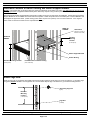
Determine Location of Switch Ducting and Switch Support Bracket
NOTES: Front to back span of equipment rails may need to be adjusted to accomodate your switch. See table below for front to rear rail
spacing requirements. Equipment installed directly below CDE2 may impede routing of switch power cord if installed prior to CDE2.
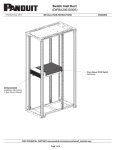
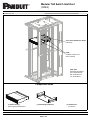
Switch Ducting and Switch Support Bracket components of CDE2 require two (2) rack spaces for installation. Switch Ducting and Switch
Support Bracket are to be installed at the same vertical rack position. CDE2 components are to be installed prior to switch installation and
are designed to support the switch. (CDE2 ducting system ONLY requires use of primary Cisco rack mount brackets. Cisco supplied
switch cradle or extension brackets are not compatible with CDE2.)
REAR OF
CABINET
1 RU Switch
(reference; port side of
switch faces Hot Aisle)
FRONT OF
CABINET
Intended
Mounting
Location
(2 rack spaces)
Switch Support Bracket
Switch Ducting
Intended Mounting Location
Perforated Door of Switch Ducting
(2 rack spaces)
(faces Cold Aisle)
Install Cage Nuts
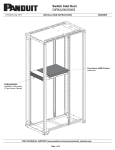
Insert (2) cage nuts per equipment rail at CDE2 component mounting locations (8 total cage nuts are to be installed). (1) grounding cage
nut (green) must be installed in each equipment rail. The view below depicts cage nut locations for (1) intended mounting location.
Grounding Cage Nut
(green)
Intended
Mounting
Location
(2 rack spaces)
Cage Nut
(installed)
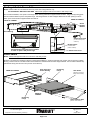
For Technical Support: www.panduit.com/resources/install_maintain.asp
Page 2 of 4