1
C:\Users\fle1\Desktop\SD130008\DATA\4476203411_
GB\050INT.fm
x
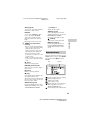
Available options
Various settings and operations are
available by pressing OPTIONS.
The available items differ depending on
the situation.
x [Browser Setup]: Displays the
Internet Browser settings.
– [Zoom]: Increases or decreases the
size of the displayed contents.
– [JavaScript Setup]: Enables or
disables JavaScript.
– [Cookie Setup]: Sets whether or not
to accept cookies.
– [SSL Alarm Display]: Enables or
disables SSL.
x [Input]: Displays the software
keyboard to enter characters while
browsing a website.
x [Break]: Moves the cursor to the next
line in the text input field.
x [Delete]: Erases one character on the
left side of the cursor during text
input.
x [Window List]: Displays a list of
currently opened website windows.
Allows you to return to a previously
displayed website by selecting the
window.
x [Bookmark List]: Displays the
bookmark list.
x [URL entry]: Allows you to enter a
URL when the software keyboard is
displayed.
x
x
x
x
x
x
x
master page=left
[Set as start page]: Sets the
currently displayed website as the
default start page.
[Open in new window]: Opens a link
in a new window.
[Character encoding]: Sets the
character code.
[Display certificate]: View server
certificates sent from pages that
support SSL.
[Previous page]/[Next page]:
Moves to the previous/next page.
[Cancel loading]: Stops loading a
page.
[Reload]: Reloads the same page.
[Add to Bookmark]: Adds the
currently displayed website to the
bookmark list.
26
BDP-S1200/BDP-S3200/BDP-S4200/BDP-S5200
4-476-203-41(1)