1
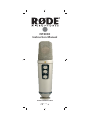
Using the NT2000
Selecting the polar pattern
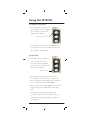
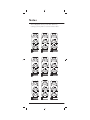
• The polar pattern or ‘pick-up’ of
the microphone can be adjusted
by moving the top of the three
dials on the microphone.
Polar pattern control dial
• The gold dot on the face of the NT2000 indicates
the front of the microphone, and the primary pickup area for the cardioid pattern.
Using the PAD
• The PAD reduces the input level
to the microphone’s in-built
pre-amp and can be adjusted
by moving the lower of the three
dials on the microphone.
PAD control dial
• When the dial is in the far left position there is
no reduction in the level of the recorded source.
When the dial is in the far right position the level of
the recorded source is lowered by 10dB.
• Any position between 0 and -10dB can be selected,
but note that a level of -3dB reduces the level by
50%.
• The PAD is very useful when recording loud
sound sources (such as close miking of drums or
amplifiers) to avoid overloading the microphone’s
pre-amplifier.
-6-