1
What’s In The Box?
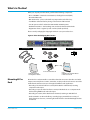
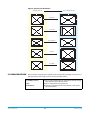
When you unpack your Ki Pro Rack, you’ll find the following components:
• Ki Pro CD-ROM—contains documentation, including this manual (PDF).
• Ki Pro Rack Recorder.
• BNC termination—place on the Ref Loop output at the end of the loop.
• Four Rubber adhesive feet for placing on the bottom of Ki Pro Rack.
• Two AC power cords for redundant 100-240 VAC 50/60 Hz power.
• Read Me First Notice—late-breaking news and errata related to Ki Pro Rack.
• Registration Sheet—register by mail or online (details provided).
Please save all packaging for shipping the Ki Pro in case you need to do so.
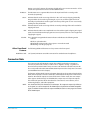
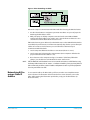
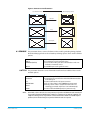
Figure 4. Ki Pro Rack Shipping Box Contents
Ki Pro Rack Recorder
AC Line Cords
Four Adhesive Feet
Ref Loop BNC Termination
Documentation
Ki Pro Documentation CD
Read Me First Notice
and Registration Sheets
Mounting Ki Pro
Rack
Ki Pro
Installation and Operation Manual
in PDF format on CD
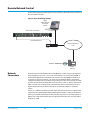
Ki Pro Rack is a rack-mountable or standalone box that connects to the video and audio
output connector(s) from a camera, camcorder, or other professional source to record the
media from that device. Here are some typical workflows and applications:
• Recording a live video feed from a camera; Ki Pro Rack is rackmounted, receiving
component video input.
• Recording a corporate video live from a camera; Ki Pro Rack sits on a computer work
desk receiving HDMI audio and video input.
• Recording on location, Ki Pro Rack is truck-mounted, receiving an HD-SDI feed.
• Desk-mounted in an AV media library, recording legacy material from a variety of
decks, formats and sources, converting dissimilar media to standardized Apple Pro Res
for archival.
Ki Pro Rack v4.2
22
www.aja.com