1
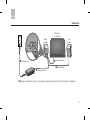
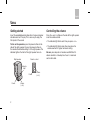
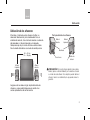
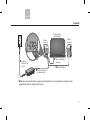
English Setting up Positioning the speakers The size and shape of these speakers make it easy to position them directly next to your computer. For proper performance, place the right speaker to the right and the left speaker to the left of your computer. Make sure there is equal distance on either side. This provides an accurate sound stage. 18"— 36" 46 cm — 92 cm Left speaker Rear of speakers Right speaker Left speaker Vents Connectors Right speaker Speaker cable AUTION: Avoid inserting any objects (such as a cable, C finger, pencil, or screwdriver) into the vent on the side of each speaker. Such items can damage the speaker and degrade performance, and may void the warranty. Be sure not to place any object in front of the speakers, which could block the sound or any signals from the remote control.