1
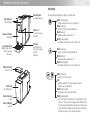
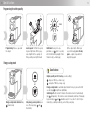
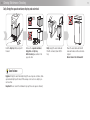
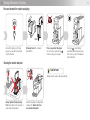
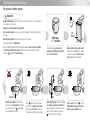
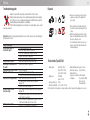
6 Overview of machine parts and controls 7 Key displays Operating keys ➔ Facing page Operating lever for loading capsules Capsule container retractable Output (hot!) for coffee, tea and hot water Insert drain grille/ tray for large cups in bottom openings ➔ Page 8 Openings Insert drip tray for small cups in upper opening ➔ Page 8 The keys light up differently according to operating mode: White (slow flickering): – Energy-saving mode, press key ➔ Page 12 White (continuous): – Ready or Coffee/tea output ➔ Page 10 White (flashing): – Machine heating up ➔ Page 10 White (flashing rapidly): – Programme the amount of coffee ➔ Page 12 White (continuous): – Ready or Coffee/tea output ➔ Page 10 White (flashing): – Machine heating up ➔ Page 10 White (flashing rapidly): – Programme the amount of coffee ➔ Page 12 Water tank cover Remove to fill + (Both keys) Water tank Lift off ➔ Page 8 Water tank valve in tank Power cable/plug Keep dry White (continuous): – Ready for coffee/tea output Dark: – Machine switched off or power plug not inserted ➔ press any key ➔ Page 12 White (flashing slowly): – Steaming-out in progress ➔ Page 20 White (flashing rapidly): – Electronics fault or temperature error (temperature too high or below 5 °C); pull out power plug and wait 30 minutes before replacing. If rapid flashing continues ➔ contact service centre (30 minutes warming up time from low temperatures should be enough to restore normal operation)