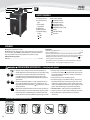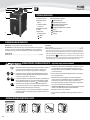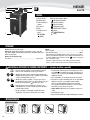
1
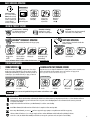
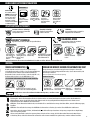
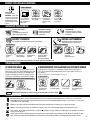
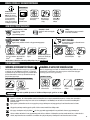
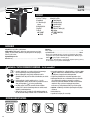
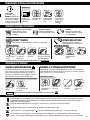
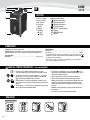
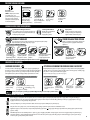
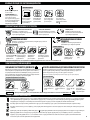
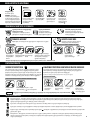
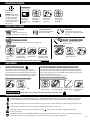
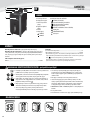
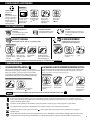
BASIC SHREDDING OPERATION PAPER OR CARD 2 1 Continuous operation: 6QUP5-minutes maximum NOTE: Shredder runs briefly after each pass to clear entry. Continuous operation beyond 15-minutes will trigger 25-minute cool down period. 3 4 12 Plug in and put disconnect power switch in ON (I) position Feed paper/card straight into paper entry and release Press ON ( ) to activate (blue) When finished shredding set to OFF ( ) ADVANCED PRODUCT FEATURES Patented SafeSense® Technology Stops shredding immediately when hands touch the paper opening. SilentShred™ Technology 4JMFOU4ISFEOPJTFRVBMJUZ shreds without noisy disruptions. Sleep Mode Energy saving feature shuts down automatically after 2 minutes of no shredding activity. SLEEP MODE OPERATION SAFESENSE® TECHNOLOGY OPERATION Energy saving feature shuts down the shredder after 2 minutes of inactivity Stops shredding immediately when hands touch the paper opening. WHEN IN SLEEP MODE SET-UP AND TESTING 1 2 3 4 1 12 3 2 12 12 12 or Touch test area and look for the SafeSense® indicator to illuminate Turn the shredder ON ( ) to activate SafeSense® SafeSense® is active and working properly If hand is held on SafeSense® area more than 3 seconds, shredder will shut off To get out of sleep mode touch control panel In sleep mode 12 insert paper For more information about all of Fellowes Advanced Product Features go to www.fellowes.com PRODUCT MAINTENANCE OILING SHREDDER CLEANING AUTO-START INFRARED SENSORS "MMNJDSPDVUTISFEEFSTSFRVJSFPJMGPSQFBLQFSGPSNBODF*GOPUPJMFEB machine may experience diminished sheet capacity, intrusive noise when shredding and could ultimately stop running. To avoid these problems, we recommend you oil your shredder each time you empty your waste bin. Paper detection sensors are designed for maintenance free operation. However, on rare occasions the sensors may become blocked by paper dust causing the motor to run even if there is no paper present. (Note: two paper detection sensors are located in the center of the paper entry). FOLLOW OILING PROCEDURE BELOW AND REPEAT TWICE TO CLEAN THE SENSORS 12 2 1 1 2 3 4 12 12 *Apply oil across entry Press and hold forward ( ) 2-3 seconds Turn off and unplug shredder Locate Auto-start infared sensor Dip cotton swab in rubbing alcohol *Only use a non-aerosol vegetable oil in long nozzle container such as Fellowes 35250 6TJOHDPUUPOTXBCXJQF away any contamination from the paper sensors TROUBLESHOOTING Overheat Indicator: When the Overheat Indicator is illuminated, the shredder has exceeded its maximum operating temperature and needs to cool down. This indicator will remain illuminated and the shredder will not operate for the duration of the recovery time. See Basic Shredding Operation for more information about the continuous operation and recovery time for this shredder. Bin Open: The shredder will not run if the bin is open. When illuminated, close the bin to resume shredding. #JO'VMM8IFOJMMVNJOBUFEUIFTISFEEFSXBTUFCJOJTGVMMBOEOFFETUPCFFNQUJFE6TF'FMMPXFTXBTUFCBH Remove Paper: When illuminated, press reverse ( BOESFNPWFQBQFS3FEVDFQBQFSRVBOUJUZUPBOBDDFQUBCMFBNPVOUBOESFGFFEJOUPQBQFSFOUSZ SafeSense® Indicator: If hands are too close to the paper entry, the SafeSense® indicator will illuminate and the shredder will stop shredding. If SafeSense® is active for 3 seconds, the shredder will automatically turn off and the user must press the power button on the control panel to resume shredding. 3