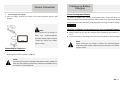
1
Important Safety
Instructions
Accessories
EN
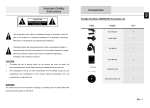
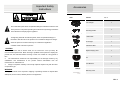
Accessories List
ITEM
NAME
QTY
Car Charger
1
Mounting Cradle
1
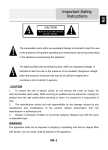
The exclamation point within an equilateral triangle is intended to alert the user
to the presence of important operating and maintenance (servicing) instructions
in the literature accompanying the appliance.
The lightning flash with arrowhead symbol, within an equilateral triangle, is
USB Cable
intended to alert the user to the presence of un-insulated “dangerous voltage”
within the product’s enclosure that may be of sufficient magnitude to
constitute a risk of electric to persons.
1
AC charger
1
USB Host cable
1
Stylish Carrying case
1
CD
1
User Manual
1
CAUTION
1.
To reduce the risk of electric shock, do not remove the cover (or back). No
user-serviceable parts inside. Refer servicing to qualified service personnel. Unplug the
product from the wall outlet before servicing or when it is unused for a long period of
time.
2.
The manufacturer should not hold responsibility for the damage caused by any
substitutions and modifications of the product without authorization from the
manufacturer or authorized unit.
3.
Danger of explosion if battery is incorrectly replaced. Replace only with the same
or equivalent type.
WARNING
1
Warranty Card
The apparatus shall not be exposed to dripping or splashing and that no objects filled
with liquids, such as vases, shall be placed on the apparatus.
EN – 1
Device Connection
View of Main Unit
EN
1
2
NOTE:
Please always make sure that the device and any other external device
9
connected to the device are powered off and unplugged from the power
supply before attempting to connect the device to any external device.
3
4
Inserting microSD Card
5
11
z
6
z
8
To remove a microSD card, gently press the edge of the card to
release the safety lock and pull the card out of the slot.
NOTE:
10
Please always make sure that no application is accessing the microSD
1
Power
2
Vol +\ Vol - Button
3
Built-in Microphone
4
Earphone Jack
5
Micro SD Card Slot
6
HDMI
7
USB port
8
DC port
9
Front Camera
Speaker
Take photos or video chat
10
11
Rear Camera
Take photos.
EN – 2
To insert a microSD card, place connector towards device and card
label towards the front side of the device.
7
card before extraction.
Turn on/off the device; Suspend/Activate the
device
Adjust the volume level.
Charging
Record sounds.
Earphones connection.
Insert Micro SD card.
HDMI cable connection
USB connection
AC adapter connection
Emit sound, voice or music
z
Insert the connector of adaptor to the DC port of the device and connect the power
adapter to the wall socket for charging.
1.
z
EN
Cautions on Battery
Charging
Device Connection
About Rechargeable Battery
Connecting to Car Charger
Insert car charger connector into vehicle 12V accessory/cigarette socket to start
charging.
The device is equipped with a built-in rechargeable battery. Please fully charge the
battery (for at least 4 hours) before initial use. Battery status level is shown at the display
bottom right corner. When the battery is fully charged the following icon will be displayed
Working conditions and precautions for the rechargeable battery
NOTE:
z
Please connect the car charger to
vehicle
12V
accessory/cigarette
socket after vehicle engine is started
to protect the device from sudden
surges in current.
z
Device with new batteries should be fully charged before initial use.
Battery should only be used and charged when temperatures are between 0° ~
37°C.
z
It is not necessary to start charging the device before the battery is fully discharged.
NOTE:
Please connect the car charger to vehicle 12V accessory/cigarette
socket after vehicle engine is started to protect the device from sudden
Connecting to Earphones
z
surges in current.
Insert earphone plug (not included) into the appropriate earphone port to switch
audio output from device speaker to earphone.
NOTE:
Excessively loud volume is potentially detrimental to hearing. Please turn
down the volume before connecting the earphone and gradually turn up
the volume to a comfortable level.
EN – 3
EN
Using Mounting
Cradle
Connecting to WiFi
z
NOTE:
z
Do not operate the device while driving.
z
Please select an appropriate location on the dashboard or
windshield where the device will not obstruct driver field of vision.
Device Mounting Procedures
The device can be securely mounted on vehicle dashboard or windshield with the
Select an appropriate location on windshield or dashboard where the device and
2.
Please also make sure that the device has a clear view of sky to attain best GPS
mounting cradle will not obstruct driver field of vision.
icon and select Settings icon to access the list
z
If the Wi-Fi is off, tap on the Wi-Fi line to turn it on.
z
The device will scan for available Wi-Fi networks and display them at the right of
the screen.
z
Tap on the network you want to connect to. Then tap inside the Wireless password
field to make the virtual keyboard appear. Enter the required network information,
tap on Enter, and then tap on Connect.
z
Your device will now attempt to establish a connection to the Wi-Fi access point
with the network parameters you entered.
mounting cradle included. Please follow procedures below to operate mounting cradle:
1.
In the Home menu press the
of options. Select Wireless & networks.
reception.
z
Place device on the bracket with bottom positioned on the
appropriate socket.
z
z
Lift the suction cup lever and press the suction cup at desired
location.
z
Press down the suction cup lever to secure the mounting cradle on
the surface.
z
Getting Started
Push on the top edge to securely install device onto the cradle.
Rotate the knob to adjust device to desired viewing angle.
1. Press and hold Power Button to turn on device.
2. Shortly after the greeting screen is shown, the main menu will be
displayed.
3. Tap the corresponding buttons with fingers to navigate various functions.
To Dismount Device
1.
Push the tap on top of the mounting cradle to release the device.
2.
Lift the suction cup lever to easily remove the suction cup from windshield or
dashboard.
EN – 4
4. Press and hold Power Button to turn off the device
5. Press the Power Button once to enter sleep mode and press it again to
awake the device.
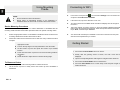
Initialization and
Software Activation
When using the navigation software for the first time, an initial setup process starts
Select the program language. If your preferred language does not appear on the
/
or drag the list up or down with your finger to view all available
languages. Tap
to select your preferred language. Tap
to
confirm your selection, and proceed to the next page.
to confirm your
You are offered to watch the tutorial that leads you through the basic steps of
if you would like to get an instant understanding of the
functions of your software. You can run it later if you choose
.
You are now asked whether you allow the software to collect usage information and
if you agree with the terms of use.
The Configuration wizard starts in the selected language. Tap
Set your preferred route planning options. Tap
preferences.
navigation. Tap
Read the Software and Database End User Licence Agreement, and tap
to
continue.
GPS logs that may be used for improving the application and the quality and coverage of
maps. Tap
Select the voice guidance language profile. If your preferred language does not
appear on the screen, scroll the list for other available profiles. Tap any item in the list for
a short voice sample. Tap
to confirm your
preferences.
automatically. Do as follows:
screen, tap
Set your preferred time format and units. Tap
EN
Initialization and
Software Activation
to allow the anonymous statistics or
to disable this
function.
The initial setup is now complete. The application starts.
to confirm your selection, and proceed to the next
page.
EN – 5
Navigation
Navigation
EN
Introduction
Destination Menu
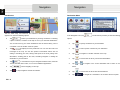
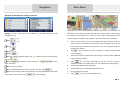
After the initial setup, and whenever the software is started, the Navigation menu
appears. You have the following options:
•
Tap
to select your destination by entering an address or selecting
In the Navigation menu, tap
. The Find menu provides you with the following
options:
a place of interest, a location on the map or one of your Favourite destinations.
You can also look up your recent destinations from the Smart History, enter a
•
Tap
to specify an address as your destination.
•
Tap
to select a place of interest as your destination.
•
Tap
to navigate to a location selected on the map.
•
Tap
•
Tap
coordinate or use the location saved in a photo.
•
Tap
to display the route parameters. You can view the route in its
full length on the map. You can also perform route-related actions such as
editing or cancelling your route, setting a start point for the route, picking route
alternatives, avoiding parts of the route, simulating navigation or adding the
destination to your Favourites.
•
Tap
to customize the way the navigation software works, watch the
Tutorial, simulate demo routes, or to run some additional applications.
•
Tap
•
Tap
EN – 6
to navigate to the recent destination that is shown on the
button.
to start navigating on the map.
to stop navigation and exit the software.
to choose from the list of your favourite destinations.
or
•
Tap
•
Tap
to choose from the list of all recent destinations.
to navigate to a coordinate or to a location saved in a photo.
Navigation
Navigation
EN
Navigating to An Address
Navigating to An Address
Enter the street name:
In the Navigation menu, tap
, then tap
. By default, the screen
proposes the city or town where you are located.
If needed, change the country. Tap the button showing the name of the country.
1.
Use the keyboard to enter the name of the country.
2.
After entering a couple of characters, the list of countries that match the entered
1.
2.
Tap
3.
Tap
and use the keyboard to enter a part of its name. As you enter letters, the most likely
to select the street that is offered in the input field or tap
to browse the list of all streets matching your input. Select a street from the list.
string appears. Tap the country of your choice.
If needed, change the city/town. Tap the button showing the name of the city/town,
.
Use the keyboard to enter a part of the street name.
Enter the house number:
1.
2.
Tap
.
Use the keyboard to enter the house number.
city/town name is always shown in the input field. You have the following options:
3.
•
Tap
to select the city/town that is offered in the input field.
•
Tap
to correct your entry.
•
Tap
Tap
to finish entering the address.
The map appears with the selected destination in the middle. Tap another map
location if necessary, then tap
to browse the list of city/town names matching your input.
to confirm the destination.
After a short summary of the route parameters, the map appears showing the entire
route. Wait for a few seconds or tap
and start navigating.
Select a city/town from the list.
EN – 7
Navigation
Navigation
Navigating to a Place of Interest (POI)
Navigating to a Place of Interest (POI)
If none of the above is appropriate, tap
to find a place of interest at the following
locations:
•
Tap
•
Tap
to search for a place within a selected city or town.
•
Tap
to search for a place around the destination of the active
•
Tap
to search around the current position or if it is not available,
around the last know position.
On the Map screen, tap
menu, tap
to return to the Navigation menu. In the Navigation
, then tap
. You are offered the following preset search
categories:
•
Tap
route.
to get a list of petrol stations along the route or if it is
not available, around your current position or your last known position.
•
Tap
to get a list of parking lots near the destination or if it
is not available, around your current position or your last known position.
•
Tap
to get a list of restaurants along the route, around
your current position or your last known position.
•
Tap
to get a list of accommodation near the destination,
around your current position or your last known position.
You can also tap
EN – 8
and search for a place by entering its name.
to search along the active route, and not around a given point.
This is useful when you search for a later stopover that results in a minimal
detour only, such as searching for upcoming petrol stations or restaurants.
More Menu
Navigation
EN
Example for Navigating to a Place of Interest
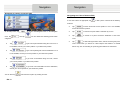
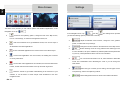
The Map screen is the most important and frequently used screen of the software. The
Example: To find a park around your destination, do as follows (starting from the
Vehimarker (a blue arrow by default) represents your current position, and the orange
Navigation menu):
line shows the recommended route. There are screen buttons and data fields on the
screen to help you navigate. During navigation, the screen shows route information.
Tap
.
•
At the top of the screen, you see your heading and the house numbers on left and
right if you have not selected a route destination. When navigating a route, you see
Tap
.
Tap
.
the next manoeuvre and the next street/road on your route. Tap either of them to
open the route itinerary.
Tap
Tap
Tap
•
Tap the map anywhere to explore the map around your current position. Additional
to open the Quick menu with a selection of functions that are useful
during navigation.
.
The list of place categories appears. Tap
and tap
•
or slide your finger to browse the list,
map control buttons appear.
.
to browse the whole category, or tap
to narrow
•
Tap any of the list items.
Check the details and the location of the place, and then tap
.
After a short summary of the route parameters, the map appears showing the entire
route. Wait for a few seconds or tap
Tap
to open three data fields on the map. Tap any of them to
suppress the others. The default values (you can change them in Map settings):
down your search.
and start navigating.
•
the remaining distance to the destination,
•
the estimated time of the arrival at the destination, and
•
the remaining time of the trip.
•
Tap
to return to the Navigation menu.
EN -9
Settings
More Screen
EN
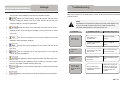
The 'More' menu provides you with various options and additional applications. In the
Navigation menu, tap
.
In the Navigation menu, tap
•
: Fine-tune route planning options, change the look of the Map screen,
turn on or off warnings, or restart the Configuration wizard, etc.
•
•
: Visit www.naviextras.com to get additional content, such as new maps or
3D landmarks and useful applications.
•
: Access multimedia applications: the Picture Viewer or the Music Player.
, then tap
. The Settings menu provides
you with the following options (scroll the list to see all):
: Adjust the different sound volumes, change the voice guidance
profile, or enable and set up warnings.
•
•
: Change the function buttons in the Quick menu of the Map screen.
: Before selecting one of the Lorry profiles as the Vehicle type used
in route calculation, set up the editable lorry attribute profile with the parameters
of your lorry. These parameters will be used in route calculation.
•
: Access travel applications: the unit converter, the clothing size converter
or country information.
•
: You can turn Smart Routes on or off, select whether to take traffic
events into consideration when calculating the route or you can change the
•
: Access other useful applications: the calculator, the fuel and maintenance
monitor, sunrise and sunset information or the trip and track log monitor.
•
radio station.
•
: Read the Tutorial to get instant understanding of the functions of your
software, or run the Demo to watch sample route simulations to see how
navigation works.
EN -10
: Select the type of vehicle you are driving, the road types used in
route planning, and the route planning method.
•
: These settings determine how Green routes will be calculated.
Settings
Troubleshooting
EN
They are also used to display the cost and CO2 emission of routes.
•
Take steps described in the tables below to solve simple problems before contacting
customer service.
: Adjust map related settings: change the daytime and night colour
schemes, change the default zoom level, switch between 2D and 3D map,
NOTE:
suppress buildings or change the Vehimarker.
Immediately turn off the device and disconnect the power adapter if the
device is not working properly. Never try to repair the unit without
•
: Change the values of the data fields on the Map screen, show or
suppress junction views and signpost or display a route progress bar on the left
authorized professionals for it may damage the unit.
PROBLEM
POSSIBLE CAUSE
POSSIBLE SOLUTION
of the map.
•
: Turn the menu animations on or off, select a different skin for the
application, adjust the display backlight.
•
The adaptor is not
connected well.
Connect the adaptor
correctly.
The built-in rechargeable
battery is weak.
Use the adaptor to supply
power or charge the
battery.
There is no
sound.
The volume may be turned
down or mute.
Turn up the volume or turn
on the sound output.
There is no
picture.
The brightness may be
turned down.
Adjust the brightness of the
LCD.
The unit cannot
receive satellite
signals or cannot
orient.
The unit work may be
obstructed by buildings or
metal blocks.
Make sure to use the unit
outdoors; if in vehicle, you
can use the external GPS
antenna to solve this
problem.
Users cannot
turn on the unit.
: Change the program language, the time format and units or the
time zone.
•
: Turn the automatic trip or track log saving on or off, check the
current size of the trip database.
•
: The application collects usage information and GPS logs that may
be used for improving the application and the quality and coverage of maps.
Here you can enable or disable collecting these logs.
•
: Modify the basic software parameters set during the initial setup
process.
•
: Delete all saved data and reset all settings to their factory defaults.
EN – 11
Troubleshooting
Technical Specifications
EN
PROBLEM
Irregularity or
instability in
signal receiving.
POSSIBLE CAUSE
POSSIBLE SOLUTION
The built-in rechargeable
battery is weak.
Use the adaptor to supply
power or charge the
battery.
The unit may be obstructed
by material, such as heat
insulation paper.
Remove the material.
The movement of the unit is
too strong.
Avoid any movement of the
unit.
GPS
MT3339 66 Channels
Processor
High performance ARM Cortex A5 at 1.2GHz
RAM
Display
Resolution
Storage capacity
1GB DDR3
7” TFT LCD, Capacitive multi-touch
800 x 480 pixels
Interfaces
Communications
Battery
Dimensions
USB 2.0, Micro SD (micro SDHC compatible), USB
Host
WiFi (802.11 b/g/n)
2900 mAh Li-Polymer battery
191.8 x 123 x 9.5mm (L x W x H) (appro.)
Weight
Storage Temperature
290 g (appro.)
-10℃ ~ +60℃
8 GB flash memory (about 6.0GB are accessible
by user), Memory card slot supports micro SDHC
card up to 32 GB
Operation Temperature
Operation
Humidity
Relative
Storage Relative Humidity
0℃ ~ +50℃
45% ~ 80% Non-Condensed
30% ~ 90% Non-Condensed
Disclaimer
As the Prestigio products are constantly updated and improved, your device’s software
may have a slightly different appearance or modified functionality than presented in this
Quick Start Guide.
EN – 12