1
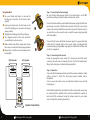
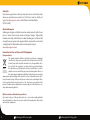
Using Bare Wire Step 3 – Connecting the Power Supply Be sure that the volume/power switch on the front panel is in the OFF position by rotating it counterclockwise until you hear a click. Use your thumb and finger to unscrew the binding post connectors on the back of each speaker. Insert each speaker wire into the holes on the side of the binding post connectors, observing proper polarity. Retighten the binding posts with your fingers. The stripped portion of the wire should be secured firmly in each connector. Make sure that none of the speaker wire strands have come in contact with an adjoining terminal. Repeat steps 1 and 5 to connect speaker wires to the amplifier. Right Speaker Left Speaker L Connect the cable with the round end from the power supply to the N22 rear panel power connector. Note that this connector is “keyed” so line up the arrow on the cable end with the arrow on the rear panel. Please do not use excessive force on the connector and use only the power supply provided with the amplifier. Connect the AC power cable from the power supply to a power outlet and verify that the indicator light on the power supply is illuminated. We recommend using a high-quality surge suppressor and/or AC line filter on all electronics equipment. Step 4 – Connecting Audio Sources Using the appropriate audio cable (3.5" mini-jack and/or RCA cable), connect your audio source (computer, iPod, etc.) to the N22 audio inputs. One of each cable type is included with your amplifier. Step 5 – Operation Turn on the N22 volume/power knob and set the volume control to an initial setting of about 3 o’clock. The front panel power indicator will be illuminated. Turn on your audio input source and adjust the volume to your desired listening level. R A INPUTS B LINE OUT L Note that both audio inputs on the N22 are active so two audio sources may be connected to the amplifier at the same time without the need for an input switch. We recommend using the volume control on each audio source to adjust the overall system volume. R POWER USB POWER OUTPUT L OUTPUT R Intertek 3056826 Made in China 5 CONFORMS TO UL STD 60065 CERTIFIED TO CSA STD C22.2 No. 60065 Speaker Connections audioengine N22 setup guide audioengine N22 setup guide 6