1
This section provides instructions on how to replace the solid-state drive.
The solid-state drive is only available in some models. It might be installed in the hard disk drive bay or
on the bottom of the optical drive bay.
• To replace the solid-state drive in the hard disk drive bay, see “Replacing the solid-state drive in the hard
disk drive bay” on page 51.
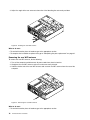
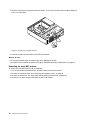
• To replace the solid-state drive on the bottom of the optical drive bay, see “Replacing the solid-state drive
on the bottom of the optical drive bay” on page 52.
Replacing the solid-state drive in the hard disk drive bay
To replace the storage converter with the solid-state drive installed in it, you might follow the steps of
replacing the hard disk drive. See “Replacing the hard disk drive” on page 48.
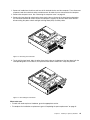
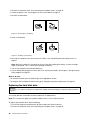
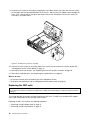
To replace the solid-state drive in the storage converter, do the following:
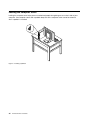
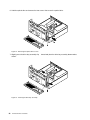
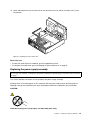
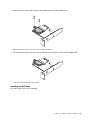
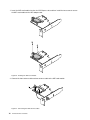
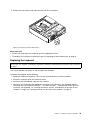
1. Remove the four screws that secure the solid-state drive to the storage converter. Then, remove the
drive from the converter as shown.
Figure 25. Removing the solid-state drive from the storage converter
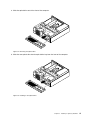
2. Take the new solid-state drive out of the static-protective package.
Chapter 5. Installing or replacing hardware
51