1
Network Camera User’s Manual
Client Setting
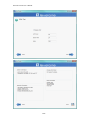
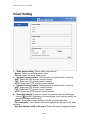
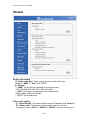
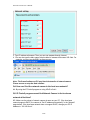
1. “Video output setting” Setting video output format.
“Stream” Select use multiple stream video.
“Picture” Select use serial video picture.
2. “Intranet Protocol Options” Setting camera in intranet mode of protocol.
“UDP” Select use UDP protocol connect camera.
“TCP” Select use TCP protocol connect camera.
“HTTP” Select use HTTP protocol connect camera.
3. “Internet Protocol Options” Setting camera in internet mode of protocol.
“UDP” Select use UDP protocol connect camera.
“TCP” Select use TCP protocol connect camera.
“HTTP” Select use HTTP protocol connect camera.
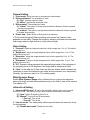
4. “Recording options” Users can record live video as they are watching by
clicking
start MP4 Recording on the main page. Here, you can specify the
storage destination and file name
“Folder” Specify the storage destination for the recorded video files.
“File name prefix” Enter the text that will be appended to the front of the video
file name.
“Add date and time suffix to file name” Select this option to append the date
21/54