1
p l ay b a c k c o n t r o l s
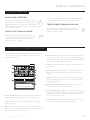
Once you have loaded a track, the TRACK TITLE on the
LCD Touch Screen will display the loaded track.
reverse
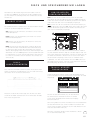
Pressing REVERSE (6) will begin playback in the
reverse direction.
pitch bend
Pressing the PITCH BEND [+] [-] (28) will raise
the pitch up to +100% or lower the pitch down
to -100% from the existing pitch setting. Releasing the
buttons will return the pitch to the original pitch setting.
p l ay / p a u s e
Pressing PLAY/PAUSE
/ ll (2) will begin playback of
the selected track. Pressing PLAY/PAUSE
/ ll (2) again
will pause playback and hold the track at the current
position.
• Pausing playback before the disc is ejected:
-Before ejecting a disc, the unit must be PAUSED.
The disc will not eject while the unit is playing.
adjusting pitch/
tempo
Moving the PITCH CONTROL FADER (29) will
accelerate the pitch/tempo when moved towards
[+] and deaccellerate the pitch/tempo when it is
moved towards [-].
The current PITCH/TEMPO value is displayed on
the LCD Touch Display.
search
Pressing SEARCH
/
(4) will search through the
track in the direction (forward/reverse). Pressing and
holding SEARCH
/
(4) will fast-search through the
track in the direction (forward/reverse).
Pressing the RANGE (26) button adjusts the
range of the PITCH CONTROL FADER between
+/- 4%, 8%, 16%, 24% ,50% and 100%
master tempo
track search
Pressing TRACK SEARCH
l (5) will advance to the
beginning position of the next track. Pressing TRACK
SEARCH l (5) will return the current track to the
beginning position. Pressing TRACK SEARCH l
(5)
twice consecutively returns to the beginning point of the
previous track.
• When searching through folders:
-When files are organized in folders, only tracks
within the same folder are searched.
• Autocue function:
-When autocue is enabled, the player will pause at
the beginning of the track.
11
MASTER TEMPO (27) allows tempo adjustment
without changing the original pitch.
The current mode, either PITCH or TEMPO, is displayed
on the LCD Touch Display.
• RANGE in MASTER TEMPO:
-In MASTER TEMPO mode, the range is +/- 4%, 8%,
16%, 24% ,50% and 100%
• Sound quality:
-The sound is digitally processed in MASTER
TEMPO mode, so a loss in sound quality may occur
if drastic tempo adjustments are employed.
c dj - 700 m a n u a l • g e m i n i dj . c o m