Transcript
Thank you for purchasing the NoiseHush
NS400 Bluetooth Sports Headset!
The NoiseHush NS400 Bluetooth Sports Headset is
a cut above the rest. With its lightweight, sweat
resistant, and user intuitive body, the NS400 allows
you to walk, play sports, and even dance to your
favorite music with ease while never missing an
incoming call! The NS400 features an ergonomic
neckband for optimum comfort and call easy touch
functions including play/pause, call mute, volume
and track control. With the best in class echo and
noise cancellation technology, the NS400 delivers
crystal clear conversations and superior audio
quality through any Bluetooth enabled mobile phone,
computer, or music player while on the go.
Please take a moment to read this manual
thoroughly, and keep it for future reference. The user
manual explains the features and functions of your
NS400 to help ensure an optimal user experience.
NS400
STEREO HEADSET
User’s
Manual
To learn more about the NS400 Bluetooth Sports
Headset, or other NoiseHush products, please visit
www.noisehush.com
Specifications:
Bluetooth: V2.1+EDR
Transmission Power: Class 2
Bluetooth Profiles: A2DP, AVRCP, HS/HF
Frequency Response: 20Hz–20KHz
Frequency Range: 2.4GHz~2.480GHz
Transmission Distance: 10 meter
Battery: 400mAh Li-Poly
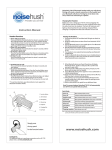
How to use the NS400
Multifunction
Button (MFB)
Volume +
Volume –
Turning ON/OFF:
To turn ON the NS400, press and hold the
Multifunction Button (MFB) for 3 seconds until the
blue LED turns on.
To turn OFF the NS400, press and hold the MFB for
3 seconds until the red LED flashes and turns off.
Pairing your NS400:
1. Press and hold MFB for about 7 seconds until the
red and blue LED flash alternatively.
2. Using the Bluetooth menu on your device, enable
Package Contents:
searching of nearby Bluetooth devices.
• NS400 Headset
• USB Charging Cable
• Carrying Case
• User Manual
3. Once the “NoiseHush NS400” is found, connect
Charging Port
LED Indicator
Previous Track
Next Track
Microphone
and pair to it. If your device prompts you for a
password, please use “0000”. For more details,
please refer to your device’s owner manual.
4. If the connection is successful, blue LED will flash
every 7 seconds. If the pairing is unsuccessful,
please turn off the NS400 and repeat Step 1.
Hands-free calling functions:
• Answer a call: Press the MFB once during an
incoming call.
• Reject a call: Press and hold the MFB for 2-3
seconds during an incoming call.
• End a call: Press the MFB once during a connected
call.
• Redial last number: Press and hold the MFB for 2
seconds to redial the last dialed number.
Previous/Next Song:
Press the
(Forward) button to play next song and
the
(Backward) button to play previous song.
Voice Dialing:
To use this voice dialing function, your mobile phone
must provide this option and corresponding voice
samples must have been recorded.
Battery and Charging Notice
1. Press MFB twice, and you will hear a short beep.
2. Say the name of the person you wish to call clearly.
Adjust Volume:
Increase or decrease volume: Press the + or – buttons
to set the volume.
Play/Pause Music:
In idle state, press MFB one time to play or pause
music.
Switch the Call Between Mobile and Headset:
Press and hold MFB for 2 seconds and you will hear a
short beep. The call will be switched from headset to
mobile or vice versa.
We use rechargeable battery for NS400. A normal
charging process takes about 2–3 hours. The red LED
will turn on when charging and will turn off when
charging is finished.
When battery is nearly used up, the red LED will flash
every 30 seconds and there is also prompt from the
headset. Please charge the headset at this time.
Always use correct AC Power Adapter to charge the
headset. Using any incorrect power supply device will
cause damage and void the warranty.
Warning and Cautions:
• Do not expose this unit to water, rain or moisture.
• Do not leave the unit exposed to extreme heat
for long periods of time.
• Do not use the headset in situations which
require special attention (e.g. in traffic or when
performing skilled jobs).
• Attention-–Your ears are very delicate, prolonged
exposure to sound pressure levels above 85dBA
can cause damage to hearing. This temporary
loss of hearing can become permanent if
exposure is done on a regular basis. Please
protect your hearing.
Warranty Information:
NoiseHush warrants this product against defects
in material and/or workmanship under normal use
for a period of ONE (1) YEAR from the date of
purchase by the original purchaser.
To view our warranty policy or to submit a claim,
please visit www.noisehush.com.
V0712
www.noisehush.com