1
Operating the device
•
Connect the plug to a suitable power outlet.
•
The control light of the „Power” button lights up and an audible signal sounds. The device is
now in stand-by mode.
•
Place a suitable cooking pot or pan centrally onto the cooking hob.
•
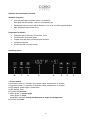
Now press button 1. „Power” to turn on the induction cooker. An audible signal sounds. Then
press button 7. Menu 1x. The power stage display 4. will blink.
•
You can use the selection buttons 2. and 3. + / - to adjust the setting in the range 1-10. Then
press button 7. Menu again to preset the temperature permanently. The temperature display
4. will blink.
•
You can use the selection buttons 2. and 3. +/- to adjust the setting in the range 60 – 220°C.
(Temperature levels: 60, 80, 100, 120, 140, 160, 180, 200 and 220 °C)
The temperature is measured by a sensor under the glass-ceramic plate so that the displayed
temperature can differ from the temperature inside the pot.
Please note that the two functions „level” and „temperature” must be selected alternately. You
can either use the power levels or the temperature selection. The most recently selected
function is active and blinks.
•
Timer function button: Press 7. Menu 2x.
•
You can use the selection buttons 2. and 3. +/- to adjust the setting in the range 1 – 120
minutes. The selected duration is then counted down in the Display in 1 minute steps. When
the time has elapsed an audible signal sounds and the device automatically switches to
stand-by mode. Note: During timer operation the duration can be changed at any time with
selection buttons. Due to the device's memory feature the set temperature level / power steps
remains unchanged.
•
When the induction cooker is set to general heating mode you can press button 6.
Booster to turn on the full power of 2100 watts for the first 30 seconds. After that the
power is reset to the preset level.
•
Button 8. Hold: Press „Hold” to lock all functions so that they cannot be changed. By pressing
„Hold” again for 5 seconds all functions are unlocked. This function can be used as a child
protection feature. At the same time it prevents accidentally changing selected settings during
cooking.
•
Do not place empty cooking pots or pans onto the ceramic field. Heating an empty pot or
pan activates the overheat protection and turns off the device.
•
Do not use the device if it is damaged in any way or does not function properly.
•
The use of accessories and spare parts not recommended by the manufacturer can
result in damaging the devices and injuries.
•
When „E2” or „E6” appears in the display this indicates that the overheat protection was
activated to protect the device and cooking pots.
An activated overheat protection can be reset by unplugging the power cord. The device can
then be used in the normal way.
16