1
English
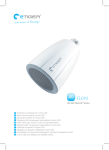
Listen to high-quality audio from your
Bluetooth compatible device on your
wireless speaker.
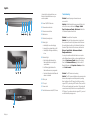
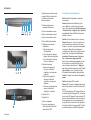
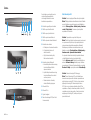
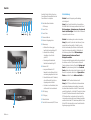
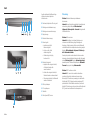
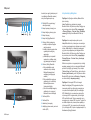
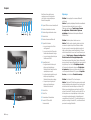
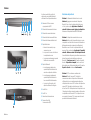
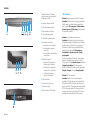
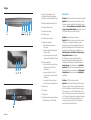
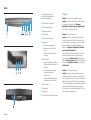
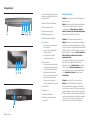
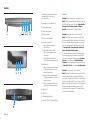
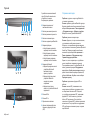
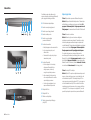
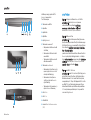
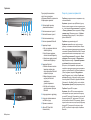
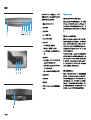
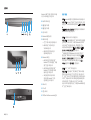
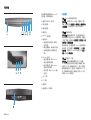
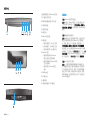
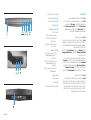
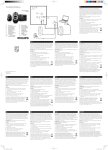
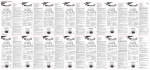
1Power On/Off LED indicator
2Volume decrease button
1
2
3 4 5 67
3Volume increase button
Troubleshooting
Problem: Bluetooth pairing and connection was
unsuccessful.
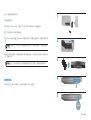
Solution: Add the Bluetooth device manually. Right-click
on the Start screen, and then click All apps > Control
Panel > Hardware and Sound > Add a device. Select the
HP Bluetooth Speaker from the list.
4Mute button
5Bluetooth pairing button
6Battery light
a. Amber light is on when charging
b.Green light is on when battery is full
c. Amber light is flashing when battery
is low
8
9
-
7Bluetooth light
a. Slow flashing light indicates the
Bluetooth devices is searching for
a paired device
b.Fast flashing light indicates the
Bluetooth devices is in pairing mode
c. Constant light indicates the Bluetooth
device is connected
8AUX-in jack
9DC-in jack
-Power switch
q Near field communication (NFC) Sensor
q
2 English
Problem: No sound from the speaker.
Solution: Verify that the system volume is turned on at
the system and turned to a high volume level. Make sure
the audio playback switch is set to Bluetooth Hands-free
Speakers: Right-click on the Start screen, and then click
All apps > Control Panel > Hardware and Sound >
Manage audio devices.
You may also need to enable the listen to music option
within Bluetooth services after you have paired the device.
Under the Hardware and Sound heading of the Control
Panel, click Devices and Printers, right-click on the HP
Bluetooth Speaker, click Properties > Services, and then
select Listen to music.
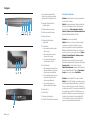
Problem: The NFC feature is not working.
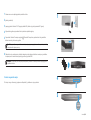
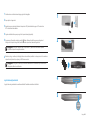
Solution: The NFC sensor establishes radio communication
between the pairing device and the speaker by touching
them together on the NFC sensor. Verify that your device
supports NFC by activating its NFC feature. Then, touch the
NFC area on the speaker with your device. The speaker will
connect automatically if the device is compatible with the
NFC feature. If your device does not support NFC, you must
use the Bluetooth pairing process.