1
BDL4652EL
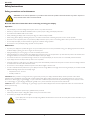
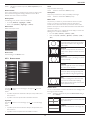
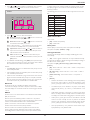
Network settings
OSD turn off
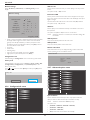
Assign {IP address}, {Subnet Mask}, and {Default gateway} for the
display.
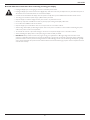
Set the period of time the OSD (on-screen display) menu stays on the
screen.
The options are: {5 ~ 120} seconds.
Network settings
Information OSD
0
9
Network host name
Set the period of time the information OSD is displayed on the upper
right corner of the screen. The information OSD will display when input
signal is changed.
L
Z
The information OSD will remain on the screen with {Off} selection.
Disable
DHCP
-
0
-
1
The options are: {1 ~ 60} seconds.
255 - 255 -
0
-
0
-
0
-
0
Off Timer
16
172 -
IP address
Subnet mask
0
-
0
Default gateway
Set the display to turn itself off to standby mode within an amount of
time specified.
a d m i n
Login user name
0
Login password
0
0
0
The options are: {Off, 1 ~ 24} hours from currrent time.
[ SET ]
NOTE:
change [SET] in STORE
hen the “Off timer” is activated, the “Schedule” settings will
W
be disabled.
OSD H-position
• DHCP - Choose to enable or disable the DHCP function. If enabled,
the display will be assigned IP address, Subnet mask and Default
gateway automatically. If disabled, you will be prompted to enter
the following values manually. When finished, press [SET] button to
store and save the chosen values.
• IP address
• Subnet mask
• Default gateway
• Login user name (The default user name is {admin})
• Login password (The default password is {0000})
Adjust the horizontal position of the OSD menu.
OSD V-position
Adjust the vertical position of the OSD menu.
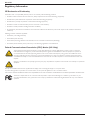
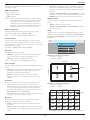
Monitor information
Shows information about your display, including model number, serial
number, operating hours and software version.
Monitor information
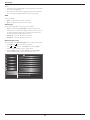
Configuration reset
Reset all settings in Configuration1 menu to the factory preset values.
Model name:
Serial no:
Operation hours:
SW Version:
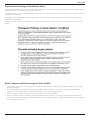
Factory reset
Reset all settings in the OSD menus of {Picture}, {Screen}, {Audio}, {PIP},
{Configuration1}, {Configuration2}, and {Advanced option} to the
factory preset values.
BDL4652EL
0H
3M
VER 0.204
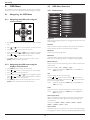
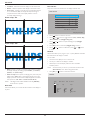
4.2.7. Advanced option menu
Press [ ] or [ ] button to select [Reset], and then press [SET] button
to do the reset.
Picture
Factory reset
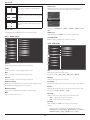
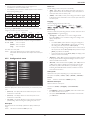
Input resolution
HDMI clock threshold
Screen
Audio
Black level expansion
Gamma selection
Scan mode
PIP
Reset
Cancel
Configuration1
Scan conversion
Film mode
IR control
4.2.6. Configuration2 menu
Configuration2
Advanced option
Picture
OSD turn off
Keyboard control
Tiling
Heat status
Information OSD
Screen
Audio
PIP
Off timer
OSD H-position
Input resolution
OSD V-position
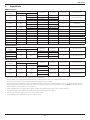
Set the resolution of the VGA input. This is only required when the
display is unable to detect the VGA input resolution correctly.
Monitor information
This item is functional for VGA input only.
Configuration1
NOTE:
Configuration2
The options are:
• {1024x768 / 1280x768 / 1360x768 / 1366x768}
Advanced option
• {1400x1050 / 1680x1050}
• {1600x1200 / 1920x1200}
• {Auto}: Determines the resolution automatically.
22