1
4 Use your
headset
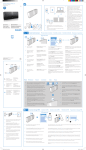
Connect the headset to a
Bluetooth device
1
Turn on your mobile phone/Bluetooth
device.
2
Press and hold the call/music button to
turn the headset on.
»» The blue LED flashes.
»» The headset is reconnected to
the last connected mobile phone/
Bluetooth device automatically. If the
last one is not available, the headset
tries to reconnect to the second last
connected device.
Turn the
headset off.
Play or
pause
music.
Pick up/
hang up a
call.
Reject an
incoming
call.
Redial the
last number.
Switch
caller
during a
call.
Press and
hold for 4
seconds.
Press once.
• 1 long beep
• 1 long white
flash
1 short beep
Press once.
1 short beep
Press and
hold
1 short beep
Press twice.
1 short beep
Press twice
1 long beep
Volume/Track control button
Adjust volume.
Tip
•• If you turn on the mobile phone/Bluetooth device or
activate the Bluetooth feature after turning on the
headset, you have to reconnect the headset and mobile
phone/Bluetooth device manually.
Skip forward.
Skip backward.
Mute/unmute the
microphone in a call.
Manage your calls and music
Call/Music button
Task
Operation
Turn the
headset on.
Press and
hold for 2
seconds.
6
EN
Sound or LED
indicator
• 1 short beep
• 3 white flashes:
battery low <
25%
• 2 white flashes:
battery level <
50%
• 1 blue flash:
battery level >
50%
Turn up/
N/A
down
Press once 1 short
beep
Press twice 1 short
beep
Press
2 short
once
beeps
Other headset indicator status
Headset status
The headset is connected
to a Bluetooth device, while
the headset in standby
mode or while you are
listening to music.
The headset is ready for
pairing.
The headset is on but not
connected to a Bluetooth
device.
There is an incoming call.
Indicator
Blue LED flashes
for every 8
seconds.
LED flashes
blue and white
alternately.
Blue LED flashes
quickly.
Blue LED flashes
once per second.