1
Quick guide
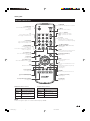
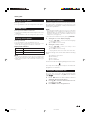
Remote control unit
SURROUND
Switch the surround effects on and off.
B (Standby/On)
Enter standby mode or turn on the
power.
(See page 7.)
e (Mute)
Switch the sound on and off.
i (k/l) (Volume)
i (k) Increase the volume.
i (l) Decrease the volume.
0–9
Set the channel in TV mode.
Set the page in Teletext mode.
P (r/s)
TV: Select the channel.
External: Switch to TV input mode.
Teletext: Move to the next/previous page.
A (Flashback)
Press to return to the previous
image in normal viewing mode.
b (INPUT SOURCE)
Select an input source.
(TV, EXT1, EXT2, EXT3, EXT4, EXT5)
(See page 8.)
f (WIDE MODE)
Select the wide mode.
(See page 19.)
Set the area of magnification in Teletext
mode. (See page 20.)
SLEEP
Set the sleep timer on (in units of 30 min.
up to max. 2 hr. 30 min.) and off.
2 (Sound mode)
Select the sound multiplex mode.
(See below.)
p (Display information)
(See page 20.)
m (Teletext)
(See page 20.)
MENU
Display the MENU screen.
(See page 10.)
a/b/c/d (Cursor)
Select a desired item on the setting
screen.
OK
Execute a command within the menu
screen.
Display the programme list. (Except
external input.)
(See page 7.)
END
Exit the menu screen.
3 (Freeze/Hold)
(See page 20.)
RETURN
Return to the previous menu screen.
k (Reveal hidden Teletext)
(See page 20.)
[ (Subtitle for Teletext)
(See page 20.)
Colour (Red/Green/Yellow/Blue)
(See page 20.)
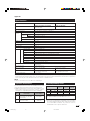
NICAM TV broadcasts selection
Signal
Selectable items
1 (Subpage)
(See page 20.)
A2 TV broadcasts selection
Signal
Selectable items
Stereo
NICAM STEREO, MONO
Stereo
STEREO, MONO
Bilingual
NICAM CH A, NICAM CH B,
NICAM CH AB, MONO
Bilingual
CH A, CH B, CH AB
Monaural
MONO
Monaural
NICAM MONO, MONO
NOTE
• When no signal is input, the sound mode will display “MONO”.
5
LC-42SA1E_GB_a
5
06.9.8, 6:07 AM