1
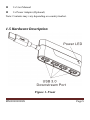
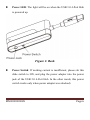
USB 3.0 4-Port Hub User Manual Ver. 1.00 All brand names and trademarks are properties of their respective owners. Contents: Chapter 1: Introduction ......................................................3 1.1 Product Introduction .................................................3 1.2 Features ......................................................................4 1.3 System Requirements ................................................4 1.4 Package Contents .......................................................4 1.5 Hardware Description ...............................................5 Chapter 2: Getting Started .................................................7 2.1 Hardware Installation ...............................................7 Chapter 3: Troubleshooting Tips ........................................8 MN3000000085 Page 2 Chapter 1: Introduction 1.1 Product Introduction Super-Speed USB 3.0 interface is the next revolution in I/O interconnect standards that will deliver the bandwidth and features required by PCs, consumer electronics and communications devices. With 10 times faster throughput than USB 2.0 standard and backward compatible with current USB device features, USB 3.0 interface will be the trendy of IT technology. Super-Speed USB 3.0 Hub data transfer rate up to 5 Gbps when connecting to USB 3.0 compliant peripherals. Hot-Swapping and Plug-n-Play function, you With USB don’t have to worry about running out of system resource on your motherboard or complicated hardware installation process. USB 3.0 Hub supports USB 3.0 Super-Speed device and backward compatible with USB 2.0 High-Speed and USB 1.1 Full-Speed device. It is an ideal choice for external storage devices, MP3 players, enclosure, external writer, digital cameras, webcam, networking and video devices, and all other USB devices. MN3000000085 Page 3 1.2 Features Connects up to 4 USB devices Provide four USB 3.0 ports Compliant with USB 3.0 Specification 1.0 Supports simultaneous operation of multiple USB 3.0, USB 2.0 and USB 1.1 devices Up to 5Gbps data transfer rate Hot-swapping feature allows you to connect/disconnect devices without powering down the system No device drivers required for Hub installation LED to indicate Hub power 1.3 System Requirements Windows® XP/Vista/7 (32/64 bit) Available USB port (USB 3.0 recommended) 1.4 Package Contents 1 x USB 3.0 4-Port Hub MN3000000085 Page 4 1 x User Manual 1 x Power Adapter (Optional) Note: Contents may vary depending on country/market. 1.5 Hardware Description Figure 1. Front MN3000000085 Page 5 Power LED: The light will be on when the USB 3.0 4-Port Hub is powered up. Figure 2. Back Power Switch: If working current is insufficient, please stir this slide switch to ON, and plug the power adapter into the power jack of the USB 3.0 4-Port Hub. In the other words, this power switch works only when power adapter was attached) MN3000000085 Page 6 Chapter 2: Getting Started 2.1 Hardware Installation 1. Plug the power adapter into the power jack of the USB 3.0 4-Port Hub. (If power adapter is available) 2. Plug the USB 3.0 4-Port Hub into your computer’s SuperSpeed USB 3.0 port. 3. Upon powering up your computer, the USB 3.0 4 Ports Hub will be recognized by the computer’s operating system. 4. Once complete, you are ready to plug all peripheral devices into your new USB 3.0 4-Port Hub. Note: Be sure to connect USB 3.0 4-Port Hub to USB 3.0 port on the system, USB 3.0 Hub will NOT enhance USB data transfer rate, if you connect it to traditional USB 2.0 or USB 1.1 port. There is no addition driver for USB 3.0 4-Port Hub. Drivers for USB 3.0 4-Port Hub is always supplied with drivers for USB 3.0 host controllers, and are provided by your USB 3.0 host controller vendor. MN3000000085 Page 7 If system can not install USB 3.0 4-Port Hub driver properly, be sure to confirm system’s USB 3.0 host controller’s driver working properly. We do suggest that you may re-install your USB 3.0 host controller driver again. Chapter 3: Troubleshooting Tips I can not run USB 3.0 SuperSpeed data transfer rate over this Hub. 1. USB 3.0 Hub must connects to USB 3.0 Port of your system. 2. Be sure to use true USB 3.0 device connection. Traditional USB 3.0 or USB 1.1 devices can NOT run USB 3.0 SuperSpeed data transfer rate. 3. USB 3.0 Hub will NOT enhance USB data transfer rate, if user connect it to traditional USB 2.0 or USB 1.1 Port. How to expand USB 3.0 SuperSpeed Port on my system? You can purchase an USB 3.0 SuperSpeed Host Card adding on your current system, or a new motherboard with USB 3.0 Port. MN3000000085 Page 8 How about connecting USB 3.0 Hub to traditional USB 2.0 Host Port? USB 3.0 Hub works, but only running under USB 2.0 High Speed mode. My USB 3.0 device does not work when connect to USB 3.0 Hub? Please confirm your settings as below one by one. 1. Affirm USB connection cable between USB device and Hub firmly. 2. Connect addition power adapter to your USB device, such as enclosure. 3. Make sure PC’s USB 3.0 Port works where USB 3.0 Hub connection. Should I use power adapter connecting to the USB 3.0 Hub? It depends on user’s application. USB 3.0 Bus power only supports +5V@900mA standard from PC Host. If user’s device cost higher power current, an additional power adapter is necessary. User can use power adapter for connection. MN3000000085 Page 9