1
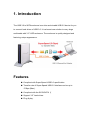
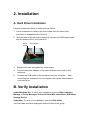
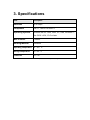
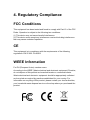
USB 3.0 to SATA Enclosure User’s Manual Safety Instructions Always read the safety instructions carefully. Keep this User’s Manual for future reference. Keep this equipment away from humidity. If any of the following situation arises, get the equipment checked by a service technician: The equipment has been exposed to moisture. The equipment has been dropped and damaged. The equipment has obvious sign of breakage. The equipment has not been working well or you cannot get it to work according to the User’s Manual. Copyright Statement No part of this publication may be reproduced in any forms without the prior written permission. Other trademarks or brand names mentioned herein are trademarks or registered trademarks of their respective companies. Disclaimer Information in this document is subject to change without notice. The manufacturer does not make any representations or warranties (implied or otherwise) regarding the accuracy and completeness of this document and shall in no event be liable for any loss of profit or any commercial damage, including but not limited to special, incidental, consequential, or other damage. Table of Contents 1. Introduction .............................................................................................4 Features...................................................................................................4 Package Contents....................................................................................5 System Requirements..............................................................................5 2. Installation ...............................................................................................6 A. Hardware Installation...........................................................................6 B. Verify Installation .................................................................................6 3. Specifications ..........................................................................................7 4. Regulatory Compliance ..........................................................................8 FCC Conditions .......................................................................................8 CE............................................................................................................8 WEEE Information…………………………………………………..…………8 1. Introduction The USB 3.0 to SATA enclosure is an ultra and durable USB 3.0 device for you to connect hard drives of USB 3.0. It is a brand new solution to carry large multimedia with 3.5’’ HDD enclosure. The enclosure is quality designed and featuring unique appearance. Features Compliant with Super-Speed USB 3.0 specification. Transfer rate of Super-Speed USB 3.0 interface can be up to 5 Gbps (Max). Compliant with the SATA/SATA Ⅱ Support 3.5’’ hard drives. Plug & play. Package Contents USB 3.0 to SATA Enclosure x1 Power Adapter x1 Stand x1 User’s manual x1 System Requirements Windows 98 SE, 2000, 2003, XP, Vista, Windows 7; Mac OS X v10.4, 10.5 or later 2. Installation A. Hard Drive Installation Follow the steps as follows to install your hard drive. 1. Use a screwdriver to remove the four screws from the case of the enclosure to disassemble the housing. 2. With the label of the hard drive facing up, connect the SATA signal cable and the power cord to your hard drive SATA Power SATA Signal 3. Replace the case and fasten the screws back. 4. Connect the power adapter to the mains and the power jack on the enclosure. 5. Connect the USB cable to the enclosure and your computer. After connecting the enclosure to your computer, the system should detect your hard drive. B. Verify Installation Under Windows OS: To verify your installation, right click My computer > Manage > Device Manager> Universal Serial Bus controllers> USB Mass Storage Device. Under Mac: To verify your installation, open the Disk Utility. Your hard disk should be displayed under the Disk drives group. 3. Specifications Item Description Data Rate Up to 5Gbps Compliance USB 1.1, USB 2.0 & USB 3.0 Operating Systems Windows 98 SE, 2000, 2003, XP, Vista, Windows 7; Mac OS X v10.4, 10.5 or later Max Distance 3 meters Housing Material Aluminum Operating temperature 10 ~ 40∘C Storage temperature -10 ~ 80∘C Certificate FCC, CE. *Specification is subject to change without further notice. 4. Regulatory Compliance FCC Conditions This equipment has been tested and found to comply with Part 15 of the FCC Rules. Operation is subject to the following two conditions: (1) This device may not cause harmful interference (2) This device must accept any interference received including interference that may cause undesired operation. CE This equipment is in compliance with the requirements of the following regulations: EN 55 022: CLASS B WEEE Information For EU (European Union) member users: According to the WEEE (Waste electrical and electronic equipment) Directive, do not dispose of this product as household waste or commercial waste. Waste electrical and electronic equipment should be appropriately collected and recycled as required by practices established for your country. For information on recycling of this product, please contact your local authorities, your household waste disposal service or the shop where you purchased the product.