1
Nokia 7360 User Guide
9243654
Issue 1
DECLARATION OF CONFORMITY
We, NOKIA CORPORATION declare under our sole responsibility that the product RM-127 is in conformity
with the provisions of the following Council Directive: 1999/5/EC.
A copy of the Declaration of Conformity can be found from
http://www.nokia.com/phones/declaration_of_conformity/.
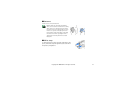
The crossed-out wheeled bin means that within the European Union the product must be taken to
separate collection at the product end-of life. This applies to your device but also to any
enhancements marked with this symbol. Do not dispose of these products as unsorted municipal
waste.
Copyright © 2005 Nokia. All rights reserved.
Reproduction, transfer, distribution or storage of part or all of the contents in this document in any form
without the prior written permission of Nokia is prohibited.
Nokia, Nokia Connecting People, Xpress-on, and Pop-Port are trademarks or registered trademarks of
Nokia Corporation. Other product and company names mentioned herein may be trademarks or
tradenames of their respective owners.
Nokia tune is a sound mark of Nokia Corporation.
US Patent No 5818437 and other pending patents. T9 text input software Copyright (C) 1997-2005. Tegic
Communications, Inc. All rights reserved.
Includes RSA BSAFE cryptographic or security protocol software from RSA Security.
Java is a trademark of Sun Microsystems, Inc.
This product is licensed under the MPEG-4 Visual Patent Portfolio License (i) for personal and
noncommercial use in connection with information which has been encoded in compliance with the
MPEG-4 Visual Standard by a consumer engaged in a personal and noncommercial activity and (ii) for use
in connection with MPEG-4 video provided by a licensed video provider. No license is granted or shall be
implied for any other use. Additional information, including that related to promotional, internal, and
commercial uses, may be obtained from MPEG LA, LLC. See <http://www.mpegla.com>.
Nokia operates a policy of continuous development. Nokia reserves the right to make changes and
improvements to any of the products described in this document without prior notice.
Under no circumstances shall Nokia be responsible for any loss of data or income or any special,
incidental, consequential or indirect damages howsoever caused.
The contents of this document are provided "as is". Except as required by applicable law, no warranties of
any kind, either express or implied, including, but not limited to, the implied warranties of
merchantability and fitness for a particular purpose, are made in relation to the accuracy, reliability or
contents of this document. Nokia reserves the right to revise this document or withdraw it at any time
without prior notice.
The availability of particular products may vary by region. Please check with the Nokia dealer nearest to
you.
This device may contain commodities, technology or software subject to export laws and regulations from
the US and other countries. Diversion contrary to law is prohibited.
9243654/Issue 1
Contents
For your safety ..................................................................................................... 9
General information.......................................................................................... 13
Overview of functions ............................................................................................................................. 13
Access codes .............................................................................................................................................. 14
Configuration settings service.............................................................................................................. 15
Download content and applications ................................................................................................... 16
Nokia support and contact information ............................................................................................ 16
1. Get started ..................................................................................................... 17
Install the SIM card and battery.......................................................................................................... 17
Charge the battery ................................................................................................................................... 19
Switch the phone on and off ................................................................................................................ 20
Antenna....................................................................................................................................................... 21
Wrist strap.................................................................................................................................................. 21
2. Your phone..................................................................................................... 22
Keys and parts ........................................................................................................................................... 22
Standby mode............................................................................................................................................ 23
Keypad lock (keyguard)........................................................................................................................... 26
3. Call functions ................................................................................................ 27
Make a call................................................................................................................................................. 27
Answer or reject a call ............................................................................................................................ 28
Options during a call ............................................................................................................................... 28
Copyright © 2005 Nokia. All rights reserved.
4
4. Write text....................................................................................................... 30
Settings ....................................................................................................................................................... 30
Predictive text input................................................................................................................................ 31
Traditional text input .............................................................................................................................. 32
5. Navigate the menus ...................................................................................... 33
6. Messages ........................................................................................................ 34
Text messages (SMS) ............................................................................................................................... 34
Multimedia messages (MMS)................................................................................................................ 37
Memory full................................................................................................................................................ 40
Folders.......................................................................................................................................................... 40
Flash messages.......................................................................................................................................... 41
Nokia Xpress audio messaging ............................................................................................................. 42
Instant messaging (IM)........................................................................................................................... 43
E-mail application.................................................................................................................................... 49
Voice messages ......................................................................................................................................... 52
Info messages ............................................................................................................................................ 52
Service commands.................................................................................................................................... 53
Delete messages........................................................................................................................................ 53
Message settings ...................................................................................................................................... 53
Message counter....................................................................................................................................... 56
7. Contacts ......................................................................................................... 57
Search for a contact ................................................................................................................................ 57
Save names and phone numbers ......................................................................................................... 57
Save numbers, items, or an image....................................................................................................... 57
Copy contacts............................................................................................................................................ 58
Edit contact details.................................................................................................................................. 59
Delete contacts or contact details ...................................................................................................... 59
Copyright © 2005 Nokia. All rights reserved.
5
Business cards ........................................................................................................................................... 60
My presence............................................................................................................................................... 60
Subscribed names..................................................................................................................................... 61
Settings ....................................................................................................................................................... 63
Groups.......................................................................................................................................................... 63
Voice dialing .............................................................................................................................................. 64
Speed dials.................................................................................................................................................. 65
Info, service, and my numbers.............................................................................................................. 66
8. Call register.................................................................................................... 67
Recent calls lists ....................................................................................................................................... 67
Counters and timers ................................................................................................................................ 67
9. Settings ......................................................................................................... 68
Profiles......................................................................................................................................................... 68
Themes......................................................................................................................................................... 68
Tones ............................................................................................................................................................ 69
My shortcuts.............................................................................................................................................. 69
Display ......................................................................................................................................................... 70
Time and date............................................................................................................................................ 71
Call................................................................................................................................................................ 71
Phone ........................................................................................................................................................... 72
Connectivity............................................................................................................................................... 74
Enhancements ........................................................................................................................................... 76
Configuration............................................................................................................................................. 77
Security........................................................................................................................................................ 78
Restore factory settings.......................................................................................................................... 79
10. Operator menu............................................................................................ 80
11. Gallery ......................................................................................................... 81
Copyright © 2005 Nokia. All rights reserved.
6
12. Media........................................................................................................... 82
Camera......................................................................................................................................................... 82
Radio ............................................................................................................................................................ 83
Recorder ...................................................................................................................................................... 85
13. Organiser ..................................................................................................... 86
Alarm clock................................................................................................................................................. 86
Calendar ...................................................................................................................................................... 87
To-do list..................................................................................................................................................... 88
Notes............................................................................................................................................................ 88
Synchronization ........................................................................................................................................ 89
Calculator ................................................................................................................................................... 91
Stopwatch................................................................................................................................................... 92
Countdown timer...................................................................................................................................... 93
14. Applications ................................................................................................ 94
Games .......................................................................................................................................................... 94
Collection.................................................................................................................................................... 95
15. Push to talk................................................................................................. 97
Push to talk menu .................................................................................................................................... 98
Connect to and disconnect PTT ............................................................................................................ 98
Make and receive a PTT call .................................................................................................................. 99
Callback requests................................................................................................................................... 101
Add a one-to-one contact.................................................................................................................. 103
Create and set up groups .................................................................................................................... 103
PTT settings ............................................................................................................................................. 106
16. Web............................................................................................................ 108
Set up browsing ..................................................................................................................................... 108
Connect to a service ............................................................................................................................. 108
Copyright © 2005 Nokia. All rights reserved.
7
Browse pages..........................................................................................................................................
Appearance settings .............................................................................................................................
Cookies .....................................................................................................................................................
Scripts over secure connection..........................................................................................................
Bookmarks ...............................................................................................................................................
Download files........................................................................................................................................
Service inbox...........................................................................................................................................
Cache memory........................................................................................................................................
Browser security ....................................................................................................................................
Positioning information.......................................................................................................................
109
111
112
112
112
113
114
115
115
118
17. SIM services .............................................................................................. 120
18. PC connectivity ......................................................................................... 121
Nokia PC Suite........................................................................................................................................ 121
Packet data, HSCSD, and CSD............................................................................................................ 121
Data communication applications.................................................................................................... 122
19. Battery information.................................................................................. 123
Charging and discharging ................................................................................................................... 123
Nokia battery authentication guidelines........................................................................................ 124
Care and maintenance .................................................................................... 127
Additional safety information........................................................................ 129
Index................................................................................................................. 134
Copyright © 2005 Nokia. All rights reserved.
8
For your safety
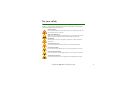
Read these simple guidelines. Not following them may be dangerous or illegal. Read the
complete user guide for further information.
SWITCH ON SAFELY
Do not switch the phone on when wireless phone use is prohibited or when it
may cause interference or danger.
ROAD SAFETY COMES FIRST
Obey all local laws. Always keep your hands free to operate the vehicle while
driving. Your first consideration while driving should be road safety.
INTERFERENCE
All wireless phones may be susceptible to interference, which could affect
performance.
SWITCH OFF IN HOSPITALS
Follow any restrictions. Switch the phone off near medical equipment.
SWITCH OFF IN AIRCRAFT
Follow any restrictions. Wireless devices can cause interference in aircraft.
SWITCH OFF WHEN REFUELING
Do not use the phone at a refueling point. Do not use near fuel or chemicals.
SWITCH OFF NEAR BLASTING
Follow any restrictions. Do not use the phone where blasting is in progress.
Copyright © 2005 Nokia. All rights reserved.
9
USE SENSIBLY
Use only in the normal position as explained in the product documentation. Do
not touch the antenna unnecessarily.
QUALIFIED SERVICE
Only qualified personnel may install or repair this product.
ENHANCEMENTS AND BATTERIES
Use only approved enhancements and batteries. Do not connect incompatible
products.
WATER-RESISTANCE
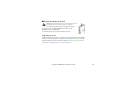
Your phone is not water-resistant. Keep it dry.
BACK-UP COPIES
Remember to make back-up copies or keep a written record of all important
information stored in your phone.
CONNECTING TO OTHER DEVICES
When connecting to any other device, read its user guide for detailed safety
instructions. Do not connect incompatible products.
EMERGENCY CALLS
Ensure the phone is switched on and in service. Press the end key as many times
as needed to clear the display and return to the start screen. Enter the
emergency number, then press the call key. Give your location. Do not end the
call until given permission to do so.
Copyright © 2005 Nokia. All rights reserved.
10
■ About your device
The wireless device described in this guide is approved for use on the EGSM 900 and GSM
1800 and 1900 networks. Contact your service provider for more information about
networks.
When using the features in this device, obey all laws and respect the privacy and legitimate
rights of others.
Warning: To use any features in this device, other than the alarm clock, the device
must be switched on. Do not switch the device on when wireless device use may
cause interference or danger.
■ Network services
To use the phone you must have service from a wireless service provider. Many of the
features in this device depend on features in the wireless network to function. These
network services may not be available on all networks or you may have to make specific
arrangements with your service provider before you can utilize network services. Your
service provider may need to give you additional instructions for their use and explain what
charges will apply. Some networks may have limitations that affect how you can use
network services. For instance, some networks may not support all language-dependent
characters and services.
Your service provider may have requested that certain features be disabled or not activated
in your device. If so, they will not appear on your device menu. Your device may also have
been specially configured for your network provider. This configuration may include changes
in menu names, menu order, and icons. Contact your service provider for more information.
This device supports WAP 2.0 protocols (HTTP and SSL) that run on TCP/IP protocols. Some
features of this device, such as text messages, multimedia messages, audio messages,
instant messaging service, e-mail, presence enhanced contacts, mobile Internet services,
Copyright © 2005 Nokia. All rights reserved.
11
content and application download, and synchronization with a remote Internet server,
require network support for these technologies.
■ Shared memory
The phone has two memories. The following features may share the first memory: contacts,
text messages, multimedia messages (but no attachments), audio messages, instant
messaging, groups, voice commands, calendar, and to-do notes. The second shared memory
is used by files stored in Gallery, attachments of multimedia messages, e-mail, and JavaTM
applications. Use of one or more of these features may reduce the memory available for the
remaining features sharing memory. For example, saving many Java applications may use all
of the available memory. Your device may display a message that the memory is full when
you try to use a shared memory feature. In this case, delete some of the information or
entries stored in the shared memory features before continuing. Some of the features, such
as text messages, may have a certain amount of memory specially allotted to them in
addition to the memory shared with other features.
■ Enhancements
A few practical rules about accessories and enhancements:
• Keep all accessories and enhancements out of the reach of small children.
• When you disconnect the power cord of any accessory or enhancement, grasp and pull
the plug, not the cord.
• Check regularly that enhancements installed in a vehicle are mounted and are operating
properly.
• Installation of any complex car enhancements must be made by qualified personnel only.
Copyright © 2005 Nokia. All rights reserved.
12
General information
■ Overview of functions
Your phone provides many functions that are practical for daily use, such as a
calendar, a clock, an alarm clock, a radio, and a built-in camera. Your phone also
supports the following functions:
• Enhanced data rates for GSM evolution (EDGE). See Packet data (EGPRS) p. 75.
• Extensible hypertext markup language (XHTML). See Web p. 108.
• Audio messaging. See Nokia Xpress audio messaging p. 42.
• Instant messaging. See Instant messaging (IM) p. 43.
• E-mail application. See E-mail application p. 49.
• Push to talk. See Push to talk p. 97.
• Presence-enhanced contacts. See My presence p. 60.
• Java 2 Platform, Micro Edition (J2METM). See Applications p. 94.
■ Access codes
Security code
The security code (5 to 10 digits) helps to protect your phone against
unauthorized use. The preset code is 12345. To change the code, and to set the
phone to request the code, see Security p. 78.
Copyright © 2005 Nokia. All rights reserved.
13
PIN codes
The personal identification number (PIN) code and the universal personal
identification number (UPIN) code (4 to 8 digits) help to protect your SIM card
against unauthorized use. See Security p. 78.
The PIN2 code (4 to 8 digits) may be supplied with the SIM card and is required for
some functions.
The module PIN is required to access the information in the security module. See
Security module p. 116.
The signing PIN is required for the digital signature. See Digital signature p. 118.
PUK codes
The personal unblocking key (PUK) code and the universal personal unblocking key
(UPUK) code (8 digits) are required to change a blocked PIN code and UPIN code,
respectively. The PUK2 code (8 digits) is required to change a blocked PIN2 code. If
the codes are not supplied with the SIM card, contact your local service provider
for the codes.
Barring password
The barring password (4 digits) is required when using the Call barring service. See
Security p. 78.
Copyright © 2005 Nokia. All rights reserved.
14
■ Configuration settings service
To use some of the network services, such as mobile Internet services, MMS, Nokia
Xpress audio messaging, or remote Internet server synchronization, your phone
needs the correct configuration settings. You may be able to receive the settings
directly as a configuration message. After receiving the settings you need to save
them on your phone. The service provider may provide a PIN that is needed to save
the settings. For more information on availability, contact your network operator,
service provider, nearest authorized Nokia dealer, or visit the support area on the
Nokia Web site, <www.nokia.com/support>.
When you have received a configuration message Configuration sett. received is
displayed.
To save the settings, select Show > Save. If the phone requests Enter settings'
PIN:, enter the PIN code for the settings, and select OK. To receive the PIN code,
contact the service provider that supplies the settings. If no settings are saved yet,
these settings are saved and set as default configuration settings. Otherwise, the
phone asks Activate saved configuration settings?.
To discard the received settings, select Exit or Show > Discard.
To edit the settings, see Configuration p. 77.
■ Download content and applications
You may be able to download new content (for example, themes) to the phone
(network service). Select the download function (for example, in the Gallery
menu). To access the download function, see the respective menu descriptions. For
Copyright © 2005 Nokia. All rights reserved.
15
the availability of different services, pricing, and tariffs, contact your service
provider.
Important: Use only services that you trust and that offer adequate security and
protection against harmful software.
■ Nokia support and contact information
Check www.nokia.com/support or your local Nokia Web site for the latest version
of this guide, additional information, downloads, and services related to your
Nokia product.
On the Web site, you can get information on the use of Nokia products and
services. If you need to contact customer service, check the list of local Nokia
contact centers at www.nokia.com/customerservice.
For maintenance services, check your nearest Nokia service center at
www.nokia.com/repair.
Copyright © 2005 Nokia. All rights reserved.
16
1. Get started
■ Install the SIM card and battery
Always switch the device off and disconnect the charger before removing the battery.
Keep all SIM cards out of the reach of small children.
For availability and information on using SIM card services, contact your SIM card vendor.
This may be the service provider, network operator, or other vendor.
This device is intended for use with the BL-5B battery.
The SIM card and its contacts can easily be damaged by scratches or bending, so
be careful when handling, inserting, or removing the card.
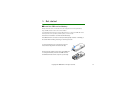
To remove the back cover of the phone, press the
release button (1), and lift the back cover (2).
Ensure, that the golden contact area on the SIM card
is facing downwards, and insert the SIM card into
the SIM card holder until it snaps into position (3).
Copyright © 2005 Nokia. All rights reserved.
17
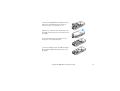
Insert the battery (4). Observe the battery contacts.
Always use original Nokia batteries. See Nokia
battery authentication guidelines p. 124.
Align the top of the back cover with the top of the
phone (5), and press the bottom of the back cover to
lock it (6).
To remove the battery, lift the lower end of the
battery out of the compartment (7).
To remove the SIM card, press the SIM card release
(8), and slide the SIM card towards the top of the
phone (9).
Copyright © 2005 Nokia. All rights reserved.
18
■ Charge the battery
Warning: Use only batteries, chargers, and enhancements approved by Nokia for
use with this particular model. The use of any other types may invalidate any
approval or warranty, and may be dangerous.
Check the model number of any charger before use with this device. This device is intended
for use when supplied with power from an AC-3, AC-4, and DC-4 charger, and from an AC-1,
ACP-7, ACP-12, and LCH-12 charger when used with the CA-44 charger adapter.
For availability of approved enhancements, please check with your dealer.
When you disconnect the power cord of any enhancement, grasp and pull the plug, not the
cord.
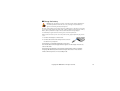
1. Connect the charger to a wall socket.
2. Connect the lead from the charger to the socket on
the bottom of your phone.
If the battery is completely discharged, it may take a
few minutes before the charging indicator appears on the display or before any
calls can be made.
The charging time depends on the charger and the battery used. For example,
charging a BL-5B battery with the AC-3 charger takes about 1 hour and 10
minutes while the phone is in the standby mode.
Copyright © 2005 Nokia. All rights reserved.
19
■ Switch the phone on and off
Warning: Do not switch the phone on when wireless phone use is
prohibited or when it may cause interference or danger.
To switch the phone on, press and hold the power key.
If the phone asks for a PIN or a UPIN code, enter the code
(displayed as ****), and select OK.
To switch the phone off, press and hold the power key.
Plug and play service
When you switch on your phone for the first time, and the phone is in the standby
mode, you are asked to get the configuration settings from your service provider
(network service). Confirm or decline the query. See "Connect to service provider
support ," p. 78 and Configuration settings service p. 15.
Copyright © 2005 Nokia. All rights reserved.
20
■ Antenna
Your device has an internal antenna.
Note: As with any other radio transmitting
device, do not touch the antenna unnecessarily
when the device is switched on. Contact with
the antenna affects call quality and may cause
the device to operate at a higher power level
than otherwise needed. Avoiding contact with
the antenna area when operating the device
optimizes the antenna performance and the
battery life.
■ Wrist strap
To attach the wrist strap at the upper right edge of the
phone, thread the strap through the eyelet as shown in
the picture, and tighten it.
Copyright © 2005 Nokia. All rights reserved.
21
2. Your phone
■ Keys and parts
• Power key (1)
• Earpiece (2)
• Loudspeaker (3)
• Display (4)
• Volume up and Push to talk (PTT) key (5)
• Volume down and voice command key (6)
• Infrared (IR) port (7)
• Middle selection key (8)
• 4-way navigation key (9)
• Left selection key (10)
• Right selection key (11)
• Call key (12)
• End key (13)
• Keypad, may vary by region (14)
• Charger connector (15)
• Microphone (16)
• Pop-PortTM connector (17)
• Camera lens (18)
Copyright © 2005 Nokia. All rights reserved.
22
■ Standby mode
When the phone is ready for use, and you have not entered any characters, the
phone is in the standby mode.
1 Name of the network or operator logo
2 Signal strength of the cellular network
3 Battery charge level
4 Left selection key (Go to)
5 Middle selection key (Menu)
6 Right selection key (Names)
The right selection key may be another shortcut to a
function that you selected. See My shortcuts p. 69.
Operator variants may have an operator-specific name to access an operatorspecific Web site.
Personal shortcut list
The left selection key is Go to. To view the functions in the personal shortcut list,
select Go to. To activate a function, select it.
To view a list with available functions, select Go to > Options > Select options. To
add a function to the shortcut list, select Mark. To remove a function from the list,
select Unmark.
To rearrange the functions on your personal shortcut list, select Go to >
Options > Organise. Select the desired function, Move, and the place where you
want to move the function.
Copyright © 2005 Nokia. All rights reserved.
23
Shortcuts in standby mode
• To access the list of dialed numbers, press the call key once. Scroll to a number
or name; to call the number, press the call key.
• To open the Web browser, press and hold 0.
• To call your voice mailbox, press and hold 1.
• Use the navigation key as a shortcut. See My shortcuts p. 69.
Power saving
A digital clock view overwrites the display when no function of
the phone has been used for a certain period of time. To
activate the power saver, see Power saver in Display p. 70. To
deactivate the screen saver, press any key.
Copyright © 2005 Nokia. All rights reserved.
24
Indicators
You received one or several text or picture messages. See Read and reply
to a SMS message p. 35.
You received one or several multimedia messages. See Read and reply to a
MMS message p. 39.
For e-mail and voice messages different icons may appear.
The phone registered a missed call. See Call register p. 67.
The keypad is locked. See Keypad lock (keyguard) p. 26.
The phone does not ring for an incoming call or text message when
Incoming call alert and Message alert tone are set to Off. See Tones p. 69.
The alarm clock is set to On. See Alarm clock p. 86.
he packet data connection mode Always online is selected, and the packet
data service is available. See Packet data (EGPRS) p. 75.
A packet data connection is established. See Packet data (EGPRS) p. 75
and Browse pages p. 109.
The packet data connection is suspended (on hold), for example, if there is
an incoming or outgoing call during a packet data dial-up connection.
When the infrared connection is activated, the indicator is shown
continuously.
Push to talk connection is active or suspended. See Push to talk p. 97.
Copyright © 2005 Nokia. All rights reserved.
25
■ Keypad lock (keyguard)
To prevent the keys from being accidentally pressed, select Menu, and press *
within 3.5 seconds to lock the keypad.
To unlock the keypad, select Unlock, and press * within 1.5 seconds. If the Security
keyguard is set On, enter the security code if requested.
To answer a call when the keyguard is on, press the call key. When you end or
reject the call, the keypad automatically locks.
For Automatic keyguard and Security keyguard. See Phone p. 72.
When the keyguard is on, calls still may be possible to the official emergency number
programmed into your device.
Copyright © 2005 Nokia. All rights reserved.
26
3. Call functions
■ Make a call
1. Enter the phone number, including the area code.
For international calls, press * twice for the international prefix (the +
character replaces the international access code) and then enter the country
code, the area code without the leading 0, if necessary, and the phone number.
2. To call the number, press the call key.
3. To end the call or to cancel the call attempt, press the end key.
To make a call using names, search for a name or phone number in Contacts, see
Search for a contact p. 57. Press the call key to call the number.
To access the list of up to 20 dialed numbers, press the call key once in the standby
mode. To call the number, select a number or name, and press the call key.
Speed dialing
Assign a phone number to one of the speed-dialing keys, 2 to 9. See Speed dials
p. 65. Call the number in either of the following ways:
• Press a speed-dialing key, and then press the call key.
• If Speed dialling is set to On, press and hold a speed-dialing key until the call
begins. See Speed dialling in Call p. 71.
Copyright © 2005 Nokia. All rights reserved.
27
■ Answer or reject a call
To answer an incoming call, press the call key. To end the call, press the end key.
To reject an incoming call, press the end key.
To mute the ringing tone select Silence.
Tip: If the Divert if busy function is activated to divert the calls (for
example, to your voice mailbox) rejecting an incoming call also diverts the
call. See Call p. 71.
If a compatible headset supplied with the headset key is connected to the phone,
to answer and end a call, press the headset key.
Call waiting
To answer the waiting call during an active call, press the call key. The first call is
put on hold. To end the active call, press the end key.
To activate the Call waiting function, see Call p. 71.
■ Options during a call
Warning: Do not hold the device near your ear when the loudspeaker is in use,
because the volume may be extremely loud.
Many of the options that you can use during a call are network services. For
availability, contact your network operator or service provider.
During a call, select Options and from the following options:
Copyright © 2005 Nokia. All rights reserved.
28
Call options are Mute or Unmute, Contacts, Menu, Auto volume on or Auto volume
off, Record, Lock keypad, Audio enhancing, Loudspeaker, or Handset.
Network services options are Answer and Reject, Hold or Unhold, New call, Add to
conference, End call, End all calls, and the following:
Send DTMF — to send tone strings
Swap — to switch between the active call and the call on hold
Transfer — to connect a call on hold to an active call and disconnect yourself
Conference — to make a conference call that allows up to five persons to take part
in a conference call
Private call — to discuss privately in a conference call
Copyright © 2005 Nokia. All rights reserved.
29
4. Write text
You can enter text (for example, when writing messages) using traditional or
predictive text input. When using traditional text input, press a number key, 1 to
9, repeatedly until the desired character appears. In predictive text input you can
enter a letter with a single keypress.
When you are writing text, predictive text input is indicated by
and
traditional text input by
at the top left of the display.
,
, or
appear next to the text input indicator, indicating the character case.
To change the character case and the text input mode, press #.
indicates number mode. To change from the letter to number mode, press
and hold #, and select Number mode. To insert a special character, press and hold
*.
■ Settings
To set the writing language, select Options > Writing language. Predictive text
input is only available for the languages listed.
Select Options > Dictionary on to set the predictive text input or Dictionary off to
set traditional text input.
Copyright © 2005 Nokia. All rights reserved.
30
■ Predictive text input
Predictive text input is based on a built-in dictionary to which you can add new
words.
1. Start writing a word using the 2 to 9 keys. Press each key only once for a single
letter. The word changes after each keypress.
2. When you have finished writing the word and it is correct, to confirm it, press 0
to add a space, or press any of the navigation keys. Press a navigation key to
move the cursor.
If the word is not correct, press * repeatedly, or select Options > Matches.
When the word that you want appears, confirm it.
If ? is displayed after the word, the word you intended to write is not in the
dictionary. To add the word to the dictionary, select Spell. Enter the word
(traditional text input is used), and select Save.
To enter a full stop, press 1.
3. Start writing the next word.
Write compound words
Enter the first part of the word, and press the navigation key right to confirm it.
Write the last part of the word, and confirm the word.
Copyright © 2005 Nokia. All rights reserved.
31
■ Traditional text input
Press a number key, 1 to 9, repeatedly until the desired character appears. Not all
characters available under a number key are printed on the key. The characters
available depend on the writing language. See Settings p. 30.
If the next letter you want is located on the same key as the present one, wait
until the cursor appears, or press any of the navigation keys and enter the letter.
The most common punctuation marks and special characters are available under
the 1 key.
Copyright © 2005 Nokia. All rights reserved.
32
5. Navigate the menus
The phone offers you an extensive range of functions, which are grouped into
menus.
1. To access the menu, select Menu. To change the menu view, select Options >
Main menu view > List or Grid.
2. Scroll through the menu, and select a submenu (for example, Settings).
3. If the menu contains submenus, select the one that you want (for example,
Call).
4. If the selected menu contains further submenus, select the one that you want
(for example, Anykey answer).
5. Select the setting of your choice.
6. To return to the previous menu level, select Back. To exit the menu, select Exit.
Copyright © 2005 Nokia. All rights reserved.
33
6. Messages
The message services can only be used if they are supported by your
network or your service provider.
Note: When sending messages, your phone may display Message sent. This is an
indication that the message has been sent by your device to the message centre
number programmed into your device. This is not an indication that the message
has been received at the intended destination. For more details about messaging
services, check with your service provider.
Important: Exercise caution when opening messages. Messages may contain
malicious software or otherwise be harmful to your device or PC.
Only devices that have compatible features can receive and display messages. The
appearance of a message may vary depending on the receiving device.
■ Text messages (SMS)
Using the short message service (SMS) you can send and receive multipart
messages made of several ordinary text messages (network service) that can
contain pictures.
Before you can send any text, picture, or e-mail message, you must save your
message center number. See Message settings p. 53.
To check SMS e-mail service availability and to subscribe to the service, contact
your service provider.
Copyright © 2005 Nokia. All rights reserved.
34
Your device supports the sending of text messages beyond the character limit for a single
message. Longer messages will be sent as a series of two or more messages. Your service
provider may charge accordingly. Characters that use accents or other marks, and characters
from some language options like Chinese, take up more space limiting the number of
characters that can be sent in a single message.
Write and send a SMS message
1. Select Menu > Messages > Create message > Text message.
2. Enter a message. See Write text p. 30.
At the top of the display, you can see the message length indicator that tracks
the number of characters available. For example, 10/2 means that you can still
add 10 characters for the text to be sent as two message.
To insert text templates or a picture into the message, see Templates p. 36.
Each picture message comprises several text messages. Sending one picture or
multipart message may cost more than sending one text message.
3. To send the message, select Send > Recently used, To phone number, To many,
or To e-mail address. To send a message using a predefined message profile,
select Via sending profile. For the message profile, see Text and SMS e-mail
p. 53. Select or enter a phone number or e-mail address, or select a profile.
Read and reply to a SMS message
is shown when you received an SMS message or an SMS e-mail. The blinking
indicates that the message memory is full. Before you can receive new
messages, delete some of your old messages in the Inbox folder.
Copyright © 2005 Nokia. All rights reserved.
35
1. To view a new message, select Show. To view it later, select Exit.
To read the message later, select Menu > Messages > Inbox. If more than one
message is received, select the message that you want to read.
indicates
an unread message.
2. While reading a message, select Options and delete or forward the message;
edit the message as a text message or an SMS e-mail; rename the message you
are reading or move it to another folder; or view or extract message details.
You can also copy text from the beginning of the message to your phone
calendar as a reminder note. To save the picture in the Templates folder when
reading a picture message, select Save picture.
3. To reply as a message, select Reply > Text message, Multimedia msg., Flash
message, or Audio message. Enter the reply message. When replying to an
e-mail, first confirm or edit the e-mail address and subject.
4. To send the message to the displayed number, select Send > OK.
Templates
Your phone has text templates
and picture templates
text, picture, or SMS e-mail messages.
that you can use in
To access the template list, select Menu > Messages > Saved items > Text
messages > Templates.
Copyright © 2005 Nokia. All rights reserved.
36
■ Multimedia messages (MMS)
A multimedia message can contain text, sound, a picture, a calendar note, a
business card, or a video clip. If the message is too large, the phone may not be
able to receive it. Some networks allow text messages that include an Internet
address where you can view the multimedia message.
You cannot receive multimedia messages during a call, a game, another Java
application, or an active browsing session over GSM data. Because delivery of
multimedia messages can fail for various reasons, do not rely solely upon them for
essential communications.
Write and send a MMS message
To set the settings for multimedia messaging, see Multimedia p. 54. To check
availability and to subscribe to the multimedia messaging service, contact your
service provider.
Copyright protections may prevent some images, music (including ringing tones), and other
content from being copied, modified, transferred or forwarded.
1. Select Menu > Messages > Create message > Multimedia msg..
2. Enter a message. See Write text p. 30.
To insert a file, select Options > Insert and from the following options:
Image, Sound clip, or Video clip — to insert a file from Gallery
New image — to take a new image to be added to the message
New sound clip — to make a new recording to be added to the message
Copyright © 2005 Nokia. All rights reserved.
37
Business card or Calendar note — to insert a business card or a calendar note in
the message
Slide — to insert a slide to the message. Your phone supports multimedia
messages that contain several pages (slides). Each slide can contain text, one
image, a calendar note, a business card, and one sound clip. To open a desired
slide if the message contains several slides, select Options > Previous slide,
Next slide, or Slide list. To set the interval between the slides, select Options >
Slide timing. To move the text component to the top or bottom of the message,
select Options > Place text first or Place text last.
The following options may also be available: Delete to delete an image, slide, or
sound clip from the message, Clear text, Preview, or Save message. In More
options the following options may be available: Insert contact, Insert number,
Message details, and Edit subject.
3. To send the message, select Send > Recently used, To phone number, To e-mail
address, or To many.
4. Select the contact from the list, or enter the recipient’s phone number or email address, or search for it in Contacts. Select OK. The message is moved to
the Outbox folder for sending.
While the multimedia message is being sent, the animated indicator
is
displayed and you can use other functions on the phone. If the sending fails,
the phone tries to resend it a few times. If this fails, the message remains in the
Outbox folder, and you can try to resend it later.
Copyright © 2005 Nokia. All rights reserved.
38
If you select Save sent messages > Yes, the sent message is saved in the Sent
items folder. See Multimedia p. 54. When the message is sent, it is not an
indication that the message has been received at the intended destination.
Read and reply to a MMS message
Important: Exercise caution when opening messages. Multimedia message
objects may contain malicious software or otherwise be harmful to your device or
PC.
When your phone receives a multimedia message, the animated
is displayed.
When the message has been received,
and the text Multimedia message
received are shown.
1. To read the message, select Show. To view it later, select Exit.
To read the message later, select Menu > Messages > Inbox. In the list of
messages,
indicates an unread message. Select the message that you want
to view.
2. The function of the middle selection key changes according to the currently
displayed attachment in the message.
To view the whole message if the received message contains a presentation, a
sound clip, or a video clip, select Play.
Select Options to access Attachments (for example a business card), and
Objects (for example images).
Copyright © 2005 Nokia. All rights reserved.
39
3. To reply to the message, select Options > Reply > Text message, Multimedia
msg., Flash message, or Audio message. Enter the reply message, and select
Send.
Select Options to access available options.
■ Memory full
When you have received a new text message and the message memory is full,
blinks and Text msgs. memory full. Delete msgs. is shown. Select No, and delete
some messages from a folder. To discard the waiting message, select Exit > Yes.
When you have a new multimedia message waiting and the memory for the
messages is full,
blinks and Multimedia memory full. View waiting msg. is
shown. To view the waiting message, select Show. Before you can save the
waiting message, delete old messages to free memory space. To save the message,
select Save.
To discard the waiting message, select Exit > Yes. If you select No, you can view
the message.
■ Folders
The phone saves received text and multimedia messages in the Inbox folder.
Multimedia messages that have not yet been sent are moved to the Outbox folder.
If you have selected Message settings > Text messages > Save sent messages >
Yes, and Message settings > Multimedia msgs. > Save sent messages > Yes, the
sent messages are saved in the Sent items folder.
Copyright © 2005 Nokia. All rights reserved.
40
To save the text message that you are writing and wish to send later in the Saved
items folder, select Options > Save message > Saved text msgs.. For multimedia
messages, select the option Save message.
indicates unsent messages.
To organize your text messages, you can move some of them to My folders or add
new folders for your messages. Select Messages > Saved items > Text messages >
My folders.
To add a folder, select Options > Add folder. If you have not saved any folders,
select Add.
To delete or rename a folder, scroll to the desired folder, and select Options >
Delete folder or Rename folder.
■ Flash messages
Flash messages are text messages that are instantly displayed upon reception.
Write a flash message
Select Menu > Messages > Create message > Flash message. Write your message.
The maximum length of a flash message is 70 characters. To insert a blinking text
into the message, select Insert blink char. from the options list to set a marker. The
text after the marker blinks until a second marker is inserted.
Receive a flash message
A received flash message is not automatically saved. To read the message, select
Read. To extract phone numbers, e-mail addresses, and Web site addresses from
Copyright © 2005 Nokia. All rights reserved.
41
the current message, select Options > Use detail. To save the message, select Save
and the folder in which you want to save the message.
■ Nokia Xpress audio messaging
With this menu, use the multimedia message service to create and send a voice
message in a convenient way. Multimedia messaging service must be activated
before this service can be used.
Create and send an audio message
1. Select Menu > Messages > Create message > Audio message. The recorder
opens. To use the recorder, see Recorder p. 85.
2. When the message is ready to send, select Options > Play to check the
message before sending, Replace sound clip to repeat the recording, Save
message, Save sound clip to save the recording in Gallery, Edit subject to insert
a subject to the message, Message details to view the message details, or
Loudspeaker or Handset.
3. To send the message, select Send > Recently used, To phone number, To e-mail
address, or To many. Depending on your operator, more options may be
available.
4. Select the contact from the list, enter the recipient’s phone number or e-mail
address, or search for it in Contacts. Select OK, and the message is moved to
the Outbox folder for sending.
Copyright © 2005 Nokia. All rights reserved.
42
Receive an audio message
When your phone is receiving an audio message, 1 audio message received is
shown. Select Show to open the message or select Show > Play if there is more
than one message received. Select Options to see the available options. To listen
to the message later, select Exit.
To save the message, select Options > Save sound clip and the folder in which you
want to save the message.
■ Instant messaging (IM)
Instant messaging (network service) is a way to send short, simple text messages
to online users.
Before you can use instant messaging, you must subscribe to the service. To check
the availability and costs, and to subscribe to the service, contact your network
operator or service provider, from whom you also receive your unique ID,
password, and settings.
To set the required settings for the instant messaging service, see Connect.
settings in Access the IM menu p. 44. The icons and texts on the display may vary,
depending on the instant messaging service.
Depending on the network, the active instant messaging conversation may
consume the phone battery faster, and you may need to connect the phone to a
charger.
Copyright © 2005 Nokia. All rights reserved.
43
Access the IM menu
To access the menu while still offline, select Menu > Messages > Instant
messages. If more than one set of connection settings for the instant messaging
service is available, select the desired one. If there is only one set defined, it is
selected automatically.
The following options are shown:
Login — to connect to the instant messaging service
Saved convers. — to view, erase or, rename the instant messaging conversations
that you have saved during the instant messaging session
Connect. settings — to edit the settings needed for messaging and presence
connection
Connect to the IM service
To connect to the instant messaging service, open the Instant messages menu,
activate an instant messaging service, and select Login. When the phone has
successfully connected, Logged in is displayed.
To disconnect from the instant messaging service, select Logout.
Start an IM session
Open the Instant messages menu, and connect to the service. Start the service in
different ways.
• Select Conversations to view the list of new and read instant messages or
invitations for instant messaging during the active instant messaging session.
Copyright © 2005 Nokia. All rights reserved.
44
Scroll to the message or invitation that you want, and select Open to read the
message.
indicates the new and
read group messages.
the read instant messages.
indicates the new and
indicates the invitations.
The icons and texts on the display may vary, depending on the instant
messaging service.
• Select IM contacts to view the contacts that you have added. Scroll to the
contact with whom you would like to chat, and select Chat or Open if a new
contact is shown in the list. To add contacts, see Contacts for IM p. 47.
indicates the online and
the offline contacts in the phone contacts
memory.
indicates a blocked contact.
indicates a contact that has
been sent a new message.
• Select Groups > Public groups to display the list of bookmarks to public groups
provided by the network operator or service provider. To start an instant
messaging session with a group, scroll to a group, and select Join. Enter your
screen name that you want to use in the conversation. When you have
successfully joined the group conversation, you can start a group conversation.
To create a private group, see Groups p. 48.
• Select Search > Users or Groups to search for other instant messaging users or
public groups on the network by phone number, screen name, e-mail address,
or name. If you select Groups, you can search for a group by a member in the
group or by group name, topic, or ID.
Copyright © 2005 Nokia. All rights reserved.
45
To start the conversation when you have found the user or the group that you
want, select Options > Chat or Join group.
To start a conversation from Contacts, see View the subscribed names p. 62.
Accept or reject an invitation
In the standby mode, when you are connected to the instant messaging service
and you receive a new invitation, New invitation received is displayed. To read it,
select Read. If more than one invitation is received, scroll to the invitation you
want, and select Open. To join the private group conversation, select Accept, and
enter the screen name; or to reject or delete the invitation, select Options >
Reject or Delete.
Read a received instant message
In the standby mode, when you are connected to the instant messaging service,
and you receive a new message that is not a message associated with an active
conversation, New instant message is displayed. To read it, select Read. If you
receive more than one message, scroll to the message, and select Open.
New messages received during an active conversation are held in Instant
messages > Conversations. If you receive a message from someone who is not in
IM contacts, the sender ID is displayed. To save a new contact that is not in the
phone memory, select Options > Save contact.
Copyright © 2005 Nokia. All rights reserved.
46
Participate in a conversation
To join or start an instant messaging session, select Write. Write your message,
and select Send or press the call key to send it.
Select Options to access available options: View conversation, Save contact,
Group members, Block contact, and End conversation.
Edit your availability status
1. Open the Instant messages menu, and connect to the instant messaging
service.
2. To view and edit your own availability information or screen name, select My
settings.
3. To allow all the other instant messaging users to see you when you are online,
select Availability > Available for all.
To allow only the contacts on your instant messaging contact list to see you
when you are online, select Availability > Avail. for contacts.
To appear as being offline, select Availability > Appear offline.
When you are connected to the instant messaging service,
indicates that you
are online, and
indicates that you are not visible to others.
Contacts for IM
To add contacts to the instant messaging contacts list, connect to the instant
messaging service, and select IM contacts. To add a contact to the list, select
Copyright © 2005 Nokia. All rights reserved.
47
Options > Add contact, or if you have no contacts added, select Add. Select Enter
ID manually, Search from serv., Copy from server, or By mobile number.
Scroll to a contact, and to start a conversation, select Chat or Options > Contact
info, Block contact or Unblock contact, Add contact, Remove contact, Change list,
Copy to server, or Availability alerts.
Block and unblock messages
To block messages, connect to the instant messaging service, and select
Conversations > IM contacts; or join or start a conversation. Scroll to the contact
from whom you want to block incoming messages, and select Options > Block
contact > OK.
To unblock the messages, connect to the instant messaging service, and select
Blocked list. Scroll to the contact from whom you want to unblock the messages,
and select Unblock.
Groups
You can create your own private groups for an instant messaging conversation, or
use the public groups provided by the service provider. The private groups exist
only during an instant messaging conversation. The groups are saved on the server
of the service provider. If the server you are logged on to does not support group
services, all group-related menus are dimmed.
Copyright © 2005 Nokia. All rights reserved.
48
Public groups
You can bookmark public groups that your service provider may maintain.
Connect to the instant messaging service, and select Public groups. Scroll to a
group with which you want to chat, and select Join. If you are not in the group,
enter your screen name as your nickname for the group. To delete a group from
your group list, select Options > Delete group.
To search for a group, select Groups > Public groups > Search groups. You can
search for a group by a member in the group, group name, topic, or ID.
Private groups
Connect to the instant messaging service, and select Groups > Create group. Enter
the name for the group and the screen name that you want to use. Mark the
private group members in the contacts list, and write an invitation.
■ E-mail application
The e-mail application allows you to access your compatible e-mail account from
your phone when you are not in the office or at home. This e-mail application is
different from the SMS and MMS e-mail function.
Your phone supports POP3 and IMAP4 e-mail servers. Before you can send and
retrieve any e-mail, you may need to do the following:
• Obtain a new e-mail account or use the current one. For availability of your
e-mail account, contact your e-mail service provider.
• For the settings required for e-mail, contact your e-mail service provider. You
may receive the e-mail configuration settings as a configuration message. See
Copyright © 2005 Nokia. All rights reserved.
49
Configuration settings service p. 15. You can also enter the settings manually.
See Configuration p. 77.
To activate the e-mail settings, select Menu > Messages > Message settings >
E-mail messages. See E-mail p. 55.
This application does not support keypad tones.
Write and send an e-mail
1. Select Menu > Messages > E-mail > Create e-mail.
2. Enter the recipient’s e-mail address, a subject, and the e-mail message.
To attach a file to the e-mail, select Options > Attach and the file in Gallery.
3. Select Send > Send now.
Download e-mail
1. To access the e-mail application, select Menu > Messages > E-mail.
2. To download e-mail messages that have been sent to your e-mail account,
select Retrieve.
To download new e-mail messages and to send e-mail that has been saved in
the Outbox folder, select Options > Retrieve and send.
To download first the headings of the new e-mail messages that have been
sent to your e-mail account, select Options > Check new e-mail. Then, to
download the selected e-mail, mark the desired ones, and select Options >
Retrieve.
Copyright © 2005 Nokia. All rights reserved.
50
3. Select the new message in Inbox. To view it later, select Back.
indicates an unread message.
Read and reply to e-mail
Important: Exercise caution when opening messages. E-mail messages may
contain malicious software or otherwise be harmful to your device or PC.
Select Menu > Messages > E-mail > Inbox and the desired message.
While reading the message, select Options to view the available options.
To reply to an e-mail, select Reply > Empty screen or Original text. To reply to
many, select Options > Reply to all. Confirm or edit the e-mail address and
subject; then write your reply. To send the message, select Send > Send now.
Inbox and other folders
Your phone saves e-mail that you have downloaded from your e-mail account in
the Inbox folder. Other folders contains the following folders: Drafts for saving
unfinished e-mail, Archive for organizing and saving your e-mail, Outbox for
saving e-mail that has not been sent, and Sent items for saving e-mail that has
been sent.
To manage the folders and their e-mail content, select Options > Manage folder.
Copyright © 2005 Nokia. All rights reserved.
51
Delete e-mail messages
Select Menu > Messages > E-mail > Options > Manage folder and the desired
folder. Mark the messages that you want to delete. To delete them, select
Options > Delete.
Deleting an e-mail from your phone does not delete it from the e-mail server. To
set the phone to delete the e-mail also from the e-mail server, select Menu >
Messages > E-mail > Options > Extra settings > Leave copy: > Delete retr. msgs.
■ Voice messages
The voice mailbox is a network service and you may need to subscribe to it. For
details, contact your service provider.
To call your voice mailbox, select Menu > Messages > Voice messages > Listen to
voice messages. To enter, search for, or edit your voice mailbox number, select
Voice mailbox number.
If supported by the network,
indicates that there are new voice messages.
Select Listen to call your voice mailbox number.
■ Info messages
Select Menu > Messages > Info messages. With the Info messages network
service, you can receive messages on various topics from your service provider. To
check availability, topics, and the relevant topic numbers, contact your service
provider.
Copyright © 2005 Nokia. All rights reserved.
52
■ Service commands
Select Menu > Messages > Service commands. Write and send service requests
(also known as USSD commands) to your service provider, such as activation
commands for network services.
■ Delete messages
To delete all messages from a folder, select Menu > Messages > Delete messages
and the folder from which you want to delete the messages. Select Yes, and if the
folder contains unread messages, the phone asks whether you want to delete
them also. Select Yes again.
■ Message settings
Text and SMS e-mail
The message settings affect the sending, receiving, and viewing of messages.
Select Menu > Messages > Message settings > Text messages and from the
following options:
Sending profile — If more than one message profile set is supported by your SIM
card, select the set you want to change.
The following options may be available: Message centre number (delivered from
your service provider), Messages sent via, Message validity, Default recipient
number (text messages) or E-mail server (e-mail), Delivery reports, Use packet
data, Reply via same centre (network service), and Rename sending profile.
Copyright © 2005 Nokia. All rights reserved.
53
Save sent messages > Yes — Set the phone to save the sent text messages in the
Sent items folder.
Automatic resending > On — The phone automatically attempts to resend a text
message, if the sending has failed.
Multimedia
The message settings affect the sending, receiving, and viewing of multimedia
messages.
Select Menu > Messages > Message settings > Multimedia msgs. and from the
following options:
Save sent messages > Yes — to set the phone to save sent multimedia messages in
the Sent items folder
Delivery reports — to ask the network to send delivery reports about your
messages (network service)
Default slide timing — to define the default time between slides in multimedia
messages
Allow multimedia reception > Yes or No — to receive or to block the multimedia
message. If you select In home network, you cannot receive multimedia messages
when outside your home network.
Incoming multimedia messages > Retrieve, Retrieve manually, or Reject — to
allow the reception of multimedia messages automatically, manually after being
prompted, or to reject the reception
Copyright © 2005 Nokia. All rights reserved.
54
Configuration settings > Configuration — Only the configurations that support
multimedia messaging are shown. Select a service provider, Default, or Personal
config. for multimedia messaging. Select Account and a multimedia messaging
service account contained in the active configuration settings.
Allow adverts — to receive or reject advertisements. This setting is not shown if
Allow multimedia reception is set to No.
E-mail
The settings affect the sending, receiving, and viewing of e-mail.
You may receive the configuration settings for the e-mail application as a
configuration message. See Configuration settings service p. 15. You can also
enter the settings manually. See Configuration p. 77.
To activate the settings for the e-mail application, select Menu > Messages >
Message settings > E-mail messages and from the following options:
Configuration — Select the set that you want to activate.
Account — Select an account provided by the service provider.
My name — Enter your name or nickname.
E-mail address — Enter your e-mail address.
Include signature — You can define a signature that is automatically added to the
end of your e-mail when you write your message.
Reply-to address — Enter the e-mail address to which you want the replies to be
sent.
Copyright © 2005 Nokia. All rights reserved.
55
SMTP user name — Enter the name that you want to use for outgoing mail.
SMTP password — Enter the password that you want to use for outgoing mail.
Display terminal window — Select Yes to perform manual user authentication for
intranet connections.
Incoming server type — Select POP3 or IMAP4, depending on the type of e-mail
system that you use. If both types are supported, select IMAP4.
Incoming mail settings — Select available options for POP3 or IMAP4.
Font size and smileys
Select Menu > Messages > Message settings > Other settings. To change the font
size for reading and writing messages, select Font size. To replace character-based
smileys with graphical ones, select Graphical smileys > Yes.
■ Message counter
Select Menu > Messages > Message counter for approximate information on your
recent communications.
Copyright © 2005 Nokia. All rights reserved.
56
7. Contacts
You can save names and phone numbers (Contacts) in the phone
memory and in the SIM card memory.
The phone memory may save contacts with numbers and text items. You can also
save an image for a certain number of names.
Names and numbers saved in the SIM card memory are indicated by
.
■ Search for a contact
Select Menu > Contacts > Names. Scroll through the list of contacts, or enter the
first letter of the name for which you are searching.
■ Save names and phone numbers
Names and numbers are saved in the used memory. Select Menu > Contacts >
Names > Options > Add new contact. Enter the name and the phone number.
■ Save numbers, items, or an image
In the phone memory for contacts, you can save different types of phone numbers
and short text items per name.
The first number you save is automatically set as the default number. It is
indicated with a frame around the number type indicator (for example,
).
Copyright © 2005 Nokia. All rights reserved.
57
When you select a name (for example, to make a call), the default number is used
unless you select another number.
1. Ensure that the memory in use is Phone or Phone and SIM. See Settings p. 63.
2. Scroll to the name to which you want to add a new number or text item, and
select Details > Options > Add detail.
3. To add a number, select Number and a number type.
To add another detail, select a text type or an image from Gallery.
To search for an ID from the server of your service provider if you have
connected to the presence service, select User ID > Search. See My presence
p. 60. If only one ID is found, it is automatically saved. Otherwise, to save the
ID, select Options > Save. To enter the ID, select Enter ID manually.
4. Enter the number or text item; to save it, select OK.
5. To return to the standby mode, select Back > Exit.
■ Copy contacts
Search for the contact you want to copy, and select Options > Copy. You can copy
names and phone numbers from the phone contact memory to the SIM card
memory, or vice versa. The SIM card memory can save names with one phone
number attached to them.
Copyright © 2005 Nokia. All rights reserved.
58
■ Edit contact details
1. Search for the contact you want to edit, select Details, and scroll to the desired
name, number, text item, or image.
2. To edit a name, number, or text item, or to change an image, select Options >
Edit name, Edit number, Edit detail, or Change image.
To change the number type, scroll to the desired number, and select Options >
Change type. To set the selected number as the default number, select Set as
default.
You cannot edit an ID when it is on the IM contacts or Subscribed names list.
■ Delete contacts or contact details
To delete all the contacts and the details attached to them from the phone or SIM
card memory, select Menu > Contacts > Delete all contacts > From phone mem.
or From SIM card. Confirm with the security code.
To delete a contact, search for the desired contact, and select Options > Delete
contact.
To delete a number, text item, or an image attached to the contact, search for the
contact, and select Details. Scroll to the desired detail, and select Options >
Delete > Delete number, Delete detail, or Delete image. Deleting an image from
contacts does not delete it from Gallery.
Copyright © 2005 Nokia. All rights reserved.
59
■ Business cards
You can send and receive a person’s contact information from a compatible device
that supports the vCard standard as a business card.
To send a business card, search for the contact whose information you want to
send, and select Details > Options > Send bus. card > Via multimedia, Via text
message, or Via infrared.
When you have received a business card, select Show > Save to save the business
card in the phone memory. To discard the business card, select Exit > Yes.
■ My presence
With the presence service (network service) you can share your presence status
with other users with compatible devices and access to the service. Presence
status includes your availability, status message, and personal logo. Other users
who have access to the service and who request your information are able to see
your status. The requested information is shown in Subscribed names in the
viewers’ Contacts menu. You can personalize the information that you want to
share with others and control who can see your status.
Before you can use presence, you must subscribe to the service. To check the
availability and costs, and to subscribe to the service, contact your network
operator or service provider, from whom you also receive your unique ID,
password, and the settings for the service. See Configuration p. 77.
While you are connected to the presence service, you can use the other functions
of the phone; the presence service is active in the background. If you disconnect
Copyright © 2005 Nokia. All rights reserved.
60
from the service, your presence status is shown for a certain amount of time to
viewers, depending on the service provider.
Select Menu > Contacts > My presence and from the following options:
Connect to 'My presence' service or Disconnect from service — to connect to or
disconnect from the service
View my presence — to view the status in Private pres. and Public presence
Edit my presence — to change your presence status. Select My availability, My
presence message, My presence logo, or Show to.
My viewers > Current viewers, Private list, or Blocked list
Settings > Show current presence in idle, Synchronise with profiles, Connection
type, or Presence settings
■ Subscribed names
You can create a list of contacts whose presence status information you want to
be aware of. You can view the information if it is allowed by the contacts and the
network. To view these subscribed names, scroll through the contacts or use the
Subscribed names menu.
Ensure that the memory in use is Phone or Phone and SIM. See Settings page 63.
To connect to the Presence service, select Menu > Contacts > My presence >
Connect to 'My presence' service.
Copyright © 2005 Nokia. All rights reserved.
61
Add contacts to the subscribed names
1. Select Menu > Contacts > Subscribed names.
2. If you have no contacts on your list, select Add. Otherwise, select Options >
Subscribe new. The list of your contacts is shown.
3. Select a contact from the list, and if the contact has an user ID saved, the
contact is added to the subscribed names list.
View the subscribed names
To view the presence information, see Search for a contact p. 57.
1. Select Menu > Contacts > Subscribed names.
The status information of the first contact on the subscribed names list is
displayed. The information that the person wants to give to the others may
include text and some of the following icons:
, , or
available.
indicates that the person is available, not visible to others, or not
indicates that the person’s presence information is not available.
2. Select Details to view the details of the selected contact; or select Options >
Subscribe new, Chat, Send message, Send bus. card, or Unsubscribe.
Copyright © 2005 Nokia. All rights reserved.
62
Unsubscribe a contact
To unsubscribe a contact from the Contacts list, select the contact and Details >
the user ID > Options > Unsubscribe > OK.
To unsubscribe, use the Subscribed names menu. See View the subscribed names
p. 62.
■ Settings
Select Menu > Contacts > Settings and from the following options:
Memory in use — to select SIM card or phone memory for your contacts. Select
Phone and SIM to recall names and number from both memories. In that case,
when you save names and numbers, they are saved in the phone memory.
Contacts view — to select how the names and numbers in contacts are displayed
Memory status — to view the free and used memory capacity
■ Groups
Select Menu > Contacts > Groups to arrange the names and phone numbers
saved in the memory into caller groups with different ringing tones and group
images.
Copyright © 2005 Nokia. All rights reserved.
63
■ Voice dialing
You can make a phone call by saying a voice tag that has been added to a phone
number. Any spoken words, such as a name, can be a voice tag. The number of
voice tags you can create is limited.
Before using voice tags, note the following:
• Voice tags are not language-dependent. They are dependent on the speaker's voice.
• You must say the name exactly as you said it when you recorded it.
• Voice tags are sensitive to background noise. Record voice tags and use them in a quiet
environment.
• Very short names are not accepted. Use long names and avoid similar names for different
numbers.
Note: Using voice tags may be difficult in a noisy environment or during an
emergency, so you should not rely solely upon voice dialling in all circumstances.
Add and manage voice tags
Save or copy the contacts to the phone memory for which you want to add a voice
tag. You can also add voice tags to the names in the SIM card, but if you replace
your SIM card with a new one, you must first delete the old voice tags before you
can add new ones.
1. Search for the contact to which you want to add a voice tag.
2. Select Details, scroll to the desired phone number, and select Options > Add
voice tag.
Copyright © 2005 Nokia. All rights reserved.
64
3. Select Start, and say clearly the words you want to record as a voice tag. After
recording, the phone plays the recorded tag.
appears behind the phone number with a voice tag in Contacts.
To check the voice tags, select Menu > Contacts > Voice tags. Scroll to the
contact with the voice tag that you want, and select an option to listen to, delete,
or change the recorded voice tag.
Make a call with a voice tag
If the phone has an application running that is sending or receiving data using a
packet data connection, you must end the application before voice dialing.
1. In the standby mode, press and hold the volume down key. A short tone is
heard, and Speak now is displayed.
2. Say the voice tag clearly. The phone plays the recognized voice tag, and dials
the phone number of the voice tag after 1.5 seconds.
If you are using a compatible headset with the headset key, press and hold the
headset key to start the voice dialing.
■ Speed dials
To assign a number to a speed-dialing key, select Menu > Contacts > Speed dials,
and scroll to the speed-dialing number that you want.
Select Assign, or if a number has already been assigned to the key, select
Options > Change. Select Search, the name, then the number you want to assign.
Copyright © 2005 Nokia. All rights reserved.
65
If the Speed dialling function is off, the phone asks whether you want to activate
it. See also Speed dialling in Call p. 71.
To make a call using the speed-dialing keys, see Speed dialing p. 27.
■ Info, service, and my numbers
Select Menu > Contacts and from the following functions:
Info numbers — to call the information numbers of your service provider if the
numbers are included on your SIM card (network service)
Service numbers — to call the service numbers of your service provider if the
numbers are included on your SIM card (network service)
My numbers — to view the phone numbers assigned to your SIM card, if the
numbers are included on your SIM card
Copyright © 2005 Nokia. All rights reserved.
66
8. Call register
The phone registers the phone numbers of identified missed,
received, and dialed calls; and the approximate length of your calls. Select
Menu > Call register.
The phone registers if it is switched on and within the networks service area, and
the network supports these functions.
■ Recent calls lists
When you select Options in the Missed calls, Received calls, Dialled numbers, or
Message Recipients menu, you can view the time of the call; edit, view, or call the
registered phone number; add it to the memory; or delete it from the list. You can
also send a text message. To delete the recent calls lists, select Menu > Call
register > Delete recent calls.
■ Counters and timers
Note: The actual invoice for calls and services from your service provider may vary,
depending upon network features, rounding off for billing, taxes and so forth.
Some timers, including the life timer, may be reset during service or software
upgrades.
Select Menu > Call register > Call duration, Packet data counter, or
Packet data conn. timer for approximate information on your recent
communications.
Copyright © 2005 Nokia. All rights reserved.
67
9. Settings
■ Profiles
Your phone has various setting groups, called profiles, for which you can
customize the phone tones for different events and environments.
Select Menu > Settings > Profiles. Scroll to a profile, and select it.
To activate the selected profile, select Activate.
To set the profile to be active until a certain time up to 24 hours, select Timed, and
set the time the profile setting shall end. When the time set for the profile expires,
the previous profile that was not timed becomes active.
To personalize the profile, select Personalise. Select the setting you want to
change, and make the changes. To change your presence status information,
select My presence > My availability or My presence message. The My presence
menu is available if you set Synchronise with profiles to On. See My presence
p. 60.
■ Themes
A theme contains many elements for personalizing your phone, such as wallpaper,
screen saver, color scheme, and a ringing tone.
Select Menu > Settings > Themes and from the following options:
Select theme — to set a theme in your phone. A list of folders in Gallery opens.
Open the Themes folder, and select a theme.
Copyright © 2005 Nokia. All rights reserved.
68
Theme downloads — to open a list of links to download more themes. See
Download files p. 113.
■ Tones
You can change the settings of the selected active profile.
Select Menu > Settings > Tones. Select and change Incoming call alert, Ringing
tone, Ringing volume, Vibrating alert, Push to talk settings, Message alert tone,
Instant message alert tone, Keypad tones, and Warning tones. You can find the
same settings in the Profiles menu. See Profiles p. 68.
To set the phone to ring only for calls from phone numbers that belong to a
selected caller group, select Alert for. Scroll to the caller group you want or All
calls, and select Mark.
■ My shortcuts
With personal shortcuts, you get quick access to often used functions of the
phone. To manage the shortcuts, select Menu > Settings > My shortcuts and from
the following options:
Right selection key — to select a function from the list for the right selection key.
See also Standby mode p. 23. This menu may not be shown, depending on your
service provider.
Navigation key — to select shortcut functions for the navigation key. Scroll to the
desired navigation key, select Change and a function from the list. To remove a
Copyright © 2005 Nokia. All rights reserved.
69
shortcut function from the key, select (empty). To reassign a function for the key,
select Assign. This menu may not be shown, depending on your service provider.
Voice commands — to activate phone functions by saying a voice tag. Select a
folder, scroll to a function to which you want to add a voice tag, and select Add.
indicates a voice tag. To activate a voice command, see Make a call with a
voice tag p. 65.
■ Display
Select Menu > Settings > Display and from the following options:
Wallpaper — to add the background image to the display in the standby mode. To
activate, or deactivate the wallpaper, select On, or Off. Select Select wallpaper to
select an image from the Gallery or Select slide set and a folder in the Gallery to
use the images in the folder as a slide set. To download more images for wallpaper,
select Graphic downloads.
Screen saver > On — to activate the screen saver for the main display. To set the
time after which the screen saver is activated, select Time-out. To select a graphic
for the screen saver, select Image and an image or a graphic from the Gallery.
Select Slide set and a folder in the Gallery to use the images in the folder as a slide
set. To download more images for the screen saver, select Graphic downloads.
Power saver > On — to save some battery power. A digital clock is displayed when
no function of the phone is used for a certain time.
Colour schemes — to change the color of the menu background and the signal and
battery bars
Copyright © 2005 Nokia. All rights reserved.
70
Idle state font colour — to select the color for the texts on the display in the
standby mode
Operator logo — to set your phone to display or hide the operator logo. The menu
is dimmed, if you have not saved the operator logo. For more information on
availability of an operator logo, contact your network operator or service provider.
■ Time and date
Select Menu > Settings > Time and date and from the following options:
Clock — to set the phone to show the clock in the standby mode, adjust the clock,
and select the time zone and the time format
Date — to set the phone to show the date in the standby mode, set the date, and
select the date format and date separator
Auto-update of date & time (network service) — to set the phone to automatically
update the time and date according to the current time zone
■ Call
Select Menu > Settings > Call and from the following options:
Automatic volume control — to set the phone to automatically adjust the output
volume according to the background noise
Call divert (network service) — to divert your incoming calls. You may not be able
to divert your call, if some call barring functions are active. See Call barring service
in Security p. 78.
Copyright © 2005 Nokia. All rights reserved.
71
Anykey answer > On — to answer an incoming call, briefly press any key, except
the end key and the left and right selection keys.
Automatic redial > On — to set your phone to make a maximum of 10 attempts to
connect the call after an unsuccessful call attempt
Speed dialling > On — to activate speed dialling. To set up speed dialling, see
Speed dials p. 65. To dial, press and hold the corresponding number key.
Call waiting > Activate — to set the network to notify you of an incoming call
while you have a call in progress (network service). See Call waiting p. 28.
Summary after call > On — to briefly display the approximate duration and cost
(network service) of the call after each call
Send my caller ID (network service) > Yes, No, or Set by network
Line for outgoing calls (network service) — to select the phone line 1 or 2 to make
calls, if supported by your SIM card
■ Phone
Select Menu > Settings > Phone and from the following options:
Phone language — to set the display and writing language
Memory status — to view the free memory and the used memory in Gallery,
Messages, and Applications
Automatic keyguard — to set the keypad of your phone to lock automatically after
a preset time delay when the phone is in the standby mode and no function of the
Copyright © 2005 Nokia. All rights reserved.
72
phone has been used. Select On, and you can set the time from 5 seconds to 60
minutes.
Security keyguard — to set the phone to ask for the security code when you unlock
the keyguard. Enter the security code, and select On.
When the keyguard is on, calls still may be possible to the official emergency number
programmed into your device.
Cell info display > On — to receive information from the network operator
depending on the network cell used (network service)
Welcome note — to enter a welcome note to be shown briefly when the phone is
switched on
Operator selection > Automatic — to set the phone automatically to select one of
the cellular networks available in your area. With Manual, you can select a
network that has a roaming agreement with your home network operator.
Confirm SIM service actions — See SIM services p. 120.
Help text activation — to select whether the phone shows help texts
Start-up tone — to select whether the phone plays a start-up tone when the
phone is switched on
Copyright © 2005 Nokia. All rights reserved.
73
■ Connectivity
You can connect your phone to compatible devices using an infrared connection.
You can also define the settings for packet data dial-up connections.
Infrared
You can set up the phone to send and receive data through its infrared (IR) port. To
use an IR connection, the device with which you want to establish a connection
must be IrDA compliant. You can send or receive data to or from a compatible
phone or data device (for example, a computer) through the IR port of your phone.
Do not point the IR (infrared) beam at anyone's eyes or allow it to interfere with other IR
devices. Infrared devices are Class 1 laser products.
When sending or receiving data, ensure that the IR ports of the sending and
receiving devices are pointing at each other and that there are no obstructions
between the devices.
To activate the IR port of your phone to receive data using IR, select Menu >
Settings > Connectivity > Infrared.
To deactivate the IR connection, select Menu > Settings > Connectivity >
Infrared. When the phone displays Deactivate infrared?, select Yes.
If data transfer is not started within 2 minutes after the activation of the IR port,
the connection is canceled and must be started again.
IR connection indicator
When
is shown continuously, the IR connection is activated, and your phone
is ready to send or receive data through its IR port.
Copyright © 2005 Nokia. All rights reserved.
74
When
blinks, your phone is trying to connect to the other device, or a
connection has been lost.
Packet data (EGPRS)
Enhanced general packet radio service (EGPRS), packet data, is a network service
which allows mobile phones to send and receive data over an Internet protocol
(IP)-based network. It enables wireless access to data networks such as the
Internet.
The applications that may use packet data are MMS, browsing sessions, e-mail,
remote SyncML, Java application downloading, push to talk, instant messaging,
and the PC dial-up.
To define how to use the service, select Menu > Settings > Connectivity > Packet
data > Packet data connection.
Select When needed to set the packet data connection to be established when an
application needs it. The connection will be closed when the application is
terminated.
Select Always online to set the phone to automatically connect to an packet data
network when it is switched on.
indicates a packet data connection.
Modem settings
You can connect the phone using an IR or a data cable (CA-42) connection to a
compatible PC, and use the phone as a modem to enable packet data connectivity
from the PC.
Copyright © 2005 Nokia. All rights reserved.
75
To define the settings for connections from the PC, select Menu > Settings >
Connectivity > Packet data > Packet data settings > Active access point, activate
the access point you want to use, and select Edit active access point. Select Alias
for access point, and enter a nick name for the currently selected access point.
Select Packet data access point, and enter the access point name (APN) to
establish a connection to an EGPRS network.
You can also set the dial-up service settings (access point name) on your PC using
the Nokia Modem Options software. See Nokia PC Suite p. 121. If you have set the
settings both on the PC and on your phone, the PC settings are used.
■ Enhancements
This menu is shown only if the phone is or has been connected to a compatible
mobile enhancement.
Select Menu > Settings > Enhancements. You can select an enhancement menu if
the corresponding enhancement is, or has been, connected to the phone.
Depending on the enhancement, select from the following options:
Default profile — to select the profile that you want to be automatically activated
when you connect to the selected enhancement
Automatic answer — to set the phone to answer an incoming call automatically
after 5 seconds. If Incoming call alert is set to Beep once or Off, automatic answer
is off.
Lights — to set the lights permanently On. Select Automatic to set the lights on for
15 seconds after a keypress.
Copyright © 2005 Nokia. All rights reserved.
76
Text phone > Use text phone > Yes — to use the text phone settings instead of
headset or loopset settings
■ Configuration
You can configure your phone with settings that are required for certain services
to function correctly. The services are browser, multimedia messaging, remote
Internet server synchronization, presence, and e-mail application. Get the settings
from your SIM card, from a service provider as a configuration message, or enter
your personal settings manually. You can store configuration settings from up to
20 service providers in the phone and manage them within this menu.
To save the configuration settings received by a configuration message from a
service provider, see Configuration settings service p. 15.
Select Menu > Settings > Configuration and from the following options:
Default configuration settings — to view the service providers saved in the phone.
Scroll to a service provider, and select Details to view the applications that the
configuration settings of this service provider support. To set the configuration
settings of the service provider as default settings, select Options > Set as default.
To delete configuration settings, select Delete.
Activate default in all applications — to activate the default configuration settings
for supported applications
Preferred access point — to view the saved access points. Scroll to an access point,
and select Options > Details to view the name of the service provider, data bearer,
and packet data access point or GSM dial-up number.
Copyright © 2005 Nokia. All rights reserved.
77
Connect to service provider support — to download the configuration settings
from your service provider
Personal configuration settings — to add new personal accounts for various
services manually, and to activate or delete them. To add a new personal account
if you have not added any, select Add new; otherwise, select Options > Add new.
Select the service type, and select and enter each of the required parameters. The
parameters differ according to the selected service type. To delete or activate a
personal account, scroll to it, and select Options > Delete or Activate.
■ Security
When security features that restrict calls are in use (such as call barring, closed user group
and fixed dialing) calls still may be possible to the official emergency number programmed
into your device.
Select Menu > Settings > Security and from the following options:
PIN code request — to set the phone to ask for your PIN or UPIN code every time
the phone is switched on. Some SIM cards do not allow the code request to be
turned off.
Call barring service (network service) — to restrict incoming calls to and outgoing
calls from your phone. A barring password is required.
Fixed dialling — to restrict your outgoing calls to selected phone numbers if this
function is supported by your SIM card
Closed user group (network service) — to specify a group of people whom you can
call and who can call you
Copyright © 2005 Nokia. All rights reserved.
78
Security level > Phone — the phone asks for the security code whenever a new SIM
card is inserted into the phone. Select Memory, and the phone asks for the
security code when SIM card memory is selected and you want to change the
memory in use.
Access codes — to change the security code, PIN code, UPIN code, PIN2 code, and
barring password
Code in use — to select whether the PIN code or UPIN code is be active
Pin2 code request — to select whether PIN2 code is required when using a specific
phone feature which is covered by the PIN2 code
■ Restore factory settings
To reset some of the menu settings to their original values, select Menu >
Settings > Restore factory sett.. Enter the security code. The data you have
entered or downloaded are not deleted, for example, the names and phone
numbers saved in Contacts.
Copyright © 2005 Nokia. All rights reserved.
79
10. Operator menu
This menu lets you access a portal to services provided by your network operator.
The name and the icon depend on the operator. For more information contact,
your network operator. If this menu is not shown, the following menu numbers
change accordingly.
The operator can update this menu with a service message. For more information,
see Service inbox p. 114.
Copyright © 2005 Nokia. All rights reserved.
80
11. Gallery
In this menu you can manage graphics, images, recordings, video
clips, themes, and tones. These files are arranged in folders.
Your phone supports an activation key system to protect acquired content. Always
check the delivery terms of any content and activation key before acquiring them,
as they may be subject to a fee.
Copyright protections may prevent some images, music (including ringing tones), and other
content from being copied, modified, transferred or forwarded.
The files stored in Gallery use a memory that may have a capacity of about 3 MB.
To see the list of folders, select Menu > Gallery.
To see the available options of a folder, select a folder and Options.
To view the list of files in a folder, select a folder and Open.
To see the available options of a file, select a file and Options.
Copyright © 2005 Nokia. All rights reserved.
81
12. Media
Copyright protections may prevent some images, music (including ringing tones), and other
content from being copied, modified, transferred or forwarded.
■ Camera
You can take photos or record video clips with the built-in camera. The camera
produces pictures in JPEG format and video clips in 3GP format.
When taking and using images or video clips, obey all laws and respect local customs as well
as privacy and legitimate rights of others.
The Nokia 7360 device supports an image capture resolution of 640 x 480 pixels. The image
resolution in these materials may appear different.
Take a photo
To take a photo, select Menu > Media > Camera > Capture. The phone saves the
photo in Gallery > Images. To take another photo, select Back; to send the photo
as a multimedia message, select Send. To view the options, select Options.
Record a video clip
Select Menu > Media > Camera. To select the video mode, scroll left or right, or
select Options > Video; to start the recording, select Record. To pause the
recording, select Pause; to resume the recording, select Continue. To stop the
Copyright © 2005 Nokia. All rights reserved.
82
recording, select Stop. The phone saves the recording in Gallery > Video clips. To
view the options, select Options.
■ Radio
The FM radio depends on an antenna other than the wireless device antenna. A compatible
headset or enhancement needs to be attached to the device for the FM radio to function
properly.
Warning: Listen to music at a moderate level. Continuous exposure to high
volume may damage your hearing. Do not hold the device near your ear when the
loudspeaker is in use, because the volume may be extremely loud.
or
Select Menu > Media > Radio. To use the graphical keys ,
,
on the display, scroll left or right to the desired key, and select it.
,
To change the volume, press the volume keys.
Save radio channels
1. To start the channel search, select and hold
frequency in 0.05 MHz steps, briefly press
or
or
. To change the radio
.
2. To save the channel to a memory location, 1 to 9, press and hold the
corresponding number key. To save the channel in the memory location from
10 to 20, press briefly 1 or 2, and press and hold the desired number key, 0 to 9.
3. Enter the name of the channel, and select OK.
Copyright © 2005 Nokia. All rights reserved.
83
Listen to the radio
Select Menu > Media > Radio. To scroll to the desired channel, select
or
or press the headset key. To select a radio channel location, briefly press the
corresponding number keys.
Select Options and from the following options:
Switch off — to turn off the radio
Save channel — to save a new channel, and enter the channel name
Channels — to select the list of saved channels. To delete or rename a channel,
scroll to the desired channel, and select Options > Delete channel or Rename.
Mono output or Stereo output — to listen to the radio in monophonic sound or in
stereo
Loudspeaker or Headset — to listen to the radio using the loudspeaker or headset.
Keep the headset connected to the phone. The lead of the headset functions as the
radio antenna.
Set frequency — to enter the frequency of the desired radio channel
You can normally make a call or answer an incoming call while listening to the
radio. During the call, the volume of the radio is muted.
When an application using a packet data or HSCSD connection is sending or
receiving data, it may interfere with the radio.
Copyright © 2005 Nokia. All rights reserved.
84
■ Recorder
You can record pieces of speech, sound, or an active call for up to 5 minutes. The
actual recording time depends on the available memory space.
The recorder cannot be used when a data call or packet data connection is active.
Record sound
1. Select Menu > Media > Recorder.
To use the graphical keys, ,
the desired key, and select it.
, or
, on the display, scroll left or right to
2. To start the recording, select . To start the recording during a call, select
Options > Record. While recording a call, all parties to the call hear a faint
beeping sound about every 5 seconds. When recording a call, hold the phone in
the normal position near to your ear.
3. To end the recording, select
. The recording is saved in Gallery > Recordings.
4. To listen to the latest recording, select Options > Play last recorded.
5. To send the last recording using a multimedia message or IR, select Options >
Send last recorded.
List of recordings
Select Menu > Media > Recorder > Options > Recordings list. The list of folders in
the Gallery is shown. Open Recordings to see the list with recordings. Select
Options to select options for files in the Gallery. See Gallery p. 81.
Copyright © 2005 Nokia. All rights reserved.
85
13. Organiser
■ Alarm clock
You can set the phone to alarm at a desired time. Select Menu > Organiser >
Alarm clock.
To set the alarm, select Alarm time, and enter the alarm time. To change the alarm
time when the alarm time is set, select On. To set the phone to alert you on
selected days of the week, select Repeat alarm.
To select the alarm tone or set a radio channel as the alarm tone, select Alarm
tone. If you select the radio as an alarm tone, connect the headset to the phone.
The phone uses the last channel you listened to as the alarm, and the alarm plays
through the loudspeaker. If you remove the headset or switch off the phone, the
default alarm tone replaces the radio.
To set a snooze time-out, select Snooze time-out.
Stop the alarm
The phone sounds an alert tone, and flashes Alarm! and the current time on the
display, even if the phone was switched off. To stop the alarm, select Stop. If you
let the phone continue to sound the alarm for a minute or select Snooze, the
alarm stops for the selected snooze time-out and then resumes.
If the alarm time is reached while the device is switched off, the device switches itself on
and starts sounding the alarm tone. If you select Stop, the device asks whether you want to
Copyright © 2005 Nokia. All rights reserved.
86
activate the device for calls. Select No to switch off the device or Yes to make and receive
calls. Do not select Yes when wireless phone use may cause interference or danger.
■ Calendar
Select Menu >Organiser > Calendar.
The current day is indicated by a frame. If there are any notes set for the day, the
day is in bold type. To view the day notes, select View. To view a week, select
Options > Week view. To delete all notes in the calendar, select the month or week
view, and select Options > Delete all notes.
Other options for the day view may be Make a note, Delete, Edit, Move, or Repeat a
note; Copy a note to another day; Send note as text message or multimedia
message, with IR, or to the calendar of another compatible phone. In Settings you
can set the date and time settings. In Auto-delete notes you can set the phone to
delete old notes automatically after a specified time.
Make a calendar note
Select Menu > Organiser > Calendar. Scroll to the date you want, and select
Options > Make a note and one of the following note types:
Meeting,
Call,
Birthday,
Memo, or
Reminder.
Note alarm
The phone displays the note, and if set, sounds a tone. With a call note
on the
display, to call the displayed number, press the call key. To stop the alarm and to
Copyright © 2005 Nokia. All rights reserved.
87
view the note, select View. To stop the alarm for about 10 minutes, select Snooze.
To stop the alarm without viewing the note, select Exit.
■ To-do list
To save notes for tasks that you must do, select Menu > Organiser > To-do list.
To create a note if no note is added, select Add note; otherwise, select Options >
Add. Write the note, and select Save. Select the priority, the deadline, and the
alarm type for the note.
To view a note, scroll to it, and select View.
You can also select an option to delete the selected note and delete all the notes
that you have marked as done. You can sort the notes by priority or deadline; send
a note to another phone using a text message, multimedia message, or infrared;
save a note as a calendar note; or access the calendar. While viewing a note, you
can also select an option to edit the deadline or priority for the note or mark the
note as done.
■ Notes
To use this application for writing and sending notes, select Menu > Organiser >
Notes. To create a note if no note is added, select Add note; otherwise, select
Options > Make a note. Write a note, and select Save.
Other options for notes include deleting, and editing a note. While editing a note,
you can also exit the text editor without saving the changes. You can send the
note to compatible devices using a text message, a multimedia message, or IR. If
Copyright © 2005 Nokia. All rights reserved.
88
the note is too long to send as a text message, the phone asks you to delete the
appropriate number of characters from your note.
■ Synchronization
Synchronization allows you to save your calendar and Contacts data on a remote
Internet server (network service) or on a compatible PC. If you have saved data on
the remote Internet server, to synchronize your phone, start the synchronization
from your phone. To synchronize the data in the phone contacts, calendar, and
notes to correspond with the data of your compatible PC, start the
synchronization from the PC. The contact data in your SIM card is not
synchronized.
Answering an incoming call during synchronization ends the synchronization, and
you must restart it.
Server synchronization
Before synchronizing from your phone, you must do the following:
• Subscribe to a synchronization service. For details, contact your service
provider.
• Retrieve the synchronization settings from your service provider. See
Synchronization settings p. 90.
To start the synchronization from your phone, do the following:
1. Select the configuration settings you need for the synchronization. See
Synchronization settings p. 90.
Copyright © 2005 Nokia. All rights reserved.
89
2. Select Menu > Organiser > Sync > Server sync > Data to be synchronised.
Mark the data to be synchronized.
3. Select Menu > Organiser > Sync > Server sync > Synchronise. The marked
data of the active set is synchronized after confirmation.
Synchronizing for the first time or after an interrupted synchronization may take
up to 30 minutes to complete, if the contacts or calendar are full.
Synchronization settings
You may receive the configuration settings required for synchronization as a
configuration message from the service provider. To manage the configuration
settings, see Configuration p. 77.
1. Select Menu > Organiser > Sync > Server sync > Sync settings and from the
following options:
Configuration — Only the configurations that support the synchronization are
shown. Select a service provider, Default, or Personal config. for
synchronization.
Account — Select a synchronization service account contained in the active
configuration settings.
2. Select PC sync settings to enter the settings for server alerted synchronization.
Set the User name and Password.
The user name and password must be the same in the phone and in the PC.
Copyright © 2005 Nokia. All rights reserved.
90
Synchronize from a compatible PC
To synchronize Contacts, Calendar, and Notes from a compatible PC, use an IR or
data cable connection. You also need Nokia PC Suite software of your phone
installed on the PC. Start the synchronization from the PC using Nokia PC Suite.
■ Calculator
The calculator in your phone adds, subtracts, multiplies, divides, calculates the
square and the square root, and converts currency values.
Note: This calculator has limited accuracy and is designed for simple calculations.
Select Menu > Organiser > Calculator. When 0 is displayed on the
screen, enter the first number in the calculation. Press # for a decimal point.
Select Options >Add, Subtract, Multiply, Divide, Square, Square root, or Change
sign. Enter the second number, if needed. For a total, select Equals. Repeat this
sequence as many times as it is necessary. To start a new calculation, select and
hold Clear.
To perform a currency conversion, select Menu > Organiser > Calculator. To save
the exchange rate, select Options > Exchange rate. Select either of the displayed
options. Enter the exchange rate, press the # key for a decimal point, and select
OK. The exchange rate remains in the memory until you replace it with another
one. To perform the currency conversion, enter the amount to be converted, and
select Options > In domestic or In foreign.
Note: When you change base currency, you must enter the new rates because all
previously set exchange rates are set to zero.
Copyright © 2005 Nokia. All rights reserved.
91
■ Stopwatch
To measure time, take intermediate times, or take lap times, use the stopwatch.
During timing, the other functions of the phone can be used. To set the stopwatch
timing in the background, press the end key.
Using the stopwatch or allowing it to run in the background when using other features
increases the demand on battery power and reduces the battery life.
Select Menu > Organiser > Stopwatch and from the following options:
Split timing — to take intermediate times. To start the time observation, select
Start. Select Split every time that you want to take an intermediate time. To stop
the time observation, select Stop. To save the measured time, select Save. To start
the time observation again, select Options > Start. The new time is added to the
previous time. To reset the time without saving it, select Reset. To set the
stopwatch timing in the background, press the end key.
Lap timing — to take lap times. To set the stopwatch timing in the background,
press the end key.
Continue — to view the timing that you have set in the background
Show last — to view the most recently measured time if the stopwatch is not reset
View times or Delete times — to view or delete the saved times
Copyright © 2005 Nokia. All rights reserved.
92
■ Countdown timer
Select Menu > Organiser > Timer. Enter the alarm time in hours, minutes, and
seconds, and select OK. If you wish, write your own note text that is displayed
when the time expires. To start the countdown timer, select Start. To change the
countdown time, select Change time. To stop the timer, select Stop timer.
If the alarm time is reached when the phone is in the standby mode, the phone
sounds a tone and flashes the note text if it is set or Countdown time up. To stop
the alarm, press any key. If no key is pressed, the alarm automatically stops within
60 seconds. To stop the alarm and to delete the note text, select Exit. To restart
the countdown timer, select Restart.
Copyright © 2005 Nokia. All rights reserved.
93
14. Applications
■ Games
Your phone software includes some games.
Launch a game
Select Menu > Applications > Games. Scroll to the desired game, and select Open.
For options related to a game, see Other application options p. 95.
Game downloads
Select Menu > Applications > Options > Downloads > Game downloads. The list
of available bookmarks is shown. Select More bookmarks to access the list of
bookmarks in the Web menu. See Bookmarks p. 112.
Important: Only install and use applications and other software from sources that
offer adequate security and protection against harmful software.
Game settings
To set sounds, lights, and shakes for games and applications, select Menu >
Applications > Options > App. settings.
Copyright © 2005 Nokia. All rights reserved.
94
■ Collection
Your phone software includes some Java applications specially designed for this
Nokia phone.
Launch an application
Select Menu > Applications > Collection. Scroll to an application, and select
Open.
Other application options
Delete — to delete the application or application set from the phone
Details — to view additional information about the application
Update version — to check if a new version of the application is available for
download from Web (network service)
App. access — to restrict the application from accessing the network. Different
categories are shown. Select in each category, if available, one of the following
permissions: Ask every time to set the phone to always ask for network access, Ask
first time only to set the phone to ask for network access only on the first attempt,
Always allowed to allow the network access, or Not allowed to not allow the
network access.
Web page — to provide further information or additional data for the application
from an Internet page. This feature must be supported by the network. It is only
shown if an Internet address has been provided with the application.
Copyright © 2005 Nokia. All rights reserved.
95
Download an application
Your phone supports J2METM Java applications. Ensure that the application is
compatible with your phone before downloading it.
Important: Only install and use applications and other software from sources that
offer adequate security and protection against harmful software.
You can download new Java applications in different ways.
Select Menu > Applications > Options > Downloads > App. downloads. The list of
available bookmarks is shown. Select More bookmarks to access the list of
bookmarks in the Web menu. Select the appropriate bookmark to connect to the
desired page. For the availability of different services, pricing, and tariffs, contact
your service provider.
Select Menu > Web > Downloads. Download an appropriate application or game.
See Download files p. 113.
Use the game download function. See Game downloads p. 94.
Use the Nokia Application Installer in PC Suite to download the applications to
your phone.
Your device may have some bookmarks loaded for sites not affiliated with Nokia. Nokia does
not warrant or endorse these sites. If you choose to access them, you should take the same
precautions, for security or content, as you would with any Internet site.
Copyright © 2005 Nokia. All rights reserved.
96
15. Push to talk
Push to talk (PTT) over cellular is a two-way radio service available
over a GSM/GPRS cellular network (network service). PTT provides direct voice
communication. To connect, press and hold the volume up (PTT) key.
You can use PTT to have a conversation with one person or with a group of people
having compatible devices. When your call is connected, the person or group you
are calling does not have to answer the phone. The participants should confirm
the reception of any communications where appropriate, as there is no other
confirmation whether the recipients have heard the call.
To check availability and costs, and to subscribe to the service, contact your
service provider. Roaming services may be more limited than for normal calls.
Before you can use the PTT service, you must define the required PTT service
settings. See PTT settings p. 106.
While you are connected to the PTT service, you can use the other functions of the
phone. The PTT over cellular service is not connected to traditional voice
communication, and therefore many of the services available for traditional voice
calls (for example, voice mailbox) are not available for PTT over cellular
communications.
Copyright © 2005 Nokia. All rights reserved.
97
■ Push to talk menu
Select Menu > Push to talk.
To connect to or disconnect from the PTT service, select Switch PTT on or Switch
PTT off.
To view the received callback requests, select Callback inbox.
To view the list of PTT groups, select Group list.
To view the list of contacts to which you have added the PTT address received from
the service provider, select Contacts list.
To add a new PTT group to the phone, select Add group.
To set the PTT settings for use, select PTT settings.
To set the required settings for the PTT connection, select Config. settings.
To open the browser and to connect to the PTT network portal provided by the
service provider, select Web.
■ Connect to and disconnect PTT
To connect to the PTT service, select Menu > Push to talk > Switch PTT on.
indicates the PTT connection.
indicates that the service is temporarily
unavailable. The phone automatically tries to reconnect to the service until you
disconnect from the PTT service. If you have added groups to the phone, you are
automatically joined to the active (Default or Listened) groups, and the name of
the default group is displayed in the standby mode.
To disconnect from the PTT service, select Switch PTT off.
Copyright © 2005 Nokia. All rights reserved.
98
■ Make and receive a PTT call
Select Menu > Settings > Tones > Push to talk settings to set the phone to use the
loudspeaker or headset for PTT communication.
Warning: Do not hold the device near your ear when the loudspeaker is in use,
because the volume may be extremely loud.
When connected to the PTT service, you can make or receive dial-out calls, group
calls, or one-to-one calls. One-to-one calls are calls you make to only one person.
Make a dial-out PTT call
For a dial-out PTT call you can select multiple PTT contacts from the contact list.
The recipients get an incoming call and need to accept the call in order to
participate. A dial-out call creates a temporary group, and the participants join
this group only for the duration of the call. After the call, the temporary dial-out
group is deleted.
Select Menu > Push to talk > Contacts list, and mark the desired contacts for the
dial-out call.
The icon behind the contact in the list denotes current login status: , , or
indicate that the person is available, unavailable, or unknown;
indicates that
the login status is not available. The login status is only available for subscribed
contacts. To change the subscribed contacts, select Options and from the
available contact list options Subscribe contact or Unsubscr. contact; or if one or
more contacts are already marked, Subscribe marked or Unsubscr. marked.
Copyright © 2005 Nokia. All rights reserved.
99
Press and hold the volume up (PTT) key briefly to start the dial-out call. The
marked contacts are called by the PTT service, and the joining contacts are shown
on the display. Press and hold the volume up (PTT) key again to talk to the joined
contacts. Release the volume up (PTT) key to hear the response.
Press the endkey to terminate the dial-out call.
Make a group call
To make a call to the default group, press and hold the volume up (PTT) key. A tone
sounds, indicating that the access is granted, and the phone displays your
nickname and group name.
To make a call to a non-default group, select Group list in the PTT menu, scroll to
the desired group, and press and hold the volume up (PTT) key.
Press and hold the volume up (PTT) key the entire time you are talking, and hold
the phone in front of you so that you can see the display. When you have finished,
release the volume up (PTT) key. Talking is allowed on a first-come, first-served
basis. When someone stops talking, the first person to press the volume up (PTT)
key can talk next.
Make a one-to-one call
To start a one-to-one call from the list of contacts to which you have added the
PTT address, select Contacts list. Scroll to a contact, and press and hold the volume
up (PTT) key.
You can also select the contact from Contacts.
Copyright © 2005 Nokia. All rights reserved.
100
To start a one-to-one call from the list of PTT groups, select Group list, and scroll
to the desired group. Select Options > Active members, scroll to the desired
contact, and press and hold the volume up (PTT) key.
To start a one-to-one call from the list of callback requests you have received,
select Callback inbox. Scroll to the desired nickname, and press and hold the
volume up (PTT) key.
Receive a PTT call
A short tone notifies you of an incoming group and one-to-one call. When
receiving a group call, the group name and the nickname of the caller are
displayed. When receiving a one-to-one call from a person whose information you
have saved in Contacts, the saved name is displayed if identified; otherwise, only
the nickname of the caller is displayed.
You can either accept or reject an incoming one-to-one call if you have set the
phone to first notify you of the one-to-one calls.
If you press and hold the volume up (PTT) key to try to respond to a group while
another member is talking, you hear a queuing tone, and Queuing is displayed as
long as you press the volume up (PTT) key. Press and hold the volume up (PTT) key,
and wait for the other person to finish; then you can talk.
■ Callback requests
If you make a one-to-one call and do not get a response, you can send a request
for the person to call you back.
Copyright © 2005 Nokia. All rights reserved.
101
When someone sends you a callback request, Callback request received is
displayed in the standby mode. When you receive a callback request from
someone who is not in your contacts list, you can save the name to your Contacts.
Send a callback request
You can send a callback request in the following ways:
• To send a callback request from the contacts list in the Push to talk menu,
select Contacts list. Scroll to a contact, and select Options > Send callback.
• To send a callback request from Contacts, search for the desired contact, select
Options > Contact details, scroll to the PTT address, and select Options > Send
callback.
• To send a callback request from the group list in the PTT menu, select Group
list, and scroll to the desired group. Select Options > Active members, scroll to
the desired contact, and select Options > Send callback.
• To send a callback request from the callback request list in the Push to talk
menu, select Callback inbox. Scroll to a contact, and select Options > Send
callback.
Respond to a callback request
1. To open the Callback inbox, select View. The list of nicknames of the persons
who have sent you callback requests is shown.
2. To make a one-to-one call, press and hold the volume up (PTT) key.
3. To send a call request back to the sender, select Options > Send callback.
To delete the request, select Delete.
Copyright © 2005 Nokia. All rights reserved.
102
Save the callback request sender
1. To open the Callback inbox, select View. The list of nicknames of the persons
who have sent you callback requests is shown.
2. To view the sender's PTT address, select Options > View PTT address.
To save a new contact or to add the PTT address to a contact, select Options >
Save as or Add to contact.
■ Add a one-to-one contact
You can save the names of persons to whom you often make one-to-one calls in
the following ways:
• To add a PTT address to a name in Contacts, search for the desired contact, and
select Options > Add detail > PTT address.
• To add a contact to the PTT contacts list, select Menu > Push to talk >
Contacts list > Options > Add contact.
• To add a contact from the group list, connect to the PTT service, select Group
list, and scroll to the desired group. Select Options > Active members. Scroll to
the member whose contact information you want to save, and select Options.
To add a new contact, select Save as. To add a PTT address to a name in
Contacts, select Add to contact.
■ Create and set up groups
When you call a group, all members joined to the group hear the call
simultaneously.
Copyright © 2005 Nokia. All rights reserved.
103
Each member in the group is identified by a nickname, which is shown as a caller
identification. Group members can choose a nickname for themselves in each
group.
Groups are registered with a URL address. One user registers the group URL in the
network by joining the group session the first time.
There are three types of PTT groups:
• Provisioned groups are closed groups that allow only selected participants
provisioned by the service provider to join.
• Ad hoc groups are groups that the users can create. You can create your own
group, and invite members to the group.
• Ad hoc pro groups are groups you can create from members in a provisioned
group. For example, a business can have a closed group and separate groups
created for certain business functions.
Add a group
Select Menu > Push to talk > Add group. Select from the following options:
• Guided — to add a new group. To set the security level for the group, select
Public group or Private group. If you select Private group, the phone
automatically creates a scrambled part to the group address that the members
cannot view when they receive the invitation to the group. Only the person
who creates the private group can invite more members to the group. Enter the
name for the group. Select Default, Listened, or Inactive. The phone indicates
that the group is saved and its status. Default and Listened are active groups.
Copyright © 2005 Nokia. All rights reserved.
104
When you press and hold the volume up (PTT) key to make a group call, the
default group is called if you have not scrolled to any other group or contact.
To send an invitation to the group, select Yes when the phone requests it. You
can send the invitation using a text message or IR.
The members you invite to the public groups can also invite more members to
the group.
• Manual — to join an existing group. Enter the group address. Select Default,
Listened, or Inactive. The phone indicates that the group is saved and its status.
Default and Listened are active groups. When you press and hold the volume
up (PTT) key to make a group call, the default group is called if you have not
scrolled to any other group or contact.
Receive an invitation
1. When you receive a text message invitation to a group, Group invitation
received: is displayed.
2. To view the nickname of the person who sent the invitation and the group
address if the group is not a private group, select View.
3. To add the group to your phone, select Save. To set the status for the group,
select Default, Listened, or Inactive.
To reject the invitation, select Exit > Yes, or select View > Discard > Yes.
Copyright © 2005 Nokia. All rights reserved.
105
■ PTT settings
There are two kinds of PTT settings: settings for connecting to the service and
settings for use.
You may receive the settings for connecting to the service from your service
provider. See Configuration settings service p. 15. You can enter the settings
manually. See Configuration p. 77.
To select the settings for connecting to the service, select Menu > Push to talk >
Config. settings and from the following options:
Configuration — to select a service provider, Default, or Personal config. for PTT
service. Only the configurations that support the PTT service are shown.
Account — to select a PTT service account contained in the active configuration
settings
You can also select from the following options: PTT user name, Default nickname,
PTT password, Domain, and Server address
To edit the PTT settings for use, select Menu > Push to talk > PTT settings and from
the following:
1 to 1 calls > On — to select the phone to allow the reception of incoming one-toone calls
1 to 1 calls > Off — to make but not receive one-to-one calls. The service provider
may offer some services that override these settings. To set the phone to first
notify you of incoming one-to-one calls with a ringing tone, select Notify.
Listened groups > On — to activate the listened groups
Copyright © 2005 Nokia. All rights reserved.
106
PTT status in startup > Yes — to set the phone to automatically connect to the PTT
service when you switch the phone on
Send my PTT address > No — to hide your PTT address from group and one-to-one
calls
Copyright © 2005 Nokia. All rights reserved.
107
16. Web
You can access various mobile Internet services with your phone
browser (network service).
Important: Use only services that you trust and that offer adequate security and
protection against harmful software.
Check the availability of these services, pricing, tariffs, and instructions with your
service provider.
With the phone browser you can view the services that use wireless markup
language (WML) or extensible hypertext markup language (XHTML) on their
pages. Appearance may vary due to screen size. You may not be able to view all
details of the Internet pages.
■ Set up browsing
You may receive the configuration settings required for browsing as a
configuration message from the service provider that offers the service that you
want to use. See Configuration settings service p. 15. You can also enter all the
configuration settings manually. See Configuration p. 77.
■ Connect to a service
First, verify that the correct configuration settings of the service that you want to
use are activated.
Copyright © 2005 Nokia. All rights reserved.
108
1. To select the settings for connecting to the service, select Menu > Web >
Settings > Configuration settings.
2. Select Configuration. Only the configurations that support browsing service
are shown. Select a service provider, Default, or Personal config. for browsing.
See Set up browsing p. 108.
Select Account and a browsing service account contained in the active
configuration settings.
Select Display terminal window > Yes to perform manual user authentication
for intranet connections.
Secondly, make a connection to the service in one of the following ways:
• Select Menu > Web > Home; or in the standby mode, press and hold 0.
• To select a bookmark of the service, select Menu > Web > Bookmarks.
• To select the last URL, select Menu > Web > Last web address.
• To enter the address of the service, select Menu > Web > Go to address, enter
the address of the service, and select OK.
■ Browse pages
After you make a connection to the service, you can start browsing its pages. The
function of the phone keys may vary in different services. Follow the text guides
on the phone display. For more information, contact your service provider.
If packet data is selected as the data bearer,
is shown on the top left of the
display during browsing. If you receive a call or a text message, or make a call
Copyright © 2005 Nokia. All rights reserved.
109
during a packet data connection, is shown on the top of the display to indicate
that the packet data connection is suspended (on hold). After a call the phone
tries to reconnect the packet data connection.
Browse with phone keys
Use the navigation keys to browse through the page.
To select a highlighted item, press the call key, or select Select.
To enter letters and numbers, press the keys, 0 to 9. To enter special characters,
press *.
Options while browsing
Nokia.com, Home, Add bookmark, Bookmarks, Page options, History, Downloads,
Other options, Reload, and Quit may be available. The service provider may also
offer other options.
A cache is a memory location that is used to store data temporarily. If you have tried to
access or have accessed confidential information requiring passwords, empty the cache
after each use. The information or services you have accessed is stored in the cache.
To empty the cache, see Cache memory p. 115.
Direct calling
The browser supports functions that you can access while browsing. You can make
a phone call, save a name and a phone number from a page.
Copyright © 2005 Nokia. All rights reserved.
110
■ Appearance settings
While browsing, select Options > Other options > Appear. settings; or in the
standby mode, select Menu > Web > Settings > Appearance settings and from
the following options:
Text wrapping > On — to set the text to continue on the next line on the display. If
you select Off, the text is abbreviated.
Font size > Extra small, Small, or Medium — to set the font size
Show images > No — to hide pictures on the page. This can speed up the browsing
of pages that contain a lot of pictures.
Alerts > Alert for unsecure connection > Yes — to set the phone to alert when an
encrypted connection changes to unencrypted during browsing.
Alerts > Alert for unsecure items > Yes — to set the phone to alert when an
encrypted page contains an unsecure item. These alerts do not guarantee a secure
connection. For more information, see Browser security p. 115.
Character encoding > Content encoding — to select the encoding for the browser
page content
Character encoding > Unicode (UTF-8) web addresses > On — to set the phone to
send a URL as a UTF-8 encoding. You may need this setting when you access a
Web page created in foreign language.
Screen size > Full or Small — to set the screen size
Copyright © 2005 Nokia. All rights reserved.
111
■ Cookies
A cookie is data that a site saves in the cache memory of your phone. Cookies are
saved until you clear the cache memory. See Cache memory p. 115.
While browsing, select Options > Other options > Security > Cookie settings; or in
the standby mode, select Menu > Web > Settings > Security settings > Cookies.
To allow or prevent the phone from receiving cookies, select Allow or Reject.
■ Scripts over secure connection
You can select whether to allow the running of scripts from a secure page. The
phone supports WML scripts.
1. While browsing, select Options > Other options > Security > Script settings; or
in the standby mode, select Menu > Web > Settings > Security settings >
Scripts over secure connection.
2. To allow the scripts, select Allow.
■ Bookmarks
You can save page addresses as bookmarks in the phone memory.
1. While browsing, select Options > Bookmarks; or in the standby mode, select
Menu > Web > Bookmarks.
2. Scroll to a bookmark, and select it; or press the call key to make a connection
to the page associated with the bookmark.
Copyright © 2005 Nokia. All rights reserved.
112
3. Select Options to view, edit, delete, or send the bookmark; create a new
bookmark; or save the bookmark to a folder.
Your device may have some bookmarks loaded for sites not affiliated with Nokia. Nokia does
not warrant or endorse these sites. If you choose to access them, you should take the same
precautions, for security or content, as you would with any Internet site.
Receive a bookmark
When you have received a bookmark that is sent as a bookmark,
1 bookmark received is displayed. To save the bookmark, select Show > Save. To
view or delete the bookmark, select Options > View or Delete. To discard the
bookmark directly after you have received the bookmark, select Exit > OK.
■ Download files
To download more tones, images, games, or applications to your phone (network
service), select Menu > Web > Downloads > Tone downloads, Graphic downloads,
Game downloads, Video downloads, Theme downloads, or App. downloads.
Important: Only install and use applications and other software from sources that
offer adequate security and protection against harmful software.
To save all downloaded files automatically in the appropriate folder in
Gallery or in Applications, select Menu > Web > Settings > Downloading
settings > Automatic saving > On.
Copyright © 2005 Nokia. All rights reserved.
113
■ Service inbox
The phone is able to receive service messages (pushed messages) sent by your
service provider (network service). Service messages are notifications of, for
example, news headlines, and they may contain a text message or an address of a
service.
To access the Service inbox in the standby mode, when you have received a service
message, select Show. If you select Exit, the message is moved to the Service
inbox. To access the Service inbox later, select Menu > Web > Service inbox.
To access the Service inbox while browsing, select Options > Other options >
Service inbox. Scroll to the message you want, and to activate the browser and
download the marked content, select Retrieve. To display detailed information on
the service notification or to delete the message, select Options > Details or
Delete.
Copyright © 2005 Nokia. All rights reserved.
114
Service inbox settings
Select Menu > Web > Settings > Service inbox settings.
To set whether you want to receive service messages, select Service messages >
On or Off.
To set the phone to receive service messages only from content authors approved
by the service provider, select Message filter > On. To view the list of the approved
content authors, select Trusted channels.
To set the phone to automatically activate the browser from the standby mode
when the phone has received a service message, select Automatic connection >
On. If you select Off, the phone activates the browser only after you select
Retrieve when the phone has received a service message.
■ Cache memory
A cache is a memory location that is used to store data temporarily. If you have tried to
access or have accessed confidential information requiring passwords, empty the cache
after each use. The information or services you have accessed is stored in the cache.
To empty the cache, while browsing, select Options > Other options > Clear the
cache; in the standby mode, select Menu > Web > Clear the cache.
■ Browser security
Security features may be required for some services, such as online banking or
shopping. For such connections you need security certificates and possibly a
security module, which may be available on your SIM card. For more information,
contact your service provider.
Copyright © 2005 Nokia. All rights reserved.
115
Security module
The security module improves security services for applications requiring a
browser connection, and allows you to use a digital signature. The security module
may contain certificates as well as private and public keys. The certificates are
saved in the security module by the service provider.
Select Menu > Web > Settings > Security settings > Security module settings and
from the following options:
Security module details — to show the security module title, status, manufacturer,
and serial number
Module PIN request — to set the phone to ask for the module PIN when using
services provided by the security module. Enter the code, and select On. To disable
the module PIN request, select Off.
Change module PIN — to change the module PIN, if allowed by the security
module. Enter the current module PIN code, then enter the new code twice.
Change signing PIN — to change the signing PIN code for the digital signature.
Select the signing PIN you want to change. Enter the current PIN code, then enter
the new code twice.
See also Access codes p. 13.
Copyright © 2005 Nokia. All rights reserved.
116
Certificates
Important: Even if the use of certificates makes the risks involved in remote
connections and software installation considerably smaller, they must be used
correctly in order to benefit from increased security. The existence of a certificate
does not offer any protection by itself; the certificate manager must contain
correct, authentic, or trusted certificates for increased security to be available.
Certificates have a restricted lifetime. If Expired certificate or Certificate not valid
yet is shown even if the certificate should be valid, check that the current date and
time in your device are correct.
Before changing any certificate settings, you must make sure that you really trust
the owner of the certificate and that the certificate really belongs to the listed
owner.
There are three kinds of certificates: server certificates, authority
certificates, and user certificates. You may receive these certificates from your
service provider. Authority certificates and user certificates may also be saved in
the security module by the service provider.
To view the list of the authority or user certificates downloaded into your phone,
select Menu > Web > Settings > Security settings > Authority certificates or User
certificates.
The security indicator
is displayed during a connection, if the data
transmission between the phone and the content server is encrypted.
The security icon does not indicate that the data transmission between the gateway and the
content server (or place where the requested resource is stored) is secure. The service
provider secures the data transmission between the gateway and the content server.
Copyright © 2005 Nokia. All rights reserved.
117
Digital signature
You can make digital signatures with your phone if your SIM card has a security
module. Using the digital signature can be the same as signing your name to a
paper bill, contract, or other document.
To make a digital signature, select a link on a page, for example, the title of the
book you want to buy and its price. The text to sign, which may include the
amount and date, is shown.
Check that the header text is Read and that the digital signature icon
shown.
is
If the digital signature icon does not appear, there is a security breach, and you
should not enter any personal data such as your signing PIN.
To sign the text, read all of the text first, and select Sign.
The text may not fit within a single screen. Therefore, make sure to scroll through
and read all of the text before signing.
Select the user certificate you want to use. Enter the signing PIN (see Access
codes p. 13), and select OK. The digital signature icon disappears, and the service
may display a confirmation of your purchase.
■ Positioning information
The network may send you a location request. You can ensure that the network
delivers location information of your phone only if you approve it (network
service). Contact your network operator or service provider to subscribe and to
agree upon the delivery of location information.
Copyright © 2005 Nokia. All rights reserved.
118
To accept or reject the location request, select Accept or Reject. If you miss the
request, the phone automatically accepts or rejects it according to what you have
agreed with your network operator or service provider. The phone displays 1
missed position request. To view the missed location request, select Show.
To view the information on the 10 most recent privacy notifications and requests
or to delete them, select Menu > Web > Positioning > Position log > Open folder
or Delete all.
Copyright © 2005 Nokia. All rights reserved.
119
17. SIM services
Your SIM card may provide additional services that you can access. This menu is
shown only if it is supported by your SIM card. The name and contents of the
menu depend on the SIM card.
For availability and information on using SIM card services, contact your SIM card vendor.
This may be the service provider, network operator, or other vendor.
To set the phone to show you the confirmation messages sent between your
phone and the network when you are using the SIM services, select Menu >
Settings > Phone > Confirm SIM service actions > Yes.
Accessing these services may involve sending messages or making a phone call for
which you may be charged.
Copyright © 2005 Nokia. All rights reserved.
120
18. PC connectivity
You can send and receive e-mail, and access the Internet when your phone is
connected to a compatible PC through an infrared or a data cable (CA-42)
connection. You can use your phone with a variety of PC connectivity and data
communications applications.
■ Nokia PC Suite
With Nokia PC Suite you can synchronize Contacts, Calendar, To-do list, and Notes
between your phone and the compatible PC or remote Internet server (network
service).
You may find more information about Nokia PC Suite, for example, downloadable
files in the support area on the Nokia Web site at www.nokia.com/support.
■ Packet data, HSCSD, and CSD
With your phone you can use packet data, high-speed circuit switched data
(HSCSD), and circuit switched data (CSD, GSM data).
For availability and subscription to data services, contact your network operator
or service provider.
The use of HSCSD services consumes the phone battery faster than normal voice
or data calls. You may need to connect the phone to a charger for the duration of
data transfer. See Packet data (EGPRS) p. 75.
Copyright © 2005 Nokia. All rights reserved.
121
■ Data communication applications
For information on using a data communication application, refer to the
documentation provided with it. Making or answering phone calls during a
computer connection is not recommended, as it might disrupt the operation. For
better performance during data calls, place the phone on a stationary surface with
the keypad facing down. Do not move the phone by holding it in your hand during
a data call.
Copyright © 2005 Nokia. All rights reserved.
122
19. Battery information
■ Charging and discharging
Your device is powered by a rechargeable battery. The full performance of a new battery is
achieved only after two or three complete charge and discharge cycles. The battery can be
charged and discharged hundreds of times but it will eventually wear out. When the talk and
standby times are noticeably shorter than normal, replace the battery. Use only Nokia
approved batteries, and recharge your battery only with Nokia approved chargers
designated for this device.
Unplug the charger from the electrical plug and the device when not in use. Do not leave a
fully charged battery connected to a charger, since overcharging may shorten its lifetime. If
left unused, a fully charged battery will lose its charge over time.
Use the battery only for its intended purpose. Never use any charger or battery that is
damaged.
Do not short-circuit the battery. Accidental short-circuiting can occur when a metallic
object such as a coin, clip, or pen causes direct connection of the positive (+) and negative () terminals of the battery. (These look like metal strips on the battery.) This might happen, for
example, when you carry a spare battery in your pocket or purse. Short-circuiting the
terminals may damage the battery or the connecting object.
Leaving the battery in hot or cold places, such as in a closed car in summer or winter
conditions, will reduce the capacity and lifetime of the battery and its ability to charge.
Always try to keep the battery between 15°C and 25°C (59°F and 77°F). A device with a hot
or cold battery may not work temporarily, even when the battery is fully charged. Battery
performance is particularly limited in temperatures well below freezing.
Copyright © 2005 Nokia. All rights reserved.
123
Do not dispose of batteries in a fire as they may explode. Batteries may also explode if
damaged. Dispose of batteries according to local regulations. Please recycle when possible.
Do not dispose as household waste.
■ Nokia battery authentication guidelines
Always use original Nokia batteries for your safety. To check that you are getting an original
Nokia battery, purchase it from an authorized Nokia dealer, look for the Nokia Original
Enhancements logo on the packaging and inspect the hologram label using the following
steps:
Successful completion of the four steps is not a total assurance of the authenticity of the
battery. If you have any reason to believe that your battery is not an authentic original Nokia
battery, you should refrain from using it and take it to the nearest authorized Nokia service
point or dealer for assistance. Your authorized Nokia service point or dealer will inspect the
battery for authenticity. If authenticity cannot be verified, return the battery to the place of
purchase.
Copyright © 2005 Nokia. All rights reserved.
124
Authenticate hologram
1. When looking at the hologram label, you should see the Nokia
connecting hands symbol from one angle and the Nokia
Original Enhancements logo when looking from another angle.
2. When you angle the hologram left, right, down, and up, you
should see 1, 2, 3, and 4 dots on each side respectively.
3. Scratch the side of the label to reveal a 20-digit code, for
example, 12345678919876543210. Turn the battery so that
the numbers are facing upwards. The 20-digit code reads
starting from the number at the top row followed by the
bottom row.
4. Confirm that the 20-digit code is valid by following the
instructions at www.nokia.com/batterycheck.
To create a text message, enter the 20-digit code, for example,
12345678919876543210, and send to +44 7786 200276.
National and international operator charges will apply.
You should receive a message indicating whether the code can
be authenticated.
Copyright © 2005 Nokia. All rights reserved.
125
What if your battery is not authentic?
If you cannot confirm that your Nokia battery with the hologram on the label is an authentic
Nokia battery, please do not use the battery. Take it to the nearest authorized Nokia service
point or dealer for assistance. The use of a battery that is not approved by the manufacturer
may be dangerous and may result in poor performance and damage to your device and its
enhancements. It may also invalidate any approval or warranty applying to the device.
To find out more about original Nokia batteries, visit www.nokia.com/battery.
Copyright © 2005 Nokia. All rights reserved.
126
Care and maintenance
Your device is a product of superior design and craftsmanship and should be treated with
care. The suggestions below will help you protect your warranty coverage.
• Keep the device dry. Precipitation, humidity and all types of liquids or moisture can
contain minerals that will corrode electronic circuits. If your device does get wet, remove
the battery and allow the device to dry completely before replacing it.
• Do not use or store the device in dusty, dirty areas. Its moving parts and electronic
components can be damaged.
• Do not store the device in hot areas. High temperatures can shorten the life of electronic
devices, damage batteries, and warp or melt certain plastics.
• Do not store the device in cold areas. When the device returns to its normal temperature,
moisture can form inside the device and damage electronic circuit boards.
• Do not attempt to open the device other than as instructed in this guide.
• Do not drop, knock, or shake the device. Rough handling can break internal circuit boards
and fine mechanics.
• Do not use harsh chemicals, cleaning solvents, or strong detergents to clean the device.
• Do not paint the device. Paint can clog the moving parts and prevent proper operation.
• Use a soft, clean, dry cloth to clean any lenses (such as camera, proximity sensor, and
light sensor lenses).
• Use only the supplied or an approved replacement antenna. Unauthorized antennas,
modifications, or attachments could damage the device and may violate regulations
governing radio devices.
• Use chargers indoors.
Copyright © 2005 Nokia. All rights reserved.
127
• Always create a backup of data you want to keep (such as contacts and calendar notes)
before sending your device to a service facility.
All of the above suggestions apply equally to your device, battery, charger, or any
enhancement. If any device is not working properly, take it to the nearest authorized service
facility for service.
Copyright © 2005 Nokia. All rights reserved.
128
Additional safety information
Your device and its enhancements may contain small parts. Keep them out of the reach of
small children.
■ Operating environment
Remember to follow any special regulations in force in any area and always switch off your
device when its use is prohibited or when it may cause interference or danger. Use the device
only in its normal operating positions. This device meets RF exposure guidelines when used
either in the normal use position against the ear or when positioned at least 2.2 centimeters
away from the body. When a carry case, belt clip or holder is used for body-worn operation,
it should not contain metal and should position the device the above-stated distance from
your body.In order to transmit data files or messages, this device requires a good quality
connection to the network. In some cases, transmission of data files or messages may be
delayed until such a connection is available. Ensure the above separation distance
instructions are followed until the transmission is completed.
Parts of the device are magnetic. Metallic materials may be attracted to the device. Do not
place credit cards or other magnetic storage media near the device, because information
stored on them may be erased.
■ Medical devices
Operation of any radio transmitting equipment, including wireless phones, may interfere
with the functionality of inadequately protected medical devices. Consult a physician or the
manufacturer of the medical device to determine if they are adequately shielded from
external RF energy or if you have any questions. Switch off your device in health care
facilities when any regulations posted in these areas instruct you to do so. Hospitals or
health care facilities may be using equipment that could be sensitive to external RF energy.
Copyright © 2005 Nokia. All rights reserved.
129
Pacemakers
Pacemaker manufacturers recommend that a minimum separation of 15.3 centimeters
(6 inches) be maintained between a wireless phone and a pacemaker to avoid potential
interference with the pacemaker. These recommendations are consistent with the
independent research by and recommendations of Wireless Technology Research. Persons
with pacemakers should do the following:
• Always keep the device more than 15.3 centimeters (6 inches) from the pacemaker
• Not carry the device in a breast pocket
• Hold the device to the ear opposite the pacemaker to minimize the potential for
interference.
If you suspect interference, switch off your device, and move the device away.
Hearing aids
Some digital wireless devices may interfere with some hearing aids. If interference occurs,
consult your service provider.
■ Vehicles
RF signals may affect improperly installed or inadequately shielded electronic systems in
motor vehicles such as electronic fuel injection systems, electronic antiskid (antilock)
braking systems, electronic speed control systems, and air bag systems. For more
information, check with the manufacturer, or its representative, of your vehicle or any
equipment that has been added.
Only qualified personnel should service the device, or install the device in a vehicle. Faulty
installation or service may be dangerous and may invalidate any warranty that may apply to
the device. Check regularly that all wireless device equipment in your vehicle is mounted
and operating properly. Do not store or carry flammable liquids, gases, or explosive materials
in the same compartment as the device, its parts, or enhancements. For vehicles equipped
Copyright © 2005 Nokia. All rights reserved.
130
with an air bag, remember that air bags inflate with great force. Do not place objects,
including installed or portable wireless equipment in the area over the air bag or in the air
bag deployment area. If in-vehicle wireless equipment is improperly installed, and the air
bag inflates, serious injury could result.
Using your device while flying in aircraft is prohibited. Switch off your device before
boarding an aircraft. The use of wireless teledevices in an aircraft may be dangerous to the
operation of the aircraft, disrupt the wireless telephone network, and may be illegal.
■ Potentially explosive environments
Switch off your device when in any area with a potentially explosive atmosphere, and obey
all signs and instructions. Potentially explosive atmospheres include areas where you would
normally be advised to turn off your vehicle engine. Sparks in such areas could cause an
explosion or fire resulting in bodily injury or even death. Switch off the device at refueling
points such as near gas pumps at service stations. Observe restrictions on the use of radio
equipment in fuel depots, storage, and distribution areas; chemical plants; or where blasting
operations are in progress. Areas with a potentially explosive atmosphere are often, but not
always, clearly marked. They include below deck on boats, chemical transfer or storage
facilities, vehicles using liquefied petroleum gas (such as propane or butane), and areas
where the air contains chemicals or particles such as grain, dust, or metal powders.
■ Emergency calls
Important: Wireless phones, including this device, operate using radio signals,
wireless networks, landline networks, and user-programmed functions. Because of
this, connections in all conditions cannot be guaranteed. You should never rely
solely on any wireless device for essential communications like medical
emergencies.
Copyright © 2005 Nokia. All rights reserved.
131
To make an emergency call:
1. If the device is not on, switch it on. Check for adequate signal strength.
Some networks may require that a valid SIM card is properly inserted in the device.
2. Press the end key as many times as needed to clear the display and ready the device for
calls.
3. Enter the official emergency number for your present location. Emergency numbers vary
by location.
4. Press the call key.
If certain features are in use, you may first need to turn those features off before you can
make an emergency call. Consult this guide or your service provider for more information.
When making an emergency call, give all the necessary information as accurately as
possible. Your wireless device may be the only means of communication at the scene of an
accident. Do not end the call until given permission to do so.
■ Certification information (SAR)
This mobile device meets guidelines for exposure to radio waves
Your mobile device is a radio transmitter and receiver. It is designed not to exceed the limits
for exposure to radio waves recommended by international guidelines. These guidelines
were developed by the independent scientific organization ICNIRP and include safety
margins designed to assure the protection of all persons, regardless of age and health.
The exposure guidelines for mobile devices employ a unit of measurement known as the
Specific Absorption Rate or SAR. The SAR limit stated in the ICNIRP guidelines is 2.0 watts/
kilogram (W/kg) averaged over 10 grams of tissue. Tests for SAR are conducted using
standard operating positions with the device transmitting at its highest certified power level
in all tested frequency bands. The actual SAR level of an operating device can be below the
maximum value because the device is designed to use only the power required to reach the
Copyright © 2005 Nokia. All rights reserved.
132
network. That amount changes depending on a number of factors such as how close you are
to a network base station. The highest SAR value under the ICNIRP guidelines for use of the
device at the ear is 0.60 W/kg.
Use of device accessories and enhancements may result in different SAR values. SAR values
may vary depending on national reporting and testing requirements and the network band.
Additional SAR information may be provided under product information at www.nokia.com.
Copyright © 2005 Nokia. All rights reserved.
133
Index
certificates .........................117
cookies ................................112
digital signature ...............118
script settings ....................112
security module ................116
set up ...................................108
business cards ............................. 60
A
access codes ............................... 14
accessories
See enhancements. ................... 12
alarm clock .................................. 86
antenna ........................................ 21
application download ............... 16
audio messaging ........................ 42
B
barring password ....................... 15
battery
authentication .................. 124
charge level ......................... 23
charging ......................19, 123
installation .......................... 17
bookmarks ................................. 112
browser
appearance settings ........ 111
bookmarks ..........................112
browsing pages ................ 109
cache memory .................. 115
C
cache memory ..........................115
calculator ..................................... 91
calendar ........................................ 87
calendar note .............................. 87
call functions .............................. 27
call key .......................................... 22
call register .................................. 67
call settings ................................. 71
call waiting .................................. 28
caller groups ................................ 63
calls
answer ................................... 28
call waiting .......................... 28
Copyright © 2005 Nokia. All rights reserved.
134
international ....................... 27
making of ............................. 27
options during call ............ 28
recent calls list ................... 67
reject ..................................... 28
speed dialing ....................... 27
voice dialing ........................ 65
camera
record a video clip ............. 82
take a photo ........................ 82
care .............................................. 127
certificates ................................ 117
certification information ....... 132
charge the battery .................... 19
circuit switched data .............. 121
clock settings .............................. 71
codes
access .................................... 14
barring password ............... 15
PIN ......................................... 14
PUK ........................................ 14
security ................................. 14
UPIN ...................................... 14
configuration .............................. 77
configuration setting service . 15
contact information .................. 16
contacts
business cards ..................... 60
caller groups ........................ 63
copy ........................................ 58
delete ..................................... 59
edit details ........................... 59
my numbers ......................... 66
my presence ......................... 60
save ........................................ 57
search .................................... 57
service numbers .................. 66
settings ................................. 63
speed dialing ................63, 65
subscribed names ............... 61
cookies ........................................112
countdown timer ....................... 93
counters ........................................ 67
CSD ..............................................121
customer service ........................ 16
D
data communication ...............121
date settings ............................... 71
delete
Copyright © 2005 Nokia. All rights reserved.
135
e-mail .................................... 52
messages .............................. 53
dictionary ..................................... 30
digital signature ...................... 118
display settings .......................... 70
downloads
applications ................16, 113
content ................................. 16
files ...................................... 113
E
inbox ...............................40, 51
other ...................................... 51
outbox ................................... 40
saved items .......................... 40
sent items ............................. 40
font size ........................................ 56
G
gallery ........................................... 81
H
earpiece ........................................ 22
EGPRS ........................................... 75
e-mail ........................................... 49
e-mail settings ........................... 55
emergency calls ....................... 131
end call ......................................... 27
end key ......................................... 22
enhancement settings .............. 76
enhancements ............................ 12
F
factory settings .......................... 79
flash messages ........................... 41
folders
handsfree. See loudspeaker.
help text ....................................... 73
high-speed circuit switched data
121
HSCSD .........................................121
I
IM ................................................... 43
IMAP4 ........................................... 49
indicators ..................................... 25
info messages ............................. 52
infrared
connection ........................... 74
port ......................................... 22
Copyright © 2005 Nokia. All rights reserved.
136
installation
battery .................................. 17
SIM card ............................... 17
instant messaging
accept invitation ................ 46
availability ........................... 47
block ...................................... 48
contacts ................................ 47
conversation ........................ 47
groups ................................... 48
read ........................................ 46
reject invitation .................. 46
service ................................... 44
start session ........................ 44
unblock ................................. 48
Internet ...................................... 108
IR. See infrared.
K
keyguard ...................................... 26
keypad lock ................................. 26
keys ................................................ 22
L
language ............................... 30, 32
lights .............................................. 76
location information ...............118
lock the keypad .......................... 26
log .................................................. 67
loudspeaker ..........................22, 28
M
maintenance ..................... 16, 127
media
camera .................................. 82
radio ....................................... 83
recorder ................................. 85
memory
cache .........................110, 115
capacity ................................ 81
copy ........................................ 58
full ...................................35, 40
select ..................................... 63
shared memory ................... 12
SIM ......................................... 57
status ..............................63, 72
menu ............................................. 33
message center number ........... 34
message counter ........................ 56
message length indicator ........ 35
Copyright © 2005 Nokia. All rights reserved.
137
message settings ....................... 53
MMS settings ............................. 54
MMS. See multimedia messages.
modem settings ......................... 75
multimedia messages ............... 37
my numbers ................................ 66
my presence ................................ 60
my shortcuts ............................... 69
N
names. See contacts.
navigation .................................... 33
navigation key ............................ 22
network
EGSM ..................................... 11
GSM ....................................... 11
name on display ................. 23
services ................................. 11
Nokia contact and support ..... 16
note alarm ................................... 87
notes ............................................. 88
O
operator menu ............................ 80
organizer ...................................... 86
overview
functions .............................. 13
keys and parts ..................... 22
P
packet data ........................ 75, 121
parts ............................................... 22
PC
connectivity .......................121
PC Suite ..............................121
synchronization .................. 91
personalize the phone .............. 68
phone lock. See keypad lock.
phone settings ............................ 72
phone strap ................................. 21
phonebook ................................... 57
photos ........................................... 82
PIN code ....................................... 20
PIN codes ..................................... 14
POP3 .............................................. 49
Pop-Port connector ................... 22
positioning .................................118
power key ..................................... 22
power saving ............................... 24
predictive text input ..........30, 31
Copyright © 2005 Nokia. All rights reserved.
138
profiles .......................................... 68
PTT key .......................................... 22
PUK codes .................................... 14
punctuation marks .................... 32
push to talk key ......................... 22
R
radio .............................................. 83
recent calls list ........................... 67
recorder ........................................ 85
repair service .............................. 16
ringing tones ......... 63, 69, 81, 82
S
safety
additional information ... 129
certification information
(SAR) .................................... 132
emergency calls ................ 131
enhancements .................... 12
guidelines ................................9
operating environment .. 129
SAR ...................................... 132
SAR .............................................. 132
screen saver ................................ 24
script settings ...........................112
scroll key. See navigation key.
security
codes ...................................... 14
module ................................116
settings ................................. 78
selection keys .......................22, 23
server synchronization ............. 89
service
commands ............................ 53
numbers ................................ 66
services .......................................108
settings ......................................... 68
call settings ......................... 71
clock ....................................... 71
configuration ....................... 77
connectivity ......................... 74
date ........................................ 71
display ................................... 70
EGPRS .................................... 75
enhancements ..................... 76
IR ............................................. 74
messages .............................. 53
modem settings .................. 75
my shortcuts ........................ 69
Copyright © 2005 Nokia. All rights reserved.
139
packet data .......................... 75
phone settings .................... 72
profiles .................................. 68
restore factory settings .... 79
service inbox ..................... 114
shortcuts .............................. 69
themes .................................. 68
time ....................................... 71
tones ...................................... 69
shared memory .......................... 12
shortcuts ............................... 23, 69
in standby mode ................ 24
navigation key .................... 24
personal list ......................... 23
signal strength ........................... 23
SIM card installation ................ 17
SIM services .............................. 120
SMS ............................................... 34
SMS e-mail ................................. 35
SMS settings ............................... 53
SMS templates ........................... 36
special characters ...................... 32
speed dialing .................27, 63, 65
standby mode ............................. 23
stopwatch .................................... 92
strap ............................................... 21
subscribed names
add contacts ........................ 62
unsubscribe a contact ...... 63
support .......................................... 16
switch on and off ....................... 20
symbols ......................................... 25
synchronization .......................... 89
T
take a photo ................................ 82
templates ..................................... 36
text message ............................... 34
text message settings ............... 53
text writing .................................. 30
themes .......................................... 68
time settings ............................... 71
timers ............................................ 67
to-do list ...................................... 88
tones .............................................. 69
traditional text input .........30, 32
U
unlock keypad ............................. 26
UPIN ........................................14, 79
Copyright © 2005 Nokia. All rights reserved.
140
UPIN code .................................... 20
W
wallpaper ..............................68, 70
Web
bookmarks ..........................112
connect ...............................108
wireless markup language .....108
WML ............................................108
write text message .................... 35
writing language ........................ 30
writing text .................................. 30
V
vibrating alert ............................. 69
video clip ...................................... 82
voice command key .................. 22
voice commands ........................ 64
voice dialing
add voice tags ..................... 64
make a call .......................... 65
manage voice tags ............ 64
voice messages ........................... 52
voice tags ..................................... 64
volume keys ................................ 22
X
XHTML 108
Copyright © 2005 Nokia. All rights reserved.
141
Copyright © 2005 Nokia. All rights reserved.
142