1
QuickDock Duo
English
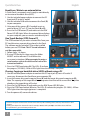
Read from / Write to an external drive
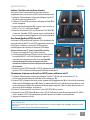
A Quick Dock is commonly used simply to work directly
on an external hard disk drive (HDD).
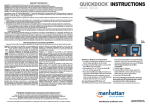
1.Use the included power adapter to connect the DC
Input jack (C) to an AC outlet.
2.Use the included USB cable to connect the Dock (D)
to your computer.
3.Using one of the spacers (E) if needed, insert an
external drive (2.5” or 3.5”) into the Dock (A or B).
4. Press the On/Off button (F) and make sure the R/W
Power LED (G) lights. When the external drive displays
on your computer, you can read or write directly to it.
A
B
E
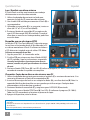
One Touch Backup (OTB) from a PC
The OTB function lets you move selected files from your
PC hard drive to a separate drive placed in the Dock.
DC INPUT
The software on the included CD must be installed
before you use OTB. Note: This PC-based software is
not Mac compatible.
1.Follow Steps 1-4 above.
2.If using OTB for the first time, open the folder
C
F
JMS551 on the software CD and follow the
on-screen instructions. When prompted to enter a
serial number, refer to the label on the back of this
instruction booklet.
I
3.Press the OTB/Clone button (H). The LEDs (I) indicate
the progress (25-100%). All four LEDs light when the backup is complete.
USB 3.0
D
G
H
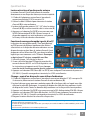
Cloning: Copying a hard disk drive (HDD) without using a PC
1.Use the included power adapter to connect the DC Input jack (C) to an AC outlet. If
necessary, disconnect the Dock from your computer (D).
2.Insert the source drive you’re copying from (A) and the target drive you’re copying to (B).
Note: The capacity of the target drive must be greater than that of the source drive. Any data
already on the target drive will be lost.
3.Press the On/Off button (F) and make sure the R/W Power LED (G) lights.
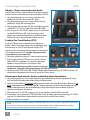
4.Press the OTB/Clone button (H) twice. The LEDs (I) indicate the progress (25-100%). All four
LEDs light when the copying process is complete.
5. Turn the power off; remove the drives.
• Don’t turn off power to the Dock or remove a drive while any LED is blinking; that is, while any data transfer is still in
progress.
• Cloning time depends on the transfer rate: for example, 100 GB / SATA @ 60 MBps would take about a half hour.
• For specifications, go to manhattan-products.com.
2
ENGLISH