1
4
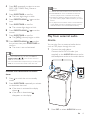
Press SRC repeatedly to select a source:
DISC, USB, TUNER, iPod_iPhone or
PLAYLIST.
5
Press SLEEP/TIMER to confirm.
»» The hour digits begin to blink.
6
Press PRESET/ALBUM
hour.
7
Press SLEEP/TIMER to confirm.
»» The minute digits begin to blink.
8
Press PRESET/ALBUM
minute.
9
Press SLEEP/TIMER to confirm.
»» The [VOL] (volume) begins to blink.
/
/
to set the
Note
•• In AUDIO IN mode, the alarm timer cannot be set.
•• If DISC/USB/Dock source is selected and the track
cannot be played, tuner is activated automatically.
•• If iPod/iPhone playlist is selected as the alarm source,
you need create a playlist called "PHILIPS" in your iPod/
iPhone.
•• If no playlist named “PHILIPS” exists in the iPod/iPhone
or the playlist includes no playable track, this product
switches the alarm source to iPod/iPhone library.
to set the
10 Press PRESET/ALBUM
/ to adjust
the volume, then press SLEEP/TIMER to
confirm.
»» The timer is set and activated.
Play from external audio
device
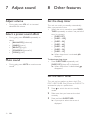
You can play from an external audio device
such as MP3 player through this unit.
1
Connect the audio device.
Connect the AUDIO IN cable (not
supplied) to the AUDIO IN socket and to
the headphone socket on the audio device.
2
Press SRC to select AUDIO IN source.
Tip
•• For source selection, you can also press VOL -/+,
PRESET/ALBUM
/
on the remote control, or
VOL -/+ on the main unit.
•• For hour/minute/volume adjustment, you can also press
VOL -/+ on the remote control or the main unit.
Activate and deactivate the alarm
timer
1
Press to switch the unit to standby
mode.
2
Press SLEEP/TIMER repeatedly to activate
or deactivate the timer.
»» If the timer is activated, the display
shows .
»» If the timer is deactivated,
disappears on the display.
EN
13