1
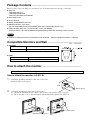
Package Contents ________________________________
Please contact your local dealer for assistance if any of the listed items are missing or damaged.
Arm Unit
-Attaching-wall Part
-Attaching-monitor Part
-Arm Part (Enclosed to LA-030-W)
Arm Cover, 2 pcs
User's Manual
Sheet (Compatible Screws List)
Mounting Screws, 4 pcs each
(For the compatible screws and monitors, refer to the ‘Compatible Screws List’.)
Fixing Screw(s) M4 x 16: 1 pc (LA-011-W) / 2 pcs (LA-030-W)
(Fixing screw(s) is put into the different bag from the bag which the mounting screws are into.)
NOTE
Screws for fixing wall anchor on the wall are not enclosed. Prepare appropriate screws in advance.
Compatible Monitors and Wall ______________________
Monitors
Supported Weight*
Hole Spacing
Unit: mm (inch)
4.0kg to 9.0 kg
100 mm x 100 mm (VESA compatible)
*Total weight of the monitor including the weight of the cables and optional peripherals.
Wall
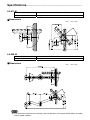
Thickness and Depth
Weight Capability
Refer to right figure
More than 130 kg
How to attach the monitor _________________________
Use specified screws for tightening up referring to the ‘Compatible Screws List’.
How to attach the monitor: LA-011-W
1.
Attach the Attaching-wall Part of the arm on the wall.
Fix them with screws (4 pcs).
Wall
Screws (4 pcs)
2.
Attach the Attaching-monitor Part to the monitor.
(1) Attach the Attaching-monitor Part to the monitor with specific screws (4 points).
(2) Put in the arm covers to the shield plate with sliding them rightward or leftward.
(1)
(2)
Arm covers
Mounting screws (4 pcs)