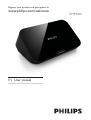
1
Register your product and get support at
www.philips.com/welcome
HMP3000
EN User manual
Englis h
Contents
1 Trademark notice
5
2 Connect and play
7
3 Control and play
11
4 Options
13
13
14
14
Video options
Audio option
Photo options
5 File browsing
15
16
17
18
19
Browse all files
Browse movie files
Browse music files
Browse photo files
6 File management
21
21
Basic operations
7 Settings
23
23
24
24
25
25
System
Audio
Video
EasyLink
MISC
EN
3
8 EasyLink
26
9 Troubleshooting
27
10 Specification
28
4
EN
Englis h
1 Trademark notice
HDMI, the HDMI logo, and High-Definition Multimedia Interface are
trademarks or registered trademarks of HDMI licensing LLC in the
United States and other countries.
Manufactured under license from Dolby Laboratories. Dolby and the
double-D symbol are trademarks of Dolby Laboratories.
ABOUT DIVX VIDEO: DivX® is a digital video format created by
DivX, Inc. This is an official DivX Certified® device that plays DivX
video. Visit divx.com for more information and software tools to
convert your files into DivX video.
ABOUT DIVX VIDEO-ON-DEMAND: This DivX Certified® device
must be registered in order to play purchased DivX Video-onDemand (VOD) movies. To obtain your registration code, locate the
DivX VOD section in your device setup menu. Go to vod.divx.com
for more information on how to complete your registration.
DivX®, DivX Certified®, DivX Plus™ HD and associated logos are
registered trademarks of DivX, Inc. and are used under license.
DivX Certified® to play DivX® and DivX Plus™ HD (H.264/MKV)
video up to 1080p HD including premium content.
EN
5
Real RMVB logo is a trademark or a registered trademark of
RealNetworks, Inc.
Windows Media and the Windows logo are trademarks, or
registered trademarks of Microsoft Corporation in the United States
and/or other countries.
Manufactured under license under U.S. Patent Nos: 5,956,674;
5,974,380; 6,487,535 & other U.S. and worldwide patents issued
& pending. DTS, the Symbol, & DTS and the Symbol together are
registered trademarks & DTS 2.0+Digital Out is a trademark of DTS,
Inc. Product includes software. © DTS, Inc. All Rights Reserved.
6
EN
Englis h
2 Connect and play
Register your product and get support at
www.philips.com/welcome
HMP3000
HMP3000
PC & Mac
1
EN
7
2
TV OUT + AUD
AUDIO
DIO OUT
L
3
8
EN
R
VIDEO
Englis h
4
5
AV / HDMI
SOURCE
TV
EN
9
6
1
2
USB
CARD
SETUP
3
1
2
USB
3
10
EN
CARD
SETUP
Englis h
3 Control and play
Use your remote control to control the play.
Function
Buttons / Actions
Stop the play.
Pause or resume the
play.
Skip to the previous/
/
next media file.
Return to the
home page.
Zoom in or out.
Press
repeatedly.
To pan through
an enlarged photo,
press / /
/
.
/
Search backward/
Press
repeatedly to select
forward fast.
a speed.
ሷଢ
Access subtitle
settings.
Rotate a photo.
Press / .
/ /
/
Navigate menus.
Confirm a selection OK
or entry.
Access option menus
during play or in the
file list.
эࠤ
Access the file
editing menu in the
file folder list.
EN
11
Note
• You can only play DivX videos that were rented or purchased with
DivX® registration code of this player. (Refer to “Setup’ > “MISC” >
[DivX® VOD Code])
• Subtitle files with the following filename extensions (.srt, .smi, .sub,
.ssa, .ass, .txt) are supported but not displayed in the file list.
• The subtitle filename has to be the same as the filename of the DivX
video (the file extension excluded).
• The DivX video file and the subtitle file must be saved under the
same directory.
12
EN
Englis h
4 Options
During play, press
to access the option items.
a
b
c
Video options
[Subtitle]: Adjust subtitle settings. Press
/
to select an item
and / to adjust values. Then press OK to confirm.
[Audio]: Select an audio language.
[GOTO]: Skip play to the specific time. Press
/
to select an
item and / to adjust values. Then press OK to confirm.
[Repeat Title]: Repeat the current title.
[Repeat All]: Repeat the all movie file.
[Repeat Off]: Turn off a repeat mode.
EN
13
[Video Setting]: Adjust the video settings. Press / to select an
item and
/
to adjust values. Then press OK to confirm.
Audio option
[Repeat Off]: Turn off a repeat mode.
[Repeat One]: Repeat the current music file.
[Repeat All]: Repeat all the music flies.
[Shuffle Loop]: Play music files in a random loop.
Photo options
[Slide Timing]: Set a display interval for a slideshow.
[Slide Transition]: Select a transition effect for a slideshow.
[Repeat Off]: Turn off a repeat mode.
[Repeat All]: Repeat all the photo flies.
[Shuffle Loop]: Play photo files in a random loop.
[Select Music]: Select and play a music file during slideshow.
[Video Setting]: Adjust the video settings.
14
EN
Englis h
5 File browsing
You can browse media files stored in a USB/SD storage device.
a
USB
CARD
SETUP
b
c
Folder
1
2
3
Press
Movies
Music
Photos
.
Select [USB]/ [CARD].
Select a mode to browse media files.
• [Folder]
• [Movies]
• [Music]
• [Photos]
EN
15
Browse all files
Folder
1
2
3
4
Movies
Music
Photos
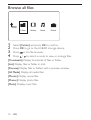
Select [Folder] and press OK to confirm.
Press OK to go to the USB/SD storage device.
Press
Press
in the file browser.
/
to select a mode to view or arrange files.
[Thumbnails]: Display thumbnails of files or folder.
[List]: Display files or folder in a list.
[Preview]: Display files or folders with a preview window.
[All Media] Display all media files.
[Movies]: Display movie files.
[Photos]: Display photo files.
[Music]: Display music files.
16
EN
Englis h
Browse movie files
Folder
1
2
3
4
Press
/
Movies
Music
Photos
to select [Movies] and press OK to confirm.
Press OK to go to the USB/SD storage device.
Press
Press
in the file browser.
/
to select a mode to view or arrange files.
[Search]: Search movie files. Follow on screen instruction to type in
key words in the mini keyboard and press
to start search.
[Thumbnails]: Display thumbnails of movie files or folder.
[List]: Display files or folder in a list.
[Preview]: Display files or folders with a preview window.
[All Movies]: Display all movies files.
[Go to Folder]: Go to the folder where the selected file is placed.
[Name]: List movies files in an alphabetical order of their names.
[Size]: List movies files in the ascending order of their sizes.
[Most Viewed]: List most viewed movie files.
[Recently Added]: List movie files added recently.
EN
17
Browse music files
Folder
1
2
3
4
Press
/
Movies
Music
Photos
to select [Music] and press OK to confirm.
Press OK to go to the USB/SD storage device.
Press
Press
in the file browser.
/
to select a mode to view or arrange files.
[Search]: Search music files. Follow on screen instruction to type in
key words in the mini keyboard and press
to start search.
[Thumbnails]: Display thumbnails of music files or folder.
[List]: Display files or folder in a list.
[Preview]: Display files or folders with a preview window.
[Go to Folder]: Go to the folder where the selected file is placed.
[All Songs]: Display all music files.
[Albums]: Sort music files by albums.
[Artists]: Sort music files by artists.
[Genres]: Sort music files by genres.
[Years]: Sort music files by years.
[Playlists]: Display play lists.
[Recently Played]: List music files played recently.
18
EN
[Recently Added]: List music files added recently.
Englis h
[Name]: List music files in an alphabetical order of their names.
Browse photo files
Folder
1
2
3
4
Press
/
Movies
Music
Photos
to select [Photos]and press OK to confirm.
Press OK to go to the USB/SD storage device.
Press
Press
in the file browser.
/
to select a mode to view or arrange files.
[Search]: Search photo files. Follow on screen instruction to type in
key words in the mini keyboard and press
to start search.
[Thumbnails]: Display thumbnails of photo files or folder.
[List]: Display files or folder in a list.
[Preview]: Display files or folders with a preview window.
[Photo Directory]: Display photo files in the directory mode.
[Leaf Folder View]: Display photo files in the leaf folder mode.
[Date view]: Sort photo files by date modified.
[All Photos]: Display all photos files.
EN
19
[Albums]: Sort photo files by album.
[Go to Folder]: Go to the folder where the selected file is placed.
[Name]: List photo files in an alphabetical order of their names.
[Recently Added]: List photo files added recently.
[Recently Played]: List photo files played recently.
20
EN
Englis h
6 File management
You can manage media files on the storage device.
Basic operations
a
USB
CARD
SETUP
b
c
Folder
1
2
3
4
5
Press
Movies
Music
Photos
.
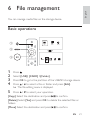
Select [USB]/ [CARD] >[Folder].
Press OK to go to the partition of the USB/SD storage device.
Press / to select a file or folder and press [Edit].
» The file editing menu is displayed.
Press
/
to select your operation.
[Copy]: Select the destination and press
to confirm.
[Delete]: Select [Yes] and press OK to delete the selected files or
folders.
[Move]: Select the destination and press
to confirm.
EN
21
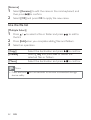
[Rename]
1
Select [Rename] to edit the name in the mini keyboard, and
then press
to confirm.
2
Select [OK] and press OK to apply the new name.
Use the file list
[Multiple Select]
1
Press /
the list.
2
3
Press [Edit]when you complete adding files and folders.
to select a file or folder and press
to add to
Select an operation.
[Copy]
[Delete]
[Move]
Select the destination and press
to confirm.
Select [Yes] and press OK to delete the
selected files or folders.
to confirm.
Select the destination and press
Note
• Press and hold
device safely.
22
EN
for two seconds to remove a connected storage
Englis h
7 Settings
You can change settings of this player in the setup menu.
a
USB
CARD
SETUP
b
System
c
Audio
Video
EasyLink
MISC
1
2
Press
.
Select [Setup] and press OK to confirm.
» The setup menu is displayed.
» Press
/
to select a menu item or setting option.
» Press OK to access the lower-level menu.
» Press
to return to the upper-level menu.
System
[Menu Language]: Select a language for on-screen menu.
[Subtitle]: Select a text encoding option of a subtitle for video.
EN
23
[Screen Saver]: Enable the screen saver in case of inactivity (for
example, in pause or stop mode).
[Auto Scan]: Scan media files on a storage device automatically.
[Scan Storage]: Start or stop scanning media files on a storage
device.
[Resume Play]: Resume playback of a video file from the point
where you last stopped.
[Factory Default]: Reset all settings to factory default.
Audio
[Night Mode]: Equalize loud sound and soft sound. If enabled, you
can watch movies at a low volume at night.
[HDMI Output]: Select an output sound format when connecting
the HDMI jack.
[SPDIF Output]: Select an output sound format when connecting
the digital audio jack.
Video
[Aspect Ratio]: Select display aspect ratio.
[TV System]: Select video output format to TV system.
[Video Zoom]: Zoom in or out video scenes.
[1080P 24Hz]: Use 1080p 24Hz video output mode for video
content.
24
EN
Englis h
Note
• The video resolution and the frame rate of the video content is
1080p 24Hz.
• Your TV supports the 1080p 24Hz.
• Ensure that you use a HDMI cable to connect this player to your TV.
[Deep Color]: Display colors with more shades and hues when the
video content is recorded in Deep Color mode and the TV supports
this feature.
EasyLink
[Easy Link]: Enable or disable the EasyLink feature.
[One Touch Play]: After you enable this feature, the connected
HDMI CEC TV automatically switches to the HDMI input channel
when you play a media file.
[One Touch Standby]: After you enable this feature, you can press
and hold on the remote control of your player to switch all
connected HDMI CEC devices to standby mode simultaneously.
MISC
[Version Info]: Display the information about software version of this
player.
[DivX® VOD Code]: Display the DivX® registration code and
deregistration code.
EN
25
8 EasyLink
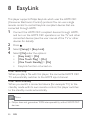
This player supports Philips EasyLink which uses the HDMI CEC
(Consumer Electronics Control) protocol. You can use a single
remote control to control EasyLink compliant devices that are
connected through HDMI.
1
Connect the HDMI CEC compliant devices through HDMI,
and turn on the HDMI CEC operations on the TV and other
connected devices (see the user manual of the TV or other
devices for details).
2
3
4
Press
.
Select [Setup] > [Easy Link].
Select [On]under the options:
• [Easy Link] > [On]
• [One Touch Play] > [On]
• [One Touch Standby] > [On]
• EasyLink function is turned on.
One Touch Play
When you play a file with this player, the connected HDMI CEC
TV automatically switches to the HDMI input channel.
One Touch Standby
When you switch a connected device (for example TV) to the
standby mode with its own remote control, this player switches
to the standby mode automatically.
Note
• Philips does not guarantee 100% interoperability with all HDMI CEC
devices.
26
EN
Englis h
9 Troubleshooting
If you contact Philips, you will be asked for the model and serial
number of this player. The model number and serial number are at
the bottom of this player. Write the numbers here:
Model No. __________________________
Serial No. ___________________________
No picture.
• Refer to the TV user manual for how to select the correct
video input channel
No sound output from the TV.
• Make sure that the audio cables are connected to the audio
input sockets that are grouped with the selected video input
sockets.
The contents of the USB storage device cannot be read.
• The format of this USB storage device is not supported.
• The supported memory size is 1TB maximum.
• Make sure that this player supports these files. (Refer to
“Specifications” > “Playable media”)
• DRM-protected video files that are stored on a USB/SD
storage device cannot be played through an analog video
connection (for example, composite). You need to use an
HDMI connection to play these files.
DivX subtitles are not displayed correctly.
• Make sure that the subtitle filename is the same as the video
filename.
• Make sure that the DivX video file and the subtitle file are
saved under the same directory.
EN
27
10 Specification
Note
• Specification and design are subject to change without notice.
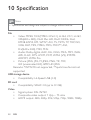
File
•
Video: MPEG 1/2/4(MPEG 4 Part 2), H.264, VC-1, H.263,
VP6(640 x 480),, DivX Plus HD, DivX 3/4/5/6, Xvid,
RMVB 8/9/10, RM, WMV*, AVI, TS, M2TS, TP, TRP, ISO,
VOB, DAT, MP4, MPEG, MPG, MOV**, ASF,
FLV(640 x 480), MKV, M4V.
• Audio: Dolby digital, AAC, RA, OGG, MKA, MP3, WAV,
APE, FLAC, DTS, LPCM, PCM, WMA (V9), IMP/MS
ADPCM, WMA Pro
• Picture: JPEG, JPG, M-JPEG, PNG, TIF, TIFF,
GIF (unanimated GIF), BMP, HD JPEG
Remarks: *WMV7/8 not supported, **quick time format not
supported
USB storage device
• Compatibility: Hi-Speed USB (2.0)
SD card
• Compatibility: SDHC 2.0 (up to 32 GB)
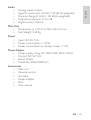
Video
•
•
•
28
EN
Signal system: PAL /NTSC
Composite video output: 1 Vpp ~ 75 ohm
HDMI output: 480i, 480p, 576i, 576p, 720p, 1080i, 1080p
Analog stereo output
Signal to noise ratio (1 kHz): > 90 dB (A-weighted)
Dynamic Range (1 kHz): > 80 dB (A-weighted)
Frequency response: +/-0.2 dB
Digital output: Optical
Englis h
Audio
•
•
•
•
•
Main Unit
• Dimensions (L x W x H): 136 x 86 x 52 mm
• Net Weight: 0.49 Kg
Power
•
•
•
Input: DC 9V 1.1A
Power consumption: < 10 W
Power consumption in standby mode: < 1 W
Power Adapter
• Power supply rating: AC 100V-240V 50Hz / 60Hz
• Output: DC 9V 1.1A
• Brand: Philips
• Model No: SSW-1918CN-1
Accessories
• Main unit
• Remote control
• AV cable
• Power adapter
• Disc
• User manual
EN
29
© 2011 Koninklijke Philips Electronics N.V.
All rights reserved.
HMP3000_93_UM_V2.1