1
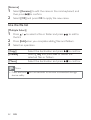
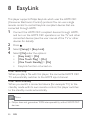
[Rename]
1
Select [Rename] to edit the name in the mini keyboard, and
then press
to confirm.
2
Select [OK] and press OK to apply the new name.
Use the file list
[Multiple Select]
1
Press /
the list.
2
3
Press [Edit]when you complete adding files and folders.
to select a file or folder and press
to add to
Select an operation.
[Copy]
[Delete]
[Move]
Select the destination and press
to confirm.
Select [Yes] and press OK to delete the
selected files or folders.
to confirm.
Select the destination and press
Note
• Press and hold
device safely.
22
EN
for two seconds to remove a connected storage