1
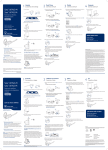
Customize Your Headset
Your headset comes configured for your right ear with a pre-installed small
eartip and medium earloop. You can also configure your headset for your left
ear, install a different sized eartip and earloop, or install the headband.
Change Headset Configuration
1 Gently pull the eartip from the headset. Rotate the earloop down 90°.
NOTE You will feel resistance when rotating the earloop down; this is normal.
90º
2 Remove the earloop from the headset.
3 To wear the headset on the right ear but with a different size earloop or eartip, select the size you
want and reinstall in reverse order as shown. Be sure notch in the eartip faces the microphone.
90º
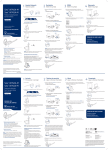
Left Earloop Assembly
90ºthe earloop as shown and insert it
1 Choose the size of earloop that fits most comfortably. Align
onto the headset. Be sure the earloop is flat against the headset and rotate the earloop up 90°.
90º
90º
90º
2 Choose the size of eartip that fits most comfortably. Align the eartip with the notch facing the
microphone as shown. Press on to attach.
7