1
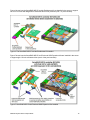
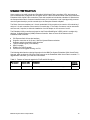
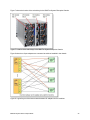
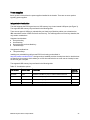
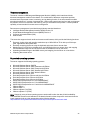
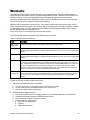
All I/O adapters are the same shape and can be used in any available slot. A compatible switch or
pass-through module must be installed in the corresponding I/O bays in the chassis, as indicated in the
following table. Installing two switches means that all ports of the adapter are enabled, which improves
performance and network availability.
Table 12. Adapter to I/O bay correspondence
I/O adapter slot in the server
Port on the adapter
Corresponding I/O module bay in the chassis
Port 1
Module bay 1
Port 2
Module bay 2
Port 3 (for 4-port cards)
Module bay 1
Port 4 (for 4-port cards)
Module bay 2
Port 1
Module bay 3
Port 2
Module bay 4
Port 3 (for 4-port cards)
Module bay 3
Port 4 (for 4-port cards)
Module bay 4
Port 1
Module bay 1
Port 2
Module bay 2
Port 3 (for 4-port cards)
Module bay 1
Port 4 (for 4-port cards)
Module bay 2
Port 1
Module bay 3
Port 2
Module bay 4
Port 3 (for 4-port cards)
Module bay 3
Port 4 (for 4-port cards)
Module bay 4
Slot 1
Slot 2
Slot 3
Slot 4
For a list of supported switches, see the IBM Flex System Interoperability Guide, available from:
http://www.redbooks.ibm.com/fsig
IBM Flex System x440 Compute Node
21