1
Always there to help you
Register your product and get support at
www.philips.com/welcome
Question?
Contact
Philips
User manual
HTB5510D
HTB5540D
HTB5570D
Contents
Energy saving settings Speaker settings Restore default settings 1 Important 2
2
3
3
4
2 Your home theater 5
5
5
6
Safety Care for your product Care of the environment 3D health warning Main unit Remote control Connectors 3 Connect and set up Connect speakers Connect to TV Connect digital devices through HDMI Connect audio from TV and other
devices Set up speakers Set up EasyLink (HDMI-CEC control) Connect and set up a home network 8
8
9
10
11
12
12
13
4 Use your home theater 15
15
15
17
17
18
19
20
21
21
21
22
24
25
5 Change settings 27
27
27
27
28
28
Access the home menu Discs Play audio through Bluetooth Data files USB storage devices Audio, video, and picture options Radio MP3 player iPod or iPhone Smartphone control Browse Smart TV Browse PC through DLNA Choose sound Language settings Picture and video settings Audio settings Parental control settings Display settings 28
28
29
6 Update software 30
Check software version 30
Update software through USB 30
Update software through the Internet 31
7 Product specifications 32
8 Troubleshooting 36
9 Notice 39
39
39
39
40
10 Language code 41
11 Index 42
Copyright Open source software Compliance Trademarks EN
1
1Important
Read and understand all instructions before you
use your product. If damage is caused by failure
to follow instructions, the warranty does not
apply.
Safety
Risk of electric shock or fire!
• Never expose the product and accessories
to rain or water. Never place liquid
containers, such as vases, near the product.
If liquids are spilt on or into the product,
disconnect it from the power outlet
immediately. Contact Philips Consumer
Care to have the product checked before
use.
• Never place the product and accessories
near naked flames or other heat sources,
including direct sunlight.
• Never insert objects into the ventilation
slots or other openings on the product.
• Where the mains plug or an appliance
coupler is used as the disconnect device,
the disconnect device shall remain readily
operable.
• Batteries (battery pack or batteries
installed) shall not be exposed to excessive
heat such as sunshine, fire or the like.
• Disconnect the product from the power
outlet before lightning storms.
• When you disconnect the power cord,
always pull the plug, never the cable.
Risk of short circuit or fire!
• Before you connect the product to the
power outlet, ensure that the power
voltage matches the value printed on the
back or bottom of the product. Never
connect the product to the power outlet if
the voltage is different.
Risk of injury or damage to the home theater!
• For wall-mountable products, use only the
supplied wall mount bracket. Secure the
2
EN
wall mount to a wall that can support the
combined weight of the product and the
wall mount. Koninklijke Philips Electronics
N.V. bears no responsibility for improper
wall mounting that results in accident,
injury or damage.
• For speakers with stands, use only the
supplied stands. Secure the stands to the
speakers tightly. Place the assembled stands
on flat, level surfaces that can support the
combined weight of the speaker and stand.
• Never place the product or any objects
on power cords or on other electrical
equipment.
• If the product is transported in
temperatures below 5°C, unpack the
product and wait until its temperature
matches room temperature before
connecting it to the power outlet.
• Visible and invisible laser radiation when
open. Avoid exposure to beam.
• Do not touch the disc optical lens inside
the disc compartment.
• Parts of this product can be made of
glass. Handle with care to avoid injury and
damage.
Risk of overheating!
• Never install this product in a confined
space. Always leave a space of at least four
inches around the product for ventilation.
Ensure curtains or other objects never
cover the ventilation slots on the product.
Risk of contamination!
• Do not mix batteries (old and new or
carbon and alkaine, etc.).
• Danger of explosion if batteries are
incorrectly replaced. Replace only with the
same or equivalent type.
• Remove batteries if they are exhausted or
if the remote control is not to be used for
a long time.
• Batteries contain chemical substances, they
should be disposed of properly.
Risk of swallowing batteries!
• The product/remote control may contain
a coin/button type battery, which can be
swallowed. Keep the battery out of reach
•
•
•
of children at all times! If swallowed, the
battery can cause serious injury or death.
Severe internal burns can occur within two
hours of ingestion.
If you suspect that a battery has been
swallowed or placed inside any part of the
body, seek immediate medical attention.
When you change the batteries, always
keep all new and used batteries out of
reach of children. Ensure that the battery
compartment is completely secure after
you replace the battery.
If the battery compartment cannot be
completely secured, discontinue use of the
product. Keep out of reach of children and
contact the manufacturer.
This is CLASS II apparatus with double
insulation, and no protective earth provided.
Care for your product
•
•
•
•
Do not insert any objects other than discs
into the disc compartment.
Do not insert warped or cracked discs into
the disc compartment.
Remove discs from the disc compartment
if you are not using the product for an
extended period of time.
Use only microfiber cloth to clean the
product.
Care of the environment
Your product is designed and manufactured
with high quality materials and components,
which can be recycled and reused.
When this crossed-out wheeled bin symbol is
attached to a product it means that the product
is covered by the European Directive 2002/96/
EC. Please inform yourself about the local
separate collection system for electrical and
electronic products.
Please act according to your local rules and
do not dispose of your old products with your
normal household waste.
Correct disposal of your old product helps to
prevent potential negative consequences for the
environment and human health.
Your product contains batteries covered by the
European Directive 2006/66/EC, which cannot
be disposed with normal household waste.
Please inform yourself about the local rules
on separate collection of batteries because
correct disposal helps to prevent negative
consequences for the environmental and
human health.
EN
3
3D health warning
If you or your family has a history of epilepsy
or photosensitive seizures, consult a medical
professional before exposing yourself to flashing
light sources, rapid image sequences or 3D
viewing.
To avoid discomfort such as dizziness, headache
or disorientation, we recommend not watching
3D for extended periods of time. If you
experience any discomfort, stop watching
3D and do not immediately engage in any
potentially hazardous activity (for example
driving a car) until your symptoms have
disappeared. If symptoms persist, do not resume
watching 3D without consulting a medical
professional first.
Parents should monitor their children during
3D viewing and ensure they do not experience
any discomfort as mentioned above. Watching
3D is not recommended for children under six
years of age as their visual system is not fully
developed yet.
4
EN
2 Your home
theater
Congratulations on your purchase, and
welcome to Philips! To fully benefit from the
support that Philips offers(e.g. notification
of product software upgrade), register your
product at www.philips.com/welcome.
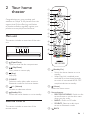
Main unit
This section includes an overview of the main
unit.
a
b
c
n
d
o
e
f
g
p
q
h
i
r
j
s
k
a b c de f
l
t
m
u
a (Open/Close)
Open or close the disc compartment.
b
(Play/Pause)
Start, pause or resume play.
c
(Stop)
Stop play.
a
(Standby-On)
• Switch the home theater on or to
standby.
• When EasyLink is enabled, press
and hold for at least three seconds
to switch all connected HDMI CEC
compliant devices to standby.
(Home)
Access the home menu.
d SOURCE
Select an audio, video, radio source or
Bluetooth mode for the home theater.
e
+/- (Volume)
Increase or decrease volume.
b
f
(Standby-On)
Switch the home theater on or to standby.
c Source buttons
• DISC/POP-UP MENU : Switch to disc
source.Access or exit the disc menu
when you play a disc.
• RADIO : Switch to FM radio.
• SOURCE : Select an audio input
source or Bluetooth mode.
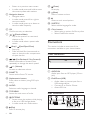
Remote control
This section includes an overview of the
remote control.
d
BACK
EN
5
• Return to a previous menu screen.
• In radio mode, press and hold to erase
the current preset radio stations.
e Navigation buttons
• Navigate menus.
• In radio mode, press left or right to
start auto search.
• In radio mode, press up or down to
tune the radio frequency.
f OK
Confirm an entry or selection.
g
h
/ (Previous/Next)
• Skip to the previous or next track,
chapter or file.
• In radio mode, select a preset radio
station.
(Stop) / (Eject/Open/Close)
• Stop play.
• Press and hold for three seconds to
open or close the disc compartment,
or eject the disc.
i
/
(Fast Backward / Fast Forward)
Search backwards or forward. Press
repeatedly to change the search speed.
j
+/- (Volume)
Increase or decrease volume.
k SMART TV
Access online Smart TV service.
l Alphanumeric buttons
Enter values or letters (using SMS style
entry).
q
(Pause)
Pause play.
r (Mute)
Mute or restore volume.
s
Access or exit sound options.
t SUBTITLE
Select subtitle language for video.
u Color buttons
• Select tasks or options for Blu-ray discs.
• Select iPod/iPhone source.
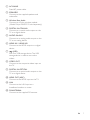
Connectors
This section includes an overview of the
connectors available on your home theater.
Front connectors
iPod/iPhone
ab
a AUDIO-IN
Audio input from an MP3 player (3.5mm
jack).
m AUDIO
Select an audio language or channel.
b iPod/iPhone (USB)
• Audio, video or picture input from a
USB storage device.
• Connect to an iPod or iPhone.
• Access BD-Live
n TOP MENU
Access the main menu of a disc.
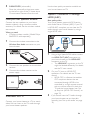
Rear connectors
o
OPTIONS
• Access more play options while playing
a disc or a USB storage device.
• In radio mode, set a radio station.
p
(Play)
Start or resume play.
6
EN
hi jk l
a AC MAINS
Fixed AC power cable.
b SPEAKERS
Connect to the supplied speakers and
subwoofer.
c Wireless Rear Audio
Connect to a Philips wireless module.
(Model: Philips RWSS5512, sold separately)
d DIGITAL IN-COAXIAL
Connect to a coaxial audio output on the
TV or a digital device.
e AUDIO IN-AUX
Connect to an analog audio output on the
TV or an analog device.
f HDMI IN1 / HDMI IN2
Connect to the HDMI output on a digital
device.
g
(USB)
Slot for a USB storage device. The USB
storage device is used to rent online
videos.
h VIDEO OUT
Connect to the composite video input on
the TV.
i DIGITAL IN-OPTICAL
Connect to an optical audio output on the
TV or a digital device.
j HDMI OUT (ARC)
Connect to the HDMI input on the TV.
k LAN
Connect to the LAN input on a
broadband modem or router.
l FM ANTENNA
Connect to the supplied FM antenna.
EN
7
3 Connect and set
up
This section helps you connect your home
theater to a TV and other devices, and then set
it up.
For information about the basic connections
of your home theater and accessories, see the
quick start guide.
SUB
WOOFER
FRONT
LEFT
FRONT
CENTER
FRONT
RIGHT
REAR
LEFT
REAR
RIGHT
Note
•• For identification and supply ratings, see the type plate
at the back or bottom of the product.
•• Before you make or change any connections, make sure
that all devices are disconnected from the power outlet.
* The actual speaker shapes may vary from the
illustration above.
Note
Connect speakers
The speaker cables are color-coded for easy
connection. To connect a speaker to your home
theater, match the color on the speaker cable to
the color on the connector.
Speaker position plays a critical role in setting
up a surround sound effect. For best effect,
position all the speakers towards the seating
position and place them close to your ear level
(seated).
•• Surround sound depends on factors such as room
shape and size, type of wall and ceiling, windows and
reflective surfaces, and speaker acoustics. Experiment
with the speaker positions to find the optimum setting
for you.
Follow these general guidelines for speakers
placement.
1
2
3
4
8
EN
Seating position:
This is the center of your listening area.
FRONT CENTER (front center) speaker:
Place the center speaker directly in front of
the seating position, either above or below
your TV.
FRONT LEFT (front left) and FRONT
RIGHT (front right) speakers:
Place the left and right speakers in the
front, and at equal distance from the center
speaker. Make sure that the left, right, and
the center speakers are at equal distance
from your seating position.
REAR LEFT (rear left) and REAR RIGHT
(rear right) speakers:
Place the rear surround speakers to the
left and right side of your seating position,
either in line with it or slightly behind it.
5
SUBWOOFER (subwoofer):
Place the subwoofer at least one meter
to the left or right of the TV. Leave about
10-centimeter clearance from the wall.
Make your rear speakers wireless
Connect the rear speakers to your home
theater wirelessly using a wireless module
accessory. For details, see the wireless module
user manual.
What you need
• A Philips wireless module. (Model: Philips
RWSS5512, sold separately)
1
Use the best quality connection available on
your home theater and TV.
Option 1: Connect to TV through
HDMI (ARC)
Best quality video
Your home theater supports HDMI version
with Audio Return Channel (ARC). If your TV
is HDMI ARC compliant, you can hear the TV
audio through your home theater by using a
single HDMI cable.
TV
Connect the wireless transmitter to the
Wireless Rear Audio connector on your
home theater.
1
2
3
Connect the rear speakers to the wireless
receiver.
Connect the wireless receiver to the
power supply.
Connect to TV
Connect your home theater to a TV to watch
videos. You can listen to the TV audio through
your home theater speakers.
2
3
Using a High Speed HDMI cable, connect
the HDMI OUT (ARC) connector on
your home theater to the HDMI ARC
connector on the TV.
• The HDMI ARC connector on the TV
might be labeled differently. For details,
see the TV user manual.
On your TV, turn on HDMI-CEC
operations. For details, see the TV user
manual.
• HDMI-CEC is a feature that enables
CEC compliant devices that are
connected through HDMI to be
controlled by a single remote control,
such as volume control for both the
TV and the home theater. (see 'Set
up EasyLink (HDMI-CEC control)' on
page 12)
If you cannot hear the TV audio through
your home theater, set up the audio
manually. (see 'Set up the audio' on page
13)
EN
9
Option 2: Connect to TV through
standard HDMI
Option 3: Connect to the TV through
composite video
Best quality video
If your TV is not HDMI ARC compliant, connect
your home theater to the TV through a
standard HDMI connection.
Basic quality video
If your TV does not have HDMI connectors, use
a composite video connection. A composite
connection does not support high-definition
video.
TV
1
2
3
4
Using a High Speed HDMI cable, connect
the HDMI OUT (ARC) connector on your
home theater to the HDMI connector on
the TV.
Connect an audio cable to hear the TV
audio through your home theater (see
'Connect audio from TV and other devices'
on page 11).
On your TV, turn on HDMI-CEC
operations. For details, see the TV user
manual.
• HDMI-CEC is a feature that enables
CEC compliant devices that are
connected through HDMI to be
controlled by a single remote control,
such as volume control for both the
TV and the home theater. (see 'Set
up EasyLink (HDMI-CEC control)' on
page 12)
If you cannot hear the TV audio through
your home theater, set up the audio
manually. (see 'Set up the audio' on page
13)
Note
•• If your TV has a DVI connector, you can use an HDMI/
DVI adapter to connect to TV. However, some of the
features may not be available.
10
EN
TV
1
2
3
4
Using a composite video cable, connect
the VIDEO OUT connector on your
home theater to the VIDEO IN connector
on the TV.
• The composite video connector might
be labeled AV IN, COMPOSITE, or
BASEBAND.
Connect an audio cable to hear the TV
audio through your home theater (see
'Connect audio from TV and other devices'
on page 11).
When you watch TV programs, press
SOURCE on your home theater
repeatedly to select the correct audio
input.
When you watch videos, switch your TV to
the correct video input. For details, see the
TV user manual.
Connect digital devices
through HDMI
Connect a digital device such as a set-top box,
games console, or camcorder to your home
theater through a single HDMI connection.
When you connect the devices in this way and
play a file or game, the
•
•
1
2
3
video is automatically displayed on your
TV, and
audio is automatically played on your home
theater.
Option 1: Connect audio through a
digital optical cable
Best quality audio
Using a High Speed HDMI cable, connect
the HDMI OUT connector on your digital
device to the HDMI IN 1/2 on your home
theater.
Connect your home theater to TV through
HDMI OUT (ARC).
• If the TV is not HDMI CEC compliant,
select the correct video input on your
TV.
On the connected device, turn on HDMICEC operations. For details, see the user
manual of the device.
• If you cannot hear the digital device
audio through your home theater, set
up the audio manually. (see 'Set up the
audio' on page 13)
• You can also press SOURCE on your
home theater repeatedly to select the
correct HDMI input.
TV
1
Using an optical cable, connect the
OPTICAL connector on your home
theater to the OPTICAL OUT connector
on the TV or other device.
• The digital optical connector might be
labeled SPDIF or SPDIF OUT.
Option 2: Connect audio through a
digital coaxial cable
Good quality audio
Connect audio from TV and
other devices
Play audio from TV or other devices through
your home theater speakers.
Use the best quality connection available on
your TV, home theater, and other devices.
Note
•• When your home theater and TV are connected
through HDMI ARC, an audio connection is not
required (see 'Option 1: Connect to TV through HDMI
(ARC)' on page 9).
1
Using a coaxial cable, connect the
COAXIAL connector on your home
theater to the COAXIAL/DIGITAL OUT
connector on the TV or other device.
• The digital coaxial connector might be
labeled DIGITAL AUDIO OUT.
EN
11
Option 3: Connect audio through
analog audio cables
compliant devices that are connected through
HDMI can be controlled by a single remote
control.
Basic quality audio
1
Using an analog cable, connect the AUX
connectors on your home theater to the
AUDIO OUT connectors on the TV or
other device.
Note
•• Depending on the manufacturer, HDMI-CEC is known
by many names. For information on your device, see
the user manual of the device.
•• Philips does not guarantee 100% interoperability with
all HDMI-CEC devices.
VCR
Before you start
• Connect your home theater to the HDMICEC compliant device through HDMI
connection.
• Make the necessary connections described
in the quick start guide, and then switch
the TV to the correct source for your
home theater.
Set up speakers
Set up the speakers manually to experience
customized surround sound.
Before you start
Make the necessary connections described in
the quick start guide, and then switch the TV to
the correct source for your home theater.
1
2
3
4
Press
(Home).
Select [Setup], and then press OK.
1
2
3
4
Press
(Home).
Select [Setup], and then press OK.
Select [EasyLink] > [EasyLink] > [On] .
On your TV and other connected devices,
turn on HDMI-CEC control. For details, see
the user manual of the TV or other devices.
• On your TV, set the audio output to
'Amplifier' (instead of TV speakers).
For details, see the TV user manual.
Select [Audio] > [Speaker Setup].
Enter the distance for each speaker, and
then listen to the test tones and change
the volume. Experiment with the speaker
positions to find the ideal setting.
Set up EasyLink (HDMI-CEC
control)
This home theater supports Philips EasyLink,
which uses the HDMI-CEC (Consumer
Electronics Control) protocol. EasyLink12
Enable EasyLink
EN
EasyLink controls
With EasyLink, you can control your home
theater, TV, and other connected HDMI-CEC
compliant devices with a single remote control.
• [One Touch Play] (One-touch play): When
a video disc is in the disc compartment,
press (Play) to wake up the TV from
standby, and then play a disc.
• [One Touch Standby] (One-touch
standby): If one-touch standby is enabled,
your home theater can switch to standby
•
•
with the remote control of the TV or other
HDMI-CEC devices.
[System Audio Control] (System audio
control): If system audio control is enabled,
the audio of the connected device is
output through your home theater
speakers automatically when you play the
device.
[Audio Input Mapping] (Audio input
mapping):If system audio control does not
work, map the connected device to the
correct audio input connector on your
home theater. (see 'Set up the audio' on
page 13)
Note
•• To change the EasyLink control settings, press
(Home), select [Setup] > [EasyLink].
Set up the audio
If you cannot hear the audio output of a
connected device through your home theater
speakers, do the following:
• Check that you have enabled EasyLink
on all the devices, (see 'Set up EasyLink
(HDMI-CEC control)' on page 12) and
• on your TV, set the audio output to
"Amplifier" (instead of TV speakers). For
details, see the TV user manual, and
• setup the EasyLink audio control.
1
2
3
4
5
Press
(Home).
Select [Setup], and then press OK.
Select [EasyLink] > [System Audio
Control] > [On].
• To play the audio from the TV
speakers, select [Off], and skip the
following steps.
Select [EasyLink] > [Audio Input
Mapping].
Follow the onscreen instructions to map
the connected device to the audio inputs
on your home theater.
• If you connect your home theater
to the TV through an HDMI ARC
connection, make sure that the TV
audio is mapped to the ARC input on
your home theater.
Connect and set up a home
network
Connect your home theater to a network
router for a network setup, and enjoy:
• Streamed multimedia content (see 'Browse
PC through DLNA' on page 24)
• Smartphone control
• Smart TV (see 'Browse Smart TV' on page
22)
• BD Live applications (see 'BD-Live on Bluray' on page 16)
• Software update (see 'Update software
through the Internet' on page 31)
Caution
•• Familiarize yourself with the network router, media
server software and networking principles. If necessary,
read documentation that accompanies the network
components. Philips is not responsible for lost, damaged,
or corrupt data.
Before you start
• For Smart TV and software updates, make
sure that the network router has access to
the Internet with high-speed connection
and is not restricted by firewalls or other
security systems.
• Make the necessary connections described
in the quick start guide, and then switch
the TV to the correct source for your
home theater.
Set up the wired network
What you need
• A network cable (RJ45 straight cable).
• A network router (with DHCP enabled). EN
13
LAN
www
1
2
3
4
5
6
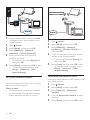
Using a network cable, connect the LAN
connector on your home theater to the
network router.
Press
(Home).
Select [Setup], and then press OK.
Select [Network] > [Network
installation] > [Wired (Ethernet)].
Follow the onscreen instructions to
complete the setup.
• If connection fails, select [Retry], and
then press OK.
Select [Finish], and then press OK to exit.
• To view the network settings, select
[Setup] > [Network] > [View
network settings].
Set up the wireless network
Your home theater has a built-in Wi-Fi for easy
access to a wireless network.
What you need
• A network router (with DHCP enabled).
For best wireless performance, coverage,
and compatibility, use 802.11n router.
14
EN
www
1
2
3
4
5
Press
(Home).
Select [Setup], and then press OK.
Select [Network] > [Network
installation] > [Wireless (Wi-Fi)], and
then press OK.
Follow the onscreen instructions to select
and set up the wireless network.
• If connection fails, select [Retry], and
then press OK.
Select [Finish], and then press OK to exit.
• To view the network settings, select
[Setup] > [Network] > [View
wireless settings].
Personalize the network name
Name your home theater to easily identify it on
your home network.
1
2
3
4
5
Press
(Home).
Select [Setup], and then press OK.
Select [Network] > [Name your
Product:].
Press the Alphanumeric buttons to enter
the name.
Select [Done], and then press OK to exit.
4 Use your home
theater
This section helps you use the home theater to
play media from a wide range of sources.
Before you start
• Make the necessary connections described
in the quick start guide and the user
manual.
• Complete the first-time setup. First-time
setup appears when you turn on your
home theater for the first time or if you do
not complete the setup.
• Switch the TV to the correct source for
your home theater (for example, HDMI,
AV IN).
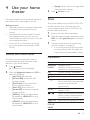
Access the home menu
The home menu provides easy access to
connected devices, setup and other useful
features in your home theater.
1
2
Press (Home).
»» The home menu is displayed.
Press the Navigation buttons and OK to
select the following:
• [play Disc]: Start disc play.
• [browse USB]: Access the USB
content browser.
• [iPod Music]: Access the iPod or
iPhone content browser.
• [Smart TV]: Access Smart TV.
• [browse PC]: Access the computer
content browser.
• [HDMI 1]: Select the digital device
connected to HDMI IN 1 on your
home theater.
• [HDMI 2]: Select the digital device
connected to HDMI IN 2 on your
home theater.
• [Setup]: Access menus to change video,
audio and other settings.
3
Press
(Home) to exit.
Discs
Your home theater can play DVDs, VCDs, CDs,
and Blu-ray discs. It can also play discs that
you’ve made at home, such as CD-R discs of
photos, videos, and music.
1
2
Insert a disc into the home theater.
If the disc does not play automatically, press
DISC or select [play Disc] from the home
menu.
3
Use the remote control to control play
(see 'Play buttons' on page 15).
• It is normal to hear a little noise when
you play a Blu-ray disc. This does not
mean that your home theater is faulty.
Play buttons
Button
Action
Navigation
buttons
Navigate menus.
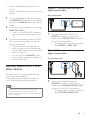
Up/Down: Rotate the picture
clockwise or counter-clockwise.
Confirm an entry or selection.
Start or resume play.
Pause play.
Stop play.
Press and hold for three seconds
to open or close the disc
compartment.
Skip to the previous or next track,
chapter or file.
Search fast backwards or forward.
When a video is paused, search
slow backwards or forward.
Select subtitle language for video.
Access or exit the disc menu.
OK
(Play)
/
/
/
SUBTITLE
DISC/
POP-UP
MENU
EN
15
Button
OPTIONS
Action
Access the advanced options
when you play your audio, video,
or media files (see 'Audio, video,
and picture options' on page 19).
Note
•• To avoid flickering, change the brightness of the display.
Bonus View on Blu-ray
Synchronize picture and sound
If the audio and video are not synchronized,
delay the audio to match the video.
1
2
3
4
Press .
Select AUD SYNC, and then press OK.
Press the Navigation buttons (up/down)
to synchronize the audio with the video.
Press OK to confirm.
Play Blu-ray 3D disc
Your home theater can play Blu-ray 3D video.
Read the 3D health warning before playing a
3D disc.
What you need
• A 3D TV
• A pair of 3D glasses that are compatible
with your 3D TV
• A 3D Blu-ray video
• A high speed HDMI cable
1
2
3
16
Using the high speed HDMI cable, connect
your home theater to a 3D compatible TV.
Make sure that the 3D video setting is
enabled. Press (Home), select [Setup] >
[Video] > [Watch 3D video] > [Auto].
• To play 3D discs in 2D mode, select
[Off].
Play a Blu-ray 3D disc and put on the 3D
glasses.
• During video search and in certain play
modes, the video is displayed in 2D.
The video display returns to 3D when
you resume play.
EN
On Blu-ray discs that support the Bonus View,
enjoy extra content such as commentaries in a
small screen window. Bonus View is also known
as picture-in-picture.
1
2
3
4
5
Enable Bonus View in the Blu-ray disc
menu.
While you play the movie, press
OPTIONS.
»» The options menu is displayed.
Select [PIP selection] > [PIP].
• Depending on the video, PIP menu [1]
or [2] is displayed.
• To disable Bonus View, select [Off].
Select [2nd audio language] or [2nd
Subtitle Language].
Select the language, and then press OK.
BD-Live on Blu-ray
Access additional features on the Blu-ray discs
with BD-Live content, such as internet chats
with the director, the latest movie trailers,
games, wallpaper, and ringtones.
BD-Live services and content vary from disc to
disc.
What you need
• Blu-ray disc with BD-Live content
• a USB storage device, with at least 1 GB of
memory
Connect your home theater to a home
network with Internet access (see 'Connect and
set up a home network' on page 13).
6
7
Connect a USB storage device to the
(USB) connector at the front of your
home theater for BD-Live download.
Press (Home) and select [Setup] >
[Advanced] > [BD-Live security] > [Off].
8
9
• To disable BD-Live, select [On].
Select the BD-Live icon in the disc menu,
and then press OK.
»» BD-Live starts to load. The loading
time depends on the disc and your
internet connection.
Press the Navigation buttons to navigate
BD-Live, and then press OK to select an
option.
»» When the Bluetooth connection
succeeds, BT_READY is displayed on
the display panel.
4
Note
•• To clear the memory on the storage device, press
(Home), select [Setup] > [Advanced] > [Clear
memory].
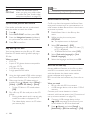
Play audio through Bluetooth
Through Bluetooth, connect the home theater
with your Bluetooth device (such as an iPad,
iPhone, iPod touch, Android phone, or laptop),
and then you can listen to the audio files stored
on the device through your home theater
speakers.
What you need
• A Bluetooth device which supports
Bluetooth profile A2DP, and with Bluetooth
version as 2.1 + EDR.
• The operational range between the
home theater and a Bluetooth device is
approximately 10 meters (30 feet).
1
2
3
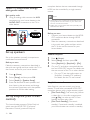
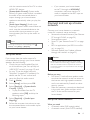
Press SOURCE repeatedly to select
Bluetooth mode.
»» BT is displayed on the display panel.
On the Bluetooth device, switch on
Bluetooth, search for and select the name
of your home theater to start connection
(see the user manual of the Bluetooth
device on how to enable Bluetooth).
• If prompted for a password, enter
"0000".
Wait until BT_READY is displayed on the
display panel.
5
»» If the connection fails, BT on the
display panel is still displayed.
Select and play audio files or music on
your Bluetooth device.
• During play, if a call is coming, music
play is paused.
• If music streaming is interrupted, place
the Bluetooth device closer to the
home theater.
To exit Bluetooth, select other source.
• When your switch back to Bluetooth
mode, Bluetooth connection remains
active.
Note
•• The music streaming may be interrupted by obstacles
between the device and home theater, such as wall,
metallic casing that covers the device, or other devices
nearby that operate in the same frequency.
•• If you want to connect your home theater with another
Bluetooth device, press and hold on the remote
control (or
on the main unit) to disable the
currently connected Bluetooth device.
•• Philips does not guarantee 100% compatibility with all
Bluetooth devices.
Data files
Your home theater can play pictures, audio and
video files contained in a disc or a USB storage
device. Before you play a file, check that the file
format is supported by your home theater (see
'File formats' on page 32).
1
2
Play the files from a disc or USB storage
device.
To stop play, press .
• To resume the video from where you
stopped, press (Play).
• To play the video from the start, press
OK.
EN
17
Note
•• To play DivX DRM protected files, connect your home
theater to a TV through an HDMI cable.
Europe, India, LATAM, and Russia
Character
Set
Language
[Standard]
English, Albanian, Danish,
Dutch, Finnish, French, Gaelic,
German, Italian, Kurdish (Latin),
Norwegian, Portuguese, Spanish,
Swedish and Turkish
Albanian, Croat, Czech, Dutch,
English, German, Hungarian, Irish,
Polish, Romanian, Slovak, Slovene
and Sorbian
Bulgarian, Belorussian, English,
Macedonian, Moldavian, Russian,
Serbian and Ukrainian
Greek
Estonian, Latvian and Lithuanian
Subtitles
If your video has subtitles in multiple languages,
select a subtitle language.
[Central
Europe]
Note
•• Make sure that the subtitle file has the exact same
name as the video file. For example, if the video file is
named 'movie.avi', name the subtitle file as 'movie.srt'
or 'movie.sub'.
•• Your home theater supports the following file formats:
.srt, .sub, .txt, .ssa, .ass, smi, and .sami. If the subtitles do
not appear correctly, change the character set.
1
2
3
4
While playing video, press SUBTITLE to
select a language.
For DivX or RMVB/RM videos, if the
subtitles do not appear correctly, continue
the following steps to change the character
set.
Press OPTIONS.
»» The options menu is displayed.
Select [Character set], and then select a
character set that supports the subtitle.
[Cyrillic]
[Greek]
[Baltic]
VOD code for DivX
Before you purchase DivX videos and play
them on your home theater, register the home
theater on www.divx.com using the DivX VOD
code.
1
2
3
Press
(Home).
Select [Setup], and then press OK.
Select [Advanced] > [DivX® VOD Code].
»» The DivX VOD registration code for
your home theater is displayed.
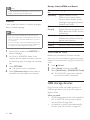
USB storage devices
Enjoy pictures, audio, and video stored on a
USB storage device such as an MP4 player or
digital camera.
What you need
• A USB storage device that is formatted for
FAT or NTFS file systems, and complies
with the Mass Storage Class.
• A media file in one of the supported file
formats (see 'File formats' on page 32).
18
EN
• [Info]: Display information about what
is playing.
• [Audio language]: Select audio
language for video.
• [Subtitle Language]: Select subtitle
language for video.
• [Subtitle shift]: Change the subtitle
position on the screen.
• [Character set]: Select a character set
that supports the DivX subtitle.
• [Time search]: Skip to a specific part
of the video by entering the time of
the scene.
• [2nd audio language]: Select the
second audio language for Blu-ray
video.
• [2nd Subtitle Language]: Select the
second subtitle language for Blu-ray
video.
• [Titles]: Select a specific title.
• [Chapters]: Select a specific chapter.
• [Angle list]: Select a different camera
angle.
• [Menus]: Display the disc menu.
• [PIP selection]: Display Picture-inPicture window when playing a Blu-ray
disc that supports the Bonus View.
• [Zoom]: Zoom into a video scene or
picture. Press the Navigation buttons
(left/right) to select a zoom factor.
• [Repeat]: Repeat a chapter or title.
• [Repeat A-B]: Mark two points within a
chapter or track to repeat play, or turn
off the repeat mode.
• [Picture settings]: Select a predefined
color setting.
Note
•• If you use a USB extension cable, USB HUB, or USB
multi-reader, the USB storage device may not be
recognized.
1
2
3
4
5
Connect a USB storage device to the
(USB) connector on your home theater.
Press
(Home).
Select [browse USB], and then press OK.
»» A content browser is displayed.
Select a file, and then press OK.
Press the play buttons to control play (see
'Play buttons' on page 15).
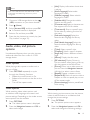
Audio, video, and picture
options
Use advanced features when you play pictures,
audio and video files from a disc or a USB
storage device.
Audio options
While playing audio, repeat an audio track, a
disc, or a folder.
1
Press OPTIONS repeatedly to cycle
through the following functions:
• Repeat the current track or file.
• Repeat all the tracks on the disc or the
folder.
• Turn off the repeat mode.
Video options
While watching video, select options such
as subtitles, audio language, time search, and
picture settings. Depending on the video source,
some options are not available.
1
2
Press OPTIONS.
»» The video options menu is displayed.
Press the Navigation buttons and OK to
select and change:
Picture options
While viewing a picture, zoom into the picture,
rotate it, add animation to a slideshow, and
change the picture settings.
1
2
Press OPTIONS.
»» The picture options menu appears.
Press the Navigation buttons and OK to
select and change the following settings:
EN
19
• [Info]: Display picture information.
• [Rotate +90]: Rotate the picture 90
degree clockwise.
• [Rotate -90]: Rotate the picture 90
degree counter-clockwise.
• [Zoom]: Zoom into a video scene or
picture. Press the Navigation buttons
(left/right) to select a zoom factor.
• [Duration per slide]: Select the display
speed for each picture in a slide show.
• [Slide animation]: Select animation for
the slide show.
• [Picture settings]: Select a predefined
color setting.
• [Repeat]: Repeat a selected folder.
If the picture and audio files are from the same
disc or USB storage device, you can create a
musical slideshow.
3
4
5
Select an audio track, and then press OK.
Press
folder.
BACK, and go to the picture
Select a picture, and then press
start the slideshow.
Press
to stop slideshow.
Press
again to stop music.
2
3
Musical slideshow
1
2
1
(Play) to
Connect the FM antenna to the FM
ANTENNA on your home theater.
• For the best reception, place the
antenna away from your TV or other
sources of radiation.
Press RADIO on the remote control to
switch to radio source.
»» If you have already installed the radio
stations, the last channel that you
listened to is played.
»» If you have not installed any radio
stations, the message AUTO
INSTALL...PRESS PLAY appears on
the display panel. Press (Play) to
install radio stations.
Use the remote control to listen or to
change radio stations.
Play buttons
Button
Action
/
or
Alphanumeric
buttons
Navigation
buttons
Select a preset radio station.
Note
•• Make sure that the picture and audio formats are
supported by your home theater (see 'File formats' on
page 32).
BACK
OPTIONS
Radio
Listen to FM radio on your home theater, and
store up to 40 radio stations.
Note
•• AM and digital radio are not supported.
•• If no stereo signal is detected, you are prompted to
install the radio stations again.
20
EN
SUBTITLE
Left/Right: Search for a radio
station.
Up/Down: Fine tune a radio
frequency.
Press to stop the installation
of radio stations.
Press and hold to erase the
preset radio station.
Manual:
1) Press OPTIONS. 2) Press
/ to select your preset.
3) Press OPTIONS again to
store the radio station.
Automatic: Press and hold
for three seconds to reinstall
the radio stations.
Toggle between the stereo
and mono sounds.
Tuning grid
In some countries, you can toggle the FM tuning
grid between 50 kHz and 100 kHz.
1
2
3
3
4
Press RADIO on the remote control to
switch to radio source.
Press .
Press and hold (Play) to toggle between
50 kHz or 100 kHz.
Browse your iPod or iPhone screen to
select the music.
Play the music on your iPod or iPhone.
»» The music is heard on your home
theater.
Note
•• The USB connector at the back of the home theater is
500mA and not for Apple devices.
•• A device with more than 500mA cannot be charged via
the USB connector at the back of the home theater.
MP3 player
Connect a MP3 player to play audio files.
What you need
• An MP3 player.
• A 3.5mm stereo audio cable.
1
2
3
Using the 3.5mm stereo audio cable,
connect the MP3 player to the AUDIO-IN
connector on your home theater.
• If you use 6.5mm stereo audio cable,
connect the MP3 player to your
home theater using a 3.5mm - 6.5mm
converter jack.
Press SOURCE repeatedly until AUDIOIN appears on the display panel.
Press the buttons on the MP3 player to
select and play audio files.
iPod or iPhone
Through the home theater, you can play audio
files from your iPod or iPhone.
1
2
With an iPod/iPhone USB cable, connect
your iPod or iPhone to the iPod/iPhone
(USB) connector at the side panel of your
home theater.
Press iPod/iPhone on the home theater
remote control.
• Charge your iPod/iPhone while the
home theater is in iPod/iPhone mode.
Smartphone control
Use your mobile device such as iPhone (iOS
3.1.3 and above), Android phone (2.1 and
above), iPad, or tablet to:
• Control your home theater
• Browse a data disc or USB storage device
• Stream and share content from the devices
on your home network
Before you start
• Connect your home theater, mobile device,
and other DLNA-compatible devices to
the same home network.
• For better video quality, use wired
connection whenever possible. • Personalize the network name for your
home theater (see 'Personalize the
network name' on page 14).
• Download Philips MyRemote application
on your mobile device.
• For iPhone or iPad, search for the app
in App Store (App Store).
• For Android based phone or tablet,
search for the app in Market (Market).
Control your home theater
1
On the mobile device, access MyRemote
application.
EN
21
2
3
Select your home theater (by its network
name) from the home screen.
»» A browsing bar is displayed at the
bottom of the screen.
• If your home theater is not found,
check the network connection or tap
the Devices tab on your mobile device
to search again.
Select one of the following tabs to access
more options.
• To return to the previous screen, press
back button.
Option
Action
App
Home
Media
Return to the home screen of your
device.
DISC: Browse and play a file stored
on a data disc.
USB: Browse and play a file stored
on a USB storage device.
Access the remote control on your
mobile device. Swipe the screen
to the left or right to access more
buttons. Only the relevant buttons
are enabled on your mobile device.
Some functions such as switch-on
from standby and long press, are not
available on the mobile device.
Remote
4
Follow the onscreen instructions to select
an option or complete the set up.
Stream multimedia content
(SimplyShare)
Philips SimplyShare allows you to use your
smartphone to stream multimedia content
(such as pictures, audio and video files), and play
through your home theater or any DLNAcompatible device in the same home network.
Before you start
• Install a DLNA-compliant media server
application on your mobile device, such as
Twonky Media Server.
22
EN
•
1
2
3
4
5
6
Enable media sharing of files. For details,
check the user manual of the media server
software software.
On the mobile device, launch the media
server application. For iPhone or Android
phone, access MyRemote application.
From the menu of your mobile device,
select SimplyShare.
»» Your home theater and other
devices on the home network are
automatically detected and displayed
on the screen.
Select a device on the network.
»» The folders in the selected device are
displayed. Depending on the media
server, the folder names may vary.
• If you cannot see the folders, make
sure that you enable media sharing on
the selected device so that the content
is available for sharing.
Select a media file to play.
From the menu on your mobile device,
select the home theater to stream the
media file to your home theater.
• Some media files may not display
or play due to compatibility issues.
For your home theater, check the
supported file formats.
Use your mobile device to control play.
Browse Smart TV
Use Smart TV to access variety of internet
applications and specially adapted internet
websites.
For interactive discussions on Smart TV services,
visit the Smart TV forum at www.supportforum.
philips.com
4
Note
•• Koninklijke Philips Electronics N.V. bears no
responsibility for content provided by Smart TV service
providers.
1
2
3
4
5
Connect your home theater to a home
network with high-speed Internet access
(see 'Connect and set up a home network'
on page 13).
Press
(Home).
Select [Smart TV], and then press OK.
Follow the onscreen instructions to
confirm the onscreen message.
»» The Smart TV home page is displayed.
Use the remote control to select
applications and enter text (for example,
web URL, passwords, etc) (see 'Navigate
Smart TV' on page 23).
Navigate Smart TV
Button
Action
Navigation
buttons
OK
Select an application or
navigate.
Confirm an entry or
selection.
Return to the previous page.
Delete a character in any text
entry box.
Enter characters in the text
entry box.
Exit Smart TV portal and
return to home menu.
BACK
Alphanumeric
buttons
(Home)
Clear browsing history
Rent online video
The function is only available in Smart TV
service that has the VOD feature.
Rent videos from online stores, through your
home theater. You can watch them right away
or later.
Many online video stores offer a huge choice of
video, with different rental prices, periods, and
conditions. For some stores, you must create an
account before you can rent.
What you need
• a USB storage device, with at least 8 GB of
memory
1
2
3
4
5
6
Clear the browsing history to remove
passwords, cookies, and browsing data from
your home theater.
1
2
3
Press
(Home).
Select [Setup], and then press OK.
Select [Network] > [Clear Smart TV
memory].
Press OK to confirm.
7
Connect your home theater to a home
network with high-speed Internet access
(see 'Connect and set up a home network'
on page 13).
Insert a blank USB storage device into the
(USB) connector at the back of your
home theater, and follow the onscreen
instructions to format the USB device.
• After formatting, leave the USB storage
device in the
(USB) connector.
• After formatting, the USB storage
device will no longer be compatible
with computers or cameras, unless
formatted again using Linux operating
system.
Press
(Home).
Select [Smart TV], and then press OK.
»» The online services available in your
country are displayed.
Select a video store, and then press OK.
Follow the onscreen instructions to rent
or watch a video. If prompted, enter the
necessary information to register or log in
to the store's account.
»» The video is downloaded to your USB
storage device. You can watch it only
on your home theater.
Press the playback buttons to control play
(see 'Play buttons' on page 15).
EN
23
• If you cannot play a video, check the
file format to make sure that it is
supported by your home theater (see
'File formats' on page 32).
Browse PC through DLNA
Access and play the pictures, audio and video
files from a computer or media server on the
home network through your home theater.
Before you start
• Install a DLNA-compliant media server
application on your device. Make sure that
you download an application that works
best for you. For example,
• Windows Media Player 11 or higher
for PC
• Twonky Media Server for Mac or PC
• Enable media sharing of files. For ease of
use, we have included the steps for the
following applications:
• Windows Media Player 11 (see
'Microsoft Windows Media Player 11'
on page 24)
• Windows Media Player 12 (see
'Microsoft Windows Media Player 12'
on page 24)
• Twonky Media for Mac (see 'Macintosh
OS X Twonky Media (v4.4.2)' on page
25)
•
•
•
•
Microsoft Windows Media Player 11
1
2
3
4
5
6
Note
•• For additional help on these applications or other
media servers, check the user manual of the media
server software software.
Set up media server software
To enable media sharing, set up the media
server software.
Before you start
7
8
EN
Start Windows Media Player on your PC.
Click the Library tab, and then select
Media Sharing.
The first time you select Media Sharing on
your PC,a pop-up screen appears. Check
the Share my media box and click OK.
»» The Media Sharing screen is displayed.
In the Media Sharing screen, make sure
that you see a device marked as Unknown
Device.
»» If you don't see an unknown device
after a minute or so, check that
your PC firewall is not blocking the
connection.
Select the unknown device and click Allow.
»» A green tick appears next to the
device.
By default, Windows Media Player shares
from these folders: My Music, My Pictures,
and My Videos. If your files are in other
folders, select Library > Add to Library.
»» The Add to Library screen is displayed.
• If necessary, select Advanced options
to display a list of monitored folders.
Select My folders and those of others I
can access, and then click Add.
Follow the onscreen instructions to add
the other folders that contain your media
files.
Microsoft Windows Media Player 12
1
24
Connect your home theater to a home
network. For better video quality, use wired
connection whenever possible.
Connect the computer and other DLNAcompatible devices to the same home
network.
Make sure that your PC firewall allows
you to run Media Player programs (or
the firewall’s exemption list has the media
server software included).
Switch on your computer and the router.
Start Windows Media Player on your PC.
2
3
4
5
6
7
8
In Windows Media Player, click the Stream
tab, and then select Turn on media
streaming.
»» The Media streaming options screen
is displayed.
5
6
Click Turn on media streaming.
»» You return to Windows Media Player
screen.
Click the Stream tab and select More
streaming options.
»» The Media streaming options screen
is displayed.
Make sure that you see a media program
in the Local network screen.
»» If you don't see a media program,
check that your PC firewall is not
blocking the connection.
Select the media program and click
Allowed.
»» A green arrow appears next to the
media program.
By default, Windows Media Player shares
from these folders: My Music, My Pictures,
and My Videos. If your files are in other
folders, click the Organize tab and select
Manage libraries > Music.
»» The Music Library Locations screen is
displayed.
Follow the onscreen instructions to add
the other folders that contain your media
files.
2
3
4
Visit www.twonkymedia.com to purchase
the software, or download a free 30-day
trial to your Macintosh.
Start Twonky Media on the Macintosh.
In the Twonky Media Server screen, select
Basic Setup and First Steps.
»» The First steps screen is displayed.
Type a name for your media server, and
then click Save changes.
Browse and select folders to share, and
then select Save Changes.
»» Your Macintosh rescans the folders
automatically so that they are ready to
share.
Play files from your PC
Note
•• Before you play multimedia content from the computer,
make sure that the home theater is connected to
the home network, and the media server software is
properly set up.
1
2
3
4
Macintosh OS X Twonky Media (v4.4.2)
1
Back in the Twonky Media screen, select
Basic Setup and Sharing.
»» The Sharing screen is displayed.
5
Press
(Home).
Select [browse PC], and then press OK.
»» A content browser is displayed.
Select a device on the network.
»» The folders in the selected device are
displayed. Depending on the media
server, the folder names may vary.
• If you cannot see the folders, check
that you have enabled media sharing
on the selected device so that the
content is available for sharing.
Select a file, and then press OK.
• Some media files may not play due
to compatibility issues. Check the file
formats supported by your home
theater.
Press the play buttons to control play (see
'Play buttons' on page 15).
Choose sound
This section helps you choose the ideal sound
for your video or music.
1
Press .
EN
25
2
Press the Navigation buttons (left/right) to
access the sound options on the display.
Sound options
Description
SURROUND
Select surround sound or
stereo sound.
Select a sound mode.
Delay the audio to match the
video.
Reduce sudden changes in
volume, for example, during
TV commercials.
SOUND
AUD SYNC
AUTO VOL
3
4
Select an option, and then press OK.
Press BACK to exit.
• If you do not press a button within a
minute, the menu exits automatically.
Surround sound mode
Experience an immersive audio experience with
surround sound modes.
1
2
3
4
Press .
Select SURROUND, and then press OK.
Press the Navigation buttons (up/down)
to select a setting from your display:
• AUTO: Surround sound based on the
audio stream.
• MULTI-CH: Traditional 5.1 channel for
a more relaxing cinematic experience.
• 5CH STER: 5-channel stereo for a
stereo source (e.g. CDDA).
• STEREO: 2-channel stereo sound. Ideal
for listening to music.
Press OK to confirm.
Sound mode
Select predefined sound modes to suit your
video or music.
1
2
3
26
4
Make sure that audio post processing is
enabled at the speakers (see 'Speaker
settings' on page 28).
Press .
Select SOUND, and then press OK.
EN
5
Press the Navigation buttons (up/down)
to select a setting on the display:
• AUTO: Automatically select a sound
setting based on the sound stream.
• BALANCED: Experience the original
sound of your movies and music,
without added sound effects.
• POWERFUL: Enjoy thrilling arcade
sounds, ideal for action-packed videos
and loud parties.
• BRIGHT: Spice up your dull movies
and music with added sound effects.
• CLEAR: Hear every detail in your
music and clear voices in your movies.
• WARM: Experience spoken words and
music vocals in comfort.
• PERSONAL: Personalize the sound
based on your preferences.
Press OK to confirm.
Equalizer
Change the high frequency (treble), mid
frequency (mid), and low frequency (bass)
settings of the home theater.
1
2
3
4
Press .
Select SOUND > PERSONAL, and then
press Navigation buttons (right).
Press the Navigation buttons (up/down)
to change bass, mid or treble frequency.
Press OK to confirm.
Auto volume
Turn on auto volume to reduce sudden changes
in volume, for example, during TV commercials.
1
2
3
4
Press .
Select AUTO VOL, and then press OK.
Press the Navigation buttons (up/down)
to select ON or OFF.
Press OK to confirm.
5 Change settings
Picture and video settings
The home theater settings are already
configured for optimal performance. Unless
you have a reason to change a setting, we
recommend that you keep the default setting.
1
2
3
4
Note
•• You cannot change a setting that is grayed out.
•• To return to the previous menu, press
BACK. To
exit the menu, press
(Home).
Language settings
1
2
3
4
Press
(Home).
Select [Setup], and then press OK.
Select [Preference], and then press OK.
Press the Navigation buttons and OK to
select and change:
• [Menu language]: Select a display
language for menu.
• [Audio]: Select an audio language for
discs.
• [Subtitle]: Select a subtitle language
for discs.
• [Disc menu]: Select a menu language
for discs.
Press
(Home).
Select [Setup], and then press OK.
Select [Video], and then press OK.
Press the Navigation buttons and OK to
select and change:
• [Tv type]: If the video does not appear
correctly, select a TV type (color
system).
• [TV display]: Select a picture format to
fit the TV screen.
• [HDMI video]: Select the resolution of
video signal that is output from HDMI
OUT (ARC) on your home theater.
To enjoy the selected resolution,
make sure that your TV supports the
selected resolution.
• [HDMI Deep Color]: Recreate the
natural world on your TV screen by
displaying vivid images using billion
colors. Your home theater must be
connected to a Deep Color enabled
TV through an HDMI cable.
• [Picture settings]: Select pre defined
color settings for the video display.
• [Watch 3D video]: Set HDMI video to
support 3D or 2D video.
Note
•• If you change a setting, make sure that the TV supports
the new setting.
Note
•• If your preferred disc language is not available, select
[Others] from the list, and enter the 4-digit language
code found at the end of this user manual (see
'Language code' on page 41).
•• If you select a language that is not available on a disc,
the home theater uses the default language of the disc.
Audio settings
1
2
3
4
Press
(Home).
Select [Setup], and then press OK.
Select [Audio], and then press OK.
Press the Navigation buttons and OK to
select and change:
EN
27
• [Night mode]: For quiet listening,
decrease the volume of loud sounds
on your home theater. Night mode
is only available in DVDs and Blu-ray
discs with Dolby Digital, Dolby Digital
Plus, and Dolby True HD soundtracks.
• [HDMI Audio]: Set the HDMI audio
output from your TV, or disable HDMI
audio output from the TV.
• [Speaker Setup]: Set up speakers for
best surround sound experience.
• [Default sound settings]: Restore
the equalizer settings of all the sound
modes to the default values.
• [Display panel]: Set the brightness of
the home theater front panel display.
• [VCD PBC]: Enable or disable the
content menu navigation of VCD and
SVCD discs with Play Back Control
feature.
Energy saving settings
1
2
3
4
Parental control settings
1
2
3
4
Press
(Home).
Select [Setup], and then press OK.
Select [Preference], and then press OK.
Press the Navigation buttons and OK to
select and change:
• [Change Password]: Set or change
your password for parental control
access. If you do not have a password
or have forgotten your password, enter
0000.
• [Parental control]: Restrict access
to discs that are recorded with age
ratings. To play all discs, irrespective of
the ratings, select 8 or [Off].
Display settings
1
2
3
4
28
Press
(Home).
Select [Setup], and then press OK.
Select [Preference], and then press OK.
Press the Navigation buttons and OK to
select and change:
• [Auto subtitle shift]: Enable or disable
automatic repositioning of subtitles on
TVs that support this feature.
EN
Press
(Home).
Select [Setup], and then press OK.
Select [Preference], and then press OK.
Press the Navigation buttons and OK to
select and change:
• [Screen saver]: Switch the home
theater to screen saver mode after 10
minutes of inactivity.
• [Auto standby]: Switch the home
theater to standby after 30 minutes of
inactivity. This timer works only when a
disc or USB play is paused or stopped.
• [Sleep timer]: Set the duration of the
sleep timer so that the home theater is
switched to standby after the specified
period.
Speaker settings
1
2
3
4
Press
(Home).
Select [Setup], and then press OK.
Select [Advanced], and then press OK.
Press the Navigation buttons and OK to
select and change:
• [Enhanced audio]: Select [On] to
enable audio post processing at the
speaker and enable karaoke settings
(if your product supports Karaoke).
To play the original audio of the disc,
select [Off].
Tip
•• Enable audio post processing before you select a
predefined sound mode (see 'Sound mode' on page
26).
Restore default settings
1
2
3
4
Press
(Home).
Select [Setup], and then press OK.
Select [Advanced] > [Restore default
settings], and then press OK.
Select [OK], and then press OK to
confirm.
»» Your home theater is reset to its
default settings except for some
settings such as parental control and
DivX VOD registration code.
EN
29
6 Update software
Philips continually tries to improve its products.
To get the best features and support, update
your home theater with the latest software.
Compare the version of your current software
with the latest version on www.philips.com/
support. If the current version is lower than the
latest version available on the Philips support
website, upgrade your home theater with the
latest software.
Caution
Step 1: Download the latest software
1
2
3
4
5
•• Do not install a lower version of software than the
current version installed on your product. Philips is not
liable for problems caused due to software downgrade.
6
Check software version
Press
(Home).
Update software through
USB
What you need
• A USB flash drive that is FAT or NTFSformatted, with at least 256MB of memory.
Do not use a USB hard drive.
• A computer with Internet access.
• An archive utility that supports the ZIP file
format.
30
EN
At the Philips Support website, find your
product and locate the Software and
drivers.
»» The software update is available as a
zip file.
Save the zip file in the root directory of
your USB flash drive.
Use the archive utility to extract the
software update file in the root directory.
»» The files are extracted under the
UPG_ALL folder of your USB flash
drive.
Disconnect the USB flash drive from your
computer.
Caution
•• Do not switch off the home theater or remove the
USB flash drive during the update.
Select [Setup], and then press OK.
Select [Advanced] > [Version
information].
»» The software version is displayed.
In your web browser, go to www.philips.
com/support.
Step 2: Update the software
Check the version of the current software
installed on your home theater.
1
2
3
Connect a USB flash drive to your
computer.
1
2
3
4
5
Connect the USB flash drive containing the
downloaded file to your home theater.
• Make sure that the disc compartment
is closed and no disc inside.
Press
(Home).
Select [Setup], and then press OK.
Select [Advanced] > [Software update]
> [USB].
Follow the onscreen instructions to
confirm the update.
»» Update process takes about 5 minutes
to complete.
Update software through the
Internet 1
2
3
4
5
Connect your home theater to a home
network with a high-speed Internet access
(see 'Connect and set up a home network'
on page 13).
Press
(Home).
Select [Setup], and then press OK.
Select [Advanced] > [Software update] >
[Network].
»» If an upgrade media is detected, you
are prompted to start or cancel the
update.
»» Downloading of the upgrading file may
take long, depending on your home
network condition.
Follow the onscreen instructions to
confirm the update.
»» Update process takes about 5 minutes
to complete.
»» Once complete, the home theater
automatically switches off and restarts.
If it does not, disconnect the power
cord for a few seconds and then
reconnect it.
EN
31
7Product
specifications
File formats
•
•
Note
•• Specifications and design are subject to change without
notice.
•
Region codes
The type plate on the back or bottom of the
home theater shows which regions it supports.
Country
Europe,
United Kingdom
Asia Pacific, Taiwan,
Korea
Latin America
DVD
BD
Audio:
• .aac, .mka, .mp3, .wma, .wav, .mp4, .m4a,
.flac, .ogg
• .ra (Available only in Asia Pacific and
China)
Video:
• .avi, .divx, .mp4, .m4v, .mkv, .asf, .wmv,
.m2ts, .mpg, .mpeg, .flv, .3gp
• .rmvb, .rm, .rv (Available only in Asia
Pacific and China)
Picture: .jpg, .jpeg, .jpe, .gif, .png
Bluetooth
••
••
Bluetooth profiles: A2DP
Bluetooth version: 2.1 + EDR
Audio formats
A
A
Australia,
New Zealand
Your home theater supports the following
audio files.
(. ra files are supported only in Asia Pacific and
China)
Extension
Container
.mp3
MP3
Audio
codec
MP3
Russia, India
C
.wma
ASF
WMA
China
C
.aac
AAC
.wav
WAV
AAC,
HEAAC
PCM
.m4a
.mka
MKV
MKA
AAC
PCM
Media formats
•
32
AVCHD, BD, BD-R/ BD-RE, BD-Video,
DVD-Video, DVD+R/+RW, DVD-R/-RW,
DVD+R/-R DL, CD-R/CD-RW, Audio CD,
Video CD/SVCD, Picture files, MP3 media,
WMA media, DivX Plus HD media, USB
storage device
EN
Dolby
Digital
DTS
core
MPEG
Bit rate
Upto 320
kbps
Upto 192
kbps
Upto 192
kbps
27.648
Mbps
192 kbps
27.648
Mbps
640 kbps
1.54 Mbps
912 kbps
MP3
WMA
.flac
FLAC
AAC,
HEAAC
AAC,
HEAAC
Cook
FLAC
.ogg
OGG
Vorbis
.ra
RM
MP3
Upto 320
kbps
Upto 192
kbps
Upto 192
kbps
Upto 192
kbps
96469 bps
Upto 24
bps
Variable
bit rate,
maximum
block size
4096
Upto 320
kbps
Video formats
If you have a high definition TV, your home
theater allows you to play your video files with:
• Resolution: 1920 x 1080 pixels at
• Frame rate: 6 ~ 30 frames per second.
.avi files in AVI container
Audio
codec
Video codec
Bit rate
PCM,
Dolby
Digital,
DTS core,
MP3,
WMA
DivX 3.11, DivX 4.x,
DivX 5.x, DivX 6.x
10 Mbps
max
MPEG 1, MPEG 2
MPEG 4 SP / ASP
H.264/AVC upto
[email protected]
WMV9
40 Mbps
38.4
Mbps
25 Mbps
45 Mbps
.divx files in AVI container
Audio codec
Video codec
Bit rate
PCM, Dolby
Digital, MP3,
WMA
DivX 3.11,
DivX 4.x, DivX 5.x,
DivX 6.x
10
Mbps
max
.mp4 or .m4v files in MP4 container
Audio codec
Video codec
Bit rate
Dolby Digital,
MPEG, MP3,
AAC, HE-AAC,
DD+
MPEG 1,
MPEG 2
40 Mbps
MPEG 4 ASP
38.4
Mbps
25 Mbps
H.264/AVC
[email protected]
.mkv files in MKV container
Audio codec
Video codec
Bit rate
PCM, Dolby
Digital, DTS core,
MPEG, MP3,
WMA, AAC, HEAAC, DD+
DivX Plus HD
30 Mbps
MPEG 1, MPEG 40 Mbps
2
MPEG 4 ASP
38.4
Mbps
H.264/AVC
25 Mbps
[email protected]
WMV9
45 Mbps
.m2ts files in MKV container
Audio codec
Video codec
Bit rate
PCM, Dolby Digital,
DTS core, MPEG,
MP3, WMA, AAC,
HE-AAC, DD+
MPEG 1,
MPEG 2
40 Mbps
MPEG 4 ASP
38.4
Mbps
25 Mbps
H.264/AVC
[email protected]
WMV9
45 Mbps
EN
33
.asf and .wmv files in ASF container
•
Audio codec
Video codec
Bit rate
Dolby Digital,
MP3, WMA,
DD+
MPEG 4 ASP
38.4 Mbps
Video
25 Mbps
H.264/AVC
[email protected]
WMV9
Video codec
Bit rate
PCM, DTS core,
MPEG, MP3
MPEG 1,
MPEG 2
40
Mbps
Audio
codec
Video codec
Bit rate
MP3,
AAC
H.264/AVC upto
[email protected]
H.263
25 Mbps
38.4 Mbps
.3gp files in 3GP container
Audio
codec
Video codec
Bit rate
AAC, HEAAC
MPEG 4 ASP
38.4 Mbps
H.264/AVC upto
[email protected]
25 Mbps
max
.rm, .rv, and .rmvb files in RM container
(Available only in Asia Pacific and China)
Audio codec
Video codec
Bit rate
AAC, COOK
RV30, RV40
40 Mbps
Amplifier
34
Total output power: 1000W RMS (30%
THD)
Frequency response: 20 Hz-20 kHz /
±3 dB
Signal-to-noise ratio: > 65 dB (CCIR) /
(A-weighted)
EN
•
•
.flv files in FLV container
•
Signal system: PAL / NTSC
HDMI output: 480i/576i, 480p/576p, 720p,
1080i, 1080p, 1080p24
Audio
Audio codec
•
•
•
45 Mbps
.mpg and .mpeg files in PS container
•
Input sensitivity:
• AUX: 2 V
• AUDIO IN: 1 V
•
S/PDIF Digital audio input:
• Coaxial: IEC 60958-3
• Optical: TOSLINK
Sampling frequency:
• MP3: 32 kHz, 44.1 kHz, 48 kHz
• WMA: 44.1 kHz, 48 kHz
Constant bit rate:
• MP3: 32 kbps - 320 kbps
• WMA: 48 kbps - 192 kbps
Radio
•
•
•
Tuning range:
• Europe/Russia/China: FM 87.5-108
MHz (50 kHz)
• Asia Pacific/Latin America: FM 87.5-108
MHz (50/100 kHz)
Signal-to-noise ratio: FM 50 dB
Frequency response: FM 180 Hz-12.5 kHz /
±3 dB
USB
•
•
•
•
Compatibility: Hi-Speed USB (2.0)
Class support: USB Mass Storage Class
(MSC)
File system: FAT16, FAT32, NTFS
USB connector:
• Front panel: 5V , 1A
• Rear panel: 5V , 500mA
Main unit
•
Power supply:
• Europe/China: 220-240 V~, 50 Hz
•
•
•
•
• Latin America/Asia Pacific: 110-127
V/220-240 V~, 50-60 Hz
• Russia/India: 220-240 V~, 50 Hz
Power consumption: 160 W
Standby power consumption: ≤ 0.5 W
Dimensions (WxHxD): 435 x 58 x 280
mm
Weight: 2.66 kg
•
• HTB5540: 3.64 kg/each (front); 0.61
kg/each (rear)
• HTB5570: 2.18 kg/each (front); 2.21
kg/each (rear)
Cable length (front):
• HTB5510: 3 m (front); 10 m (rear)
• HTB5540: 4 m (front); 10 m (rear)
• HTB5570: 4 m (front); 11 m (rear)
Subwoofer
Remote control batteries
•
•
•
•
•
•
•
Output power: 166 W RMS (30% THD)
Impedance: 4 ohm
Speaker drivers: 165 mm (6.5") woofer
Dimensions (WxHxD):
228.8 x 293 x 310 mm
Weight: 4 kg
Cable length: 3 m
Speakers
Center speaker:
• Output power: 166 W RMS (30% THD)
• Speaker impedance: 4 ohm
• Speaker drivers: 1 x 78 mm (3") full range
• Dimensions (WxHxD):
314.2 x 111.04 x 83 mm
• Weight: 1 kg
• Cable length: 2 m
Front/Rear speaker:
• Output power: 4 x 166 W RMS (30%
THD)
• Speaker impedance: 4 ohm
• Speaker drivers: 1 x 78 mm (3") full range
• Dimensions (WxHxD):
• HTB5510: 100.17 x 227.7 x 130.33
mm (front); 100.17 x 191.4 x 125.3
(rear)
• HTB5540: 250 x 1179.1 x 250 mm
(front); 100.17 x 191.4 x 125.3 mm
(rear)
• HTB5570: 250 x 1179.1 x 250 mm
(front/rear)
• Weight:
• HTB5510: 0.63 kg/each (front); 0.60
kg/each (rear)
2 x AAA-R03-1.5 V
Laser
•
•
•
Laser Type (Diode): InGaN/AIGaN (BD),
AIGaInP (DVD/CD)
Wave length: 405 +7 nm/-7 nm (BD),
655 +10 nm/-10 nm (DVD),
790 +10 nm/-20 nm (CD)
Output power (Max. ratings): 20 mW
(BD), 6 mW (DVD), 7 mW (CD)
EN
35
8Troubleshooting
Warning
•• Risk of electric shock. Never remove the casing of the
product.
To keep the warranty valid, never try to repair
the product yourself.
If you have problems using this product, check
the following points before you request service.
If you still have a problem, get support at www.
philips.com/support.
Main unit
The buttons on the home theater do not
work.
• Disconnect the home theater from the
power supply for a few minutes, then
reconnect.
• Make sure that the touch buttons surface
is not in contact with any conductive
material, like water drop, metal, etc.
Picture
No picture.
• Make sure that the TV is switched to the
correct source for the home theater.
No picture on a TV connected through HDMI.
• Make sure that you use a High Speed
HDMI cable to connect the home theater
and TV. Some Standard HDMI cables do
not display properly for some images, 3D
video, or Deep Color.
• Make sure that the HDMI cable is not
faulty. If it is faulty, replace it with a new
cable.
• Press (Home) and then 731 on the
remote control to restore the default
picture resolution.
36
EN
•
Change the HDMI video setting, or wait
for 10 seconds for auto recovery (see
'Picture and video settings' on page 27).
Disc does not play high-definition video.
• Make sure that the disc contains highdefinition video.
• Make sure that the TV supports highdefinition video.
• Use an HDMI cable to connect to the TV.
Sound
No sound from home theater speakers.
• Connect the audio cable from your home
theater to your TV or other devices.
However, you do not need a separate
audio connection when:
• the home theater and TV are
connected through an HDMI ARC
connection, or
• a device is connected to the HDMI IN
connector on your home theater.
• Set up the audio for the connected device.
• Reset your home theater to its factory
settings, and then switch it off and switch
on again.
• On your home theater, press SOURCE
repeatedly to select the correct audio
input.
Distorted sound or echo.
• If you play audio from the TV through the
home theater, make sure that the TV is
muted.
Audio and video are not synchronized.
• 1) Press . 2) Press the Navigation
buttons (left/right) to select AUD
SYNC, and then press OK. 3) Press
the Navigation buttons (up/down) to
synchronize the audio with the video.
Play
Cannot play a disc.
• Clean the disc.
•
•
•
Make sure that the home theater supports
the type of disc (see 'Media formats' on
page 32).
Make sure that the home theater supports
the region code of the disc (see 'Region
codes' on page 32).
If the disc is a DVD±RW or DVD±R disc,
make sure that it is finalized.
Cannot play a DivX file.
• Make sure that the DivX file is encoded
according to the 'Home Theater Profile'
with the DivX encoder.
• Make sure that the DivX file is complete.
DivX do not display correctly.
• Make sure that the subtitle file name is
the same as the movie file name (see
'Subtitles' on page 18).
• Select the correct character set: 1) Press
OPTIONS. 2) Select [Character set]. 3)
Select the supported character set. 4)
Press OK.
Cannot read the contents of a USB storage
device.
• Make sure that the format of the USB
storage device is compatible with the
home theater.
• Make sure that the file system on the USB
storage device is supported by the home
theater.
'No entry' or 'x' sign appears on the TV.
• The operation is not possible.
EasyLink does not work.
• Make sure that the home theater is
connected to a Philips brand EasyLink TV,
and the EasyLink option is turned on (see
'Set up EasyLink (HDMI-CEC control)' on
page 12).
• For TVs from different manufacturers, the
HDMI CEC could be called differently.
Check theTV user manual on how to
enable it.
When you switch on the TV, the home theater
automatically switches on.
• This behavior is normal when you are using
Philips EasyLink (HDMI-CEC). To make the
home theater work independently, switch
off EasyLink.
Cannot access BD-Live features.
• Make sure that the home theater is
connected to the network. Use a wired
network connection (see 'Set up the wired
network' on page 13), or wireless network
connection (see 'Set up the wireless
network' on page 14).
• Make sure that the network is set up.
Use a wired network installation (see 'Set
up the wired network' on page 13), or
wireless network installation (see 'Set up
the wireless network' on page 14).
• Make sure that the Blu-ray disc supports
BD-Live features.
• Clear memory storage (see 'BD-Live on
Blu-ray' on page 16).
My 3D video played in 2D mode.
• Make sure that your home theater is
connected to a 3D TV through an HDMI
cable.
• Make sure that the disc is a Blu-ray 3D disc,
and the Blu-ray 3D video option is on (see
'BD-Live on Blu-ray' on page 16).
TV screen is black when you play a Blu-ray 3D
video or a DivX copy protected video.
• Make sure that the home theater is
connected to the TV through an HDMI
cable.
• Switch to the correct HDMI source on
the TV.
Cannot download video from an online video
store.
• Make sure that your home theater is
connected to the TV through an HDMI
cable.
• Make sure that the USB storage device
is formatted, has enough memory to
download the video.
EN
37
•
•
•
Make sure that you have paid for the video,
and it is within the rental period.
Make sure that the network connection
is good. Use a wired network connection
(see 'Set up the wired network' on page
13), or a wireless network connection (see
'Set up the wireless network' on page 14).
Visit the video store website for more
information.
Bluetooth
A device cannot connect with the home
theater.
• The device does not support the
compatible profiles required for the home
theater.
• You have not enabled the Bluetooth
function of the device. See the user manual
of the device on how to enable the
function.
• The device is not correctly connected.
Connect the device correctly. (see 'Play
audio through Bluetooth' on page 17)
• The home theater is already connected
with another Bluetooth device. Disconnect
the connected device, then try again.
Quality of audio play from a connected
Bluetooth device is poor.
• The Bluetooth reception is poor. Move
the device closer to the home theater, or
remove any obstacle between the device
and the home theater.
The connected Bluetooth device connects and
disconnects constantly.
• The Bluetooth reception is poor. Move
the device closer to the home theater, or
remove any obstacle between the device
and the home theater.
• Turn off Wi-Fi function on the Bluetooth
device to avoid interference.
38
EN
•
For some Bluetooth, the Bluetooth
connection can be deactivated
automatically to save power. This does
not indicate any malfunction of the home
theater.
Network
Wireless network distorted or not found.
• Make sure that the wireless network is
not disturbed by microwave ovens, DECT
phones, or other neighboring Wi-Fi devices.
• Place the wireless router and the home
theater within five meters of each other.
• If the wireless network does not work
properly, try a wired network installation
(see 'Set up the wired network' on page
13).
9Notice
This section contains the legal and trademark
notices.
Copyright
This item incorporates copy protection
technology that is protected by U.S. patents
and other intellectual property rights of
Rovi Corporation. Reverse engineering and
disassembly are prohibited.
This product incorporates proprietary
technology under license from Verance
Corporation and is protected by U.S. Patent
7,369,677 and other U.S. and worldwide
patents issued and pending as well as copyright
and trade secret protection for certain aspects
of such technology. Cinavia is a trademark of
Verance Corporation. Copyright 2004-2010
Verance Corporation. All rights reserved by
Verance. Reverse engineering or disassembly is
prohibited.
Cinavia notice
This product uses Cinavia technology to
limit the use of unauthorized copies of some
commercially-produced film and videos and
their soundtracks. When a prohibited use of an
unauthorized copy is detected, a message will
be displayed and playback or copying will be
interrupted.
More information about Cinavia technology
is provided at the Cinavia Online Consumer
Information Center at http://www.cinavia.com.
To request additional information about Cinavia
by mail, send a postcard with your mailing
address to: Cinavia Consumer Information
Center, P.O. Box 86851, San Diego, CA, 92138,
USA.
Open source software
Open source software
Philips Electronics Hong Kong Ltd. hereby offers
to deliver, upon request, a copy of the complete
corresponding source code for the copyrighted
open source software packages used in this
product for which such offer is requested by
the respective licenses.
This offer is valid up to three years after
product purchase to anyone in receipt of this
information. To obtain source code, please
contact [email protected]. If you prefer
not to use email or if you do not receive
confirmation receipt within a week after mailing
to this email address, please write to "Open
Source Team, Philips Intellectual Property &
Standards, P.O. Box 220, 5600 AE Eindhoven,
The Netherlands." If you do not receive timely
confirmation of your letter, please email to the
email address above.
Compliance
This product complies with the radio
interference requirements of the European
Community.
Hereby, Philips Consumer Lifestyle, declares that
this product is in compliance with the essential
requirements and other relevant provisions of
Directive 1999/5/EC.
A copy of the EC declaration of Conformity
is available in the Portable Document Format
(PDF) version of the user manual at www.
philips.com/support.
EN
39
Trademarks
"Blu-ray 3D " and "Blu-ray 3D " logo are
trademarks of Blu-ray Disc Association.
'DVD Video' is a trademark of DVD Format/
Logo Licensing Corporation.
Java and all other Java trademarks and logos are
trademarks or registered trademarks of Sun
Microsystems, Inc. in the United States and/or
other countries.
Manufactured under license under U.S. Patent
Nos: 5,956,674; 5,974,380; 6,226,616; 6,487,535;
7,392,195; 7,272,567; 7,333,929; 7,212,872
& other U.S. and worldwide patents issued
& pending. DTS-HD, the Symbol, & DTSHD and the Symbol together are registered
trademarks & DTS-HD Master Audio | Essential
is a trademark of DTS, Inc. Product includes
software. DTS, Inc. All Rights Reserved.
Manufactured under license from Dolby
Laboratories. Dolby, Pro Logic, and the
double-D symbol are trademarks of Dolby
Laboratories.
40
EN
DivX , DivX Certified , DivX Plus HD
and associated logos are trademarks of Rovi
Corporation or its subsidiaries and are used
under license.
ABOUT DIVX VIDEO: DivX is a digital video
format created by DivX, LLC, a subsidiary
of Rovi Corporation. This is an official DivX
Certified device that plays DivX video. Visit
divx.com for more information and software
tools to convert your files into DivX videos.
ABOUT DIVX VIDEO-ON-DEMAND: This
DivX Certified device must be registered
in order to play purchased DivX Video-onDemand (VOD) movies. To obtain your
registration code, locate the DivX VOD section
in your device setup menu. Go to vod.divx.com
for more information on how to complete your
registration.
DivX Certified to play DivX and DivX Plus
HD (H.264/MKV) video up to 1080p HD
including premium content.
The terms HDMI and HDMI High-Definition
Multimedia Interface, and the HDMI Logo are
trademarks or registered trademarks of HDMI
Licensing LLC in the United States and other
countries.
The Bluetooth word mark and logos are
registered trademarks owned by Bluetooth
SIG, Inc. and any use of such marks by Philips
is under license. Other trademarks and trade
names are those of their respective owners.
CLASS 1
LASER PRODUCT
10Language code
Abkhazian
6566
Afar
6565
Afrikaans
6570
Amharic
6577
Arabic
6582
Armenian
7289
Assamese
6583
Avestan
6569
Aymara
6589
Azerhaijani
6590
Bahasa Melayu
7783
Bashkir
6665
Belarusian
6669
Bengali
6678
Bihari
6672
Bislama
6673
Bokmål, Norwegian
7866
Bosanski
6683
Brezhoneg
6682
Bulgarian
6671
Burmese
7789
Castellano, Español
6983
Catalán
6765
Chamorro
6772
Chechen
6769
Chewa; Chichewa; Nyanja 7889
9072
Ё᭛
Chuang; Zhuang
9065
Church Slavic; Slavonic 6785
Chuvash
6786
Corsican
6779
Česky
6783
Dansk
6865
Deutsch
6869
Dzongkha
6890
English
6978
Esperanto
6979
Estonian
6984
Euskara
6985
6976
Faroese
7079
Français
7082
Frysk
7089
Fijian
7074
Gaelic; Scottish Gaelic 7168
Gallegan
7176
Georgian
7565
Gikuyu; Kikuyu
7573
Guarani
7178
Gujarati
7185
Hausa
7265
Herero
7290
Hindi
7273
Hiri Motu
7279
Hrwatski
6779
Ido
7379
Interlingua (International)7365
Interlingue
7365
Inuktitut
7385
Inupiaq
Irish
Íslenska
Italiano
Ivrit
Japanese
Javanese
Kalaallisut
Kannada
Kashmiri
Kazakh
Kernewek
Khmer
Kinyarwanda
Kirghiz
Komi
Korean
Kuanyama; Kwanyama
Kurdish
Lao
Latina
Latvian
Letzeburgesch;
Limburgan; Limburger
Lingala
Lithuanian
Luxembourgish;
Macedonian
Malagasy
Magyar
Malayalam
Maltese
Manx
Maori
Marathi
Marshallese
Moldavian
Mongolian
Nauru
Navaho; Navajo
Ndebele, North
Ndebele, South
Ndonga
Nederlands
Nepali
Norsk
Northern Sami
North Ndebele
Norwegian Nynorsk;
Occitan; Provencal
Old Bulgarian; Old Slavonic
Oriya
Oromo
Ossetian; Ossetic
Pali
Panjabi
Persian
Polski
Português
7375
7165
7383
7384
7269
7465
7486
7576
7578
7583
7575
7587
7577
8287
7589
7586
7579
7574
7585
7679
7665
7686
7666
7673
7678
7684
7666
7775
7771
7285
7776
7784
7186
7773
7782
7772
7779
7778
7865
7886
7868
7882
7871
7876
7869
7879
8369
7868
7878
7967
6785
7982
7977
7983
8073
8065
7065
8076
8084
Pushto
Russian
Quechua
Raeto-Romance
Romanian
Rundi
Samoan
Sango
Sanskrit
Sardinian
Serbian
Shona
Shqip
Sindhi
Sinhalese
Slovensky
Slovenian
Somali
Sotho; Southern
South Ndebele
Sundanese
Suomi
Swahili
Swati
Svenska
Tagalog
Tahitian
Tajik
Tamil
Tatar
Telugu
Thai
Tibetan
Tigrinya
Tonga (Tonga Islands)
Tsonga
Tswana
Türkçe
Turkmen
Twi
Uighur
Ukrainian
Urdu
Uzbek
Vietnamese
Volapuk
Walloon
Welsh
Wolof
Xhosa
Yiddish
Yoruba
Zulu
8083
8285
8185
8277
8279
8278
8377
8371
8365
8367
8382
8378
8381
8368
8373
8373
8376
8379
8384
7882
8385
7073
8387
8383
8386
8476
8489
8471
8465
8484
8469
8472
6679
8473
8479
8483
8478
8482
8475
8487
8571
8575
8582
8590
8673
8679
8765
6789
8779
8872
8973
8979
9085
EN
41
11Index
2
2nd audio language
2nd subtitle language
3
3D disc in 2D mode
3D safety
3D video
5
5.1 speakers
16
16
16
4
16
8
D
data files
deep color
default settings
device name
disc language
disc menu
display panel
disposal
DivX
E
A
advanced settings
amplifier
audio connection (analog cable)
audio connection (HDMI ARC)
audio formats
audio from other devices
audio language
audio options
audio post processing
audio settings
auto standby
auto subtitle shift
auto volume
B
batteries
BD-Live
Blu-ray
Bonus View
brightness
28
34
12
9
32
11
27
19
28
27
28
28
26
35
16
15
16
28
Easylink (HDMI-CEC)
eject disc
enhanced audio
environment
F
factory settings
file formats
H
HDMI ARC
HDMI audio
HDMI-CEC
home menu
home network
I
internet
iPod or iPhone
L
C
change password
character set
clear BD-Live memory
connect a digital device (HDMI)
42
connect to TV
connectors
control buttons (disc)
control buttons (USB)
EN
28
18
16
10
language code
M
main unit
9
6
15
15
17
27
29
14
27
27
28
3
17
12
5
28
3
29
32
9
27
12
15
13
13
21
41
5
manual setup
media formats
media sharing
menu language
musical slideshows
N
network
night mode
O
one-touch play
one-touch standby
options
P
parental control
PBC (play back control)
picture options
picture resolution
picture settings
picture-in-picture
play disc
play from iPod
play from PC
play USB storage device
power settings
predefined sound mode
preference
R
recycling
region codes
remote control
repeat
S
shuffle
sleep timer
slide animation
Smart TV
software update
software version
sound
12
32
24
27
20
13
27
12
12
19
speaker position
speaker setup
speaker specifications
subtitle language
subtitle position
surround sound
synchronize picture and sound
8
12
32
27
28
26
16
T
troubleshooting (network)
troubleshooting (picture)
troubleshooting (play)
troubleshooting (sound)
tuning grid
38
36
36
36
21
U
28
28
19
27
27
16
15
21
25
18
28
26
27
update software (through Internet)
USB storage device
31
18
V
VCD
video connection (composite video)
video connection (HDMI ARC)
video connection (standard HDMI)
video formats
video options
video settings
VOD code (DivX)
28
10
9
10
34
19
27
18
W
3
32
5
19
watch 3D
wired network
wireless network
wireless rear audio
wireless speakers
16
13
14
9
9
19
28
19
22
30
30
25
EN
43
Philips Consumer Lifestyle B.V.
HK-1312-HTB55X0D;
2013/03
.................................................................
(Document No. / Numéro du document)
..............................................................................................
(Year, Month (yyyy/mm) in which the CE mark is affixed /
Année/mois (aaaa/mm) au cours de laquelle le marquage
CE a été apposé)
EUROPEAN DECLARATION OF CONFORMITY
(DECLARATION DE CONFORMITE CE)
We / Nous, PHILIPS CONSUMER LIFESTYLE B.V.
(Company name / Nom de l’entreprise)
TUSSENDIEPEN 4, 9206 AD DRACHTEN, THE NETHERLANDS
(address / adresse)
declare under our responsibility that the product(s):
(déclarons sous notre propre responsabilité que le(s) produit(s))
Philips
.............................................................................
(brand name, nom de la marque)
HTB5510D/12;HTB5540D/12;
HTB5570D/12;
...........................................................................
(Type version or model, référence ou modèle)
Home Theater
.............................................................................
(product description, description du produit)
to which this declaration relates is in confirmity with the following harmonized standards:
(auquel cette déclaration se rapporte, est conforme aux normes harmonisées suivantes)
(title, number and date of issue of the standard / titre, numéro et date de parution de la norme)
EN 60065:2006+A1:2006+A11:2008+A2:2010+A12:2011
EN 55013:2001+A1:2003+A2:2006
EN 55020:2007+A11:2011
EN55022:2010
EN55024:2010
EN61000-3-2:2006+A1:2009+A2:2009
EN61000-3-3:2008
EN301489-1 V1.9.2 :2011
EN301489-17 V2.1.1 : 2009
EN300328 V1.7.1:2006
EN62311:2008
EN50564 : 2011
EN62479:2010
EN50581: 2012
following the provisions of :
(conformément aux exigences essentielles et autres dispositions pertinentes de:)
2006/95/EC (Low Voltage Directive)
2004/108/EC (EMC directive)
1999/5/EC (R&TTE Directive)
2011/65/EU (RoHS Directive)
2009/125/EC (Eco Design) - EC/1275/2008
And are produced under a quality scheme at least in conformity with ISO 9001 or CENELEC Permanent Documents
(Et sont fabriqués conformément à une qualité au moins conforme à la norme ISO 9001 ou aux Documents Permanents CENELEC)
Only for Medical Devices and R&TTE products:
The Notified Body:
(L’Organisme Notifié)
CE0560
..................................................
(Name and number/ nom et numéro)
and issued the certificate:
(et a délivré le certificat)
Remarks:
(a effectué)
NB
................................................................................
(description of intervention / description de ’intervention)
13214037/AA/00
...........................................................
(certificate number / numéro du certificat)
Drachten, Netherlands, March 21, 2013
A.Speelman, CL Compliance Manager
(place,date / lieu, date)
(signature, name and function / signature, nom et fonction)
.........................................................
Philips Consumer Lifestyle B.V.
44
performed:
...................................................................
template AMB 544-9056
Specifications are subject to change without notice
© 2013 Koninklijke Philips Electronics N.V.
All rights reserved.
HTB5510D_5540D_5570D_12_UM_V1.0