1
Maintenance Indicators
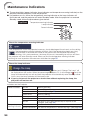
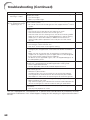
■ The warning lights (power indicator, lamp indicator and temperature warning indicator) on the
projector indicate problems inside the projector.
■ If a problem occurs, either the temperature warning indicator or the lamp indicator will
illuminate red, and the projector will enter Standby mode. After the projector has entered
Standby mode, follow the procedures given below.
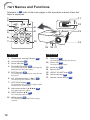
Top View
Temperature warning indicator
Lamp indicator
Power indicator
About the temperature warning indicator
If the temperature inside the projector increases, due to blockage of the air vents, or the setting
location, the temperature warning indicator will blink. And if the temperature keeps on rising,
“
” will illuminate in the lower left corner of the picture with the temperature warning
indicator blinking. If this state continues, the lamp will turn off, the cooling fan will run and then
the projector will enter Standby mode. When you find the temperature warning indicator
blinking, be sure to perform the measures described on page 55.
About the lamp indicator
■ When the remaining lamp life becomes 5% or less, (yellow) and “Change The Lamp” will
be displayed on the screen. When the percentage becomes 0%, it will change to (red), the
lamp will automatically turn off and then the projector will automatically enter Standby mode.
At this time, the lamp indicator will illuminate in red.
■ If you try to turn on the projector a fourth time without replacing the lamp, the
projector will not turn on.
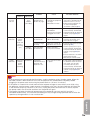
Indicators on the Projector
Power indicator
Normal (Standby)
Normal (Power on)
Abnormal (See page 55.)
Normal (Cooling)
Lamp indicator
Normal
The lamp is warming up.
The lamp is shut down abnormally or requires to be
changed. (See page 55.)
Temperature
Off
Normal
warning indicator Red on/Red blinks The internal temperature is abnormally high. (See page 55.)
54
Red on
Green on
Red blinks
Green blinks
Green on
Green blinks
Red on