1
Connections
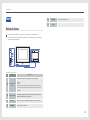
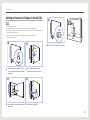
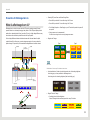
Putting in Devices for Display in the NL22B
5
NOTE
• Door open angle: ≤ 100˚
• Maximum live load of the display panel: less than 20kg (15kg or lower recommended)
• If you place a bulky object inside the product, the light source may be blocked causing the inside and
screen of the product to be dark.
• The key is only provided to open or close the door. It is not intended to prevent theft.
This applies to all products.
1
1
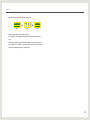
Insert the key into the slot and turn the
key in the direction of the arrow as shown
in the image.
3
3
Put in a device or accessories to display in
the product.
2
2
5 Turn the key in the direction of the arrow.
Open the door at the back of the
product in the direction of the arrow.
4
4
Close the door at the back.
21