1
ENGLISH
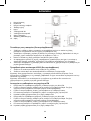
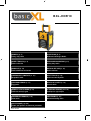
Heavy duty radio
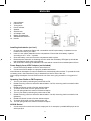
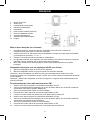
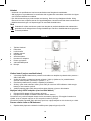
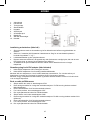
1.
2.
3.
4.
5.
6.
7.
8.
9.
10.
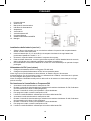
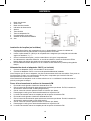
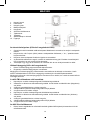
Volume Button
FM Antenna
Tuning Knob
Power Indicator
Speaker
AUX-IN Jack
AC Adaptor Jack
Battery Compartment
AM/FM/Power Selector
Handle
Installing the batteries (not incl.)
1.
2.
3.
4.
5.
Unscrew the compartment fixture with a screwdriver and lift up the battery compartment cover
located on the rear of your radio.
Insert 4 C size (UM-2) batteries into the compartment. Ensure that each battery is placed
according to the “+” and “-” symbols.
Close the battery cover and screw the compartment back in place.
Reduced power, distortion, a shuttering sound or when the low battery LED lights up all indicate
that the batteries might need to be replaced.
We recommend removing the batteries if the radio will be unused for an extended period of time.
Power Supply from AC/DC Adaptor (not included)
1. Connect the AC/DC adaptor to the DC inlet of the unit.
2. Connect the AC/DC adaptor to a properly installed wall socket.
Note: Whenever the adaptor is used, the batteries are automatically disconnected. To operate the radio
on battery power, check that the AC plug is detached from the DC inlet of the unit.
Note: Unplug the adaptor from the mains and the unit if the unit is going unused for a long period of
time.
Operating Your Radio on FM Frequency
1.
2.
Turn on your radio by switching the power knob to FM.
Rotate the tuning control to select the desired station. On FM, the tuning scale is marked in MHz
(Megahertz).
3. Rotate the volume control to find the desired volume.
4. To switch off the radio, turn the power knob to Off.
5. The soft spring antenna is used for FM band reception.
6. Turn on your radio by switching the power knob to AM.
7. Rotate the tuning control to select the desired station. On AM, the tuning scale is marked in kHz
(kilohertz).
8. Rotate the volume control to find the desired volume.
9. To switch off the radio, turn the power knob to Off.
10. The soft spring antenna is used for FM band reception.
AUX-IN Socket
1.
Connect the AUX connect wire from the output jack of, for example, a portable MP3 player to the
AUX input jack.
2