1
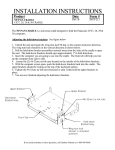
7160-0044 Screen Support continued -
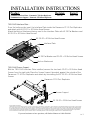
7160-0044 can be used as the Screen Support for Panasonic CF27, CF28 & CF29 Port
Replicators that use a GJ-PAN-CF27 Interface bracket.
Attach Screen Support to last hole on right side of Panasonic Port Replicator using screw,
washer and nut found in Hardware Bag 7120-0094 before attaching the GJ-PAN-CF27
Interface.
Complete the install by attaching the GJ-PAN-CF27.
Use the mounting screws supplied with the interface, thru remaining mounting hole on the
scre.en support.
Panasonic Port Replicator
CF27, CF28 or CF29
Nut from
Hardware Bag 7120-0094
inside last hole
7160-0044 Screen Support
attach on Right Side
GJ-PAN-CF27
Screw & Washer from
Hardware Bag 7120-0094
on outside
Screws & Washers supplied with
GJ-PAN-CF27
2 of 2