1
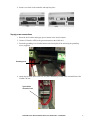
4. Put the cover back on the controller and snap into place.
Supply power connections
1. Route the tLAN cables and supply power harness to the electrical panel.
2. Connect J3 from the AFPS to the green connector on the tLAN card.
3. Fasten the grounding wire from the harness to the back plate of the unit using the grounding
screw (supplied).
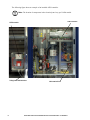
Grounding screw
4. Attach the electrical wires to the 24V AC power terminals provided in the terminal block of the
Uniflair CW unit.
Typical 24V AC
connection in unit
Automatic Floor Pressurization Sensor for Uniflair CW — Installation
7