1
Pairing Instructions
Headset and Transmitter
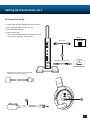
The headset and transmitter are pre-paired out of the box. The instructions below are only necessary if pre-pairing
appears to have been lost.*
1. Headset should be powered OFF.
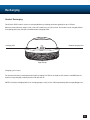
2. Press and hold Power/Pairing button on the transmitter for 5 seconds until the Power/Pairing LED flashes rapidly.
(The headset will announce “Pairing headset.”) Release.
3. Press and hold Power button on the headset until the Power LED flashes rapidly. Release.
4. Once your Turtle Beach PX51 headset has been paired successfully, the headset’s Power LED will blink once per
second and the transmitter Power/Pairing LED will light solid. A voice prompt will announce, “Headset paired.”
5 GHz WiFi
dual band wireless
* If pairing is unsuccessful on first attempt, please try again. It may take as many as five attempts to pair successfully.
8