1
RocketRAID 600 Series 6Gb/s SATA Host Adapters Quick Installation Guide
Hardware Installation
Kit Contents
z
z
z
z
z
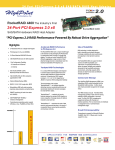
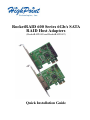
RocketRAID 62x controller
2 SATA cables (RR620)
HighPoint Software CD
Low-profile bracket
Quick Installation Guide
Installing the RR62x Host Adapter
Note: Make sure the system is powered-off before installing the RocketRAID 62x
host adapter.
1)
Open the system chassis and locate an unused PCI-E (2.0 or 1.0) x1, x4, x8
or x16 slot.
2)
Remove the PCI slot cover.
3)
Gently insert the RocketRAID 62x into the PCI-E slot, and secure the
bracket to the system chassis.
4)
After installing the adapter, attach the hard disks or disk enclosure to the
RocketRAID card using the SATA or eSATA cables.
5)
Close and secure the system chassis.
Driver Installation (Windows 7, Vista, 2008)
1)
After installing the RR62x host adapter, boot to the Windows operating
system.
2)
Windows should automatically detect the card, and displays the “Found New
Hardware Wizard”. Select “Locate and install driver software”. When
Windows asks: “Windows needs your permission to continue”, select
“Continue”.
3