1
SVENSKA
NEDERLANDS
ESPAÑOL
ITALIANO
FRANÇAIS
DEUTSCH
ENGLISH
Network Audio Player
NA7004
1.NA7004N_ENG_30A_0714.indd F1
2011/07/14 11:37:00
NA7004K_30A_0714.indd 35
2011/07/14 11:17:29
SVENSKA
CAUTION
CAUTION:
TO REDUCE THE RISK OF ELECTRIC SHOCK, DO NOT REMOVE
COVER (OR BACK). NO USER-SERVICEABLE PARTS INSIDE.
REFER SERVICING TO QUALIFIED SERVICE PERSONNEL.
The lightning flash with arrowhead symbol, within an equilateral
triangle, is intended to alert the user to the presence of
uninsulated “dangerous voltage” within the product’s enclosure
that may be of sufficient magnitude to constitute a risk of
electric shock to persons.
The exclamation point within an equilateral triangle is intended
to alert the user to the presence of important operating
and maintenance (servicing) instructions in the literature
accompanying the appliance.
WARNING:
TO REDUCE THE RISK OF FIRE OR ELECTRIC SHOCK, DO NOT
EXPOSE THIS APPLIANCE TO RAIN OR MOISTURE.
ESPAÑOL
ITALIANO
IMPORTANT SAFETY
INSTRUCTIONS
n SAFETY PRECAUTIONS
RISK OF ELECTRIC SHOCK
DO NOT OPEN
NEDERLANDS
1.
2.
3.
4.
5.
6.
7.
Read these instructions.
Keep these instructions.
Heed all warnings.
Follow all instructions.
Do not use this apparatus near water.
Clean only with dry cloth.
Do not block any ventilation openings.
Install in accordance with the manufacturer’s instructions.
8. Do not install near any heat sources such as radiators, heat registers,
stoves, or other apparatus (including amplifiers) that produce heat.
9. Protect the power cord from being walked on or pinched particularly at
plugs, convenience receptacles, and the point where they exit from the
apparatus.
10. Only use attachments/accessories specified by the manufacturer.
11. Use only with the cart, stand, tripod, bracket, or table
specified by the manufacturer, or sold with the apparatus.
When a cart is used, use caution when moving the cart/
apparatus combination to avoid injury from tip-over.
12. Unplug this apparatus during lightning storms or when
unused for long periods of time.
13. Refer all servicing to qualified service personnel.
Servicing is required when the apparatus has been damaged in any way,
such as power-supply cord or plug is damaged, liquid has been spilled or
objects have fallen into the apparatus, the apparatus has been exposed to
rain or moisture, does not operate normally, or has been dropped.
14. Batteries shall not be exposed to excessive heat such as sunshine, fire or
the like.
FRANÇAIS
DEUTSCH
ENGLISH
CAUTION:
To completely disconnect this product from the mains, disconnect
the plug from the wall socket outlet.
The mains plug is used to completely interrupt the power supply to
the unit and must be within easy access by the user.
VORSICHT:
Um dieses Gerät vollständig von der Stromversorgung abzutrennen,
ziehen Sie bitte den Stecker aus der Wandsteckdose.
Der Netzstecker wird verwendet, um die Stromversorgung zum
Gerät völlig zu unterbrechen; er muss für den Benutzer gut und
einfach zu erreichen sein.
PRECAUTION:
Pour déconnecter complètement ce produit du courant secteur,
débranchez la prise de la prise murale.
La prise secteur est utilisée pour couper complètement
l’alimentation de l’appareil et l’utilisateur doit pouvoir y accéder
facilement.
ATTENZIONE:
Per scollegare completamente questo prodotto dalla rete di
alimentazione elettrica, scollegare la spina dalla relativa presa a
muro.
La spina di rete viene utilizzata per interrompere completamente
l’alimentazione all’unità e deve essere facilmente accessibile
all’utente.
PRECAUCIÓN:
Para desconectar completamente este producto de la alimentación
eléctrica, desconecte el enchufe del enchufe de la pared.
El enchufe de la alimentación eléctrica se utiliza para interrumpir
por completo el suministro de alimentación eléctrica a la unidad
y debe de encontrarse en un lugar al que el usuario tenga fácil
acceso.
WAARSCHUWING:
Om de voeding van dit product volledig te onderbreken moet de
stekker uit het stopcontact worden getrokken.
De netstekker wordt gebruikt om de stroomtoevoer naar het toestel
volledig te onderbreken en moet voor de gebruiker gemakkelijk
bereikbaar zijn.
FÖRSIKTIHETSMÅTT:
Koppla loss stickproppen från eluttaget för att helt skilja produkten
från nätet.
Stickproppen används för att helt bryta strömförsörjningen till
apparaten, och den måste vara lättillgänglig för användaren.
I
1.NA7004N_ENG_30A_0714.indd F3
2011/07/14 11:37:01
ENGLISH
DEUTSCH
FRANÇAIS
ITALIANO
ESPAÑOL
NEDERLANDS
SVENSKA
n NOTE ON USE / HINWEISE ZUM GEBRAUCH / OBSERVATIONS RELATIVES A L’UTILISATION / NOTE SULL’USO /
NOTAS SOBRE EL USO / ALVORENS TE GEBRUIKEN / OBSERVERA ANGÅENDE ANVÄNDNINGEN
WARNINGS
WARNHINWEISE
AVERTISSEMENTS
AVVERTENZE
ADVERTENCIAS
WAARSCHUWINGEN
VARNINGAR
• Avoid high temperatures.
Allow for sufficient heat
dispersion when installed in a
rack.
• Handle the power cord carefully.
Hold the plug when unplugging
the cord.
• Keep the unit free from
moisture, water, and dust.
• Unplug the power cord when
not using the unit for long
periods of time.
• Do not obstruct the ventilation
holes.
• Do not let foreign objects into
the unit.
• Do not let insecticides,
benzene, and thinner come in
contact with the unit.
• Never disassemble or modify
the unit in any way.
• Ventilation should not be
impeded by covering the
ventilation openings with
items, such as newspapers,
tablecloths or curtains.
• Naked flame sources such as
lighted candles should not be
placed on the unit.
• Observe and follow local
regulations regarding battery
disposal.
• Do not expose the unit to
dripping or splashing fluids.
• Do not place objects filled with
liquids, such as vases, on the
unit.
• Do not handle the mains cord
with wet hands.
• When the switch is in the OFF
position, the equipment is not
completely switched off from
MAINS.
• The equipment shall be
installed near the power supply
so that the power supply is
easily accessible.
• Vermeiden Sie hohe Temperaturen.
Beachten Sie, dass eine
ausreichende Belüftung
gewährleistet wird, wenn das Gerät
auf ein Regal gestellt wird.
• Gehen Sie vorsichtig mit dem
Netzkabel um.
Halten Sie das Kabel am
Stecker, wenn Sie den Stecker
herausziehen.
• Halten Sie das Gerät von
Feuchtigkeit, Wasser und Staub
fern.
• Wenn das Gerät längere Zeit
nicht verwendet werden soll,
trennen Sie das Netzkabel vom
Netzstecker.
• Decken Sie den Lüftungsbereich
nicht ab.
• Lassen Sie keine fremden
Gegenstände in das Gerät
kommen.
• Lassen Sie das Gerät nicht
mit Insektiziden, Benzin oder
Verdünnungsmitteln in Berührung
kommen.
• Versuchen Sie niemals das Gerät
auseinander zu nehmen oder zu
verändern.
• Die Belüftung sollte auf keinen
Fall durch das Abdecken der
Belüftungsöffnungen durch
Gegenstände wie beispielsweise
Zeitungen, Tischtücher, Vorhänge
o. Ä. behindert werden.
• Auf dem Gerät sollten keinerlei
direkte Feuerquellen wie
beispielsweise angezündete
Kerzen aufgestellt werden.
• Bitte beachten Sie bei der
Entsorgung der Batterien
die örtlich geltenden
Umweltbestimmungen.
• Das Gerät sollte keiner tropfenden
oder spritzenden Flüssigkeit
ausgesetzt werden.
• Auf dem Gerät sollten keine mit
Flüssigkeit gefüllten Behälter wie
beispielsweise Vasen aufgestellt
werden.
• Das Netzkabel nicht mit feuchten
oder nassen Händen anfassen.
• Wenn der Schalter ausgeschaltet
ist (OFF-Position), ist das Gerät
nicht vollständig vom Stromnetz
(MAINS) abgetrennt.
• Das Gerät sollte in der Nähe einer
Netzsteckdose aufgestellt werden,
damit es leicht an das Stromnetz
angeschlossen werden kann.
• Eviter des températures
élevées.
Tenir compte d’une dispersion
de chaleur suffisante lors de
l’installation sur une étagère.
• Manipuler le cordon
d’alimentation avec précaution.
Tenir la prise lors du
débranchement du cordon.
• Protéger l’appareil contre
l’humidité, l’eau et la poussière.
• Débrancher le cordon
d’alimentation lorsque l’appareil
n’est pas utilisé pendant de
longues périodes.
• Ne pas obstruer les trous
d’aération.
• Ne pas laisser des objets
étrangers dans l’appareil.
• Ne pas mettre en contact des
insecticides, du benzène et un
diluant avec l’appareil.
• Ne jamais démonter ou
modifier l’appareil d’une
manière ou d’une autre.
• Ne pas recouvrir les orifi ces
de ventilation avec des objets
tels que des journaux, nappes
ou rideaux. Cela entraverait la
ventilation.
• Ne jamais placer de flamme
nue sur l'appareil, notamment
des bougies allumées.
• Veillez à respecter les lois en
vigueur lorsque vous jetez les
piles usagées.
• L’appareil ne doit pas être
exposé à l’eau ou à l’humidité.
• Ne pas poser d’objet contenant
du liquide, par exemple un
vase, sur l’appareil.
• Ne pas manipuler le cordon
d’alimentation avec les mains
mouillées.
• Lorsque l’interrupteur est sur
la position OFF, l’appareil n’est
pas complètement déconnecté
du SECTEUR (MAINS).
• L’appareil sera installé près de
la source d’alimentation, de
sorte que cette dernière soit
facilement accessible.
• Evitate di esporre l’unità a
temperature elevate.
Assicuratevi che vi sia
un’adeguata dispersione del
calore quando installate l’unità
in un mobile per componenti
audio.
• Manneggiate il cavo di
alimentazione con attenzione.
Tenete ferma la spina quando
scollegate il cavo dalla presa.
• Tenete l’unità lontana
dall’umidità, dall’acqua e dalla
polvere.
• Scollegate il cavo di
alimentazione quando
prevedete di non utilizzare
l’unità per un lungo periodo di
tempo.
• Non coprite i fori di
ventilazione.
• Non inserite corpi estranei
all’interno dell’unità.
• Assicuratevi che l’unità non
entri in contatto con insetticidi,
benzolo o solventi.
• Non smontate né modificate
l’unità in alcun modo.
• Le aperture di ventilazione
non devono essere ostruite
coprendole con oggetti, quali
giornali, tovaglie, tende e così
via.
• Non posizionate sull’unità fi
amme libere, come ad esempio
candele accese.
• Prestate attenzione agli aspetti
legati alla tutela dell’ambiente
nello smaltimento delle
batterie.
• L’apparecchiatura non deve
essere esposta a gocciolii o
spruzzi.
• Non posizionate sull’unità alcun
oggetto contenente liquidi,
come ad esempio i vasi.
• Non toccare il cavo di
alimentazione con le mani
bagnate.
• Quando l’interruttore
è nella posizione OFF,
l’apparecchiatura non è
completamente scollegata da
MAINS.
• L’apparecchio va installato
in prossimità della fonte di
alimentazione, in modo che
quest’ultima sia facilmente
accessibile.
• Evite altas temperaturas.
Permite la suficiente dispersión
del calor cuando está instalado
en la consola.
• Maneje el cordón de energía
con cuidado.
Sostenga el enchufe cuando
desconecte el cordón de
energía.
• Mantenga el equipo libre de
humedad, agua y polvo.
• Desconecte el cordón de
energía cuando no utilice el
equipo por mucho tiempo.
• No obstruya los orificios de
ventilación.
• No deje objetos extraños
dentro del equipo.
• No permita el contacto
de insecticidas, gasolina y
diluyentes con el equipo.
• Nunca desarme o modifique el
equipo de ninguna manera.
• La ventilación no debe quedar
obstruida por haberse cubierto
las aperturas con objetos
como periódicos, manteles o
cortinas.
• No deberán colocarse sobre
el aparato fuentes inflamables
sin protección, como velas
encendidas.
• A la hora de deshacerse de las
pilas, respete la normativa para
el cuidado del medio ambiente.
• No exponer el aparato al goteo
o salpicaduras cuando se
utilice.
• No colocar sobre el aparato
objetos llenos de líquido, como
jarros.
• No maneje el cable de
alimentación con las manos
mojadas.
• Cuando el interruptor está en la
posición OFF, el equipo no está
completamente desconectado
de la alimentación MAINS.
• El equipo se instalará cerca
de la fuente de alimentación
de manera que resulte fácil
acceder a ella.
• Vermijd hoge temperaturen.
Zorg er bij installatie in een
audiorack voor, dat de door het
toestel geproduceerde warmte
goed kan worden afgevoerd.
• Hanteer het netsnoer
voorzichtig.
Houd het snoer bij de stekker
vast wanneer deze moet
worden aan- of losgekoppeld.
• Laat geen vochtigheid,
water of stof in het apparaat
binnendringen.
• Neem altijd het netsnoer uit
het stopkontakt wanneer het
apparaat gedurende een lange
periode niet wordt gebruikt.
• De ventilatieopeningen mogen
niet worden beblokkeerd.
• Laat geen vreemde
voorwerpen in dit apparaat
vallen.
• Voorkom dat insecticiden,
benzeen of verfverdunner met
dit toestel in contact komen.
• Dit toestel mag niet
gedemonteerd of aangepast
worden.
• De ventilatie mag niet
worden belemmerd door
de ventilatieopeningen af
te dekken met bijvoorbeeld
kranten, een tafelkleed of
gordijnen.
• Plaats geen open vlammen,
bijvoorbeeld een brandende
kaars, op het apparaat.
• Houd u steeds aan de
milieuvoorschriften wanneer u
gebruikte batterijen wegdoet.
• Stel het apparaat niet bloot aan
druppels of spatten.
• Plaats geen voorwerpen gevuld
met water, bijvoorbeeld een
vaas, op het apparaat.
• Raak het netsnoer niet met
natte handen aan.
• Als de schakelaar op OFF
staat, is het apparaat niet
volledig losgekoppeld van de
netspanning (MAINS).
• De apparatuur wordt in de
buurt van het stopcontact
geïnstalleerd, zodat dit altijd
gemakkelijk toegankelijk is.
• Undvik höga temperaturer.
Se till att det finns möjlighet
till god värmeavledning vid
montering i ett rack.
• Hantera nätkabeln varsamt.
Håll i kabeln när den kopplas
från el-uttaget.
• Utsätt inte apparaten för fukt,
vatten och damm.
• Koppla loss nätkabeln om
apparaten inte kommer att
användas i lång tid.
• Täpp inte till
ventilationsöppningarna.
• Se till att främmande föremål
inte tränger in i apparaten.
• Se till att inte insektsmedel
på spraybruk, bensen och
thinner kommer i kontakt med
apparatens hölje.
• Ta inte isär apparaten och
försök inte bygga om den.
• Ventilationen bör inte
förhindras genom att täcka
för ventilationsöppningarna
med föremål såsom tidningar,
bordsdukar eller gardiner.
• Placera inte öppen eld, t.ex.
tända ljus, på apparaten.
• Tänk på miljöaspekterna när du
bortskaffar batterier.
• Apparaten får inte utsättas för
vätska.
• Placera inte föremål fyllda
med vätska, t.ex. vaser, på
apparaten.
• Hantera inte nätsladden med
våta händer.
• Även om strömbrytaren står
i det avstängda läget OFF,
så är utrustningen inte helt
bortkopplad från det elektriska
nätet (MAINS).
• Utrustningen ska vara
installerad nära strömuttaget
så att strömförsörjningen är lätt
att tillgå.
II
1.NA7004N_ENG_30A_0714.indd F4
2011/07/14 11:37:01
SVENSKA
• DECLARATION OF CONFORMITY
We declare under our sole responsibility that this product, to which this
declaration relates, is in conformity with the following standards:
EN60065, EN55013, EN55020, EN61000-3-2 and EN61000-3-3.
Following the provisions of Low Voltage Directive 2006/95/EC and EMC
Directive 2004/108/EC, the EC regulation 1275/2008 and its frame work
Directive 2009/125/EC for Energy-related Products (ErP).
• ÜBEREINSTIMMUNGSERKLÄRUNG
Wir erklären unter unserer Verantwortung, daß dieses Produkt, auf das
sich diese Erklärung bezieht, den folgenden Standards entspricht:
EN60065, EN55013, EN55020, EN61000-3-2 und EN61000-3-3.
Following the provisions of low voltage directive 2006/95/EC and EMC
directive 2004/108/EC, the EC regulation 1275/2008 and its frame work
directive 2009/125/EC for energy-related products (ErP).
• DECLARATION DE CONFORMITE
Nous déclarons sous notre seule responsabilité que l’appareil, auquel se
réfère cette déclaration, est conforme aux standards suivants:
EN60065, EN55013, EN55020, EN61000-3-2 et EN61000-3-3.
Selon la directive 2006/95/EC concernant la basse tension et la directive
CEM 2004/108/EC, la réglementation européenne 1275/2008 et la directive
2009/125/EC établissant un cadre de travail applicable aux produits liés à
l'énergie (ErP).
• DICHIARAZIONE DI CONFORMITÀ
Dichiariamo con piena responsabilità che questo prodotto, al quale la
nostra dichiarazione si riferisce, è conforme alle seguenti normative:
EN60065, EN55013, EN55020, EN61000-3-2 e EN61000-3-3.
Facendo seguito alle disposizioni della direttiva sul basso voltaggio
2006/95/EC alla direttiva EMC 2004/108/EC, alla norma EC 1275/2008 e
alla relativa legge quadro 2009/125/EC in materia di prodotti alimentati ad
energia (ErP).
QUESTO PRODOTTO E’ CONFORME
AL D.M. 28/08/95 N. 548
• DECLARACIÓN DE CONFORMIDAD
Declaramos bajo nuestra exclusiva responsabilidad que este producto al
que hace referencia esta declaración, está conforme con los siguientes
estándares:
EN60065, EN55013, EN55020, EN61000-3-2 y EN61000-3-3.
De acuerdo con la directiva sobre baja tensión 2006/95/CE y la directiva
sobre CEM 2004/108/CE, la normativa CE 1275/2008 y su directiva marco
2009/125/EC para productos relacionados con la energía (ErP).
• EENVORMIGHEIDSVERKLARING
Wij verklaren uitsluitend op onze verantwoordelijkheid dat dit produkt,
waarop deze verklaring betrekking heeft, in overeenstemming is met de
volgende normen:
EN60065, EN55013, EN55020, EN61000-3-2 en EN61000-3-3.
Volgens de voorzieningen van lage spanningsrichtlijn 2006/95/EC en
EMC-richtlijn 2004/108/EC, de EU-richtlijn 1275/2008 en de kaderrichtlijn
2009/125/EC voor energieverbruikende producten (ErP).
• ÖVERENSSTÄMMELSESINTYG
Härmed intygas helt på eget ansvar att denna produkt, vilken detta intyg
avser, uppfyller följande standarder:
EN60065, EN55013, EN55020, EN61000-3-2 och EN61000-3-3.
Uppfyller reglerna i lågspänningsdirektivet 2006/95/EC och EMC-direktivet
2004/108/EC, EU-förordningen 1275/2008 och ramverksdirektivet
2009/125/EC för energirelaterade produkter (ErP).
Marantz Europe
A division of D&M Europe B.V.
Beemdstraat 11, 5653 MA Eindhoven,
The Netherlands
NEDERLANDS
ESPAÑOL
ITALIANO
FRANÇAIS
A NOTE ABOUT RECYCLING:
This product’s packaging materials are recyclable and can be reused. Please
dispose of any materials in accordance with the local recycling regulations.
When discarding the unit, comply with local rules or regulations.
Batteries should never be thrown away or incinerated but disposed of in
accordance with the local regulations concerning battery disposal.
This product and the supplied accessories, excluding the batteries, constitute
the applicable product according to the WEEE directive.
HINWEIS ZUM RECYCLING:
Das Verpackungsmaterial dieses Produktes ist zum Recyceln geeignet und kann
wieder verwendet werden. Bitte entsorgen Sie alle Materialien entsprechend
der örtlichen Recycling-Vorschriften.
Beachten Sie bei der Entsorgung des Gerätes die örtlichen Vorschriften und
Bestimmungen.
Die Batterien dürfen nicht in den Hausmüll geworfen oder verbrannt werden;
bitte entsorgen Sie die Batterien gemäß der örtlichen Vorschriften.
Dieses Produkt und das im Lieferumfang enthaltene Zubehör (mit Ausnahme
der Batterien!) entsprechen der WEEE-Direktive.
DEUTSCH
ENGLISH
n CAUTIONS ON INSTALLATION
VORSICHTSHINWEISE ZUR AUFSTELLUNG
PRÉCAUTIONS D’INSTALLATION
PRECAUZIONI SULL’INSTALLAZIONE
EMPLAZAMIENTO DE LA INSTALACIÓN
VOORZORGSMAATREGELEN BIJ DE INSTALLATIE
FÖRSIKTIGHET VID INSTALLATIONEN
z
z
z
UNE REMARQUE CONCERNANT LE RECYCLAGE:
Les matériaux d’emballage de ce produit sont recyclables et peuvent être
réutilisés. Veuillez disposer des matériaux conformément aux lois sur le recyclage
en vigueur.
Lorsque vous mettez cet appareil au rebut, respectez les lois ou réglementations en vigueur.
Les piles ne doivent jamais être jetées ou incinérées, mais mises au rebut conformément aux lois
en vigueur sur la mise au rebut des piles.
Ce produit et les accessoires inclus, à l’exception des piles, sont des produits conformes à la
directive DEEE.
NOTA RELATIVA AL RICICLAGGIO:
I materiali di imballaggio di questo prodotto sono riutilizzabili e riciclabili. Smaltire i materiali
conformemente alle normative locali sul riciclaggio.
Per lo smaltimento dell’unità, osservare le normative o le leggi locali in vigore.
Non gettare le batterie, né incenerirle, ma smaltirle conformemente alla normativa locale sui
rifiuti chimici.
Questo prodotto e gli accessori inclusi nell’imballaggio sono applicabili alla direttiva RAEE, ad
eccezione delle batterie.
ACERCA DEL RECICLAJE:
Los materiales de embalaje de este producto son reciclables y se pueden volver a utilizar.
Disponga de estos materiales siguiendo los reglamentos de reciclaje de su localidad.
Cuando se deshaga de la unidad, cumpla con las reglas o reglamentos locales.
Las pilas nunca deberán tirarse ni incinerarse. Deberá disponer de ellas siguiendo los reglamentos
de su localidad relacionados con los desperdicios químicos.
Este producto junto con los accesorios empaquetados es el producto aplicable a la directiva
RAEE excepto pilas.
EEN AANTEKENING MET BETREKKING TOT DE RECYCLING:
Het inpakmateriaal van dit product is recycleerbaar en kan opnieuw gebruikt worden. Er wordt
verzocht om zich van elk afvalmateriaal te ontdoen volgens de plaatselijke voorschriften.
Volg voor het wegdoen van de speler de voorschriften voor de verwijdering van wit- en bruingoed
op.
Batterijen mogen nooit worden weggegooid of verbrand, maar moeten volgens de plaatselijke
voorschriften betreffende chemisch afval worden verwijderd.
Op dit product en de meegeleverde accessoires, m.u.v. de batterijen is de richtlijn voor
afgedankte elektrische en elektronische apparaten (WEEE) van toepassing.
OBSERVERA ANGÅENDE ÅTERVINNING:
Produktens emballage är återvinningsbart och kan återanvändas. Kassera det enligt lokala
återvinningsbestämmelser.
När du kasserar enheten ska du göra det i överensstämmelse med lokala regler och bestämmelser.
Batterier får absolut inte kastas i soporna eller brännas. Kassera dem enligt lokala bestämmelser
för kemiskt avfall.
Denna apparat och de tillbehör som levereras med den uppfyller gällande WEEE-direktiv, med
undantag av batterierna.
z
Wall
Wand
Paroi
Parete
Pared
Muur
Vägg
z For proper heat dispersal, do not install this unit
in a confined space, such as a bookcase or similar
enclosure.
• More than 0.1 m is recommended.
• Do not place any other equipment on this unit.
z Stellen Sie das Gerät nicht an einem geschlossenen
Ort, wie in einem Bücherregal oder einer ähnlichen
Einrichtung auf, da dies eine ausreichende Belüftung
des Geräts behindern könnte.
• Empfohlen wird über 0,1 m.
• Keine anderen Gegenstände auf das Gerät stellen.
z Pour permettre la dissipation de chaleur requise,
n’installez pas cette unité dans un espace confiné tel
qu’une bibliothèque ou un endroit similaire.
• Une distance de plus de 0,1 m est recommandée.
• Ne placez aucun matériel sur cet appareil.
z Per una dispersione adeguata del calore, non
installare questa apparecchiatura in uno spazio
ristretto, come ad esempio una libreria o simili.
• Si raccomanda una distanza superiore ai 0,1 m.
• Non posizionare alcun altro oggetto o dispositivo su
questo dispositivo.
z Para la dispersión del calor adecuadamente, no
instale este equipo en un lugar confinado tal como
una librería o unidad similar.
• Se recomienda dejar más de 0,1 m alrededor.
• No coloque ningún otro equipo sobre la unidad.
z Plaats dit toestel niet in een kleine afgesloten ruimte,
zoals een boekenkast e.d., omdat anders de warmte
niet op gepaste wijze kan worden afgevoerd.
• Meer dan 0,1 m is aanbevolen.
• Plaats geen andere apparatuur op het toestel.
z För att tillförsäkra god värmeavledning får
utrustningen inte installeras i instängda utrymmen,
som t.ex. en bokhylla eller liknande.
• Mer än 0,1 m rekommenderas.
• Placera ingen annan utrustning ovanpå den här
enheten.
III
1.NA7004N_ENG_30A_0714.indd F5
2011/07/14 11:37:02
ИНТЕГРИРОВАННЫЙ
УСИЛИТЕЛЬ
Marantz NA7004
(РУКОВОДСТВО ПО ЭКСПЛУАТАЦИИ)
Вы приобрели устройство радиоприемное/проигрываюшее диски производства компании “D&M Холдингс Инк”, Япония (“D & M Holdings Inc.”, Japan). Модель
NA7004 является CD-ресивером и предназначена для приема радиовещания и проигрывания CD в домашних аудиосистемах. Это изделие широко известно в кругах
истинных ценителей высококлассного звука. Качество и безопасность подтверждены множеством тестов, проведенных как зарубежными, так и российскими
испытательными лабораториями.
Изготовитель в течение 3 лет (срок службы) после выпуска данного изделия обеспечивает наличие комплектующих в целях возможности проведения ремонта
и технического обслуживания, по истечении которого эксплуатация и техническое обслуживание продолжается в соответствии с действующими нормативными
документами. Изделие остается безопасным для жизни, здоровья человека и окружающей среды в течение всего срока эксплуатации. Гарантийный срок - 1 год.
Информация о Российской сертификации
No сертификата
соответствия
РОСС JP.АЯ46.B13807
См. в конце инструкции
Орган по
сертификации
РОСТЕСТ-МОСКВА
Нормативные документы
Наименование сертифицированной продукции
ГОСТ Р МЭК 60065-2005
Устройства радиоприемные (AV-процессоры)
ГОСТ 5651-89 (Tабл. 1 (поз. 11),
табл. 2 (поз. 6.7))
ГОСТ 22505-97
ГОСТ Р 51515-99
ГОСТ Р 51317.3.2-2006 (Pазд. 6.7)
ГОСТ Р 51317.3.3-2008
Срок действия
сертификата
До 31.03.2013
Основные технические характеристики
ВНИМАНИЕ: Если Вы приобрели аудиоаппаратуру надлежащего качества, то, по Российским законам, она не подлежит возврату или обмену на аналогичный товар других
размера, формы и т.д.
D&M Холдингс Инк
Здание D&M, 2-1 Ниссин-тё
Кавасаки-ку, Кавасаки-си, Канагава
2108569, Япония
IV
1.NA7004N_ENG_30A_0714.indd F6
D&M Holdings Inc.
D&M Building, 2-1 Nisshin-Cho
Kawasaki-Ku, Kawasaki-Shi, Kanagawa
2108569, Japan
2011/07/14 11:37:02
ENGLISH
Getting started ·······································································2
Troubleshooting···································································39
Specifications ········································································42
Specifications
Index ··························································································42
Troubleshooting
Index
Tuner playback ············································································21
RDS (Radio Data System) ···························································21
PTY (Program Type) ····································································21
TP (Traffic Program) ····································································21
RT (Radio Text) ···········································································21
Menu map ····················································································22
The wireless receiver connection ··············································23
Remote control jacks connection ··············································23
Remote control connection ························································23
Setting the remote control··························································23
Setting the network [Network] ·················································24
Network connecting ···································································24
Network connecting (DHCP=Off) ···············································24
Proxy Settings·············································································25
Last.fm Display ···········································································25
Party Mode Function ··································································25
Network Standby ········································································27
PC Language···············································································27
Friendly Name Edit ·····································································27
Explanation terms ·······························································38
Explanation terms
Preparations ················································································10
Turning the power on ·································································10
Turning the power off ·································································10
Operations possible during playback ········································10
Input source switching ·······························································10
M-DAX
(Marantz Dynamic Audio eXpander) ···········································10
Switching the display’s brightness ·············································11
Listening with headphones·························································11
Setting the digital output ····························································11
Tuner playback ············································································11
Tuning in Broadcast Stations ······················································11
Automatically presetting FM stations
(Auto preset) ···············································································12
Presetting FM/AM stations manually ·········································12
Listening to preset stations ························································12
Calling stations reqistered in Preset List ····································13
Deleting stations registered in Preset List··································13
Advanced operations·························································21
Part names and functions···························································34
Front panel ··················································································34
Rear panel ···················································································35
Remote control ···········································································35
iPod® ····························································································36
USB memory ···············································································36
Important information ·································································36
DAB/DAB+ ···················································································37
Network audio ·············································································37
Important information ·································································37
Information
Basic operations···································································10
Information ·············································································34
Advanced Operations
Analog connections ······································································4
Digital connection ·········································································4
Digital audio output ·······································································4
Digital audio input ·········································································5
PC connection ················································································5
Connecting an antenna ································································5
FM/AM··························································································5
DAB ······························································································6
Connecting to a home network (LAN) ········································6
Required system···········································································7
Connecting an iPod ·······································································7
iPod stand ······················································································7
Connecting a USB memory device ··············································8
Connecting other equipment ·······················································9
Connecting the power cord··························································9
Basic Operations
Connections ·············································································4
Zone Management Function·······················································28
Update Notification ·····································································28
Upgrade Notification ···································································29
Setting the DAB [Tuner] ·····························································29
Making the DAB settings····························································29
Setting the others [Other] ··························································30
Auto standby···············································································30
Screen saver ···············································································30
Firmware update·········································································30
Add new feature ·········································································31
Other functions ···········································································32
Inputting characters ····································································32
Web control function ··································································33
Last function memory·································································33
Resetting the microprocessor ····················································33
Connections
Accessories ····················································································2
Main features ·················································································2
Cautions on handling ····································································2
About this guide ············································································2
About the remote control·····························································3
Inserting the batteries···································································3
Operating range of the remote control ·········································3
Listening to DAB/DAB+ ·····························································13
Tuning in DAB stations ·······························································13
Auto scannig broadcast stations ·················································13
Switching the reception information for the currently tuned in
DAB station·················································································13
iPod® playback ···········································································14
Before playing a USB or an iPod ·················································14
Playing an iPod············································································14
Playing repeatedly (Repeat playback) ········································14
Playing random order (Random playback) ··································15
Disconnecting the iPod ·······························································15
USB memory device playback ···················································15
Playing files stored on USB memory devices ·····························15
Network audio playback ····························································16
Listening to internet radio ···························································16
Playing files stored on a music server ········································17
Listening to Last.fm ····································································17
Listening to Napster ···································································18
Using as a D/A converter ···························································19
Connect and playback from a digital device (Opt/Coax)··············19
Connecting and playing back from a computer (USB) ················19
Favorite function ········································································20
Registering Internet radio stations, music servers, and tuners in
Favorite List ················································································20
Calling Internet radio stations, files registered or tuners in
Favorite List ················································································20
Deleting Internet radio stations, files registered or tuners in
Favorite List ················································································20
Getting Started
Contents
1
1.NA7004N_ENG_30A_0714.indd 1
2011/07/14 11:37:02
ENGLISH
Getting started
Thank you for purchasing this Marantz product. To ensure proper
operation, please read this user guide carefully before using the
product.
After reading the guide, be sure to keep it for future reference.
Accessories
Main features
Low-noise low-distortion filter circuit and highspeed HDAMSA2-type output amplifier with the
differential input type HDAM.
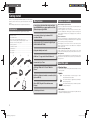
Check that the following parts are supplied with the product.
q Remote control........................................................................ 1
w R03/AAA batteries ................................................................... 2
e AC Power cord (Cord length: Approx. 1.5 m) .......................... 1
r Audio connecting cable (Cord length: Approx. 1.0 m) ............. 1
t Remote control connecting cable ............................................ 1
y AM loop antenna ..................................................................... 1
u FM indoor antenna .................................................................. 1
i DAB antenna ........................................................................... 1
o iPod stand................................................................................ 1
Q0 User guide ............................................................................... 1
q
e
r
Incorporates a Cirrus Logic advanced D/A
converter CS4398.
Can be used as a D/A converter via digital input
(USB/COAXIAL/OPTICAL).
High grade headphone circuit.
DLNA ver. 1.5 supported for Audio Network.
Internet radio by vTuner.
t
y
u
USB input “Made for iPod” and “Made for
iPhone”.
Cautions on handling
• Before turning the power switch on
Check once again that all connections are correct and that there are
no problems with the connection cables.
• Power is supplied to some of the circuitry even when the unit is
set to the standby mode. When going on vacation or leaving home
for long periods of time, be sure to unplug the power cord from the
power outlet.
• About condensation
If there is a major difference in temperature between the inside of
the unit and its surroundings, condensation may form on parts inside
the unit, causing it to fail to operate properly.
If this happens, let the unit sit for an hour or two with the power
turned off and wait until there is little difference in temperature
before using the unit.
• Cautions on using mobile phones
Using a mobile phone near this unit may result in noise. If that
occurs, move the mobile phone away from the unit when it is in use.
• Moving the unit
Turn off the power and unplug the power cord from the power outlet.
Next, disconnect the cables connected to other system units before
moving the unit.
About this guide
n Operation buttons
The operations described in this guide are based mainly on remote
control operation.
n Symbols
i
o
M-XPort for Bluetooth wireless connection (with
Optional RX101).
v
This symbol indicates a reference page on which
related information is described.
This symbol indicates a supplementary information
and tips for operations.
3Lines OELD (Organic Electroluminescence
Display).
Double-layered chassis.
NOTE
This symbol indicates points to remember operations
or function limitations.
n Illustrations
Note that the illustrations in these instructions may differ from the
actual unit for explanation purposes.
2
1.NA7004N_ENG_30A_0714.indd 2
2011/07/14 11:37:02
ENGLISH
Operating range of the remote control
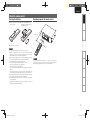
q Remove the rear cover of the w Set two R03/AAA batteries in
remote control.
the battery compartment in the
indicated direction.
Operate the remote control while pointing it at the remote sensor.
Connections
Inserting the batteries
Getting Started
About the remote control
Basic Operations
Approx. 7 m
Advanced Operations
30°
30°
e Put the rear cover back on.
NOTE
Information
NOTE
Explanation terms
The set may function improperly or the remote control may not
operate if the remote control sensor is exposed in direct sunlight or
strong artificial light such as a fluorescent or infrared light.
Troubleshooting
Specifications
• Insert the specified batteries in the remote control unit.
• Replace the batteries with new ones if the set does not operate
even when the remote control unit is operated close to the unit. (The
supplied batteries are only for verifying operation.)
• When inserting the batteries, be sure to do so in the proper direction,
following the q and w marks in the battery compartment.
• To prevent damage or leakage of battery fluid:
• Do not use a new battery together with an old one.
• Do not use two different types of batteries.
• Do not attempt to charge dry batteries.
• Do not short-circuit, disassemble, heat or dispose of batteries in
flames.
• Do not keep the battery in a place exposed to direct sunlight or in
places with extremely high temperatures, such as near a heater.
• If the battery fluid should leak, carefully wipe the fluid off the inside
of the battery compartment and insert new batteries.
• Remove the batteries from the remote control unit if it will not be in
use for long periods.
• Used batteries should be disposed of in accordance with the local
regulations regarding battery disposal.
Index
3
1.NA7004N_ENG_30A_0714.indd 3
2011/07/14 11:37:03
ENGLISH
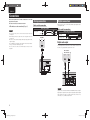
Connections
This section explains how to make connections for all of the
supported audio signals.
For other connections, see the sections below.
n The wireless receiver connection (vpage 23)
Analog connections
Digital connections
When connecting, use a commercially available optical digital cable or
coaxial digital cable.
Cables used for connections
Audio cable (supplied)
NOTE
• Do not plug in the power cord until all connections have been
completed.
• When making connections, also refer to the user guide of the other
components.
• Be sure to connect the left and right channels properly (left with left,
right with right).
• Do not bundle power supply cords together with connection cables.
Doing so can result in humming or noise.
• Do not connect the unit to the PHONO input connectors on the
amplifier.
Pin-plug cable
Cables used for connections
(White)
L
L
(Red)
R
R
Audio cables (sold separately)
Optical cable
Coaxial digital cable
Amplifier
AUDIO
AUDIO
IN
L
R
Digital audio output
Connect digital devices such as AV receivers and D/A converters with
the unit to enjoy digital audio output from the unit.
L
R
AV receivers /
D/A converters
L
COAXIAL
IN
R
OPTICAL
IN
ANALOG OUT
R
L
NETWORK
M-XPort
DIGITAL OUT
DIGITAL IN
IN
FLASHE
IN
OUT
COAXIAL OPTICAL COAXIAL OPTICAL
USB
REMOTE
NOTE
Signals on the tuner and the M-XPort and FM/AM cannot be output in
digital output. Signals that can be output using digital output are digital
audio signals from USB, iPod, DAB, internet radio, music server,
online music, PC, COAXIAL, and OPTICAL.
4
1.NA7004N_ENG_30A_0714.indd 4
2011/07/14 11:37:03
ENGLISH
When connecting the optical digital output connector
with an optical transmission cable (sold separately)
PC connection
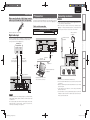
Connecting an antenna
By connecting a computer to the USB port on the rear panel of this
unit using a commercially available USB connecting cable, this unit can
be used as a D/A converter. (“Using as a D/A converter” (vpage 19)
Audio cable (sold separately)
• Connect the FM antenna or AM loop antenna supplied with the unit
to enjoy listening to radio broadcasts.
• After connecting the antenna and receiving a broadcast signal
(vpage 11 “Tuning in Broadcast Stations”), fix the antenna with
tape in a position where the noise level becomes minimal.
Basic Operations
USB cable
Match the shapes then insert firmly.
AM loop antenna
(Supplied)
Digital audio input
Advanced Operations
FM indoor antenna
(Supplied)
If a device equipped with CD transport or digital audio output is
connected to this unit, this unit can be used as a D/A converter.
(“Using as a D/A converter” (vpage 19))
N
CD Transport /
digital device
COAXIAL
OUT
ANALOG OUT
R
M-XPort
DIGITAL OUT
DIGITAL IN
L
OPTICAL
OUT
COAXIAL OPTICAL COAXIAL OPTICAL
Black
USB
White
Information
USB port
Type B
USB cable
(Sold separately)
Optical digital
connection cable
(Sold separately)
Signal flow
Explanation terms
Coaxial digital
connection cable
(Sold separately)
ANALOG OUT
R
L
Signal flow
Type A
q
w
e
Troubleshooting
Signal
flow
Computer installed with a
media player
Signal flow
NETWORK
M-XPort
DIGITAL OUT
DIGITAL IN
IN
FLASHER
IN
RS232C
USB
REMOTE CONTROL
NOTE
• Linear PCM signals with a sampling frequency of 32kHz, 44.1kHz,
48kHz, 64kHz, 88.2kHz, 96kHz, 176.4kHz, or 192kHz can be input
into this device.
• Do not input signals other than linear PCM signals, such as Dolby
digital, DTS, AAC etc. into this device. Doing so may cause noise,
which may cause damage to the speakers.
1.NA7004N_ENG_30A_0714.indd 5
Index
OUT
COAXIAL OPTICAL COAXIAL OPTICAL
NOTE
• Do not connect two FM antennas simultaneously.
• Even if an external AM antenna is used, do not disconnect the AM
loop antenna.
• Make sure the AM loop antenna lead terminals do not touch metal
parts of the panel.
• If the signal has noise interference, connect the ground terminal
(GND) to reduce noise.
• If you are unable to receive a good broadcast signal, we recommend
installing an outdoor antenna. For details, inquire at the retail store
where you purchased the unit.
Specifications
Plug that fits the shape of the
connection device connector
Connections
Cables used for connections
FM/AM
Getting Started
Digital connection
5
2011/07/14 11:37:04
ENGLISH
Connecting an antenna
n AM loop antenna assembly
the stand section
1 Put
through the bottom of
the loop antenna from
the rear and bend it
forward.
DAB
Stand
Square
hole
Loop
antenna
n Connecting the DAB indoor antenna
“Tuning in DAB stations” (vpage 13).
DAB indoor antenna
(Supplied)
Projecting
part
the projecting part
2 Insert
into the square hole in
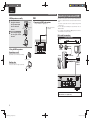
Connecting to a home network (LAN)
• This unit lets you play via your home network (LAN) music files
stored on a computer and music content such as that from Internet
radio.
You can also operate this unit from a computer using the Web
control function.
• You can update by downloading the latest firmware from the
Marantz website.
• See “Setting the network [Network]” (vpage 24) on the menu for
more information on network setting.
Cables used for connections
the stand.
Cable (sold separately)
Ethernet
cable
Computer
M-XPort
n Using the AM loop antenna
Suspending on a wall
DIGITAL OUT
Modem
DIGITAL IN
COAXIAL OPTICAL COAXIAL OPTICAL
USB
Internet
Suspend directly on a wall without assembling.
To WAN side
Router
Nail, tack, etc.
To LAN port
To LAN port
Standing alone
Use the procedure shown upper to assemble.
LAN port/
Ethernet
connector
NETWORK
M-XPort
DIGITAL OUT
DIGITAL IN
IN
FLASHER
IN
RS232C
OUT
COAXIAL OPTICAL COAXIAL OPTICAL
USB
REMOTE CONTROL
For connections to the Internet, contact an ISP (Internet
Service Provider) or a computer shop.
6
1.NA7004N_ENG_30A_0714.indd 6
2011/07/14 11:37:04
ENGLISH
Required system
Device that connects to the broadband circuit and conducts
communications on the Internet.
A type that is integrated with a router is also available.
Audio cable (sold separately)
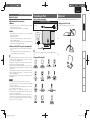
You can set your iPod or iPhone on the supplied iPod stand.
n Setting up the iPod stand
Use the procedure below to set up the iPod stand.
iPod cable
q
Basic Operations
n Router
Cables used for connections
iPod stand
Connections
n Broadband internet connection
n Modem
Connecting an iPod
Getting Started
Connecting to a home network (LAN)
iPod
When using this unit, we recommend you use a router equipped
with the following functions:
• Built-in DHCP server
This function automatically assigns IP addresses on the LAN.
• Built-in 100BASE-TX switch
When connecting multiple devices, we recommend a switching
hub with a speed of 100 Mbps or greater.
w
Advanced Operations
n Ethernet cable (CAT-5 or greater recommended)
e
n Supported iPod models
Explanation terms
Troubleshooting
Specifications
• If you have an Internet provider contract for a line on which network
settings are made manually, make the settings at “Network
connecting (DHCP=Off)” (vpage 24).
• With this unit, it is possible to use the DHCP and Auto IP functions
to make the network settings automatically.
• When using this unit with the broadband router’s DHCP function
enabled, this unit automatically performs the IP address setting and
other settings.
When using this unit connected to a network with no DHCP function,
make the settings for the IP address, etc., at “Network connecting
(DHCP=Off)” (vpage 24).
• When setting manually, check the setting contents with the network
administrator.
To connect an iPod to this unit, use the iPod cable supplied with the
iPod.
Information
• Use only shielded STP or ScTP LAN cable which is available at
retailer.
• Some flat type Ethernet cables are easily affected by noise.
We recommend using a normal type cable.
NOTE
Index
• A contract with an ISP is required to connect to the Internet.
No additional contract is needed if you already have a broadband
connection to the Internet.
• The types of routers that can be used depend on the ISP. Contact an
ISP or a computer shop for details.
• Marantz assumes no responsibility whatsoever for any
communication errors or troubles resulting from customer’s network
environment or connected devices.
• This unit is not compatible with PPPoE. A PPPoE-compatible router
is required if you have a contract for a type of line set by PPPoE.
• Do not connect an NETWORK connector directly to the LAN port/
Ethernet connector on your computer.
7
1.NA7004N_ENG_30A_0714.indd 7
2011/07/14 11:37:05
ENGLISH
iPod stand
n Setting your iPod on the iPod stand
1
Pass the iPod cable through
the opening on the iPod
stand.
2 Connect the iPod to the iPod cable.
your iPod on the iPod
3 Set
stand.
n If the iPod stand becomes detached
Connecting a USB memory device
USB
memory
device
Assemble as shown below.
"
"
NOTE
• A computer can not be connected to and operate the unit via its
USB port.
• Do not use an extension cable when connecting a USB memory
device.
• For details about USB memory devices, see “USB memory”
(vpage 36).
$
NOTE
• Make sure to place the iPod stand on a flat surface.
• Do not operate the iPod or iPhone while it is set on the iPod stand.
Doing so could cause the iPod or iPhone to fall off from the stand.
• Some iPod models cannot be set on the iPod stand because the
underside of the iPod is blocked when the iPod cable is connected.
• Make sure to disable the iPhone vibration function before you set it
on the iPod stand. If the iPhone vibrates when it is set on the stand,
it could fall off from the stand and be damaged.
• Do not use the iPod stand for purposes other than the one it is
intended to perform.
• Marantz will accept no responsibility whatsoever for any damage of
equipment connected to this unit while it is used.
$
8
1.NA7004N_ENG_30A_0714.indd 8
2011/07/14 11:37:06
ENGLISH
n RS-232C
Do not plug in the power cord until all connections have been
completed.
Connections
Connect an external control device or other device for servicing. (Use
a straight cable for the connection.)
Connecting the power cord
Getting Started
Connecting other equipment
To household power outlet
(AC 230 V, 50/60 Hz)
External control device
Basic Operations
Power cord
(supplied)
Advanced Operations
NOTE
• Insert the plugs securely. Loose connections will result in the
generation of noise.
• Do not unplug the power cord while the unit is operating.
• Do not use a power cord other than the cord supplied with this unit.
Information
n FLASHER IN
This unit can be controlled by connecting a control box or other control
device to this unit.
Explanation terms
GND
Signal
Troubleshooting
Control box
or
control device
Specifications
Index
9
1.NA7004N_ENG_30A_0714.indd 9
2011/07/14 11:37:06
ENGLISH
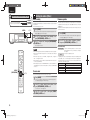
Basic operations
Symbols used to indicate buttons in this guide
Button located on both the main unit and the remote control
BUTTON
<BUTTON>
[BUTTON]
Button only on the main unit
Button only on the remote control
This section provides information on basic operations such as
settings and playback procedures.
For other operations, see the sections below.
n RDS (Radio Data System) (vpage 21)
n Setting the others [Other] (vpage 30)
Operations possible during
playback
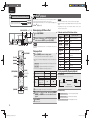
Input source switching
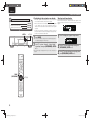
Turn <INPUT> to select the input source.
Preparations
Turning the power on
Press ON/STANDBY.
Power is turned on and the power indicator goes off.
ON/STANDBY <INPUT>
[DIMMER]
<PHONES> <LEVEL>
M-DAX
NOTE
ON/STANDBY
• Power continues to be supplied to some of the circuitry even when
the power is in the standby mode. When leaving home for long
periods of time, either press ON/STANDBY to turn off the power, or
unplug the power cord from the power outlet.
• Be sure to stop playback before turning the power off.
[Input source select]
n Completely turning off the power
[TUNING+,TUNING-]
M-DAX
[MODE]
Unplug the power cord from the wall outlet.
• The settings made for the various functions may be cleared if the
power cord is left unplugged from a power outlet for an extended
period of time.
Turning the power off
Press ON/STANDBY.
Power is set to standby and the power indicator lights.
㪠㫅㫋㪼㫉㫅㪼㫋㩷㪩㪸㪻㫀㫆
㪤㪄㪯㪧㫆㫉㫋
㪤㫌㫊㫀㪺㩷㪪㪼㫉㫍㪼㫉
㪛㪘㪙
㪛㫀㪾㫀㫋㪸㫃㩷㪠㫅㩷㪚㪦㪘㪯
㪣㪸㫊㫋㪅㪽㫄
㪝㪤
㪤㪼㫅㫌
㪥㪸㫇㫊㫋㪼㫉
㪘㪤
㪝㪸㫍㫆㫉㫀㫋㪼
㫀㪧㫆㪻㪆㪬㪪㪙
㪛㫀㪾㫀㫋㪸㫃㩷㪠㫅㩷㪬㪪㪙
z1
㪛㫀㪾㫀㫋㪸㫃㩷㪠㫅㩷㪦㪧㪫
z1 “M-XPort” appears only when an RX101 wireless receiver is
connected to M-XPort.
Press [Input source select] ([INTERNET RADIO], [MUSIC
SERVER], [ONLINE MUSIC], [iPod/USB], [M-XPort],
[TUNER], [USB], [OPT/COAX] or [FAVORITE]).
M-DAX
(Marantz Dynamic Audio eXpander)
This function makes up for lost audio content in MP3 or AAC sources
(from lossy compression) during playback. Choose one of the following
levels for this effect as desired.
NOTE
• Be sure to stop playback before turning the power off.
“High”:
“Mid”:
“Low”:
“Off”:
Stronger effect
Medium effect
Weaker effect
Deactivated
[DIG.OUT]
10
1.NA7004N_ENG_30A_0714.indd 10
2011/07/14 11:37:07
ENGLISH
[Using the remote controller]
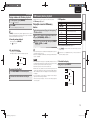
Press the M-DAX button.
Each time this button is pressed, M-DAX changes as follows.
Low
Mid
High
NOTE
Tuning in Broadcast Stations
Set to output from the rear panel DIGITAL OUT terminal (COAXIAL,
OPTICAL).
Connect the antenna beforehand (vpage 5).
During stop mode, press [DIG. OUT].
Each time [DIG.OUT] is pressed, output from the DIGITAL OUT
terminal (COAXIAL, OPTICAL) on the rear panel is switched between
“On” and “Off”.
[Selectable items]
M-DAX is compatible with PCM (48 kHz or lower), MP3, WMA, AAC
and two-channel analog sources.
On : Outputs the digital signal.
Switching the display’s brightness
Press [DIMMER].
100%
25%
50%
• The display’s brightness switches each time the button is pressed.
Plug the headphones into the headphone jack (PHONES).
” will light.
q To tune in automatically (Auto tuning)
Press [MODE] to light the “AUTO” indicator on the display, then
use [TUNING +, TUNING –] to select the station you want to hear.
w To tune in manually (Manual tuning)
Press [MODE] to turn off the display’s “AUTO” indicator, then
use [TUNING +, TUNING –] to select the station you want to hear.
• If the input source is set to something other than “TUNER”, press
[TUNER] to switch the input source to “TUNER”.
• The input source can also be switched to “DAB”, “FM” or “AM”
turning <INPUT>.
• If the desired station cannot be tuned in with auto tuning, tune it in
manually.
• When tuning in stations manually, press and hold [TUNING +, TUNING –]
to change frequencies continuously.
• A humming sound may be heard when using a TV nearby while
receiving AM programs. If this happens, move the system as far
from the TV as possible.
n To stop auto tuning
Press [TUNING +, TUNING –].
Specifications
Adjusting the Volume
When a station is received, the “
Troubleshooting
Listening with headphones
2 Tune in the desired broadcast station. (FM/AM only)
Explanation terms
• If you operate the buttons when the display’s brightness is set to
“Off”, the display temporarily lights at 25% brightness level.
• The “DISPLAY OFF“ indicator on the front display lights when
Dimmer is set to “Off”.
• When digital output is turned off, the “DIG.OUT OFF” indicator
lights.
• When digital output is turned off, you can enjoy high quality audio
output from the ANALOG OUT terminal.
• The “digital output off” has a memory retention function where
the settings remain stored and unchanged even when the power
is turned off.
FM
AM
Information
Off
75%
DAB
Advanced Operations
Off : Digital signal is not output.
1 Press [TUNER] to select the reception band.
Basic Operations
The “M-DAX” indicator on the front display lights when M-DAX mode
is Low, Mid or High. (vpage 34))
Setting the digital output
Connections
Off
Tuner playback
Getting Started
Operations possible during playback
Turn <LEVEL>.
NOTE
Index
To prevent hearing loss, do not raise the volume level excessively
when using headphones.
11
1.NA7004N_ENG_30A_0714.indd 11
2011/07/14 11:37:08
ENGLISH
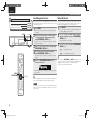
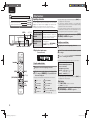
Symbols used to indicate buttons in this guide
Button located on both the main unit and the remote control
BUTTON
<BUTTON>
[BUTTON]
Button only on the main unit
Button only on the remote control
Tuner playback
Automatically presetting FM stations
(Auto preset)
This unit can be preset with a total of 99 DAB, FM and AM broadcast
stations.
NOTE
<ENTER>
u,i,o,p
Auto preset is not possible with AM broadcast stations.
n Auto presetting with the remote control
Perform this operation when tuned to an FM broadcast station.
1 Press [SEARCH].
ui to select “Auto Preset”-“Start”, then press
2 Use
[ENTER/MEMO], <ENTER> or p.
“Search” menu is display.
2
DISPLAY
After “Searching“ is displayed, “Complete“ is displayed.
Canceling auto presetting
Press 2.
[TUNER]
[TUNING+,TUNING-]
2
Broadcast stations whose antenna signal are weak cannot be preset
automatically. If you wish to preset such stations, tune them in
manually.
NOTE
When the auto presetting operation is performed, the new presettings
overwrite the previous presettings.
[ENTER/MEMO]
u,i,o,p
n Giving station names to preset channels
Names of up to 8 characters can be input.
You cannot give a station name to DAB stations.
[SEARCH]
[NUMBER]
(0-9,+10)
DISPLAY
Presetting FM/AM stations manually
This unit can be preset with a total of 99 DAB, FM and AM broadcast
stations.
1 Tune in the station you want to preset.
2 Press [ENTER/MEMO] or <ENTER>.
ui to select “Add to Preset”, then press
3 Use
[ENTER/MEMO], <ENTER> or p.
ui to select the number to be preset, then press
4 Use
[ENTER/MEMO] or <ENTER>.
“Preset” menu appears.
The reception frequency and reception mode are preset and the
display switches to the station name input display.
5 Input the station name.
“Inputting characters” (vpage 32)
• If you do not want to input a station name, press [ENTER/
MEMO] or <ENTER> without inputting anything else.
• If you make a mistake when inputting, perform the procedure
again. Whatever was previously input is overwritten.
6 Press [ENTER/MEMO] or <ENTER>.
The characters you have input are entered.
• To give names to other stations, repeat steps 1 to 5.
Listening to preset stations
Use [NUMBER] (0 – 9, +10) or ui to select the preset
number.
1 Tune in the preset channel you want to name.
2 Press and hold [ENTER/MEMO] or <ENTER>.
3 Input the station name.
4 Press [ENTER/MEMO] or <ENTER>.
The display switches to the station name input display.
“Inputting characters” (vpage 32)
The characters you have input are entered.
• To give names to other stations, repeat steps 1 to 4.
12
1.NA7004N_ENG_30A_0714.indd 12
2011/07/14 11:37:09
ENGLISH
Calling stations reqistered in Preset List
Press [ENTER/MEMO] or <ENTER>.
Listening to DAB/DAB+
n About DAB (Digital Audio Broadcasting) (vpage 37)
n About DAB+ (vpage 37)
“Preset” menu appears.
• When a DAB operation is performed for the first time after
purchase, auto scanning is performed automatically.
Use ui to select Preset List, then press [ENTER/
MEMO], <ENTER> or p.
Press [TUNING +, TUNING –] to select the desired
broadcast station.
“Preset” menu appears.
DAB stations can be stored in the preset memory and played in the
same way as FM/AM stations.
• “Presetting FM/AM stations manually” (vpage 12)
• “Listening to preset stations” (vpage 12)
The Preset list appears.
4
When the prompt “Delete?” appears, press [ENTER/
MEMO] or <ENTER>.
Connect the antenna beforehand.
1 Press [SEARCH] during DAB reception.
ui to select “Start”, then press [ENTER/
2 Use
MEMO], <ENTER> or p.
e Program Type :
The category of the tuned in station is displayed.
r Ensemble Name :
The ensemble name is displayed.
t Frequency:
The frequency is displayed.
y Signal Quality :
The reception signal sensitivity is displayed (0 to 100).
• If the reception signal sensitivity is 80 or greater, the
program can be received without noise.
u Audio Information :
The mode of the currently tuned in station and its bit rate
are displayed.
Troubleshooting
• To cancel the operation, press o.
Auto scannig broadcast stations
w Station Name :
The service station name is displayed.
Explanation terms
3
Use ui to select Preset List, then press [ENTER/
MEMO], <ENTER> or p.
q Dynamic Label Segment :
Text data included in the broadcast is scrolled.
Information
1 Press [ENTER/MEMO] or <ENTER>.
ui to select “Delete Preset”, then press
2 Use
[ENTER/MEMO], <ENTER> or p.
• The broadcast stations are displayed in the order in which they
were scanned.
Advanced Operations
Deleting stations registered in Preset List
2
• The display switches as shown below each time the button
is pressed.
Basic Operations
3
The Preset list appears.
steps 1 to 2 under “Tuning in DAB stations”
1 Perform
to tune in a DAB station.
2 Press DISPLAY.
Connections
1
Tuning in DAB stations
Use ui to select “Call Preset”, then press [ENTER/
2 MEMO], <ENTER> or p.
1 Press [TUNER] to select “DAB”.
Switching the reception information for the
currently tuned in DAB station
Getting Started
Tuner playback
After “Searching” is displayed, “_ _Stations” is displayed.
Specifications
Index
13
1.NA7004N_ENG_30A_0714.indd 13
2011/07/14 11:37:10
ENGLISH
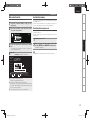
iPod® playback
Symbols used to indicate buttons in this guide
Button located on both the main unit and the remote control
BUTTON
<BUTTON>
[BUTTON]
Button only on the main unit
Button only on the remote control
DISPLAY <ENTER> u,i,o,p
With this unit, you can listen to music on an iPod. It is also possible to
operate the iPod from the main unit or remote control.
For the supported iPod models, see “Connecting an iPod” (vpage 7).
n iPod® (vpage 36)
Before playing a USB or an iPod
Press ON/STANDBY.
1
USB memory device or iPod connection
2 Connect
cable, then turn <INPUT> or press [iPod/USB].
ON/STANDBY <INPUT> 8 、9 2 13
ON/STANDBY
[iPod/USB]
8,9
[6,7]
13
NOTE
This function is activated around 1 or 2 minutes after the power is
turned on.
Playing an iPod
1
Press [MODE] to select the display mode.
The mode switches each time the button is pressed.
• There are two modes for displaying the contents recorded on the
iPod.
NOTE
• iPod nano 1G and iPod video do not have Direct mode support.
• Marantz will accept no responsibility whatsoever for any loss of iPod
data.
• Depending on the type of iPod and the software version, some
functions may not operate.
n Remote control and iPod button relations
Remote control
buttons
iPod buttons
13
13
8, 9
8, 9
Play the track from the beginning/Play the
next track.
6, 7
Press and hold
8, 9
Press and hold
Fast-reverse the track/Fast-forward the
track.
u, i
ENTER/MEMO
or p
Click Wheel
MODE
–
REPEAT
RANDOM
–
o
MENU
2
HOME
–
Stop the track.
–
Return to top menu (Remote mode only)
Remote mode Display iPod information on the display of this unit.
2
Direct mode
Display iPod information on the iPod screen.
Select
–
Operation on this unit
Play the track / Pause the track.
Select an item.
Enter the selection or plays the track.
Switch between the Direct mode and the
Remote mode.
Switch the repeat function
Switch the shuffle function
Display the menu or return to the previous
menu.
• “Direct iPod” is displayed on the display of this unit.
[ENTER/MEMO]
[SEARCH]
[RANDOM]
[MODE]
[Selectable mode]
u,i,o,p
Display location
[HOME]
Playable
files
Audio file
Video file
Active
buttons
Remote control
and main unit
iPod®
DISPLAY
[REPEAT]
Remote mode
Direct mode
Main unit display
iPod display
3
3
3
3
3
Use ui to select the item, then press [ENTER/
MEMO] or <ENTER> to select the music file to be
played.
3 Press 13.
Press [REPEAT].
Playback in the respective repeat mode starts.
Single-track repeat
3
The default display mode setting is “Direct mode”.
2
Playing repeatedly (Repeat playback)
All-track repeat
Repeat off
(indicator turns off)
[Selectable items]
1 (Single-track repeat)
Only 1 track plays repeatedly.
ALL (All-track repeat)
All tracks play repeatedly.
Repeat off (indicator turns off) Normal playback resumes.
Playback starts.
14
1.NA7004N_ENG_30A_0714.indd 14
2011/07/14 11:37:10
ENGLISH
Playing random order (Random playback)
In the stop mode, press [RANDOM].
The “
” is displayed.
The tracks start playing in random order.
While stopped, press [RANDOM].
The “ ” turns off.
Operation buttons
Playing files stored on USB memory
devices
13
8, 9
u, i
ENTER/MEMO
or p
REPEAT
o
2
SEARCH
HOME
Playback preparation (vpage 14 “Before playing a
USB or an iPod”).
1
Press ui to select the search item or folder, then
2 press
[ENTER/MEMO], <ENTER> or p.
ui to select the file, then press [ENTER/
3 Press
MEMO], <ENTER>, p or 13.
Playback starts.
n To switch the display
Artist name
Play the track from the beginning/Play the next track.
Select an item.
Enter the selection or plays the track.
Switch the repeat function
Display the menu or return to the previous menu.
Stop the track.
Character searchz
Return to top menu
• “Playing repeatedly (Repeat playback)” (vpage 14)
z Press [SEARCH], then press o p to select the first letter you want
to search mode.
• If the USB memory device is divided into multiple partitions, only the
top partition can be selected.
• This unit is compatible with MP3 files conforming to “MPEG-1 Audio
Layer-3” standards.
If the list is not in alphabetical order, you may not be able to
perform a character search.
Explanation terms
NOTE
Album name
Press ON/STANDBY to set the standby mode.
During playback, press DISPLAY.
Artist name
Album name
Specifications
1
2 Disconnect the iPod cable from the USB port.
n To switch the display
Troubleshooting
Disconnecting the iPod
• Note that Marantz will accept no responsibility whatsoever for any
problems arising with the data on a USB memory device when using
this unit in conjunction with the USB memory device.
• USB memory devices will not work via a USB hub.
• Marantz does not guarantee that all USB memory devices will
operate or be supplied power. When using a USB portable hard disk
that can draw power from an AC adapter, we recommend using the
AC adapter.
• It is not possible to connect and use a computer via the USB port
(Type A) of this unit using a USB cable.
When connecting a computer, connect it to the USB port (Type B)
on the rear panel.
Information
During playback, press DISPLAY.
The display switches each time the button is pressed.
Operation on this unit
Play the track / Pause the track.
Advanced Operations
n Canceling random playback
n USB operation
n USB memory (vpage 36)
Basic Operations
If [REPEAT] is pressed during random playback, after the current
session of random playback is finished, another session in a different
order of tracks starts. (Direct mode only)
Playing back music or files recorded on a USB memory device.
Connections
1
2 Press 13.
USB memory device playback
Getting Started
iPod® playback
File type/Bitrate
Index
15
1.NA7004N_ENG_30A_0714.indd 15
2011/07/14 11:37:12
ENGLISH
Symbols used to indicate buttons in this guide
Button located on both the main unit and the remote control
BUTTON
<BUTTON>
[BUTTON]
Button only on the main unit
Button only on the remote control
DISPLAY <ENTER> u,i,o,p
Network audio playback
Follow this procedure to play Internet radio stations or music files
stored on a computer.
n
n
n
n
About the internet radio function (vpage 37)
Music server (vpage 37)
About Napster (vpage 37)
About Last.fm (vpage 37)
Listening to internet radio
1
<INPUT> 8 、9 2
[INTERNET RADIO]
13
[MUSIC SERVER]
[ONLINE MUSIC]
[FAVORITE]
8,9
13
2
Prepare for playback.
q Check the network environment, then turn on this unit’s
power (vpage 10 “Turning the power on”).
w If settings are required, make the “Setting the network
[Network]” (vpage 24).
1 Press DISPLAY during Internet radio reception.
broadcast station information and signal format
2 The
bit rate are displayed.
n Recently played internet radio stations
Recently played internet radio stations can be selected from
“Recently Played”.
Up to 20 stations stored in “Recently Played”.
ui to select “Recently Played”, then press
1 Press
[ENTER/MEMO], <ENTER> or p.
ui to select the item you want to play, then
2 Press
press [ENTER/MEMO], <ENTER> or p.
2 Turn <INPUT> or press [INTERNET RADIO].
ui to select the item you want to play, then
3 Press
press [ENTER/MEMO], <ENTER> or p.
n Searching stations by keyword
(Alphabetic strings)
4 Repeat step 3 until the station list is displayed.
Press ui to select “Search by Keyword”, then press
1
Press ui to select the station, then press [ENTER/
<ENTER> or p.
5 MEMO], <ENTER> or p.
The station list is displayed.
Playback starts once buffering reaches “100%”.
• For character input, see page 32.
the characters, then press [ENTER/MEMO] or
2 Input
<ENTER>.
[MENU]
[ENTER/MEMO]
u,i,o,p
[SEARCH]
n Switching the display
[HOME]
DISPLAY
• There are many Internet radio stations on the Internet, and the
quality of the programs they broadcast as well as the bit rate of the
tracks varies widely.
Generally, the higher the bit rate, the higher the sound quality, but
depending on the communication lines and server traffic, the music
or audio signals being streamed may be interrupted. Inversely, lower
bit rates mean a lower sound quality but less tendency for the sound
to be interrupted.
• “Server Full” or “Connection Down” is displayed if the station is
busy or not broadcasting.
• On this unit, folder and file names can be displayed as titles. Any
characters that cannot be displayed are replaced with “.” (period).
• When DISPLAY is pressed, the display can be switched between
the file type / bitrate and radio station name.
n Registering internet radio stations as your
favorites
You can register your favorite broadcast stations in Favorite List.
(vpage 20)
16
1.NA7004N_ENG_30A_0714.indd 16
2011/07/14 11:37:12
ENGLISH
n Internet radio operation
If the list is not in alphabetical order, you may not be able to
perform a character search.
n Playing files that have been registered in your
favorites
Files can be preset, registered in your favorites and played using
the same operations as for Internet radio stations (vpage 20).
NOTE
Use this procedure to play music files or playlists.
q Check the network environment, then turn on this unit’s
power (vpage 10 “Turning the power on”).
w If settings are required, make the “Setting the network
[Network]” (vpage 24).
e Prepare the computer (vpage 37 “Music server”).
uio p
Cursor operation /
Auto search (cue, ui)
ENTER/MEMO
SEARCH
HOME
13
8 9
2
Enter
Character searchz1
Return to top page
Playback / Pause
Auto search (cue)
Stop
FAVORITE
Register or call your favorite file in Favorite List, and
delete file from the list.
• “Playing repeatedly (Repeat playback)” (vpage 14)
• “Playing random order (Random playback)” (vpage 15)z2
z1 Press [SEARCH], then press o p to select the first letter you
want to search mode.
z2 When playing files stored on a computer using the random play
function, when a track has finished playing, the next track is
selected at random from all of the tracks on the computer. For
this reason, the same track may be played back to back.
• If you do not have a Last.fm account, press i to select “I am new
to Last.fm”. Then press [ENTER/MEMO], <ENTER> or p.
Create an account in accordance with the instructions on the display.
have a Last.fm account, press ui to select
3 If“I you
have a Last.fm account”. Then press [ENTER/
MEMO], <ENTER> or p.
4 Use uip to enter your username and password.
• For character input, see page 32.
inputting the username and password, select
5 After
“login”, then press [ENTER/MEMO] or <ENTER>.
If the username and password match, the top menu for Last.
fm is displayed.
• The types of characters that can be input are as shown below.
Username:
GUpper case charactersH ABCDEFGHIJKLMNOPQRSTUVW
XYZ
GLower case charactersH abcdefghijklmnopqrstuvwxyz
GSymbolsH _ GNumbersH 0123456789
Index
• Connections to the required system and specific settings must be
made in order to play music files (vpage 6).
Function
Menu
<INPUT> or press [ONLINE MUSIC], then select
2 Turn
“Last.fm”.
Specifications
Playback starts once buffering reaches “100%”.
Operation buttons
MENU
q Make sure this unit is connected to the Internet, then turn
on this unit’s power (vpage 10 “Turning the power on”).
w If settings are required, make the “Setting the network
[Network]” (vpage 24).
Troubleshooting
2 Turn <INPUT> or press [MUSIC SERVER].
ui to select the server including the file to be
3 Press
played, then press [ENTER/MEMO], <ENTER> or p.
ui to select the search item or folder, then
4 Press
press [ENTER/MEMO], <ENTER> or p.
5 Repeat step 4 until the file is displayed.
ui to select the file, then press [ENTER/
6 Press
MEMO], <ENTER> or p.
n Music server operation
1 Prepare for playback.
Explanation terms
1 Prepare for playback.
Last.fm radio is not available in all countries. Please check www.last.
fm/hardware for more information. You’ll also need a subscription. Get
one today at www.last.fm/subscribe.
Information
Playing files stored on a music server
• When the operations described below is performed, the music
server’s database is updated and it may no longer be possible to
play preset or favorite music files.
• When you quit the music server and then restart it.
• When music files are deleted or added on the music server.
• When using an ESCIENT server, place “ESCIENT” before the server
name.
• You cannot perform the preset registration.
Listening to Last.fm
Advanced Operations
z Press [SEARCH], then press o p to select the first letter you want
to search mode.
If the list is not in alphabetical order, you may not be able to perform
a character search.
Basic Operations
FAVORITE
Function
Menu
Cursor operation
Enter
Character searchz
Return to top page
Stop
Register or call your favorite broadcast station in
Favorite List, and delete the station from the list.
Connections
Operation buttons
MENU
uio p
ENTER/MEMO
SEARCH
HOME
2
• Before starting, you must launch the computer’s server software
and set the files as server contents. For details, see the operating
instructions of your server software.
• The order in which the tracks/files are displayed depends on
the server specifications. If the tracks/ files are not displayed in
alphabetical order due to the server specifications, searching by the
first letter may not work properly.
• WMA Lossless files can be played when using a server supporting
transcoding, such as Windows Media Player Ver. 11.
• Use DISPLAY to switch between displaying the artist name, file
type/bitrate or album name.
Getting Started
Playing a network audio
Password:
GUpper case charactersH ABCDEFGHIJKLMNOPQRSTUVW
XYZ
GLower case charactersH abcdefghijklmnopqrstuvwxyz
GSymbolsH ! # “ $ % & ‘ ( ) z + , - . / : ; < = > ? @ [ \ ] ^ ` { | }
˜ (Space)
GNumbersH 0123456789
17
1.NA7004N_ENG_30A_0714.indd 17
2011/07/14 11:37:13
ENGLISH
Playing a network audio
Symbols used to indicate buttons in this guide
Button located on both the main unit and the remote control
BUTTON
<BUTTON>
[BUTTON]
Button only on the main unit
Button only on the remote control
6
Use ui to select menu and then press [ENTER/
MEMO], <ENTER> or p.
Popular Stations Play popular artists and tags in your area.
You Recent
Stations
DISPLAY <ENTER> u,i,o,p
Your stations
Search Stations
<INPUT> 8 、9 2
13
7
[USB]
8,9
[OPT/COAX]
13
2
You can search station by Artist or Tag.
Use ui to select a station, and press [ENTER/
MEMO], <ENTER> or p or 13 to start playback.
When you press p during playback, the following
menu appears.
Love this track
Loving tracks improves your Last.fm
recommendations, and you can optionally share
them on popular social networks.
Ban this track
If you ban a track, we won’t play it again. You can
undo this on the Last.fm website.
Scrobbling
Scrobbling sends the tracks you played to your
Last.fm account. You can see charts of the music
you’ve been listening to, get recommendations for
new music and events in your area and share your
listening tastes with your friends. You can turn this
service on or off using this option. The more you
scrobble, the better your recommendations will
become.
[MENU]
[ENTER/MEMO]
u,i,o,p
[SEARCH]
You can play tracks from the following personalised
stations (“Your Recommended Radio”, “Your
Library”, “Your Neighborhood”, “Your Friends’
Radio”, “Your Top Tags”,“Your Top Artists”.
Playback starts.
8
[ONLINE MUSIC]
Play your recent stations.
[HOME]
NOTE
• The password should be no longer than 90 characters
• Press [HOME] to cancel the input.
DISPLAY
18
1.NA7004N_ENG_30A_0714.indd 18
Use DISPLAY to switch between displaying the artist name, file type/
bitrate or album name.
n Last.fm operation
Operation buttons
MENU
Function
Menu
uio p
Cursor operation /
Auto search (cue, i)
ENTER/MEMO
HOME
13
9
2
Enter
Return to top page
Playback
Auto search (cue)
Stop
Listening to Napster
Napster is not available in all countries.
1 Prepare for playback.
q Check the network environment, then turn on this unit’s
power (vpage 10 “Turning the power on”).
w If settings are required, make the “Setting the network
[Network]” (vpage 24).
<INPUT> or press [ONLINE MUSIC] and select
2 Turn
“Napster”.
3 Use ui p to input “Username” and “Password”.
• For character input, see page 32.
inputting the “Username” and “Password”,
4 After
select “login”, then press [ENTER/MEMO] or
<ENTER>.
If the “Username” and “Password” match, the top menu for
Napster is displayed.
NOTE
• The password should be no longer than 99 characters.
• Press [HOME] to cancel the input.
n Searching from Napster menu
ui to select search item or folder, then press
1 Use
[ENTER/MEMO], <ENTER> or p.
2 Repeat step 1 until the track is displayed.
ui to select the track item, then press [ENTER/
3 Use
MEMO], <ENTER> or p.
2011/07/14 11:37:14
ENGLISH
n Entering a character search for the track you
want to listen to
ui to select the search item, then press [ENTER/
2 Use
MEMO], <ENTER>.
The search display appears.
the characters, then press [ENTER/MEMO] or
3 Input
<ENTER>.
Press p while the track you wish to register is playing.
“Add to my library?” is displayed.
The track is entered in the Library.
When you press o, the registration is cancelled and the display
returns to the previous page.
Use ui to select “My Napster Library”, then press
[ENTER/MEMO], <ENTER> or p.
Using as a D/A converter
Digital audio signals input from an external device or computer into
this unit can be converted and output as analog signals using this unit.
(D/A converter)
Connect and playback from a digital device
(Opt/Coax)
Press [OPT/COAX] or turn <INPUT> to change the input
source to “Digital In OPT” or “Digital In COAX”.
• If the sampling frequency cannot be detected, “Signal Unlock“ is
displayed.
When “Digital In USB” is displayed on this unit, wait for approximately
10 seconds, and then start and operate the music playback software
on the computer.
This unit functions as a D/A converter.
NOTE
• Perform operations such as playback and pause on the computer. At
this time, you cannot operate the computer with the unit's keys or
remote control.
• You can also control the volume and equalizer on the computer.
Enjoy playing music at the desired volume.
• When this unit is functioning as a D/A converter, sound is not output
from the computer's speakers.
• If the computer is disconnected from this unit while the computer
music playback software is running, the playback software may
freeze.Always exit the playback software before disconnecting the
computer.
• If an error occurs on the computer, restart the computer while it is
still connected to the USB port of this unit.
• The supported sampling frequencies are 32/44.1/48/96 kHz.
• The sampling frequency of the music playback software and
sampling frequency displayed on this unit may differ.
n Computer (recommended system)
OS
NOTE
• Linear PCM signals with sampling frequencies of 32 kHz, 44.1 kHz,
48 kHz, 64 kHz, 88.2 kHz, 96 kHz, 176.4 kHz and 192 kHz can be
input in the unit.
• Do not input non-PCM signals, such as Dolby Digital, and DTS. This
causes noise and could damage the speakers.
• If the sampling frequency switches, such as from A mode to B mode
in a CS broadcast, muting may operate for 1-2 seconds, cutting the
sound.
• Windows® XP Service Pack2 or more, Windows Vista or Windows 7
• Macintosh OSX 10.6.3
Software
• Server software supporting Windows Media Player and iTune.
Index
Use DISPLAY to switch between displaying the artist name, file type/
bitrate or album name.
• “Playing repeatedly (Repeat playback)” (vpage 14)
• “Playing random order (Random playback)” (vpage 15)
Press [USB] or turn <INPUT> to change the input source
to “Digital In USB”.
Specifications
1
Use ui to select the information or track, then
2 press
[ENTER/MEMO], <ENTER>.
Enter
Search menu
Return to top page
Playback
Auto search (cue)
Stop
Troubleshooting
Listening to tracks registered in my Napster library
ENTER/MEMO
SEARCH
HOME
13
8 9
2
Explanation terms
1
2 Press [ENTER/MEMO], <ENTER> or p.
Cursor operation /
Auto search (cue, ui)
Information
n Registering tracks in my Napster library
uio p
Connect a computer to the USB port on the rear panel of this unit
in advance. For details on how to connect the computer, see “PC
connection” (vpage 5).
Advanced Operations
• For character input, see page 32.
Function
Menu
Basic Operations
• You can search by artist name, album name or track name in menu
list.
• You cannot perform search on the playback screen.
Operation buttons
MENU
Connections
1 Press [SEARCH].
n Napster operation
Connecting and playing back from a
computer (USB)
Getting Started
Playing a network audio
USB
• USB 2.0: USB Full speed/USB Audio Class1
19
1.NA7004N_ENG_30A_0714.indd 19
2011/07/14 11:37:15
ENGLISH
Favorite function
Symbols used to indicate buttons in this guide
Button located on both the main unit and the remote control
BUTTON
<BUTTON>
[BUTTON]
Button only on the main unit
Button only on the remote control
<ENTER>
u,i,o,p
DISPLAY
This section provides information on the Favorite function.
• The Favorite function allows you to register your favorite broadcast
stations and files in Favorite List in advance so that you can call and
listen to the stations or files right away, whenever you want.
• The contents that you can register and call are Internet radio station,
music server, and tuner.
• You can register up to 50 items in Favorite List.
• When you attempt to register the 51st station in Favorite List, the
last station (station that is accessed least frequently) is automatically
deleted.
• When you select a station from Favorite List, the top of the list is
displayed.
Registering Internet radio stations, music
servers, and tuners in Favorite List
1
Press [FAVORITE] while the Internet radio station,
tuners or file to register is played back.
Deleting Internet radio stations, files
registered or tuners in Favorite List
1 Press [FAVORITE].
ui to select “Delete Favorite”, then press
2 Use
[ENTER/MEMO], <ENTER> or p.
“Favorite” menu appears.
The Favorite list appears.
Use ui to select Favorite List, then press [ENTER/
3 MEMO]
, <ENTER> or p.
When the prompt “Delete?” appears, press [ENTER/
4 MEMO]
or <ENTER>.
• To cancel the operation, press o.
“Favorite” menu appears.
[TUNER]
[FAVORITE]
ui to select “Add to Favorite”, then press
2 Use
[ENTER/MEMO], <ENTER> or p.
When the station, server, or tuner is registered, “Add to
Favorite” appears.
Calling Internet radio stations, files
registered or tuners in Favorite List
[ENTER/MEMO]
u,i,o,p
[SEARCH]
1 Press [FAVORITE].
ui to select “Call Favorite”, then press
2 Use
[ENTER/MEMO], <ENTER> or p.
“Favorite” menu appears.
The Favorite list appears.
DISPLAY
Use ui to select Favorite List, then press [ENTER/
3 MEMO]
, <ENTER> or p.
The respective function starts up and playback starts.
20
1.NA7004N_ENG_30A_0714.indd 20
2011/07/14 11:37:15
ENGLISH
Getting Started
Advanced operations
Tuner playback
TP (Traffic Program)
RDS (works only on the FM band) is a broadcasting service which
allows a station to send additional information along with the regular
radio program signal.
The following four types of RDS information can be received with this
unit:
PTY identifies the type of RDS program.
The program types and their displays are as follows:
TP identifies programs that carry traffic announcements.
This allows you to easily find out the latest traffic conditions in your
area before leaving home.
Use this function to automatically tune to FM stations that provide
the RDS service.
Press DISPLAY while receiving a RDS to display the information currently
being broadcast.
Freq.
*1
*2
PS
*2
PTY
Frequency
Program service name
• If a station name is entered, it is displayed.
Use this function to find RDS stations broadcasting traffic programs
(TP stations).
1 Press [TUNER] to select “FM”.
2 Press [SEARCH].
ui to select “TP SEARCH”, then press
3 Use
[ENTER/MEMO], <ENTER> or p.
Automatically begin the TP search operation.
• “No Program” is displayed when there is no traffic information
broadcast station.
RT (Radio Text)
n PTY search
Use this function to find RDS stations broadcasting a designated
program type (PTY).
For a description of each program type, refer to “PTY (Program Type)”.
Press [TUNER] to select “FM”.
• When the RT mode is turned on while an RDS broadcast station not
offering an RT service is tuned in, “NO TEXT” is displayed on the
display.
• The RT mode cannot be set in the AM band or for FM stations not
offering RDS broadcasts.
NOTE
The operations described below selecting “RDS Search” will not
function in areas in which there are no RDS broadcasts.
Index
1
2 Press [SEARCH].
ui to select “PTY SEARCH”, then press
3 Use
[ENTER/MEMO], <ENTER> or p.
ui to call out the desired program type, then
4 Use
press [ENTER/MEMO], <ENTER> or p.
RT allows RDS stations to send text messages that appear on the
display.
Specifications
RT
*1
n TP search
Troubleshooting
Viewing information during reception
LIGHT M
CLASSICS
OTHER M
Weather
Finance
Children’s
CHILDREN
programmes
SOCIAL
Social Affairs
RELIGION
Religion
PHONE IN
Phone In
TRAVEL
Travel
LEISURE
Leisure
JAZZ
Jazz Music
COUNTRY
Country Music
NATION M
National Music
OLDIES
Oldies Music
FOLK M
Folk Music
DOCUMENT Documentary
Explanation terms
Automatically begin the RDS search operation.
• If no RDS station is found, “No Program” is displayed.
EASY M
WEATHER
FINANCE
Information
1 Press [TUNER] to select “FM”.
2 Press [SEARCH].
ui to select “RDS SEARCH”, then press
3 Use
[ENTER/MEMO], <ENTER> or p.
News
Current Affairs
Information
Sports
Education
Drama
Culture
Science
Varied
Pop Music
Rock Music
Easy Listening
Music
Light Classical
Serious Classical
Other Music
Advanced Operations
n RDS Search
NEWS
AFFAIRS
INFO
SPORT
EDUCATE
DRAMA
CULTURE
SCIENCE
VARIED
POP M
ROCK M
Basic Operations
PTY (Program Type)
Connections
RDS (Radio Data System)
Automatically begin the PTY search operation.
• If no program of the specified type is found, “No Program”
is displayed.
21
1.NA7004N_ENG_30A_0714.indd 21
2011/07/14 11:37:16
ENGLISH
Symbols used to indicate buttons in this guide
Menu map
Button located on both the main unit and the remote control
BUTTON
<BUTTON>
[BUTTON]
Button only on the main unit
Button only on the remote control
Setting items
Detailed items
Tuning Aid
Description
Performs the wired connection settings.
DHCP
Performs the DHCP setting.
IP Address
Performs the IP address setting.
Subnet Mask
Performs the subnet mask setting.
Connection
Gateway
Performs the gateway setting.
Primary DNS
Performs the primary DNS setting.
Secondary DNS
Performs the secondary DNS setting.
Proxy
Performs the proxy setting.
Connection
Performs the connection test.
Last.fm Account
Performs the Last.fm account setting again.
Napster Account
Performs the Napster account setting again.
Last.fm Display
Disables the display of Last.fm on the menu.
Starts or stops the party mode.
Party Mode
Party Mode Function Enable/disable the party mode.
Performs other network settings.
Network Standby
Sets the network function on during standby.
Selects the language to be used for displaying the Internet
PC Language
sites.
Other
Friendly Name Edit Edits a name displayed on the Internet.
Network
Display and control a maximum of 10 devices that are
Zone Management
connected to the same network.
Update Notification Set the Update notification on/off.
Upgrade Notification Set the Upgrade notification on/off.
Network Info.
Displays various setting values of the network.
Displays the reception sensitivity for DAB antenna
Tuning Aid
installation.
Station Order
Sets the order of broadcasting stations to be displayed.
DRC
Sets dynamic range control.
DAB Initialize
Resets the DAB modules.
Station Order
DAB Version
Network
[Network]
1/8
Connection
Last.fm Account
<ENTER>
u,i,p
<INPUT>
Tuner
Displayed only when DAB is
selected as the input source.
[Tuner]
[MENU]
[ENTER/MEMO]
1/6
Other
u、i、p
[Other]
Auto Standby
Screen Saver
Auto Standby
1/6
Screen Saver
IR Setting
Firmware Update
Add New Feature
Displays DAB module version.
Sets the Auto Standby mode to automatically enter
standby when no operation is performed.
Activates the screen saver.
Disables reception on the remote control.
Starts the firmware update.
Display new features that can be downloaded to this unit
and perform an update.
Page
24
24
24
24
24
24
24
25
24
17
18
25
25
25
25
27
27
27
28
28
29
–
29
29
29
29
29
30
30
23
30
31
22
1.NA7004N_ENG_30A_0714.indd 22
2011/07/14 11:37:16
ENGLISH
Remote control jacks connection
When you use this unit connected to a Marantz amplifier, this unit
receives operation signals sent from the amplifier and operates
accordingly.
NOTE
n Setting
Wireless receiver
RX101
To use this function, set the “IR Setting” to “Disable”. (vpage 23
“Remote control connection”)
M-XPort
DIGITAL OUT
Setting the remote control
1 Turn <INPUT> or press [MENU].
Turns on the Menu settings mode and the Menu appears on the
display. (vpage 22 “Menu map”)
ui to select “Other”-“IR Setting”-“Disable”,
2 Use
then press [ENTER/MEMO], <ENTER> or p.
D
To use this unit without connecting it to the amplifier, set the IR
setting to “Enable”.
Bluetooth device
(A2DP Compatibility)
To restore original settings, repeat steps 1 and 2, select “Enable” and
press <ENTER>.
NOTE
NETWORK
DIGITAL OUT
DIGITAL IN
IN
FLASHER
IN
RS232C
The unit cannot be controlled using the remote controller while
“Disable” is set.
OUT
COAXIAL OPTICAL COAXIAL OPTICAL
USB
REMOTE CONTROL
Remote control unit
Explanation terms
-XPort
Information
COAXIAL OPTICAL COAXIAL
Advanced Operations
• This setting will disable remote sensor reception of this unit.
• To operate the unit, point the remote control at the remote
sensor of the amplifier.
When making this remote control connection, be sure to set the IR
switch of RX101 and the Marantz amplifier that are connected to the
unit, to ON.
Basic Operations
Use the supplied remote connection cable to connect the REMOTE
CONTROL IN terminal of this unit to REMOTE CONTROL OUT
terminal of the amplifier.
Connections
n Connection
Remote control connection
The unit can be controlled using the remote sensor of RX101 connected
to the unit and the Marantz amplifier. Be sure to set “IR=Disable” when
controlling in this way.
Getting Started
The wireless receiver connection
By connecting a wireless receiver RX101 (sold separately) to this unit,
you can receive and playback audio signals from other devices using
the Bluetooth Communication Function.
• Use a Bluetooth device that is A2DP compatible.
• You can also use wireless receiver RX101 as an external IR receiver.
• For instructions on the wireless receiver settings, refer to the
RX101’s operating instructions.
Troubleshooting
When you connect RX101 to M-XPort on this unit, the function
switches to M-XPort.
Remote connector cord (supplied)
Specifications
Signal flow
Amplifier
Index
23
1.NA7004N_ENG_30A_0714.indd 23
2011/07/14 11:37:18
ENGLISH
Symbols used to indicate buttons in this guide
Button located on both the main unit and the remote control
BUTTON
<BUTTON>
[BUTTON]
Button only on the main unit
Button only on the remote control
<ENTER>
u,i,p
Setting the network [Network]
When using this unit with the broadband router’s DHCP function
enabled, this unit automatically performs the IP address setting and
other settings.
When using this unit connected to a network with no DHCP function,
make the settings for the IP address, etc., at “Network connecting
(DHCP=Off)” (vpage 24).
NOTE
When setting manually, check the setting contents with the network
administrator.
Network connecting
1 Connect the LAN cable.
2 Turn on this unit.
3 Press [MENU].
(vpage 6 “Connecting to a home network (LAN)”)
Network connecting (DHCP=Off)
steps 1 to 4 of the “Network connecting”
1 Perform
procedure and select “Off” in step 5.
“Connection” menu appears.
Use ui to select “IP Address”, then press [ENTER/
2 MEMO]
, <ENTER> or p.
“IP Address” input menu appears.
uip or [NUMBER] (0 – 9) to input the address
3 Use
and press [ENTER/MEMO] or <ENTER>.
uip or [NUMBER] (0 – 9) to input the
4 Use
address for Subnet Mask, Gateway, Primary DNS,
and Secondary DNS.
(vpage 10 “Turning the power on”)
Turns on the Menu settings mode and the Menu appears on
the display. (vpage 22 “Menu map”)
you input all required addresses, perform
5 After
step 6 of “Network connecting” to connect to the
Internet.
ui to select “Network”-“Connection”-“DHCP
4 Use
(Off)”, then press [ENTER/MEMO], <ENTER> or p.
“DHCP” menu appears.
• When the network connection is set to “DHCP (On)”, go to step 6.
[MENU]
[ENTER/MEMO]
ui to select “On”, then press [ENTER/MEMO],
5 Use
<ENTER> or p.
u、i、p
[NUMBER]
(0-9)
“Connection” menu appears.
Use ui to select “Connection”, then press [ENTER/
6 MEMO]
, <ENTER> or p.
The connection starts.
• When the connection is made successfully, “Succeeded” appears.
If the connection fails, “Failed” appears.
NOTE
You may need to set the network connection manually, depending on
the provider you use. To set the connection manually, use the setting
procedure of “Network connecting (DHCP=Off)”.
24
1.NA7004N_ENG_30A_0714.indd 24
2011/07/14 11:37:19
ENGLISH
Proxy Settings
Last.fm Display
Make this setting when connecting to the Internet wia to proxy server.
Set whether or not to display Last.fm item on the menu.
Turns on the Menu settings mode and the Menu appears on
the display. (vpage 22 “Menu map”)
1
Press [MENU].
Turns on the Menu settings mode and the Menu appears on
the display. (vpage 22 “Menu map”)
p.
“Proxy” setting menu appears.
ui to select “Display” or “Hidden” , then
3 Use
press [ENTER/MEMO], <ENTER> or p.
The “Proxy” (On/Off) setting menu appears.
ui to select “On”, then press [ENTER/MEMO],
4 Use
<ENTER> or p.
ui to select “Proxy(Address)” or
5 Use
“Proxy(Name)”, then press [ENTER/MEMO],
“Select Type” setting menu appears.
• Select whether Proxy is a server address or domain name.
“Proxy” setting menu appears.
ui to select “Address” or “Name”, then
7 Use
press [ENTER/MEMO], <ENTER> or p.
• Input a server address or domain name.
8
Use uip or [NUMBER] (0 – 9) to input the address
or name, then press [ENTER/MEMO] or <ENTER>.
Party Mode Function
The same network audio (Internet radio, music server or iPod) can be
played on multiple products equipped with the Party Mode function
and connected in a network.
The party mode consists of one organizer and up to four attendees.
When one unit starts the party mode as the organizer, up to four
devices on which the party mode function is activated automatically
participate in the party as attendees. “Party Mode Function” must be
set to “ON” ahead of time in order to use the party mode function.
n Setting the Party Mode Function
1
“Port” input menu appears.
10
Use ui p or [NUMBER] (0 – 9) to input the port,
then press [ENTER/MEMO] or <ENTER>.
Turns on the Menu settings mode and the Menu appears on
the display. (vpage 22 “Menu map”)
ui to select “Stop Party”, then press
2 Use
[ENTER/MEMO], <ENTER> or p.
“Exit Party Mode?” is displayed on the menu screen.
Use ui to select “Yes”, then press [ENTER/
3 MEMO]
, <ENTER> or p
“Attendee P.Off?” is displayed.
Turns on the Menu settings mode and the Menu appears on
the display. (vpage 22 “Menu map”)
<ENTER> or p.
“P-Mode Function” menu appears.
Use ui to select “Yes” or “No”, then press [ENTER/
4 MEMO]
, <ENTER> or p.
Yes
: The power of the attendees is turned off and the party
mode is canceled.
No
: The party mode is canceled without turning off the power
of the attendees.
Index
ui to select “Port”, then press [ENTER/
9 Use
MEMO], <ENTER> or p.
1 Press [MENU].
Press [MENU].
ui to select “Network” – “Party Mode” –
2 Use
“Party Mode Function”, then press [ENTER/MEMO],
“Proxy” setting menu appears.
Canceling the party mode
Specifications
“Address” or “Name” input menu appears.
: Last.fm items will not be displayed.
Troubleshooting
6
Use ui to select “Address” or “Name”, then
press [ENTER/MEMO], <ENTER> or p.
Hidden
3 Play the desired station.
Explanation terms
<ENTER> or p.
: Last.fm items will be displayed.
or p.
• An error message is displayed when you are not connected to a
network.
• The input source automatically switches to “Music Server” and the
attendees are automatically selected.
Information
“Proxy” setting menu appears.
Display
ui to select “Network” – “Party Mode” –
2 Use
“Start Party”, then press [ENTER/MEMO], <ENTER>
Advanced Operations
3
If “Proxy(On)” appears, go to step 5. If “Proxy(Off)”
appears, press [ENTER/MEMO], <ENTER>, or p.
“Last.fm Display” appears.
Turns on the Menu settings mode and the Menu appears on
the display. (vpage 22 “Menu map”)
Basic Operations
ui to select “Network”-“Last.fm Display”,
ui to select “Network”-“Connection”2 Use
2 Use
then press [ENTER/MEMO], <ENTER> or p.
“Proxy”, then press [ENTER/MEMO], <ENTER> or
1 Press [MENU].
Connections
1
Press [MENU].
n Starting the party mode as the organizer
Getting Started
Setting the network [Network]
ui to select “On” or “Off” , then press
3 Use
[ENTER/MEMO], <ENTER> or p.
On
: Enable party mode function.
Off
: Disable party mode function.
The Proxy settings are completed.
25
1.NA7004N_ENG_30A_0714.indd 25
2011/07/14 11:37:20
ENGLISH
Setting the network [Network]
Symbols used to indicate buttons in this guide
Button located on both the main unit and the remote control
BUTTON
<BUTTON>
[BUTTON]
Button only on the main unit
Button only on the remote control
<ENTER>
u,i,o,p
n Participating in the party mode as an attendee
• When the organizer starts the party mode, up to four attendees
are selected automatically. No operation is required.
• When a device becomes an attendee, Party Mode Attendee appears
on the display. The input source automatically switches to
“Music Server” and the same network audio as on the organizer
is played.
• If there are fewer than four attendees, a device can join the
party mode after it has started. To participate in the party mode,
perform the operation described below.
1
Press [MENU].
Turns on the Menu settings mode and the Menu appears on
the display. (vpage 22 “Menu map”)
Selecting tracks from attendees
When the party mode starts, “Party Mode Attendee” appears on the
attendee’s display, after which the organizer’s playback information
appears.
Top 40
1/3
I Gotta Feeling
P A 100%
0:21
Party Mode Display Attendee Display
1 Press o to display the organizer’s input source.
---------------------------------
1/3
Internet Radio
Music Server
ui to select “Network” – “Party Mode” –
2 Use
ui to select the input source, then press
“Start Party”, then press [ENTER/MEMO], <ENTER>
2 Press
[ENTER/MEMO], <ENTER> or p.
or p.
ui to select the item you want to play, then
3 Press
press [ENTER/MEMO], <ENTER> or p.
• An error message is displayed when you are not connected to a
network.
[MENU]
[ENTER/MEMO]
u,i,o,p
26
1.NA7004N_ENG_30A_0714.indd 26
2011/07/14 11:37:20
ENGLISH
Canceling the party mode
Turns on the Menu settings mode and the Menu appears on
the display. (vpage 22 “Menu map”)
“Exit Party Mode?” is displayed on the menu screen.
3
Use ui to select “Yes”, then press
[ENTER/MEMO], <ENTER> or p
“Last.fm”, “Napster” and “USB” are not available in the Party Mode.
There can only be one organizer in the network. To form a new party
mode, first cancel the current party mode.
Select computer environment language.
1 Press [MENU].
Turns on the Menu settings mode and the Menu appears on
the display. (vpage 22 “Menu map”)
1 Press [MENU].
Turns on the Menu settings mode and the Menu appears on
the display. (vpage 22 “Menu map”)
ui to select “Network”-“Other Network”ui to select “Network”-“Other Network”2 Use
2 Use
“Network Standby”, then press [ENTER/MEMO],
“PC Language”, then press [ENTER/MEMO],
<ENTER> or p.
<ENTER> or p.
“Network Standby” menu appears.
“PC Language” setting menu appears.
ui to “On”, then press [ENTER/MEMO],
ui to select your computer environment
3 Use
3 Use
<ENTER> or p.
language, then press [ENTER/MEMO], <ENTER> or
Off
: Power consumption during the standby mode will
be minimized.
• It will take slightly longer till the network
connection is completed.
• This is the default setting.
Set to “On” when the web control function.
p.
Friendly Name Edit
The Friendly Name is the name of this unit displayed on the network.
1 Press [MENU].
Turns on the Menu settings mode and the Menu appears on
the display. (vpage 22 “Menu map”)
<ENTER> or p.
“Friendly Name Edit” menu appears.
For the character input method, see “Inputting characters”
(vpage 32)
Specifications
3 Edit a friendly name.
Troubleshooting
ui to select “Network”-“Other Network”2 Use
“Friendly Name Edit”, then press [ENTER/MEMO],
Explanation terms
: Shortens the time before the network connection
is completed.
• Power consumption during the standby mode will
be higher.
Information
On
Advanced Operations
In this case, the other devices remain in the party mode.
Set the network function On/Off during standby.
Basic Operations
ui to select “Stop Party”, then press
2 Use
[ENTER/MEMO], <ENTER> or p.
PC Language
Connections
1
Press [MENU].
Network Standby
Getting Started
Setting the network [Network]
Index
27
1.NA7004N_ENG_30A_0714.indd 27
2011/07/14 11:37:21
ENGLISH
Setting the network [Network]
Symbols used to indicate buttons in this guide
Button located on both the main unit and the remote control
BUTTON
<BUTTON>
[BUTTON]
Button only on the main unit
Button only on the remote control
<ENTER>
u,i,o,p
Zone Management Function
Update Notification
With “Device Control” of “Zone Management” menu, the network
functions (Internet radio etc) of the device selected in step 3 can be
controlled using this unit.
Displays a notification message on this unit’s menu screen when
the latest firmware is released with “Firmware Update”. Connect to
broadband Internet (vpage 6) when using this function.
1
Press [MENU].
Turns on the Menu settings mode and the Menu appears on
the display.
ui to select “Network” – “Other Network”
2 Press
– “Zone Management” from the menu, and then
press [ENTER/MEMO], <ENTER> or p.
• The status of up to 10 other devices connected to the same
network can be displayed.
Press ui to select the device, and then press
[ENTER/MEMO], <ENTER> or p.
3
ui to select “Device Control”, and then
4 Press
press [ENTER/MEMO], <ENTER> or p.
1 Press [MENU].
Turns on the Menu settings mode and the Menu appears on
the display. (vpage 22 “Menu map”)
ui to select “Network”-“Other Network”2 Use
“Update Notification”, then press [ENTER/MEMO],
<ENTER> or p.
“Update Notification” menu appears.
ui to “On”, then press [ENTER/MEMO],
3 Use
<ENTER> or p.
On
: Display update message.
Off
: Do not display update message.
The network menu of the other device is displayed on this unit’s
display.
ui, [ENTER/MEMO], <ENTER> or p to
5 Press
select the desired track.
[Friendly Name #1]
1/6
• When you press [ENTER/MEMO] or <ENTER> during display of the
notification message, the “Check for Update” is displayed (Refer to
vpage 30 for more information on “Firmware Update”).
• Press o to erase the notification message.
Internet Radio
Music Server
[MENU]
[ENTER/MEMO]
• For information about how to operate, refer to the documentation
for each function.
u,i,o,p
The zone management function can only be used on a combination of
devices that are equipped with the zone management function.
NOTE
The volume of the selected device can be controlled using this unit,
but the volume level is not displayed. Be careful not to increase the
volume too high.
28
1.NA7004N_ENG_30A_0714.indd 28
2011/07/14 11:37:21
ENGLISH
Upgrade Notification
Turns on the Menu settings mode and the Menu appears on
the display. (vpage 22 “Menu map”)
ui to select “Network”-“Other Network”2 Use
“Upgrade Notification”, then press [ENTER/
MEMO], <ENTER> or p.
Making the DAB settings
1 Press [MENU] during DAB reception.
Turns on the Menu settings mode and the Menu appears on the
display. (vpage 22 “Menu map”)
ui to select “Tuner”-“item”,
2 Use
[ENTER/MEMO], <ENTER> or p.
then press
Basic Operations
1 Press [MENU].
Setting the DAB [Tuner]
Connections
Display a notification message on this unit’s menu screen when
downloadable firmware is released with “Add New Feature”. Connect
to broadband Internet (vpage 6) when using this function.
Getting Started
Setting the network [Network]
[Selectable items]
:
Tuning Aid
Advanced Operations
“Upgrade Notification” menu appears.
3
Use ui to “On”, then press [ENTER/MEMO],
<ENTER> or p.
: Display upgrade message.
Off
: Do not display upgrade message.
The service list is created with the auto scan function.
Alphanumeric
Multiplex
(In order of frequency)
(In alphabetical order)
DRC (Dynamic Range Control)
Explanation terms
• When you press [ENTER/MEMO] or <ENTER> during display of the
notification message, the “Add New Feature” is displayed (Refer to
vpage 31 for more information on “Add New Feature”).
• Press o to erase the notification message.
:
Station Order
Information
On
The reception sensitivity of the currently tuned in frequency is
displayed.
• The program can be received without noise when the cursor move
to the right of the sensitivity display.
:
Compress dynamic range (difference between loud and soft sounds)
Off
1/2
Troubleshooting
DAB Initialize
1
:
DAB Version
Specifications
When the “DAB Initialize” procedure is performed, all the preset
memory settings for the stations and DABs are reset.
Once initialization is completed, auto scanning is performed
automatically.
:
The DAB module’s version is displayed.
Index
29
1.NA7004N_ENG_30A_0714.indd 29
2011/07/14 11:37:22
ENGLISH
Symbols used to indicate buttons in this guide
Button located on both the main unit and the remote control
BUTTON
<BUTTON>
[BUTTON]
Button only on the main unit
Button only on the remote control
<ENTER>
u,i,p
Setting the others [Other]
Auto standby
With the Auto standby ON, this unit will automatically enter the
standby mode after about 30 continuous minutes of stop mode with
no operation.
• The default setting is “OFF”.
1 Press [MENU].
Turns on the Menu settings mode and the Menu appears on the
display. (vpage 22 “Menu map”)
Use ui to select “Other”-“Auto Standby”, then
press [ENTER/MEMO], <ENTER> or p.
Firmware update
• In order to use these functions, you must have the correct system
requirements and settings for a broadband Internet connection
(vpage 6).
• Perform the Firmware update after more than 2 minutes since the
power is turned on.
1 Press [MENU].
Turns on the Menu settings mode and the Menu appears on
the display. (vpage 22 “Menu map”)
2
Use ui to select “Other”-“Firmware Update”,
Use ui to select “On”, then press [ENTER/MEMO],
2
then press [ENTER/MEMO], <ENTER> or p.
3 <ENTER> or p.
The setting is entered.
NOTE
In the following situations, the Auto standby function does not operate.
• When an iPod or USB memory device is connected to the USB port
on the unit.
• When the input source is “TUNER”, “Digital In USB”, “Digital In
OPT” or “Digital In COAX”.
• When the input source is “M-XPort” and an RX101 wireless receiver
is connected to M-XPort.
• When the input source is “INTERNET RADIO”, “MUSIC SERVER” or
“ONLINE MUSIC”, and a ethernet cable is connected to NETWORK
connector.
[MENU]
[ENTER/MEMO]
u,i,p
Screen saver
[Selectable items]
Check for Update : Check for firmware updates. You can also check
approximately how long it will take to complete
an update.
Start
: Execute the update process.
• If updating fails, the set automatically retries, but if updating is still
not possible, one of the messages shown below is displayed. If
the display reads as shown below, check the settings and network
environment, then update again.
Display
Updating fail
Login failed
Server is busy
Connection fail
Download fail
Description
Updating failed.
Failure to log into server.
Server is busy. Wait a while then try again.
Failure in connecting to server.
Downloading of the firmware has failed.
Use the following procedure to set the screen saver.
1 Press [MENU].
Turns on the Menu settings mode and the Menu appears on
the display. (vpage 22 “Menu map”)
Use ui to select “Other”-“Screen Saver”, then
2 press
[ENTER/MEMO], <ENTER> or p.
“Screen Saver” menu appears.
Use ui to select “ON” , then press [ENTER/
3 MEMO]
, <ENTER> or p.
30
1.NA7004N_ENG_30A_0714.indd 30
2011/07/14 11:37:22
ENGLISH
• Do not turn off the power until updating or upgrating is completed.
• Even with a broadband connection to the Internet, approximately
20 minutes is required for the updating/upgrading procedure to be
completed.
• Once updating/upgrade starts, normal operations on this unit cannot
be performed until updating/upgrading is completed.
• Furthermore, updating/upgrading the firmware may reset the backup
data for the parameters, etc. set for this unit.
• If the update or upgrade fails, remove and re-insert the power cord.
“Update retry” appears on the display and update restarts from
the point at which update failed. If the error continues despite this,
check the network environment.
1 Press [MENU].
Turns on the Menu settings mode and the Menu appears on
the display. (vpage 22 “Menu map”)
Use ui to select “Other”-“Add New Feature”,
2 then
press [ENTER/MEMO], <ENTER> or p.
Advanced Operations
• In order to use these functions, you must have the correct system
requirements and settings for a broadband Internet connection
(vpage 6).
• Perform the add new feature after more than 2 minutes since the
power is turned on.
Basic Operations
[Notes concerning use of “Firmware Update” and “Add
New Feature”]
Connections
Add new feature
Getting Started
Setting the network [Network]
[Selectable items]
Upgrade
: Execute the upgrade process.
: Display a list of the additional functions provided
by the upgrade.
Upgrade ID
: The ID number shown on this screen is needed
when carrying out the procedure.
Explanation terms
Upgrade Status
Information
• If the upgrade is not successful, an error message identical to those
in “Firmware Update” will appear on the display. Check the settings
and network environment, then update again.
• Information regarding the “Firmware Update” function and “Add
New Feature” will be announced on the Marantz web site each time
related plans are defined.
• When usable new firmware is released with “Firmware Update”
or “Add New Feature”, a notification message is displayed on the
menu screen. When you do not want to be notified, set “Update
Notification” vpage 28) and “Upgrade Notification” (vpage 29) to
“OFF”.
Troubleshooting
See the Marantz website for details about updates.
When the procedure is complete, “Registered” is displayed in this
menu and updates can be carried out. If the procedure has not been
carried out, “Not Registered” is displayed.
Specifications
Index
31
1.NA7004N_ENG_30A_0714.indd 31
2011/07/14 11:37:23
ENGLISH
Symbols used to indicate buttons in this guide
Button located on both the main unit and the remote control
BUTTON
<BUTTON>
[BUTTON]
Button only on the main unit
Button only on the remote control
Other functions
Inputting characters
You can change the names as desired using the “Preset Name”
(vpage 12), “Napster Account” (vpage 18), “Last.fm account”
(vpage 17) and character input for the network functions.
For inputting characters, there are two methods, as shown below.
Method
<ENTER>
u,i,o,p
Using the number
buttons
Using the cursor
buttons
Operations
• Operating with the remote control unit.
• Multiple characters are assigned to
a button, and each time the button is
pressed, a character is switched.
• Operating with the remote control unit
or the main unit.
• Use uio p and [ENTER/MEMO] or
<ENTER> to input characters.
8 、9 <DISPLAY> <M-DAX>
n Display of an input screen
GFriendly Name EditH
[Frienly Name Edit]
Marantz:[NA7004]
: select
8,9
: move
[MODE]
u,i,o,p
[ENTER/MEMO]
step 2 to change the name then press [ENTER/
3 Repeat
MEMO] or <ENTER> to register it.
Using the cursor buttons
1 Display the screen for inputting characters.
o p to set the cursor to the character you want
2 Use
to change.
3 Use ui to change the character.
• The types of characters that can be input are as shown below.
GUpper case charactersH
Using the number buttons
Display the screen for inputting characters.
[MENU]
• The input character type can be switched by pressing [MODE] while
the display name is being changed.
• For entering the characters assigned to one number button
continuously, press p to move the cursor to the right after entering
a character then enter the next character.
• For entering characters assigned to separate buttons, press the
number button continuously. The cursor automatically moves to
the next position, and the entered character is registered.
1
the cursor at the character to be changed with
2 Place
o p and press [NUMBER] (0 – 9) until the desired
character is displayed.
• The types of characters that can be input are as shown below.
ABCDEFGHIJKLMNOPQRSTUVWXYZ
GLower case charactersH
abcdefghijklmnopqrstuvwxyz
GSymbolsH ! “ # $ % & ‘ ( ) z + , - . / : ; <
=>?@[\]^_`{|}~
GNumbersH 0123456789 (Space)
• The input character type can be switched by pressing [MODE] while
the display name is being changed.
[NUMBER]
(0-9)
1.@-_/:~
mnoMNO6
Other buttons
abcABC2
pqrsPQRS7
[CLEAR]
defDEF3
tuvTUV8
• Press 8 or [CLEAR] to delete the character.
• Press 9 to insert a space.
ghiGHI4
wxyzWXYZ9
jklJKL5
0 (Space) ! “ # $ % & ‘ ( ) z + ,
;<=>?[\]^`{|}
steps 2 and 3 to change the name then press
4 Repeat
[ENTER/MEMO] or <ENTER> to register it.
32
1.NA7004N_ENG_30A_0714.indd 32
2011/07/14 11:37:23
ENGLISH
Last function memory
You can operate this unit using a browser of PC.
This stores the settings as they were immediately before going into
the standby mode.
When the power is turned back on, the settings are restored to as
they were immediately before going into the standby mode.
[Network Info]
3/4
IP Address
the IP address of this unit in browser’s address
3 Enter
box.
For example, if the IP address of this unit is “192.168.11.51”,
enter “http://192.168.11.51”.
GExample 1H Start Menu control screen
1 Unplug the power cord.
the power cord into a power outlet while
2 Plug
pressing <M-DAX> and <DISPLAY> simultaneously.
“Initialized” is displayed.
Information
4 Operate.
Perform this procedure if the display is abnormal or if operations
cannot be performed.
When the microprocessor is reset, all the settings are reset to their
default values.
Advanced Operations
192.168.11.51
Resetting the microprocessor
Basic Operations
the “Network Standby” setting to “ON”.
1 Switch
(vpage 27).
the IP address of this unit with “Menu”2 Check
“Network”-“Network Info”.
Connections
Web control function
Getting Started
Other functions
If “Initialized” does not display in step 2, start over from step 1.
START MENU
SOURCE
ON
Explanation terms
POWER
STANDBY
Digital In USB
Network
q
Tuner
OFF
M-DAX
RELOAD
Note
w
LOW
MID
Add To Your Favorite
Troubleshooting
Audio In
HIGH
Friendly Name Edit
e
To use the web control function, press the MENU button and set “Network” - “Other” - “Network Standby” setting to “ON”.
Specifications
Index
q Click to perform individual operations.
Changes to individual operation screens.
w Click when you update to the latest information.
Normally, there is a change to the latest information each time
you operate. When operating from the main unit, click this or else
the screen will not be updated.
e Click to add a setting to “Favorites” in your browser.
33
1.NA7004N_ENG_30A_0714.indd 33
2011/07/14 11:37:26
ENGLISH
Information
Part names and functions
For buttons not explained here, see the page indicated in parentheses ( ).
Front panel
Q9 Q8 Q7 Q6
q w
e
r
t
Q5
y
q Power operation switch (ON/STANDBY) ····························· (10)
w Power indicator (STANDBY) ·················································· (10)
The two-colored light indicates the player operating status as
follows:
• Power “ON” .....................................................................Turn off
• Standby ................................................................................... Red
• Network Standby ...............................................................Orange
e USB port (Type A) (iPod/USB) ················································· (8)
Used to connect USB devices.
u
Q4 Q3
i o Q0 Q1 Q2
Q3 Cursor buttons (uio p) ························································ (12)
Q4 ENTER button ·········································································· (12)
Used to confirm an item.
Q5 Display
Q6 Remote control sensor ····························································· (3)
Q7 M-DAX indicator (M-DAX) ······················································ (11)
Q8 DISPLAY OFF indicator (DISPLAY OFF) ································· (11)
Q9 DIGITAL OUT OFF indicator (DIG.OUT OFF) ························· (11)
r INPUT knob ·············································································· (10)
Selects the input source
t Reverse-skip button (8) ····················································· (14)
y Forward-skip button (9) ···················································· (14)
u Stop button (2) ······································································· (12)
i Play/Pause button (1/3) ······················································· (14)
o DISPLAY button······································································· (13)
Q0 Headphones jack (PHONES) ··················································· (11)
Q1 M-DAX button ········································································· (11)
Q2 Headphone volume control knob (LEVEL) ···························· (11)
34
1.NA7004N_ENG_30A_0714.indd 34
2011/07/14 11:37:27
ENGLISH
Rear panel
Remote control
Q5 Q4
Q3
Q2
Q1
ANALOG OUT
R
M-XPort
DIGITAL OUT
DIGITAL IN
IN
FLASHER
IN
L
RS232C
t
OUT
COAXIAL OPTICAL COAXIAL OPTICAL
w
REMOTE CONTROL
e r t y ui o
Q0
y
u
Q7
Q8
Q9
W0
W1
W2
i
q ANALOG OUT connectors ··························· (4)
w M-XPort ······················································· (23)
Q0
W3
W4
W5
W6
Q1
W7
Q2
Q3
Q4
W9
E0
Specifications
W8
Troubleshooting
o FLASHER IN connector ································ (9)
Q0 RS-232C terminal·········································· (9)
Explanation terms
OUT connectors············································ (23)
o
Index
INPUT button (df)
VOLUME button (ui)
MUTE button
Q0 MENU button·············································· (17)
Q1 SEARCH buttons ········································ (12)
Q2 Number buttons ········································· (12)
Q3 Digital out button (DIG. OUT) ··················· (11)
Q4 RANDOM button ········································ (15)
Q5 ON/STANDBY button ································ (10)
Q6 ONLINE MUSIC button ······························ (17)
Q7 M-XPort button ·········································· (10)
Q8 TUNER button ············································ (11)
Q9 FAVORITE button ······································· (20)
W0 DIGITAL IN OPT/COAX button ·················· (19)
W1 Skip buttons (8, 9) ··························· (14)
W2 Search buttons (6, 7)························· (14)
W3 M-DAX button ············································ (11)
W4 MODE button ·············································· (11)
W5 ENTER/MEMO button ································ (12)
W6 Cursor buttons (uio p) ··························· (12)
W7 HOME button ·············································· (14)
W8 CLEAR button ············································· (32)
W9 DISPLAY button·········································· (13)
E0 REPEAT button ··········································· (14)
Information
Connect to RX101 wireless receiver
e DIGITAL OUT COAXIAL connector ············· (4)
r DIGITAL OUT OPTICAL connector ·············· (4)
t DIGITAL IN COAXIAL connector ················· (5)
y DIGITAL IN OPTICAL connector ·················· (5)
u USB port (Type B) ········································ (5)
i REMOTE CONTROL IN /
Q1 AC inlet (AC IN)············································· (9)
Q2 NETWORK connector ··································· (6)
Q3 DAB antenna terminal ································· (6)
Q4 AM antenna terminal ··································· (5)
Q5 FM antenna terminal···································· (5)
(Amplifier operation buttons)
e MUSIC SERVER button······························ (17)
r INTERNET RADIO button··························· (16)
t iPod/USB button ········································ (14)
y DIGITAL IN USB button ····························· (19)
u Play/Pause button (13) ···························· (14)
i Stop button (2) ·········································· (12)
o Amplifier operation buttons
Advanced Operations
q
USB
Q5
Q6
Basic Operations
w
e
r
NETWORK
Connections
q DIMMER button ·········································· (11)
w AMP ON/STANDBY button
q
Getting Started
Part names and functions
• The supplied remote control can operate Marantz
amplifiers.
• When using it, also refer to the operating
instructions of the other devices.
NOTE
The remote control may not operate some devices.
35
1.NA7004N_ENG_30A_0714.indd 35
2011/07/14 11:37:27
ENGLISH
iPod®
USB memory
Important information
n USB memory devices
“Made for iPod” and “Made for iPhone” mean that an electronic
accessory has been designed to connect specifically to iPod, or
iPhone, respectively, and has been certified by the developer to meet
Apple performance standards.
Apple is not responsible for the operation of this device or its
compliance with safety and regulatory standards.
Please note that the use of this accessory with iPod or iPhone may
affect wireless performance.
iPhone, iPod, iPod classic, iPod nano, iPod shuffle, and iPod touch are
trademarks of Apple Inc., registered in the U.S. and other countries.
• Individual users are permitted to use iPhone, iPod, iPod classic, iPod
nano, iPod shuffle, and iPod touch for private copy and playback of
non-copyrighted contents and contents whose copy and playback is
permitted by law. Copyright infringement is prohibited by law.
NOTE
• Marantz will accept no responsibility whatsoever for any loss of iPod
data.
• Depending on the type of iPod and the software version, some
functions may not operate.
• When connecting an iPhone to this unit, keep the iPhone at least
20cm away from this unit. If the iPhone is kept closer to this unit
and a telephone call is received by the iPhone, noise may be output
from this device.
A USB memory device can be connected to the USB port (Type A)
of this unit to play music files stored on the USB memory device.
Also, files stored on an iPod can be played when the iPod is connected
directly to the USB port (Type A) of this unit. See “Connecting an
iPod” (vpage 7).
• Only USB memory devices conforming to mass storage class and
MTP (Media Transfer Protocol) standards can be played on this
unit.
• This unit is compatible with USB memory devices in “FAT16” or
“FAT32” format.
If the number of files stored in a USB memory device exceeds 1,000,
the access speed may become slower.
GCompatible formatsH
USB memory devices z1
WMA (Windows Media Audio)
3z2
MP3 (MPEG-1 Audio Layer-3)
3
WAV
3
MPEG-4 AAC
3z3
FLAC (Free Lossless Audio Codec)
3
z1 USB
• This unit is compatible with MP3 ID3-Tag (Ver. 2) standard.
• This unit is compatible with WMA META tags.
• WAV format Quantization bit rate: 16 bits.
z2 Copyright-protected files can be played on certain portable
players compatible with MTP.
z3 Only files that are not protected by copyright can be played on
this unit.
Content downloaded from pay sites on the Internet are copyright
protected. Also, files encoded in WMA format when ripped from a
CD, etc. on a computer may be copyright protected, depending on the
computer’s settings.
GCompatible formatsH
Sampling
frequency
Bit rate
Extension
WMA (Windows
Media Audio)
32/44.1/48 kHz
48 – 192 kbps
.wma
MP3 (MPEG-1
Audio Layer-3)
32/44.1/48 kHz
32 – 320 kbps
.mp3
WAV
32/44.1/48 kHz
–
.wav
MPEG-4 AAC
32/44.1/48 kHz
16 – 320 kbps
.aac/
.m4a/
.mp4
FLAC (Free
Lossless Audio
Codec)
32/44.1/48/96
kHz
–
.flac
“Windows Media” and “Windows” are registered trademarks or
trademarks in the United States and other countries of Microsoft
Corporation of the United States.
36
1.NA7004N_ENG_30A_0714.indd 36
2011/07/14 11:37:27
ENGLISH
n About DAB (Digital Audio Broadcasting)
Music server z1
WMA (Windows
Media Audio)
3
3
MP3 (MPEG-1 Audio
Layer-3)
3
3
3
MPEG-4 AAC
3z2
FLAC (Free Lossless
Audio Codec)
3
A server or server software compatible with distribution in the
corresponding formats is required to play music files via a network.
z1 Music server
• This unit is compatible with MP3 ID3-Tag (Ver. 2) standard.
• This unit is compatible with WMA META tags.
• WAV format Quantization bit rate: 16 bits.
WMA (Windows
Media Audio)
32/44.1/48 kHz
48 – 192 kbps
.wma
MP3 (MPEG-1
Audio Layer-3)
32/44.1/48 kHz
32 – 320 kbps
.mp3
WAV
32/44.1/48 kHz
–
.wav
MPEG-4 AAC
32/44.1/48 kHz
16 – 320 kbps
.aac/
.m4a/
.mp4
FLAC (Free
Lossless Audio
Codec)
32/44.1/48/96
kHz
–
.flac
n About Napster
Napster is a monthly subscription music distribution service
provided by Napster LLC. This service allows users to download
and play pieces of music they want to hear on this unit. Before
you can use Napster, you will need to visit the Napster website on
your PC to create an account and register as a member. For details,
access the following site:
http://www.napster.com/choose/index_default.html
n About Last.fm
Last.fm learns what you love... and it’s a great way to discover
new music.
Your new Marantz Network player is very clever. You can create
a free Last.fm profile when you start using your Marantz Network
player and magically keep track of all the songs you hear.
When you sign in at www.last.fm, you can see your top music
charts, view thousands of reviews, biographies and artwork, and
get recommendations for local performances you won’t want to
miss.
With an affordable subscription you can enjoy an endless choice
of personalised ad-free radio stations. Check out www.last.fm/
subscribe today for more details.
Your subscription also gives you access to Last.fm radio on a great
range of music products, including your Marantz Network player.
This feature is not available in all countries. Visit www.last.fm/
hardware to find out more.
Index
WAV
Extension
Specifications
Internet radio
Bit rate
Troubleshooting
This function lets you play music files and playlists (m3u, wpl)
stored on a computer (music server) connected to this unit via a
network.
With this unit’s network audio playback function, connection to the
server is possible using one of the technologies below.
• Windows Media Player Network Sharing Service
• Windows Media DRM10
GCompatible formatsH
Sampling
frequency
Explanation terms
n Music server
GCompatible formatsH
Information
• Internet radio refers to radio broadcasts distributed over the
Internet.
Internet radio stations from around the world can be received.
• This unit is equipped with the following Internet radio functions:
• Stations can be selected by genre and region.
• Up to 56 Internet radio stations can be preset.
• Internet radio stations in MP3 and WMA (Windows Media
Audio) format can be listened to.
• Your favorite radio stations can be registered by accessing an
exclusive Marantz Internet radio URL from a Web browser on
a computer.
• The function is managed for individual users, so you must provide
your MAC or e-mail address.
Exclusive URL: http://www.radiomarantz.com
• The radio station database service may be suspended without
notice.
• This unit’s Internet radio station list is created using a radio
station database service (vTuner). This database service provides
a list edited and created for this unit.
Advanced Operations
• The main difference between DAB and DAB+ is the type of audio
codec used.
DAB: MPEG2
DAB+: MAEG4 (AAC)
• This unit can receive both DAB and DAB+ broadcasts.
n About the internet radio function
z2 Only files that are not protected by copyright can be played on
this unit.
Content downloaded from pay sites on the Internet are copyright
protected. Also, files encoded in WMA format when ripped from a
CD, etc. on a computer may be copyright protected, depending on the
computer’s settings.
Basic Operations
n About DAB+
Important information
Connections
• Since the DAB system is broadcasted in digital format, DAB
system can supply crystal-clear audio and stable reception even
in mobile objects. DAB is a new generation radio which can
provide data service and supplementary multi-media services.
• DAB broadcasts multiple services under one Ensemble that are
called service components.
• Each component contains inherent programmes; news, music,
sports, and many more.
• Each Ensemble and service component has its label, and users
can recognize a current broadcasting station and service contents
by using the label.
• The main service component is broadcast as Primary while the
others are broadcast as Secondary.
• Also rich character information is serviced through Dynamic
Labels; song title, artist composer etc.
Network audio
Getting Started
DAB/DAB+
37
1.NA7004N_ENG_30A_0714.indd 37
2011/07/14 11:37:27
ENGLISH
Explanation terms
A
A2DP
A2DP is one profile of Bluetooth definded for
in-car devices or AV devices that use wireless
communication instead of a cable.
B
Bit rate
This expresses the read amount per 1 second of
video/audio data recorded in a disc.
Bluetooth
Bluetooth is a short-distance wireless
communication technology used for connecting
handheld devices several meters apart. This
enables notebook computers, PDA s, mobile
phones, etc. to connect without a cable for
transmitting audio and data.
D
DLNA
DLNA and DLNA CERTIFIED are trademarks and/
or service marks of Digital Living Network Alliance.
Some contents may not be compatible with other
DLNA CERTIFIED™ products.
Dynamic range
The difference between the maximum undistorted
sound level and the minimum sound level that is
discernible above the noise emitted by the device.
F
FLAC
FLAC stands for Free lossless Audio Codec, and is a
lossless free audio file format. Lossless means that
the audio is compressed without any loss in quality.
The FLAC license is as shown below.
Copyright (C) 2000,2001,2002,2003,2004,2005,200
6,2007,2008,2009 Josh Coalson
Redistribution and use in source and binary forms,
with or without modification, are permitted provided
that the following conditions are met:
• Redistributions of source code must retain the
above copyright notice, this list of conditions and
the following disclaimer.
• Redistributions in binary form must reproduce the
above copyright notice, this list of conditions and
the following disclaimer in the documentation and/
or other materials provided with the distribution.
38
1.NA7004N_ENG_30A_0714.indd 38
• Neither the name of the Xiph.org Foundation nor
the names of its contributors may be used to
endorse or promote products derived from this
software without specific prior written permission.
THIS SOFTWARE IS PROVIDED BY THE
COPYRIGHT HOLDERS AND CONTRIBUTORS
“AS IS” AND ANY EXPRESS OR IMPLIED
WARRANTIES, INCLUDING, BUT NOT
LIMITED TO, THE IMPLIED WARRANTIES OF
MERCHANTABILITY AND FITNESS FOR A
PARTICULAR PURPOSE ARE DISCLAIMED.
IN NO EVENT SHALL THE FOUNDATION OR
CONTRIBUTORS BE LIABLE FOR ANY DIRECT,
INDIRECT, INCIDENTAL, SPECIAL, EXEMPLARY,
OR CONSEQUENTIAL DAMAGES (INCLUDING,
BUT NOT LIMITED TO, PROCUREMENT OF
SUBSTITUTE GOODS OR SERVICES; LOSS
OF USE, DATA, OR PROFITS; OR BUSINESS
INTERRUPTION) HOWEVER CAUSED AND
ON ANY THEORY OF LIABILITY, WHETHER
IN CONTRACT, STRICT LIABILITY, OR TORT
(INCLUDING NEGLIGENCE OR OTHERWISE)
ARISING IN ANY WAY OUT OF THE USE OF
THIS SOFTWARE, EVEN IF ADVISED OF THE
POSSIBILITY OF SUCH DAMAGE.
M
MP3 (MPEG Audio Layer-3)
This is an internationally standardized audio data
compression scheme, using the “MPEG-1” video
compression standard. It compresses the data
volume to about one eleventh its original size while
maintaining sound quality equivalent to a music CD.
MPEG (Moving Picture Experts Group), MPEG-2,
MPEG-4
These are the names for digital compression format
standards used for the encoding of video and audio.
Video standards include “MPEG-1 Video”, “MPEG2 Video”, “MPEG-4 Visual”, “MPEG-4 AVC”. Audio
standards include “MPEG-1 Audio”, “MPEG-2
Audio”, “MPEG-4 AAC”.
S
Sampling frequency
Sampling involves taking a reading of a sound wave
(analog signal) at regular intervals and expressing
the height of the wave at each reading in digitized
format (producing a digital signal).
The number of readings taken in one second is
called the “sampling frequency”. The larger the
value, the closer the reproduced sound is to the
original.
V
vTuner
This is a free online content server for Internet
radio. Note that usage fees are included in upgrade
costs.
For inquiries about this service, visit the vTuner site
below.
vTuner website: http://www.radiomarantz.com
This product is protected by certain intellectual
property rights of Nothing Else Matters Software
and BridgeCo. Use or distribution of such technology
outside of this product is prohibited without a
license from Nothing Else Matters Software and
BridgeCo or an authorized subsidiary.
Windows Media Player Ver. 11
This is a media player distributed free of charge by
Microsoft Corporation.
It can be used to play playlists created with
Windows Media Player Ver. 11 as well as files in
such formats as WMA, DRM WMA, MP3 and WAV.
WMA (Windows Media Audio)
This is audio compression technology developed by
Microsoft Corporation.
WMA data can be encoded using Windows Media®
Player Ver.7, 7.1, Windows Media®Player
for Windows® XP and Windows Media® Player 9
Series.
To encode WMA files, only use applications
authorized by Microsoft Corporation. If you use
an unauthorized application, the file may not work
properly.
W
Windows Media DRM
This is a copyright protection technology developed
by Microsoft.
Content providers are using the digital rights
management technology for Windows Media
contained in this device (WM-DRM) to protect
the integrity of their content (Secure Content) so
that their intellectual property, including copyright,
in such content is not misappropriated. This
device uses WM-DRM software to play Secure
Content (WM-DRM Software). If the security of
the WM-DRM Software in this device has been
compromised, owners of Secure Content (Secure
Content Owners) may request that Microsoft
revoke the WM-DRM Software’s right to acquire
new licenses to copy, display and/or play Secure
Content. Revocation does not alter the WM-DRM
Software’s ability to play unprotected content.
A list of revoked WM-DRM Software is sent to
your device whenever you download a license for
Secure Content from the Internet or from a PC.
Microsoft may, in conjunction with such license,
also download revocation list onto your device on
behalf of Secure Content Owners.
2011/07/14 11:37:27
ENGLISH
Countermeasure
Page
Set does not
operate properly.
Display not lit
and sound not
produced when
power switched
to on.
Display lit but
sound not
produced.
• External noise or interference is
causing the set to malfunction.
• Power cord not plugged in
securely.
• Reset the microprocessor.
33
• Check the connections on
the set's rear panel and the
connection of the power plug to
the power outlet.
9
• Wrong input source selected.
• Select the appropriate input
source.
10
Display is off.
• The Dimmer setting is set to
“OFF”.
• Set to something other than
“OFF”.
11
Cause
• Antenna cable is not properly
connected.
Countermeasure
• Connect the antenna cable
properly.
• Connect an outdoor antenna.
–
3
3
GTunerH
• This may be noise from a TV or
interference from a broadcast
station.
• Turn off the TV.
• Change the position and
direction of the AM loop
antenna.
Page
5
–
–
5
Explanation terms
Symptom
Continuous noise
is heard when
receiving FM
programs.
Hissing or
continuous noise
is heard when
receiving AM
programs.
Information
Cause
• Insert the batteries in the
proper direction, following the
polarity marks in the battery
compartment.
• Move the set to a place in which
the remote control sensor will
not be exposed to strong light.
Page
3
3
Advanced Operations
Symptom
Countermeasure
• Replace with new batteries.
• Operate within the specified
range.
• Remove the obstacle.
Basic Operations
GGeneralH
Cause
• Batteries are worn.
• You are operating outside of the
specified range.
• Obstacle between main unit and
remote control.
• The batteries are not inserted
in the proper direction, as
indicated by the polarity marks
in the battery compartment.
• The set’s remote control sensor
is exposed to strong light (direct
sunlight, fluorescent light, etc.).
Connections
If a problem occurs first check the following:
1. Are the connections correct?
2. Is the set being operated as described in the user guide?
3. Are the other components operating properly?
If this unit does not operate properly, check the items listed in the table below. If the problem persists,
there may be a malfunction.
In this case, disconnect the power immediately and contact your retail outlet.
Symptom
Set does not
work properly
when remote
control operated.
Getting Started
GRemote controlH
Troubleshooting
Troubleshooting
Specifications
Index
39
1.NA7004N_ENG_30A_0714.indd 39
2011/07/14 11:37:27
ENGLISH
GInternet radio/Media server/iPod/USB/memory device/Napster/Last.fmH
Symptom
When a USB
memory device
is connected,
“USB” is not
displayed.
Cause
Countermeasure
• The set cannot recognize a USB • Check the connection.
memory device.
• A USB memory device not
• Connect a USB memory device
conforming to mass storage class conforming to mass storage
or MTP standards is connected.
class or MTP standards.
• A USB memory device that
• This is not a malfunction.
the set cannot recognize is
Marantz does not guarantee that
connected.
all USB memory devices will
operate or receive power.
• USB memory device is
• Connect the USB memory
connected via USB hub.
device directly to the USB port.
iPod cannot be
• Input source other than “iPod/ • Switch the INPUT to “iPod/
played.
USB” is selected.
USB”.
• Cable is not properly connected. • Reconnect.
Files on a USB
• USB memory device is in a
• Set the format to FAT16 or
memory device
format other than FAT16 or
FAT32. For details, refer to the
cannot be played.
FAT32.
USB memory device’s operating
instructions.
• USB memory device is divided
• When divided into multiple
into multiple partitions.
partitions, only files stored in the
top partition can be played.
• Files are stored in a non• Record the files in a compatible
compatible format.
format.
• You are attempting to play a file • Files that are copyright
that is copyright protected.
protected cannot be played on
this set.
Internet radio
• Ethernet cable is not properly
• Check the connection status.
cannot be played.
connected or network is
disconnected.
• Program is being broadcast in
• Only Internet radio programs in
non-compatible format.
MP3 and WMA can be played
on this set.
• The computer’s or router’s
• Check the computer’s or
firewall is activated.
router’s firewall settings.
• Radio station is not currently
• Choose a radio station that is
broadcasting.
currently broadcasting.
• IP address is wrong.
• Check the set’s IP address.
Files stored on a • Files are stored in a non• Record in a compatible format.
computer cannot
compatible format.
be played.
• You are attempting to play a file • Files that are copyright protected
that is copyright protected.
cannot be played on this set.
Sound is too quiet • The PC volume is turned down. • Turn the PC volume up.
when signals are
output from a PC.
Page
8
–
–
–
14
7
–
–
Symptom
Server is not
found, or it is
not possible to
connect to the
server.
Cannot connect
to preset or
favorite radio
stations.
For some
radio stations,
“Server Full”
or “Connection
Down” is
displayed and
station cannot be
connected to.
Sound is broken
during playback.
36
36
7
37
–
16
22
37
37
19
Sound quality is
poor or played
sound is noisy.
Cannot login to
Napster.
(“Subscription
required” is
displayed.)
Cannot login to
Napster.
(“Incorrect
Username or
Password” is
displayed.)
Cannot login to
Last.fm.
(“Subscription
required” is
displayed.)
The music is not
played.
(“Library empty”
is displayed.)
Cause
• The computer’s or router’s
firewall is activated.
• Computer’s power is not turned
on.
• Server is not running.
• Set’s IP address is wrong.
• Radio station is not currently
broadcasting.
• Radio station is not currently in
service.
• Station is congested or not
currently broadcasting.
Countermeasure
• Check the computer’s or router’s
firewall settings.
• Turn on the power.
Page
–
• Launch the server.
• Check the set’s IP address.
• Wait a while before trying again.
• It is not possible to connect to
radio stations that are no longer
in service.
• Wait a while before trying again.
–
22
–
–
• Network’s signal transfer speed • This is not a malfunction. When
is slow or communications lines playing broadcast data with a
or radio station is congested.
high bit rate, the sound may
be broken, depending on the
communications conditions.
• File being played has a low bit • This is not a malfunction.
rate.
–
• An error occurred during login • Enter the correct username and
verifi cation.
password to try to login again.
• If a nonsubscriber user accesses
it. Or when the listening limitation
exceeds it.
• A wrong username or password • Enter the correct username and
was entered at the login verifi password to try to login again.
cation.
• Check if the Username for Napster
has been properly entered.
Re-enter the Password. (Password
is not displayed.)
http://www.napster.com/
choose/index_default.html
• An error occurred during login • Enter the correct username and
password to try to login again.
verifi cation.
• If a nonsubscriber user accesses • You need to be a paid Last.
it. Or when the listening limitation fm subscriber to listen to this.
exceeds it.
Visit www.last.fm/subscribe to
upgrade.
• There is no music to play.
• Visit www.last.fm/download and
install the Scrobbler to add the
music you've played to your profi
le and make this feature work.
–
–
–
–
–
–
–
40
1.NA7004N_ENG_30A_0714.indd 40
2011/07/14 11:37:28
ENGLISH
Cause
Countermeasure
• When you played all tunes of the • Select another playlist.
playlist.
Page
–
• A wrong username or password • Enter the correct username and
was entered at the login verifi password to try to login again.
cation.
–
• The username has already been • Try to acquire an account in
taken.
another username.
–
Information
–
Advanced Operations
• Accessing Last.fm from a country • Last.fm radio is not available
where the service is not provided. in all countries. Please check
www.last.fm/hardware for more
information.
Basic Operations
6
Connections
• Confi rm your network environment.
• Cannot access the network.
Getting Started
Symptom
The music is not
played.
(“No more tacks”
is displayed.)
Cannot access
Last.fm.
(“No network
Connection” is
displayed.)
Cannot access
Last.fm.
(“Not available in
your country” is
displayed.)
Cannot login to
Last.fm.
(“Incorrect user
or password” is
displayed.)
Cannot acquire an
account.
(“Try another
username” is
displayed.)
Explanation terms
GM-XPortH
Symptom
No sound.
Page
–
• Move the unit or Bluetooth
device from where it has been
installed.
–
• Consult the user guide of the
Bluetooth device you are using
to find out whether the device
supports AVRCP commands.
–
Specifications
Cannot operate
Bluetooth device.
Countermeasure
• Perform pairing for Bluetooth
(wireless) communication again.
Troubleshooting
The sound is
distorted or
breaks up.
Cause
• Pairing for Bluetooth
communication has not been
properly completed.
• There is a device, such as a
wireless LAN or microwave,
that uses radio waves in the
same frequency band (2.4 GHz)
as this unit.
• AVRCP commands are not
supported.
Index
41
1.NA7004N_ENG_30A_0714.indd 41
2011/07/14 11:37:28
ENGLISH
Specifications
Index
n Audio section
• Analog output
Channels
Playable frequency range
Playable frequency response
S/N
Dynamic Range
Harmonic Distortion
• Output Level
Unbalanced
Headphone output
• Digital output
Output level (cinch JACK)
Output level (optical)
• Digital input
Signal format
Input level (cinch JACK)
Input level (optical)
Emission wavelength (optical)
vA
2 channels
2 Hz – 96 kHz
2 Hz – 50 kHz (–3dB)
(Sampling frequency: 192 kHz)
2 Hz – 20 kHz
(Sampling frequency: 44.1 kHz)
110 dB (Audible Range)
110 dB (Audible Range)
0.001 % (1 kHz, Audible Range)
2.35V RMS Stereo
18mW/32 Ω (variable maximum)
DIGITAL AUDIO INTERFACE (linear PCM)
0.5 Vp-p
–27 dBm or later
660 nm
87.5 to 108.0 MHz
65 dB
9 dBμV (IHF)
522 to 1611 kHz
40 dB
55 dBμV/m
n DAB tuner section
Frequency range
Sensitivity
Signal-to-noise ratio
THD+N
Channel separation
174.928 (5A) ~ 239.200 (13F) MHz
(BAND III)
–90 dBm
95 dB
0.025 % (1 kHz)
70 dB (1 kHz)
n Power supply
Power supply voltage/frequency
Power consumption
Power consumption in standby mode
AC 230 V, 50/60 Hz
30W
0.4 W
n General
External dimensions (width x height x depth)
Weight
vB
Bit rate ··································36, 37, 38
Bluetooth ····································23, 38
vC
0.5 Vp-p
–19 dBm
n Tuner section
• FM tuner
Range of receivable frequencies
S/N ratio (mono)
Sensitivity (S/N 30 dB)
• AM tuner
Range of receivable frequencies
S/N ratio
Sensitivity (S/N 20 dB)
A2DP ··········································23, 38
Accessories ········································2
Add new feature ······························31
AM loop antenna ································6
Auto preset ······································12
Auto standby ····································30
440 x 106 x 354 mm
6.5 kg
• For purposes of improvement, specifications and design are subject to change
without notice.
Cable
Audio cable ······························4, 5, 7
Ethernet cable······························6, 7
Optical cable ····································4
Pin-plug cable···································4
Characters ········································32
Connection
Antenna ···········································5
iPod ··················································7
Network ·····································6, 24
Other equipment ·····························9
PC ····················································5
Power cord ·······································9
Remote control jacks ·····················23
USB memory device ························8
Wireless receiver ···························23
vD
DAB ············································13, 37
DAB indoor antenna ···························6
D/A converter ···································19
Direct mode ·····································14
Display’s brightness ·························11
DLNA ············································2, 38
Dynamic range ·································38
vF
Firmware update ······························30
FLAC ················································38
FM indoor antenna ·····························5
Front panel ·······································34
vH
Headphones ·····································11
vI
Input source ·····································10
Inputting characters ·························32
Internet radio ····································16
iPod stand ··········································7
vL
Last.fm ·············································17
vM
Menu map ········································22
MP3 ······································36, 37, 38
MPEG-4 ······································36, 38
Music server ····································17
vT
TP ·····················································21
vV
vTuner ··············································38
vW
Web control ······································33
Windows Media DRM ······················38
Windows Media DRM10 ··················37
Windows Media Player ··············17, 38
WMA ····································36, 37, 38
vN
Napster ·············································18
vP
Party Mode ·······································25
Playback
FM/AM broadcasts ························ 11
Internet radio ·································16
iPod ················································14
Napster ··········································18
Network audio ·························16, 37
Random ·········································15
Repeat ···········································14
USB memory device ················15, 36
PTY ···················································21
vR
RDS ··················································21
Rear panel ········································35
Remote control ····························3, 35
Batteries···········································3
Remote mode ··································14
Resetting the microprocessor ··········33
RT ·····················································21
vS
Sampling frequency ·············36, 37, 38
Screen saver ····································30
Setting
Network ···································24, 27
Other··············································30
Tuner ··············································29
42
1.NA7004N_ENG_30A_0714.indd 42
2011/07/14 11:37:28
354
8
329
17
GDimensions (unit: mm)H
106
15
91
440
8.NA7004N_backpage_30A_0714.indd 1
2011/07/14 11:47:54
D&M Holdings Inc.
Printed in China 5411 10516 30AM
8.NA7004N_backpage_30A_0714.indd 2
2011/07/14 11:47:54