1
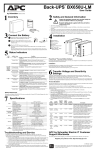
Turn on the power to the unit
Press the ON/OFF button on the front of the unit. The unit will emit a single, short “beep” and the green
POWER ON indicator will illuminate to confirm that the unit is on and is providing power protection.
To provide maximum runtime, the Back-UPS should charge for at least 10 hours. The unit is being
charged whenever it is connected to utility power, even if the unit is OFF.
PowerChute® Personal Edition Software
Overview
Use PowerChute Personal Edition software to configure the UPS settings.
• Protect your computer and other equipment during a power outage. During a power outage,
PowerChute will save any open files on your computer and safely shut it down. When power is
restored, it will restart the computer.
• Configure the UPS to use features such as power-saving outsets, shutdown configuration, and
alarms.
• Monitor the UPS for power usage and power events.
Note: PowerChute is only compatible with a Windows operating system. If you are using a Mac OSX,
use the native shutdown feature to protect your system. See the documentation provided with your
computer.
Installation
Use a USB cable to connect the Data port on the rear panel of the UPS to the USB port on your
computer.
If the Back-UPS came with a PowerChute CD, insert the CD into your computer and follow the
on-screen instructions
If the Back-UPS did not come with a PowerChute CD, go to www.apc.com and download the software
free of charge.
Transfer Voltage and Sensitivity Settings
Automatic Voltage Regulation
This Back-UPS unit has Automatic Voltage Regulation (AVR). If the input utility voltage drops below a
level that is safe for the operation of the connected equipment, the unit will boost utility voltage up to
safe level. It will also compensate for high input utility voltage by lowering it to a level that is safe for
the connected equipment.
The Back-UPS will switch to battery power if the input voltage level becomes too low for the Automatic
Voltage Regulation to compensate, or if the utility power is distorted.
No-load Shutdown
If the UPS is operating on battery power and detects that the connected equipment is using less than
15 W of energy for more than 15 minutes, it will shut down to conserve energy.
When the UPS is reconnected to utility power, the UPS will automatically switch on.
Note: Even if the UPS is OFF, it is still protecting connected equipment from power surges.
2