1
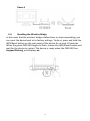
Figure ii
II-4.
Resetting the Wireless Bridge
In the event that the wireless bridge malfunctions or stops responding, you
can reset the device back to its factory settings. To do so, press and hold the
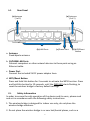
WPS/Reset button on the rear panel of the device for at least 10 seconds.
When the green PWR LED begins to flash, release the WPS/Reset button and
wait for the device to restart. The device is ready when the PWR LED has
stopped flashing, and displays on.
15