1
AZ102_05_ENG_CCR
2010.3.30
15:14
Page 9
CD Player
Programming track numbers
Different play modes:
REPEAT. and SHUFFLE
(See 6, 7)
You may store up to 20 tracks in the desired
sequence. If you like, store any track more
than once.
REPEAT
You can play the current track or the whole
disc repeatedly, and combine REPEAT
modes with PROG (PROGRAM).
1
In the stop position, press PROG to
activate programming.
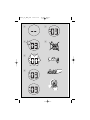
➜ Display: PROG and 00 flash. (See 5)
2
Press ∞ or § to select your desired track
number.
1
3
Press PROG to store the desired track
number.
➜ Display: PROG and 00 flash for you to
program the next track..
2
4
Repeat steps 2 to 3 to select and store all
desired tracks in this way.
➜ If you attempt to store more than 20
tracks, no track can be selected and the
display shows --.
5
REP – plays the current track continuously.
REP ALL – repeats the entire CD/program
3
To play your program, press 2/;.
SHUFFLE
You can play all the tracks in random order.
Helpful hints :
– When playback of your program comes
to the stop position, your set will return
to normal playback.To re-enter program
mode, press PROG in the stop position.
Reviewing the program
In the stop position, press PROG repeatedly
to see your stored tracks.
Erasing a program
You can erase the contents of the memory
by:
– in the stop position, press PROG to enter
program mode, and then press 9.
– selecting FM, MW or OFF;
– opening the CD door;
To select play mode, press REPEAT once or
more.
➜ The display shows REP icon or REP
ALL icon.
Press 2; to start playback if in the stop/pause
position.
To return to normal playback, press REPEAT
repeatedly until the modes are no longer displayed.
– You can also press 9 to cancel your play
mode.
1
2
In the stop position, press SHUFFLE to
switch on shuffle play.
➜ Display shows SHUFFLE icon.
To switch off shuffle play, press 9.
Helpful hints:
– During the shuffle play, when REP function is
selected, it will play the current shuffled track
repeatedly, or when the REP ALL function is
selected, it will repeat the shuffle play of the
entire CD.