1
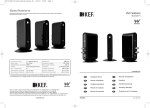
Xorb Wireless Please read before use.
Product features:
■■ Wireless Bluetooth speaker
■■ 30W speaker output
■■ Works with any Music Player / Smartphone /
Tablet with a 3.5mm headphone jack
■■ 2.1A USB charging
■■ Bass control
Getting started:
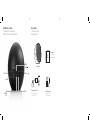
■■ To activate the speaker, plug in the power
adapter.
■■ The ON/OFF button must be fully depressed
in the ON position. This is located on the
back of the speaker.
■■ For the speaker to work wirelessly with your
Bluetooth device, they must be paired.
Note: The speaker is in AUX mode by default.
If a device is connected to the speaker via
Bluetooth the speaker will automatically switch
to Bluetooth mode. If this connection is broken,
it will revert back to AUX mode.
■■ Click the 'BASS/ ' button once to enter
pairing mode and the LED will flash blue
twice and a tone will sound.
■■ 'Xorb' will appear on your Bluetooth device.
■■ Select 'Xorb' and enter the password '0000' if
necessary.
■■ The LED will turn solid blue and a tone will
sound to confirm your device has successfully
paired and is connected.
■■ Ensure speaker volume is on full. Control the
volume through your music player.
Note: Xorb Wireless can only be paired to one
bluetooth device at any given time.
Connect via AUX IN:
■■ Plug in power adaptor.
■■ Plug in 3.5mm audio cable to 'AUX-IN' port.
■■ Plug 3.5mm audio cable into the headphone
jack on your device.
■■ Ensure speaker volume is on full. Control the
volume through your music player.
Connect via Bluetooth:
LED Status:
■■ Activate Bluetooth on your device.
■■ Power Off - LED OFF.
■■ Ensure that your Xorb Wireless is connected
to a power source and is turned ON.
■■ Power On, connected via AUX - LED solid red.
2
GEAR4 | Xorb Wireless | User Manual