1
Preface
Safety Instructions
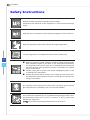
Read the safety instructions carefully and thoroughly.
All cautions and warnings on the equipment or user’s manual should be
noted.
Keep the User’s Guide that comes with the package for future reference.
Keep this equipment away from humidity and high temperature.
Lay this equipment on a reliable flat surface before setting it up.
vi
◙
◙
◙
Make sure that the power voltage is within its safety range and has
been adjusted properly to the value of 100~240V before connecting
the equipment to the power outlet. Do not disable the protective earth
pin from the plug. The equipment must be connected to an earthed
mains socket-outlet.
Always unplug the AC power cord before installing any add-on card
or module to the equipment.
Always disconnect the AC power cord or switch the wall socket off if
the equipment would be left unused for a certain time to achieve zero
energy consumption.
The ventilator on the enclosure is used for air convection and to prevent
the equipment from overheating. Do not cover the ventilator.
Do not leave the equipment in an unconditioned environment with a storage temperature above 60OC (140OF) or below 0OC (32OF), which may
damage the equipment.
NOTE: The maximum operating temperature is around 35OC.