1
Feature / Function Map (Location of controls / inputs)
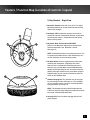
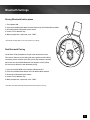
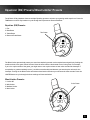
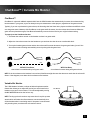
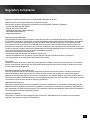
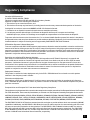
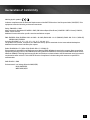
X-Ray Headset - Left View
 1. Power Button: Turn on the headset by pressing the
power button for a couple of seconds, then release.
You will hear 2 beeps and the power LED should start
flashing. Turn off the headset by pressing the button until
the LED stays on and you hear 2 beeps, then release. To
enter Pairing Mode, press and hold the power button for
about 6 seconds until you hear 2 fast beeps and the LED
begins to flash rapidly (see pg 9).
The headset will turn off after several minutes if there’s
no audio detected or if the transmitter is turned off.
 2. Tone Button: Press this button to activate the different
EQ presets. A beep will indicate which preset is selected.
(see pg. 18)
2
3
1
 4. Variable Mic Monitor: Adjusts the level of your voice
heard in the headset. (see pg. 19)
NOTE: Turning up the mic monitor may cause the mic
to pick up room sounds which will make the silence
detector not automatically shut off the headset when it’s
not being used. If the power is not automatically shutting
down, turn down this mic monitor control.
7
4
 3. Blast Limiter Button: Press this button to activate the
different Blast Limiter presets. A beep will indicate which
preset is selected. (see pg. 18)
6
 5. Xbox 360 Controller Jack: Connect the Xbox 360
Talkback Cable from your headset to the controller jack.
Game Volume: Turn to adjust the game sound level.
 6.
5
Removable Microphone with Adjustable Boom:
he microphone can be removed from the headset
 7. T
when chat is not required by detaching it from the
boom.To properly position the mic: Remove the foam
cover, insert the boom into the socket so the holes on
the mic casing are facing your mouth. Then replace
the foam cover. The boom jack also has a marker to
indicate the proper mic position.
5