1
Connect with Synology RS10613xs+
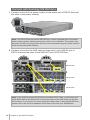
1 Connect one end of the power cord(s) to the power port of RX1213sas and
the other to the power outlet(s).
Note: Your RX1213sas as well as RS10613xs+ comes equipped with a redundant
power supply system, allowing two power cords to be connected. The system may
be power on with only one power cord, but we recommend using two power cords to
avoid unexpected power failures.
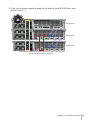
2 Connect one end of the SAS cable (at least one) to the SAS-IN port of
RX1213sas and the other to the SAS-OUT port of RS10613xs+.
RS10613xs+
RX1213sas
RX1213sas
Note: If you want to connect RX1213sas to another RX1213sas, connect one end
of the SAS cable to the SAS-OUT port and the other to the SAS-IN port of another
RX1213sas, or vice versa. For more information about how to start up RS10613xs+,
please refer to the Quick Installation Guide that comes with your RackStation.
16
Chapter 2: Set Up RX1213sas